
Switch Between Windows - Flip 3D Shortcut

How to Create a Flip 3D Switch Between Windows Shortcut in Windows 7

   Information
This will show you how to create a Switch Between Windows, also known as Flip 3D, shortcut in Windows 7.

   Note
Keyboard Shortcut Keys for Flip 3D

NOTE: Press the key combinations below in blue to activate.
  • Windows Key + Tab = Press and hold Windows Key, then press Tab (or roll mouse scroll wheel) to scroll through the open windows. Choose the open window you want by releasing the Windows Key when the window is at the front.
  • Ctrl + Windows Key + Tab = Scroll through the open windows by pressing the Tab key, arrow keys, or roll the mouse scroll wheel. Click on the window you want to see, or press Enter when it is up front.
If you would like to assign your own keyboard shortcut to the shortcut in this tutorial, then for how, see: How to Create a Keyboard Shortcut for a Program in Vista and Windows 7

   Tip
To pin this shortcut to the taskbar, you will need to have Recent Programs turned on.

Taskbar.jpg

   Warning
Aero Requirements to be Enabled in Windows 7:

NOTE: If Aero is not enabled, then Switch Between Windows - Flip 3D - will not work.
  • 1 GHz 32-bit or 64-bit processor
  • 1 GB of system memory
  • A graphics card with support for DirectX 9 graphics with at least 128 MB of memory.
  • The graphics card must support Pixel Shader 2.0 and the Windows Display Driver Model (WDDM).
  • You must be have True Color (32 bit) set instead of High Color (16 bit).
  • The desktop composition and Animate controls and elements inside windows options enabled in Visual Effects.
  • The Desktop Window Manager Session Manager and Themes Services need to be set as Started and Automatic.
  • Refresh or update your WEI score.
  • Using a Aero theme.
This shortcut will not work in Windows 7 Starter and Windows 7 Home Basic editions since they do not include the Aero feature.


EXAMPLE: Switch Between Windows - Flip-3D

Flip_3D.jpg


OPTION ONE

To Download a Flip 3D Shortcut


1. Click on the Download button below to download the file below.
Switch_Between_Windows.zip

Download


2. Click on Save, and save the .zip file to the desktop.

3. Open the .zip file and extract the Switch Between Windows shortcut to the desktop.

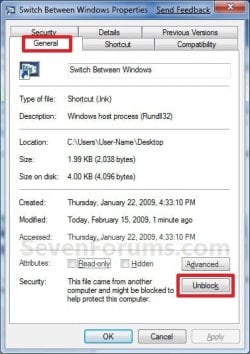
4. Right click on the Switch Between Windows shortcut, and click on Properties, General tab, and on the Unblock button. (See screenshot below)
NOTE: If you do not have a Unblock button under the General tab, then the shortcut is already unblocked and you can continue on to step 5.
Unblock.jpg
5. You can now Pin to Taskbar or Pin to Start Menu this shortcut, assign a keyboard shortcut to it, or move it where you like for easy use.

6. When done, you can delete the downloaded .zip file on the desktop if you like.


OPTION TWO

To Manually Create a Flip 3D Shortcut


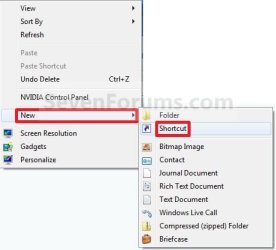
1. Right click on a empty area on desktop, and click on New and Shortcut. (See screenshot below)
Right_Click.jpg
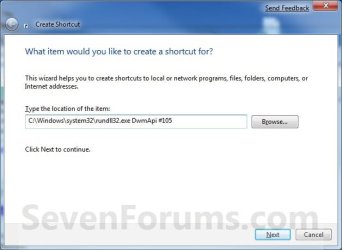
2. Copy and paste the path below into the location area, and click on the Next button. (See screenshot below)
%windir%\system32\rundll32.exe DwmApi #105
Step1.jpg
3. Type Switch Between Windows for the name, and click on the Finish button. (See screenshot below)
NOTE: You can name this anything you would like though. For example, Flip 3D.
Step2.jpg
4. Right click on the new Switch Between Windows shortcut on the Desktop and click on Properties. (See screenshot below)
Step3.jpg
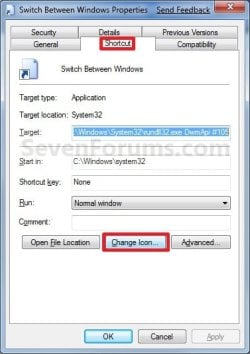
5. Click on the Change Icon button. (See screenshot below)
Step4.jpg
6. In the line under "Look for icons in this file", copy and paste the path below and press Enter. (See screenshot below)
%SystemRoot%\System32\imageres.dll
Step5.jpg
7. Select the Flip-3D icon in blue below and click on OK. (See screenshot above)

8. Click on OK. (See screenshot below)
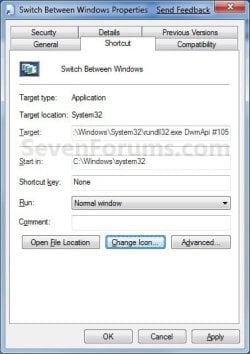
Step6.jpg
9. You can now Pin to Taskbar or Pin to Start Menu this shortcut, assign a keyboard shortcut to it, or move it where you like for easy use.
Shortcut.jpg
That's it,
Shawn


Attachments

Last edited:

My Computer

Computer Manufacturer/Model Number
Winfast N570SM2AA
OS
Windows 7 Enterprise x64
CPU
AMD Athlon™ 64 X2 Dual Core Processor 6000+
Motherboard
Winfast N570SM2AA
Memory
2x 2GB Apacer DDR2 @ 335.1 5-5-5-15 @ 1.8v
Graphics Card(s)
ATI Radeon HD 2600 XT 512MB OC @ 890/1090
Sound Card
OnBoard High Definition Audio Device
Monitor(s) Displays
Proview 17" CRT
Screen Resolution
1600x1200 @ 75 Hz
Hard Drives
WD750
PSU
EnLight 280W
Case
Pepper Custom Made
Cooling
stock.
Keyboard
Generic
Mouse
Logitech G9
Internet Speed
5MbpsU/0.4MbpsD
Other Info
things i want to upgrade: Cooling System, GPU, PSU, Motherboard
You're most welcome. :)
 

My Computer

Computer type
PC/Desktop
Computer Manufacturer/Model Number
Self built custom
OS
64-bit Windows 11 Pro for Workstations
CPU
Intel i7-8700K OC'd to 5 GHz
Motherboard
ASUS ROG Maximus XI Formula Z390
Memory
64 GB (4x16GB) G.SKILL TridentZ RGB DDR4 3600 MHz
Graphics Card(s)
ASUS ROG-STRIX-GTX1080TI-O11G-GAMING
Sound Card
Integrated
Monitor(s) Displays
2 x Samsung Odyssey G7 27"
Screen Resolution
2560x1440
Hard Drives
1TB Samsung 990 PRO M.2,
4TB Samsung 990 PRO PRO M.2,
TerraMaster F8 SSD Plus NAS
PSU
Seasonic Prime Titanium 850W
Case
Thermaltake Core P3
Cooling
Corsair Hydro H115i
Keyboard
Logitech wireless K800
Mouse
Logitech MX Master 4
Internet Speed
2 Gb/s Download and 100 Mb/s Upload
Antivirus
Malwarebyte Anti-Malware Premium
Browser
Google Chrome
Other Info
Logitech Z625 speaker system,
Logitech BRIO 4K Pro webcam,
HP Color LaserJet Pro MFP M477fdn,
APC SMART-UPS RT 1000 XL - SURT1000XLI,
Galaxy S23 Plus phone
done that but nothing i get to open my board it's just to new, i did it to my old many times the number 6 used to not work ,so i would wiggle the plastic and it would work, so since it works with the other key combination i guess i'll leave with that for now, but thanks any ways
 

My Computer

Computer Manufacturer/Model Number
jorge's first
OS
64
CPU
intel core 2 quad Q9550
Motherboard
asus p5qpro turbo
Memory
8 GB
Graphics Card(s)
asus EAH5770
Sound Card
in motherboard
Monitor(s) Displays
syncMaster T26HD
Screen Resolution
1920 - 1200
Hard Drives
intel x25-M sata

hitachi sata 1 TB
PSU
750 watt
Case
thermaltake
Cooling
ultr x wind for 775
Thanks bro you are awesome
 

My Computer

OS
Windows 7
CPU
Quad Core Intel 2.4 GHZ
Motherboard
D975xbx2
Memory
8GB
Graphics Card(s)
Nvidia 8600GTS
done that but nothing i get to open my board it's just to new, i did it to my old many times the number 6 used to not work ,so i would wiggle the plastic and it would work, so since it works with the other key combination i guess i'll leave with that for now, but thanks any ways

Well, I'm happy to hear that you have at least one method of doing it.


Thanks bro you are awesome

You're most welcome Billodada. :)
 

My Computer

Computer type
PC/Desktop
Computer Manufacturer/Model Number
Self built custom
OS
64-bit Windows 11 Pro for Workstations
CPU
Intel i7-8700K OC'd to 5 GHz
Motherboard
ASUS ROG Maximus XI Formula Z390
Memory
64 GB (4x16GB) G.SKILL TridentZ RGB DDR4 3600 MHz
Graphics Card(s)
ASUS ROG-STRIX-GTX1080TI-O11G-GAMING
Sound Card
Integrated
Monitor(s) Displays
2 x Samsung Odyssey G7 27"
Screen Resolution
2560x1440
Hard Drives
1TB Samsung 990 PRO M.2,
4TB Samsung 990 PRO PRO M.2,
TerraMaster F8 SSD Plus NAS
PSU
Seasonic Prime Titanium 850W
Case
Thermaltake Core P3
Cooling
Corsair Hydro H115i
Keyboard
Logitech wireless K800
Mouse
Logitech MX Master 4
Internet Speed
2 Gb/s Download and 100 Mb/s Upload
Antivirus
Malwarebyte Anti-Malware Premium
Browser
Google Chrome
Other Info
Logitech Z625 speaker system,
Logitech BRIO 4K Pro webcam,
HP Color LaserJet Pro MFP M477fdn,
APC SMART-UPS RT 1000 XL - SURT1000XLI,
Galaxy S23 Plus phone
lol. did a google search for this solution just to end up back here. stupid me...should have just come here first. :)

thank you for the help!!!
 

My Computer

Computer type
PC/Desktop
Computer Manufacturer/Model Number
Toshiba Qosmio X505-Q894
OS
Win 8.1 Pro
CPU
Intel® Core™ i7-740QM processor
Memory
8 GB
Graphics Card(s)
NVIDIA® GeForce® GTX 460M
Monitor(s) Displays
2
Screen Resolution
1680x945 & 1920x1080
Internet Speed
Cable
Other Info
Excellent desktop replacement for work & gaming.
LOL, you're most welcome. :)
 

My Computer

Computer type
PC/Desktop
Computer Manufacturer/Model Number
Self built custom
OS
64-bit Windows 11 Pro for Workstations
CPU
Intel i7-8700K OC'd to 5 GHz
Motherboard
ASUS ROG Maximus XI Formula Z390
Memory
64 GB (4x16GB) G.SKILL TridentZ RGB DDR4 3600 MHz
Graphics Card(s)
ASUS ROG-STRIX-GTX1080TI-O11G-GAMING
Sound Card
Integrated
Monitor(s) Displays
2 x Samsung Odyssey G7 27"
Screen Resolution
2560x1440
Hard Drives
1TB Samsung 990 PRO M.2,
4TB Samsung 990 PRO PRO M.2,
TerraMaster F8 SSD Plus NAS
PSU
Seasonic Prime Titanium 850W
Case
Thermaltake Core P3
Cooling
Corsair Hydro H115i
Keyboard
Logitech wireless K800
Mouse
Logitech MX Master 4
Internet Speed
2 Gb/s Download and 100 Mb/s Upload
Antivirus
Malwarebyte Anti-Malware Premium
Browser
Google Chrome
Other Info
Logitech Z625 speaker system,
Logitech BRIO 4K Pro webcam,
HP Color LaserJet Pro MFP M477fdn,
APC SMART-UPS RT 1000 XL - SURT1000XLI,
Galaxy S23 Plus phone
You're most welcome Amir. Thank you. :)
 

My Computer

Computer type
PC/Desktop
Computer Manufacturer/Model Number
Self built custom
OS
64-bit Windows 11 Pro for Workstations
CPU
Intel i7-8700K OC'd to 5 GHz
Motherboard
ASUS ROG Maximus XI Formula Z390
Memory
64 GB (4x16GB) G.SKILL TridentZ RGB DDR4 3600 MHz
Graphics Card(s)
ASUS ROG-STRIX-GTX1080TI-O11G-GAMING
Sound Card
Integrated
Monitor(s) Displays
2 x Samsung Odyssey G7 27"
Screen Resolution
2560x1440
Hard Drives
1TB Samsung 990 PRO M.2,
4TB Samsung 990 PRO PRO M.2,
TerraMaster F8 SSD Plus NAS
PSU
Seasonic Prime Titanium 850W
Case
Thermaltake Core P3
Cooling
Corsair Hydro H115i
Keyboard
Logitech wireless K800
Mouse
Logitech MX Master 4
Internet Speed
2 Gb/s Download and 100 Mb/s Upload
Antivirus
Malwarebyte Anti-Malware Premium
Browser
Google Chrome
Other Info
Logitech Z625 speaker system,
Logitech BRIO 4K Pro webcam,
HP Color LaserJet Pro MFP M477fdn,
APC SMART-UPS RT 1000 XL - SURT1000XLI,
Galaxy S23 Plus phone
Wow... I've been a mac guy for years now. I decided on a change... IDK.

I'm used to moving my mouse to a corner and having my open screens displayed. Although I can't do this with my mouse, this shortcut is very helpful.

thank you
 

My Computer

Computer Manufacturer/Model Number
HP Envy Beats Limited Edition
OS
Windows 7 U
CPU
i7
Memory
8gb
You're most welcome Jvrapatel, and welcome to Seven Forums. :)
 

My Computer

Computer type
PC/Desktop
Computer Manufacturer/Model Number
Self built custom
OS
64-bit Windows 11 Pro for Workstations
CPU
Intel i7-8700K OC'd to 5 GHz
Motherboard
ASUS ROG Maximus XI Formula Z390
Memory
64 GB (4x16GB) G.SKILL TridentZ RGB DDR4 3600 MHz
Graphics Card(s)
ASUS ROG-STRIX-GTX1080TI-O11G-GAMING
Sound Card
Integrated
Monitor(s) Displays
2 x Samsung Odyssey G7 27"
Screen Resolution
2560x1440
Hard Drives
1TB Samsung 990 PRO M.2,
4TB Samsung 990 PRO PRO M.2,
TerraMaster F8 SSD Plus NAS
PSU
Seasonic Prime Titanium 850W
Case
Thermaltake Core P3
Cooling
Corsair Hydro H115i
Keyboard
Logitech wireless K800
Mouse
Logitech MX Master 4
Internet Speed
2 Gb/s Download and 100 Mb/s Upload
Antivirus
Malwarebyte Anti-Malware Premium
Browser
Google Chrome
Other Info
Logitech Z625 speaker system,
Logitech BRIO 4K Pro webcam,
HP Color LaserJet Pro MFP M477fdn,
APC SMART-UPS RT 1000 XL - SURT1000XLI,
Galaxy S23 Plus phone
Very, very, very good tutorial Brink... took 15 seconds to get it working! Thanks.
 

My Computer

Computer Manufacturer/Model Number
Acer Aspire 4730Z
OS
Windows 7 Ultimate
CPU
Intel Pentium Dual CPU T3400 @ 2.16GHz
Motherboard
Acer Aspire 4730Z V1.22 GL40
Memory
4.0GB Dual-Channel DDR2 @ 332MHz
Graphics Card(s)
Mobile Intel(R) 4 Series Express Chipset Family 1309 MB
Sound Card
Realtek High Definition Audio
Monitor(s) Displays
AOC 2795V
Screen Resolution
1920 x 1080
Hard Drives
500GB Hitachi HTS545050B9A300 ATA Travelstar
You're most welcome Dick. Thank you. :)
 

My Computer

Computer type
PC/Desktop
Computer Manufacturer/Model Number
Self built custom
OS
64-bit Windows 11 Pro for Workstations
CPU
Intel i7-8700K OC'd to 5 GHz
Motherboard
ASUS ROG Maximus XI Formula Z390
Memory
64 GB (4x16GB) G.SKILL TridentZ RGB DDR4 3600 MHz
Graphics Card(s)
ASUS ROG-STRIX-GTX1080TI-O11G-GAMING
Sound Card
Integrated
Monitor(s) Displays
2 x Samsung Odyssey G7 27"
Screen Resolution
2560x1440
Hard Drives
1TB Samsung 990 PRO M.2,
4TB Samsung 990 PRO PRO M.2,
TerraMaster F8 SSD Plus NAS
PSU
Seasonic Prime Titanium 850W
Case
Thermaltake Core P3
Cooling
Corsair Hydro H115i
Keyboard
Logitech wireless K800
Mouse
Logitech MX Master 4
Internet Speed
2 Gb/s Download and 100 Mb/s Upload
Antivirus
Malwarebyte Anti-Malware Premium
Browser
Google Chrome
Other Info
Logitech Z625 speaker system,
Logitech BRIO 4K Pro webcam,
HP Color LaserJet Pro MFP M477fdn,
APC SMART-UPS RT 1000 XL - SURT1000XLI,
Galaxy S23 Plus phone
How do you remove the 3D flip shortcut and what part of the registry was changed.
 

My Computer

Computer Manufacturer/Model Number
I did it # 777SS
OS
Windows 7 Home Premium 64
CPU
AMD Phenom ll 955 BE Speed 3.2 MHz
Motherboard
MSI K9A2
Memory
G.skill 2GBx2 @ 1066
Graphics Card(s)
2 XFX 4770's
Sound Card
Realtek onboard
Monitor(s) Displays
ASUS 22''+ Old TV
Screen Resolution
1024x768
Hard Drives
Samsung 500GB
PSU
OCZ 700W
Case
CoolerMaster Cavalier CAV-T01 Silver
Cooling
Scythe Rasetsu
Keyboard
Microsoft WC 5000
Mouse
Microsoft WM 5000
Internet Speed
Never enough
Other Info
AMD Spider Platform
Hello User417, and welcome to Seven Forums.

Since it's just a shortcut that you are creating in the tutorial, you would just right click on the shortcut and click on "Delete" to remove it.

There are not any changes made in the registry since this is only a shortcut.

Hope this helps,
Shawn
 

My Computer

Computer type
PC/Desktop
Computer Manufacturer/Model Number
Self built custom
OS
64-bit Windows 11 Pro for Workstations
CPU
Intel i7-8700K OC'd to 5 GHz
Motherboard
ASUS ROG Maximus XI Formula Z390
Memory
64 GB (4x16GB) G.SKILL TridentZ RGB DDR4 3600 MHz
Graphics Card(s)
ASUS ROG-STRIX-GTX1080TI-O11G-GAMING
Sound Card
Integrated
Monitor(s) Displays
2 x Samsung Odyssey G7 27"
Screen Resolution
2560x1440
Hard Drives
1TB Samsung 990 PRO M.2,
4TB Samsung 990 PRO PRO M.2,
TerraMaster F8 SSD Plus NAS
PSU
Seasonic Prime Titanium 850W
Case
Thermaltake Core P3
Cooling
Corsair Hydro H115i
Keyboard
Logitech wireless K800
Mouse
Logitech MX Master 4
Internet Speed
2 Gb/s Download and 100 Mb/s Upload
Antivirus
Malwarebyte Anti-Malware Premium
Browser
Google Chrome
Other Info
Logitech Z625 speaker system,
Logitech BRIO 4K Pro webcam,
HP Color LaserJet Pro MFP M477fdn,
APC SMART-UPS RT 1000 XL - SURT1000XLI,
Galaxy S23 Plus phone
Thank you I just like using the center click button on mouse best Thanks again for you time
 

My Computer

Computer Manufacturer/Model Number
I did it # 777SS
OS
Windows 7 Home Premium 64
CPU
AMD Phenom ll 955 BE Speed 3.2 MHz
Motherboard
MSI K9A2
Memory
G.skill 2GBx2 @ 1066
Graphics Card(s)
2 XFX 4770's
Sound Card
Realtek onboard
Monitor(s) Displays
ASUS 22''+ Old TV
Screen Resolution
1024x768
Hard Drives
Samsung 500GB
PSU
OCZ 700W
Case
CoolerMaster Cavalier CAV-T01 Silver
Cooling
Scythe Rasetsu
Keyboard
Microsoft WC 5000
Mouse
Microsoft WM 5000
Internet Speed
Never enough
Other Info
AMD Spider Platform
You're welcome. Yeah, I prefer the middle or side button as well. :)
 

My Computer

Computer type
PC/Desktop
Computer Manufacturer/Model Number
Self built custom
OS
64-bit Windows 11 Pro for Workstations
CPU
Intel i7-8700K OC'd to 5 GHz
Motherboard
ASUS ROG Maximus XI Formula Z390
Memory
64 GB (4x16GB) G.SKILL TridentZ RGB DDR4 3600 MHz
Graphics Card(s)
ASUS ROG-STRIX-GTX1080TI-O11G-GAMING
Sound Card
Integrated
Monitor(s) Displays
2 x Samsung Odyssey G7 27"
Screen Resolution
2560x1440
Hard Drives
1TB Samsung 990 PRO M.2,
4TB Samsung 990 PRO PRO M.2,
TerraMaster F8 SSD Plus NAS
PSU
Seasonic Prime Titanium 850W
Case
Thermaltake Core P3
Cooling
Corsair Hydro H115i
Keyboard
Logitech wireless K800
Mouse
Logitech MX Master 4
Internet Speed
2 Gb/s Download and 100 Mb/s Upload
Antivirus
Malwarebyte Anti-Malware Premium
Browser
Google Chrome
Other Info
Logitech Z625 speaker system,
Logitech BRIO 4K Pro webcam,
HP Color LaserJet Pro MFP M477fdn,
APC SMART-UPS RT 1000 XL - SURT1000XLI,
Galaxy S23 Plus phone
Thanks Shaun! One more really simple ingenius trick. :D
 

My Computer

Computer type
PC/Desktop
Computer Manufacturer/Model Number
Home Built Desktop By DataTech
OS
Windows 7 Ultimate X64 SP1
CPU
Intel i5-2550K, Differing ~4.4-4.8GHz No built in GPU
Motherboard
ASUS P8Z68-V PRO/GEN3
Memory
16GB G.Skill Sniper 1866MHz @ 2133MHz 2x8GB
Graphics Card(s)
ASUS GTX650TIB-DC2OC-2GD5, (650TI Boost)
Sound Card
Onboard Realtek 5-1
Monitor(s) Displays
Samsung P2570HD
Screen Resolution
1920x1080
Hard Drives
Samsung 840 Pro 256GB SSD for OS, 500GB Seagate Constellation (Enterprise drive) for Data
PSU
Corsair HX650W
Case
Inwin Dragon Rider
Cooling
Hyper 212 EVO w/two Noctua fans, push-pull, @1300 RPM
Keyboard
E-Z Eyes, bright yellow keys with large characters
Mouse
steelseries SENSEI Laser Pro Gaming
Internet Speed
48-51Mbs Mbs down, 11 Mbs up Xfinity Cable
Antivirus
Norton Internet Security 2013
Browser
IE 10, Opera, Pale Moon if needed
Other Info
4 case fans, LG BluRay-RE, ASUS DVD-RW, Mr. Fusion power supply, 1.21 gigawatts.
You're welcome Gary. Thank you. :)
 

My Computer

Computer type
PC/Desktop
Computer Manufacturer/Model Number
Self built custom
OS
64-bit Windows 11 Pro for Workstations
CPU
Intel i7-8700K OC'd to 5 GHz
Motherboard
ASUS ROG Maximus XI Formula Z390
Memory
64 GB (4x16GB) G.SKILL TridentZ RGB DDR4 3600 MHz
Graphics Card(s)
ASUS ROG-STRIX-GTX1080TI-O11G-GAMING
Sound Card
Integrated
Monitor(s) Displays
2 x Samsung Odyssey G7 27"
Screen Resolution
2560x1440
Hard Drives
1TB Samsung 990 PRO M.2,
4TB Samsung 990 PRO PRO M.2,
TerraMaster F8 SSD Plus NAS
PSU
Seasonic Prime Titanium 850W
Case
Thermaltake Core P3
Cooling
Corsair Hydro H115i
Keyboard
Logitech wireless K800
Mouse
Logitech MX Master 4
Internet Speed
2 Gb/s Download and 100 Mb/s Upload
Antivirus
Malwarebyte Anti-Malware Premium
Browser
Google Chrome
Other Info
Logitech Z625 speaker system,
Logitech BRIO 4K Pro webcam,
HP Color LaserJet Pro MFP M477fdn,
APC SMART-UPS RT 1000 XL - SURT1000XLI,
Galaxy S23 Plus phone
Thanks, CTRL+WIN+TAB works great for my gamepad ;) I was having a hard time trying to configure it with WIN+TAB but anyone trying it that way will understand me, because the WIN key stays pressed. :p
 

My Computer

Computer Manufacturer/Model Number
Me!!!
OS
Windows 7 Ultimate 32bit.
CPU
Intel Core2Duo 2.4
Motherboard
Intel DG965WGH
Memory
Kingston 1GB
Graphics Card(s)
ATI Radeon HD4670
Monitor(s) Displays
Old CRT's RULE!!!
Screen Resolution
1024x768
Hard Drives
2 Seagate Barracudas

1) 160GB OS
2) 1.5TB files and pagefile
PSU
stock (300W?)
Case
cheap case
Cooling
stock fan
Keyboard
Genius klp0210
Mouse
Logitech M-BZ96C
Internet Speed
512K :(
Back
Top
