
Switch Between Windows - Flip 3D Shortcut

How to Create a Flip 3D Switch Between Windows Shortcut in Windows 7

   Information
This will show you how to create a Switch Between Windows, also known as Flip 3D, shortcut in Windows 7.

   Note
Keyboard Shortcut Keys for Flip 3D

NOTE: Press the key combinations below in blue to activate.
  • Windows Key + Tab = Press and hold Windows Key, then press Tab (or roll mouse scroll wheel) to scroll through the open windows. Choose the open window you want by releasing the Windows Key when the window is at the front.
  • Ctrl + Windows Key + Tab = Scroll through the open windows by pressing the Tab key, arrow keys, or roll the mouse scroll wheel. Click on the window you want to see, or press Enter when it is up front.
If you would like to assign your own keyboard shortcut to the shortcut in this tutorial, then for how, see: How to Create a Keyboard Shortcut for a Program in Vista and Windows 7

   Tip
To pin this shortcut to the taskbar, you will need to have Recent Programs turned on.

Taskbar.jpg

   Warning
Aero Requirements to be Enabled in Windows 7:

NOTE: If Aero is not enabled, then Switch Between Windows - Flip 3D - will not work.
  • 1 GHz 32-bit or 64-bit processor
  • 1 GB of system memory
  • A graphics card with support for DirectX 9 graphics with at least 128 MB of memory.
  • The graphics card must support Pixel Shader 2.0 and the Windows Display Driver Model (WDDM).
  • You must be have True Color (32 bit) set instead of High Color (16 bit).
  • The desktop composition and Animate controls and elements inside windows options enabled in Visual Effects.
  • The Desktop Window Manager Session Manager and Themes Services need to be set as Started and Automatic.
  • Refresh or update your WEI score.
  • Using a Aero theme.
This shortcut will not work in Windows 7 Starter and Windows 7 Home Basic editions since they do not include the Aero feature.


EXAMPLE: Switch Between Windows - Flip-3D

Flip_3D.jpg


OPTION ONE

To Download a Flip 3D Shortcut


1. Click on the Download button below to download the file below.
Switch_Between_Windows.zip

Download


2. Click on Save, and save the .zip file to the desktop.

3. Open the .zip file and extract the Switch Between Windows shortcut to the desktop.

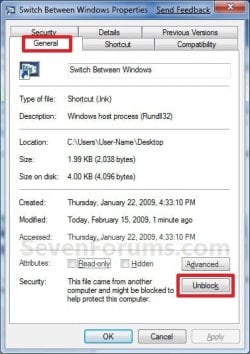
4. Right click on the Switch Between Windows shortcut, and click on Properties, General tab, and on the Unblock button. (See screenshot below)
NOTE: If you do not have a Unblock button under the General tab, then the shortcut is already unblocked and you can continue on to step 5.
Unblock.jpg
5. You can now Pin to Taskbar or Pin to Start Menu this shortcut, assign a keyboard shortcut to it, or move it where you like for easy use.

6. When done, you can delete the downloaded .zip file on the desktop if you like.


OPTION TWO

To Manually Create a Flip 3D Shortcut


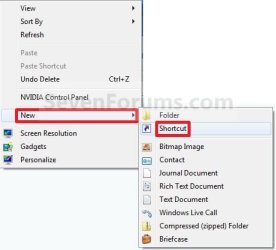
1. Right click on a empty area on desktop, and click on New and Shortcut. (See screenshot below)
Right_Click.jpg
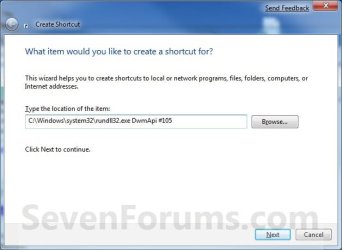
2. Copy and paste the path below into the location area, and click on the Next button. (See screenshot below)
%windir%\system32\rundll32.exe DwmApi #105
Step1.jpg
3. Type Switch Between Windows for the name, and click on the Finish button. (See screenshot below)
NOTE: You can name this anything you would like though. For example, Flip 3D.
Step2.jpg
4. Right click on the new Switch Between Windows shortcut on the Desktop and click on Properties. (See screenshot below)
Step3.jpg
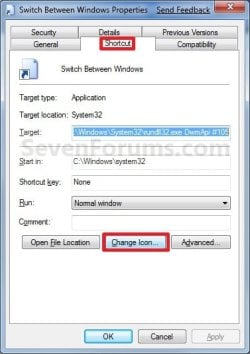
5. Click on the Change Icon button. (See screenshot below)
Step4.jpg
6. In the line under "Look for icons in this file", copy and paste the path below and press Enter. (See screenshot below)
%SystemRoot%\System32\imageres.dll
Step5.jpg
7. Select the Flip-3D icon in blue below and click on OK. (See screenshot above)

8. Click on OK. (See screenshot below)
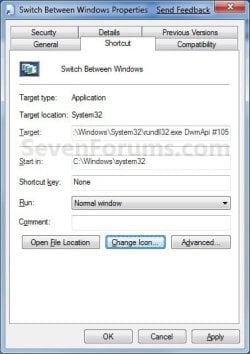
Step6.jpg
9. You can now Pin to Taskbar or Pin to Start Menu this shortcut, assign a keyboard shortcut to it, or move it where you like for easy use.
Shortcut.jpg
That's it,
Shawn


Attachments

Last edited:
Hello Evermore and Ede, and welcome to Seven Forums.

The only way that I know of is to use the same shortcut, but without the Windows Aero color theme selected. :(

Sorry,
Shawn
 

My Computer

Computer type
PC/Desktop
Computer Manufacturer/Model Number
Self built custom
OS
64-bit Windows 11 Pro for Workstations
CPU
Intel i7-8700K OC'd to 5 GHz
Motherboard
ASUS ROG Maximus XI Formula Z390
Memory
64 GB (4x16GB) G.SKILL TridentZ RGB DDR4 3600 MHz
Graphics Card(s)
ASUS ROG-STRIX-GTX1080TI-O11G-GAMING
Sound Card
Integrated
Monitor(s) Displays
2 x Samsung Odyssey G7 27"
Screen Resolution
2560x1440
Hard Drives
1TB Samsung 990 PRO M.2,
4TB Samsung 990 PRO PRO M.2,
TerraMaster F8 SSD Plus NAS
PSU
Seasonic Prime Titanium 850W
Case
Thermaltake Core P3
Cooling
Corsair Hydro H115i
Keyboard
Logitech wireless K800
Mouse
Logitech MX Master 4
Internet Speed
2 Gb/s Download and 100 Mb/s Upload
Antivirus
Malwarebyte Anti-Malware Premium
Browser
Google Chrome
Other Info
Logitech Z625 speaker system,
Logitech BRIO 4K Pro webcam,
HP Color LaserJet Pro MFP M477fdn,
APC SMART-UPS RT 1000 XL - SURT1000XLI,
Galaxy S23 Plus phone
Thanks for the tip ;), now I wonder is it possible to replace the Show desktop / Aero peek at the bottom right corner with the Flip-3D?
 

My Computer

OS
windows xp, window 7
You're most welcome Fonfwen, and welcome to Seven Forums. Sorry, but the Aero Peek button cannot be replaced by Flip-3D or anything else.
 

My Computer

Computer type
PC/Desktop
Computer Manufacturer/Model Number
Self built custom
OS
64-bit Windows 11 Pro for Workstations
CPU
Intel i7-8700K OC'd to 5 GHz
Motherboard
ASUS ROG Maximus XI Formula Z390
Memory
64 GB (4x16GB) G.SKILL TridentZ RGB DDR4 3600 MHz
Graphics Card(s)
ASUS ROG-STRIX-GTX1080TI-O11G-GAMING
Sound Card
Integrated
Monitor(s) Displays
2 x Samsung Odyssey G7 27"
Screen Resolution
2560x1440
Hard Drives
1TB Samsung 990 PRO M.2,
4TB Samsung 990 PRO PRO M.2,
TerraMaster F8 SSD Plus NAS
PSU
Seasonic Prime Titanium 850W
Case
Thermaltake Core P3
Cooling
Corsair Hydro H115i
Keyboard
Logitech wireless K800
Mouse
Logitech MX Master 4
Internet Speed
2 Gb/s Download and 100 Mb/s Upload
Antivirus
Malwarebyte Anti-Malware Premium
Browser
Google Chrome
Other Info
Logitech Z625 speaker system,
Logitech BRIO 4K Pro webcam,
HP Color LaserJet Pro MFP M477fdn,
APC SMART-UPS RT 1000 XL - SURT1000XLI,
Galaxy S23 Plus phone
Thanks. I was looking everywhere for how to do this!
Marc
 

My Computer

Computer type
Laptop
Computer Manufacturer/Model Number
Acer V3-551G
OS
Windows 7 Ultimate 32bit
CPU
AMD Quad-Core A8-4500M with Turbo Core up to 2.80GHz
Memory
8 GB DDR 3
Graphics Card(s)
AMD Radeon HD 7640G + 7670M (2GB dedicated VRAM)
Sound Card
AMD HD Audio device / Realtek HD Audio
Monitor(s) Displays
15.6" HD LED
Screen Resolution
1366 x 768 (32bit)
Hard Drives
1 TB HDD
Antivirus
AVG 2013 free edition
Browser
Google Chrome
Other Info
WEI scores:

Base score= 5.9

-Processor 6.7
-Memory (RAM) 7.2
-Graphics 5.9
-Gaming Graphics 6.2
-Primary hard disk 5.9
You're welcome Marc. :)
 

My Computer

Computer type
PC/Desktop
Computer Manufacturer/Model Number
Self built custom
OS
64-bit Windows 11 Pro for Workstations
CPU
Intel i7-8700K OC'd to 5 GHz
Motherboard
ASUS ROG Maximus XI Formula Z390
Memory
64 GB (4x16GB) G.SKILL TridentZ RGB DDR4 3600 MHz
Graphics Card(s)
ASUS ROG-STRIX-GTX1080TI-O11G-GAMING
Sound Card
Integrated
Monitor(s) Displays
2 x Samsung Odyssey G7 27"
Screen Resolution
2560x1440
Hard Drives
1TB Samsung 990 PRO M.2,
4TB Samsung 990 PRO PRO M.2,
TerraMaster F8 SSD Plus NAS
PSU
Seasonic Prime Titanium 850W
Case
Thermaltake Core P3
Cooling
Corsair Hydro H115i
Keyboard
Logitech wireless K800
Mouse
Logitech MX Master 4
Internet Speed
2 Gb/s Download and 100 Mb/s Upload
Antivirus
Malwarebyte Anti-Malware Premium
Browser
Google Chrome
Other Info
Logitech Z625 speaker system,
Logitech BRIO 4K Pro webcam,
HP Color LaserJet Pro MFP M477fdn,
APC SMART-UPS RT 1000 XL - SURT1000XLI,
Galaxy S23 Plus phone
Brink, I wish I could remember what else you had helped me, us, with that was a gem like this, (let alone all the other helps) but for now, thank you for another excellent step by step tutorial in getting us back our 3D Flip option in Windows 7. :D
 

My Computer

Computer Manufacturer/Model Number
Self Build
OS
Windows 7 Home Premium 64-bit, Windows 8 Pro 64-bit
CPU
Intel Q9650
Motherboard
Gigabyte X48-DS5
Memory
6GB Kingston HyperX Ram
Graphics Card(s)
EVGA GTX285
Sound Card
Creative Sound Blaster Xtreme Gamer
Monitor(s) Displays
2x19" Dell SE198WFP
Hard Drives
WD 300GB VelociRaptor
WD 700GB Caviar Green
PSU
Corsair TX850w
Case
Cooler Master HAF922
Cooling
6 Fans Noctua/Cooler Master
You're most welcome Siramic. :)
 

My Computer

Computer type
PC/Desktop
Computer Manufacturer/Model Number
Self built custom
OS
64-bit Windows 11 Pro for Workstations
CPU
Intel i7-8700K OC'd to 5 GHz
Motherboard
ASUS ROG Maximus XI Formula Z390
Memory
64 GB (4x16GB) G.SKILL TridentZ RGB DDR4 3600 MHz
Graphics Card(s)
ASUS ROG-STRIX-GTX1080TI-O11G-GAMING
Sound Card
Integrated
Monitor(s) Displays
2 x Samsung Odyssey G7 27"
Screen Resolution
2560x1440
Hard Drives
1TB Samsung 990 PRO M.2,
4TB Samsung 990 PRO PRO M.2,
TerraMaster F8 SSD Plus NAS
PSU
Seasonic Prime Titanium 850W
Case
Thermaltake Core P3
Cooling
Corsair Hydro H115i
Keyboard
Logitech wireless K800
Mouse
Logitech MX Master 4
Internet Speed
2 Gb/s Download and 100 Mb/s Upload
Antivirus
Malwarebyte Anti-Malware Premium
Browser
Google Chrome
Other Info
Logitech Z625 speaker system,
Logitech BRIO 4K Pro webcam,
HP Color LaserJet Pro MFP M477fdn,
APC SMART-UPS RT 1000 XL - SURT1000XLI,
Galaxy S23 Plus phone
Thanks for this! I've been wanting to try Flip 3-D but the keyboard I use (IBM Model M circa 1986 (best keyboard , ever!)) doesn't have a Windows key! I tried Ctrl-Esc-Tab but that didn't work to invoke Flip 3-D. I have been looking for an alternate method to invoke Flip 3-D and you provided it. Thanks!
 

My Computer

Computer type
PC/Desktop
Computer Manufacturer/Model Number
Home Built desktop, Dell G15 5511 Gaming laptop,MS Surface Pro 7 tablet
OS
W10 Pro desktop, W11 laptop, W11 Pro tablet (all 64-bit)
CPU
3.7Ghz 8700K i7, i7-11800H, i7-1065G7
Motherboard
ASUS TUF Z370-Pro Gaming in desktop
Memory
16G desktop, 16G laptop, 4G tablet
Graphics Card(s)
AMD Radeon RX580, RTX 3060, Intel Iris Plus
Sound Card
High Definition Audio (Built-in to mobo)
Monitor(s) Displays
Samsung U32J59 32" (2x), 15.6", 12"
Screen Resolution
3840x2160, 3840x2160, 1920x1080, 2160x1440
Hard Drives
500G SSD for OS; 2T, 10T & 15T HDDs for Data on Desktop, 1TB SSD laptop, 128G SSD tablet.
PSU
Corsair CX 750M
Case
Antec 100
Cooling
CM 212+
Keyboard
IBM Model M - used continuously since 1986
Mouse
Microsoft Pro IntelliMouse
Internet Speed
400M down 8M up
Antivirus
Windows Defender
Browser
FireFox
Other Info
Built my first computer (8Mhz 8088cpu, 640K RAM, 20MB HDD, 2 360K floppy drives) in 1985 and have been building them for myself, relatives and friends ever since.
You're most welcome Strollin. :)
 

My Computer

Computer type
PC/Desktop
Computer Manufacturer/Model Number
Self built custom
OS
64-bit Windows 11 Pro for Workstations
CPU
Intel i7-8700K OC'd to 5 GHz
Motherboard
ASUS ROG Maximus XI Formula Z390
Memory
64 GB (4x16GB) G.SKILL TridentZ RGB DDR4 3600 MHz
Graphics Card(s)
ASUS ROG-STRIX-GTX1080TI-O11G-GAMING
Sound Card
Integrated
Monitor(s) Displays
2 x Samsung Odyssey G7 27"
Screen Resolution
2560x1440
Hard Drives
1TB Samsung 990 PRO M.2,
4TB Samsung 990 PRO PRO M.2,
TerraMaster F8 SSD Plus NAS
PSU
Seasonic Prime Titanium 850W
Case
Thermaltake Core P3
Cooling
Corsair Hydro H115i
Keyboard
Logitech wireless K800
Mouse
Logitech MX Master 4
Internet Speed
2 Gb/s Download and 100 Mb/s Upload
Antivirus
Malwarebyte Anti-Malware Premium
Browser
Google Chrome
Other Info
Logitech Z625 speaker system,
Logitech BRIO 4K Pro webcam,
HP Color LaserJet Pro MFP M477fdn,
APC SMART-UPS RT 1000 XL - SURT1000XLI,
Galaxy S23 Plus phone
Great tip and very handy - but I wonder if I could map this to my Razer mouse key?
 

My Computer

Computer Manufacturer/Model Number
home built
OS
Windows 7 Ultimate 64-bit
CPU
AMD Athlon 64 X2 6400+ 3.2GHz
Motherboard
ASUS Crosshair I
Memory
Corsair Dominator DDR2 1066 4GB
Graphics Card(s)
Gigabyte ATI Radeon HD 4890 1GB GDDR5
Sound Card
on mobo
Monitor(s) Displays
Samsung SyncMaster 245BW 24" LCD
Hard Drives
(2) Western Digital Blue 80GB SATA in RAID 0
(1) Hitachi DeskStar 250GB SATA
PSU
Corsair 850W
Case
Silverstone Temjin
Cooling
lots of fans
Hello Chazcon,

You might look through it's options to see if it my already have one for something similar to Flip-3D that you can select to use for one of the mouse button (ex: middle click button or mouse wheel). If your mouse supports assigning to run a program when a button is clicked, then you could have it run this shortcut.

Hope this helps,
Shawn
 

My Computer

Computer type
PC/Desktop
Computer Manufacturer/Model Number
Self built custom
OS
64-bit Windows 11 Pro for Workstations
CPU
Intel i7-8700K OC'd to 5 GHz
Motherboard
ASUS ROG Maximus XI Formula Z390
Memory
64 GB (4x16GB) G.SKILL TridentZ RGB DDR4 3600 MHz
Graphics Card(s)
ASUS ROG-STRIX-GTX1080TI-O11G-GAMING
Sound Card
Integrated
Monitor(s) Displays
2 x Samsung Odyssey G7 27"
Screen Resolution
2560x1440
Hard Drives
1TB Samsung 990 PRO M.2,
4TB Samsung 990 PRO PRO M.2,
TerraMaster F8 SSD Plus NAS
PSU
Seasonic Prime Titanium 850W
Case
Thermaltake Core P3
Cooling
Corsair Hydro H115i
Keyboard
Logitech wireless K800
Mouse
Logitech MX Master 4
Internet Speed
2 Gb/s Download and 100 Mb/s Upload
Antivirus
Malwarebyte Anti-Malware Premium
Browser
Google Chrome
Other Info
Logitech Z625 speaker system,
Logitech BRIO 4K Pro webcam,
HP Color LaserJet Pro MFP M477fdn,
APC SMART-UPS RT 1000 XL - SURT1000XLI,
Galaxy S23 Plus phone
Awesome! Very few people know about the "3D-Flip" feature. Especially those who went from Windows XP to 7.

I used 3D-Flip all the time on VISTA, and was dissapointed, believing that it wasn't in Windows 7. I found a similar tutorial on another website.

I just use the "WinKey + TAB" and "Ctrl + WinKey + TAB" shortcuts, since it doesn't display in my recently used programs list.
 

My Computer

Computer type
PC/Desktop
Computer Manufacturer/Model Number
Custom Desktop
OS
Windows 7 Home Premium 64-bit
CPU
Intel Core i-5 2500 @ 3.3 GHz Quad Core
Motherboard
Gigabyte Z68M-D2H
Memory
8.192 GB DDR3 PC3-10700 (667 MHz)
Graphics Card(s)
Sapphire ATI HD 6870
Sound Card
Integrated - Realtek HD Audio ALC889
Monitor(s) Displays
LG Flatron Wide 19" LCD
Screen Resolution
1440 x 900
Hard Drives
250 GB Samsung SSD ( for OS )
250 GB Samsung SSD ( for Games )
1500 GB Sata HDD ( for pictures and Video )
PSU
Foxxconn 600 W
Case
Foxxconn
Keyboard
Logitech USB Keyboard
Mouse
Logitech Optical Mouse
Internet Speed
25 MB/s download 2 MB/s upload Rogers Telecommunications.
Antivirus
Microsoft Security Essentials
Browser
IE and Chrome
wicked!!!:D:D
i never know this features exist..thanx brink;)
 

My Computer

Computer Manufacturer/Model Number
Compaq Presario CQ40 502AU
OS
windows 7 professional x64 bit RTM
Motherboard
Compal 30FE
Memory
4G
Graphics Card(s)
ATI radeon HD 3200
Screen Resolution
1280 x 800
You're welcome Ozirus and Gamepoint. :)
 

My Computer

Computer type
PC/Desktop
Computer Manufacturer/Model Number
Self built custom
OS
64-bit Windows 11 Pro for Workstations
CPU
Intel i7-8700K OC'd to 5 GHz
Motherboard
ASUS ROG Maximus XI Formula Z390
Memory
64 GB (4x16GB) G.SKILL TridentZ RGB DDR4 3600 MHz
Graphics Card(s)
ASUS ROG-STRIX-GTX1080TI-O11G-GAMING
Sound Card
Integrated
Monitor(s) Displays
2 x Samsung Odyssey G7 27"
Screen Resolution
2560x1440
Hard Drives
1TB Samsung 990 PRO M.2,
4TB Samsung 990 PRO PRO M.2,
TerraMaster F8 SSD Plus NAS
PSU
Seasonic Prime Titanium 850W
Case
Thermaltake Core P3
Cooling
Corsair Hydro H115i
Keyboard
Logitech wireless K800
Mouse
Logitech MX Master 4
Internet Speed
2 Gb/s Download and 100 Mb/s Upload
Antivirus
Malwarebyte Anti-Malware Premium
Browser
Google Chrome
Other Info
Logitech Z625 speaker system,
Logitech BRIO 4K Pro webcam,
HP Color LaserJet Pro MFP M477fdn,
APC SMART-UPS RT 1000 XL - SURT1000XLI,
Galaxy S23 Plus phone
thanks
great tutorial (:
 

My Computer

OS
Windows 7 Ultimate x86
CPU
Intel Core Duo E2180 2.00GHz
Motherboard
Asus P5VD2-VM SE
Memory
Kingston 2gb
Graphics Card(s)
NVIDIA GeForce 8500
Sound Card
onboard
Monitor(s) Displays
23inch Samsung SyncMaster 2343NWX
Screen Resolution
2048x1152
Hard Drives
WD Caviar Blue SATA 320gb capacity
Internet Speed
3mb
You're most welcome Flopo. :)
 

My Computer

Computer type
PC/Desktop
Computer Manufacturer/Model Number
Self built custom
OS
64-bit Windows 11 Pro for Workstations
CPU
Intel i7-8700K OC'd to 5 GHz
Motherboard
ASUS ROG Maximus XI Formula Z390
Memory
64 GB (4x16GB) G.SKILL TridentZ RGB DDR4 3600 MHz
Graphics Card(s)
ASUS ROG-STRIX-GTX1080TI-O11G-GAMING
Sound Card
Integrated
Monitor(s) Displays
2 x Samsung Odyssey G7 27"
Screen Resolution
2560x1440
Hard Drives
1TB Samsung 990 PRO M.2,
4TB Samsung 990 PRO PRO M.2,
TerraMaster F8 SSD Plus NAS
PSU
Seasonic Prime Titanium 850W
Case
Thermaltake Core P3
Cooling
Corsair Hydro H115i
Keyboard
Logitech wireless K800
Mouse
Logitech MX Master 4
Internet Speed
2 Gb/s Download and 100 Mb/s Upload
Antivirus
Malwarebyte Anti-Malware Premium
Browser
Google Chrome
Other Info
Logitech Z625 speaker system,
Logitech BRIO 4K Pro webcam,
HP Color LaserJet Pro MFP M477fdn,
APC SMART-UPS RT 1000 XL - SURT1000XLI,
Galaxy S23 Plus phone
Ty very much for the info. I'm new to 7 and i was wondering if that function had a shortcut ( cause its cool anyway ), or if i could bind it on mouse wheel click. But the k/b shortcut its better cause i use wheel click for new tabs.

Peace.
 

My Computer

Computer Manufacturer/Model Number
Winfast N570SM2AA
OS
Windows 7 Enterprise x64
CPU
AMD Athlon™ 64 X2 Dual Core Processor 6000+
Motherboard
Winfast N570SM2AA
Memory
2x 2GB Apacer DDR2 @ 335.1 5-5-5-15 @ 1.8v
Graphics Card(s)
ATI Radeon HD 2600 XT 512MB OC @ 890/1090
Sound Card
OnBoard High Definition Audio Device
Monitor(s) Displays
Proview 17" CRT
Screen Resolution
1600x1200 @ 75 Hz
Hard Drives
WD750
PSU
EnLight 280W
Case
Pepper Custom Made
Cooling
stock.
Keyboard
Generic
Mouse
Logitech G9
Internet Speed
5MbpsU/0.4MbpsD
Other Info
things i want to upgrade: Cooling System, GPU, PSU, Motherboard
i have a microsoft keyboard and try the flip key and it work but only one time, but flip works with all the other conbination keys, so you think my new board went bad all ready, this is my only problem with it so far
 

My Computer

Computer Manufacturer/Model Number
jorge's first
OS
64
CPU
intel core 2 quad Q9550
Motherboard
asus p5qpro turbo
Memory
8 GB
Graphics Card(s)
asus EAH5770
Sound Card
in motherboard
Monitor(s) Displays
syncMaster T26HD
Screen Resolution
1920 - 1200
Hard Drives
intel x25-M sata

hitachi sata 1 TB
PSU
750 watt
Case
thermaltake
Cooling
ultr x wind for 775
Ty very much for the info. I'm new to 7 and i was wondering if that function had a shortcut ( cause its cool anyway ), or if i could bind it on mouse wheel click. But the k/b shortcut its better cause i use wheel click for new tabs.

Peace.


Hello G4b1t, and welcome to Seven Forums.

This can help show you how to assign your own keyboard shortcut to this shortcut. :)

Keyboard Shortcut - Vista Forums

Hope this helps,
Shawn


i have a microsoft keyboard and try the flip key and it work but only one time, but flip works with all the other conbination keys, so you think my new board went bad all ready, this is my only problem with it so far

Hello Jarp,

It may just be a setting in your Keyboard settings in the Control Panel that needs to be set properly. Did you install the latest version of your keyboard driver software? If you have done both of these, then restarting the computer may allow it to work properly again as well.

Hope this helps,
Shawn
 

My Computer

Computer type
PC/Desktop
Computer Manufacturer/Model Number
Self built custom
OS
64-bit Windows 11 Pro for Workstations
CPU
Intel i7-8700K OC'd to 5 GHz
Motherboard
ASUS ROG Maximus XI Formula Z390
Memory
64 GB (4x16GB) G.SKILL TridentZ RGB DDR4 3600 MHz
Graphics Card(s)
ASUS ROG-STRIX-GTX1080TI-O11G-GAMING
Sound Card
Integrated
Monitor(s) Displays
2 x Samsung Odyssey G7 27"
Screen Resolution
2560x1440
Hard Drives
1TB Samsung 990 PRO M.2,
4TB Samsung 990 PRO PRO M.2,
TerraMaster F8 SSD Plus NAS
PSU
Seasonic Prime Titanium 850W
Case
Thermaltake Core P3
Cooling
Corsair Hydro H115i
Keyboard
Logitech wireless K800
Mouse
Logitech MX Master 4
Internet Speed
2 Gb/s Download and 100 Mb/s Upload
Antivirus
Malwarebyte Anti-Malware Premium
Browser
Google Chrome
Other Info
Logitech Z625 speaker system,
Logitech BRIO 4K Pro webcam,
HP Color LaserJet Pro MFP M477fdn,
APC SMART-UPS RT 1000 XL - SURT1000XLI,
Galaxy S23 Plus phone
Back
Top
