Sygate Personal Firewall alternative?

mt12345

New member
Member
Local time
10:36 PM
Messages
67
Location
Europe
I miss old good Sygate Personal Firewall (XP). I need simple program that controls/monitors network traffic rather than protect me from hackers attack. SPF was perfect:
'Process xxxx is trying to connect to microsoft.com. Allow? yes/ no /remeber choice' or 'Application googleupdate.exe is trying to connect interenet. allow?' etc.
I installed zonealarm, restarted, launched firefox, startpage was loaded. Nobody asked me for permission for firefox to access internet :( I think comodo works like spf, I tried it years ago, but I dont want to waste 200+ MB download on mobile broadband connection... Any recommendations? Freeware only.
 

My Computer My Computer

Computer type
Laptop
Computer Manufacturer/Model Number
Lenovo
OS
Windows 10 Pro Insider Preview + WSL2
CPU
i5
Motherboard
Lenovo
Memory
8GB
Graphics Card(s)
Intel HD
Sound Card
HD Audio
Monitor(s) Displays
12"
Screen Resolution
1280x800
Hard Drives
500GB SSD
PSU
65W
Keyboard
QWERTY
Mouse
Trackpoint
Internet Speed
100Mb
Antivirus
none
Browser
Vivaldi
Sounds like you would like tinywall. It works with windows firewall to give you outbound protection.

The average user who has a router (which in it has a hardware based firewall which should be on) combined with windows firewall is more then enough protection. A software firewall will only cause issues and drain system resources. In my opinion, they are completely unnecessary. A common argument is that with comodo or zonealarm and other similar firewalls you can block programs from connecting to the internet. I say if you do not trust the program to connect to the internet, you should not have it in the first place installed on your pc which essentially defeats that argument.

That is what Virtual Machines are for ;)

However, it is up to you :)
 

My Computer My Computer

Computer type
PC/Desktop
Computer Manufacturer/Model Number
Custom Built
OS
Windows 10 Pro
CPU
AMD Ryzen 5 2400G Processor with Radeon RX Vega 11 Graphics
Motherboard
ASRock X470 Master SLI/AC AM4 AMD Promontory X470 SATA 6Gb/s
Memory
G.SKILL Ripjaws V Series 16GB (2 x 8GB) 288-Pin DDR4 SDRAM D
Graphics Card(s)
2047MB NVIDIA GeForce GTX 1060 6GB (EVGA)
Sound Card
Motherboard Built in
Monitor(s) Displays
Acer R240HY bidx 23.8-Inch IPS HDMI DVI VGA (1920 x 1080) Wi
Screen Resolution
1920 x 1080
Hard Drives
1TB Sandisk SSD PLUS (Main drive)
500 GB Seagate 7200 RPM (Games)
500 GB Western Digital 7200 RPM (Virtual Machines)
PSU
CORSAIR TX Series TX650M 650W 80+ Gold Modular Power Supply
Case
CORSAIR CARBIDE SPEC-02 Mid-Tower Gaming Case, Red LED Fan
Cooling
220mm, two 120mm, and four 60mm fans
Keyboard
Wired Dell keyboard
Mouse
Wireless Logitech mouse
Internet Speed
250mb down, 30mb up
Antivirus
Panda Cloud Antivirus
Browser
Chrome-ish x64
Other Info
Your awesome for reading this.
Thank you for answer. As I mentioned before, it's not about protection, it's rather minimising and controlling internet use and connections. My laptop connects to internet via android phone (wifi hot-spot - kinda router?). Android is Linux. Linux kernel has firewall built-in so I guess I am protected. Back in the day on XP machine I was using SPF to block IExplorer and lot of Windows services/processes - applications installed by default in Windows - quite hard to remove. Example: I installed iTunes because it has very good CD to mp3 converter but I don't want my laptop to connect to Apple website to check for updates. I dont need latest visualisations etc. (yes I know I can disable 'check for updates' in preferences but...) I tried tinywall - size impressive, 8x smaller than spf. It does the job, but whitelist'ing is inconvenient. I removed WindowsUpdate from whitelist but still I am not sure whether other system processes try to connect to microsoft etc. In SPF it was clear: any attempt of connecting to net, instant pop-up window; allow? yes,no. BTW I'm dualbooting linux/windows and use VM in linux to run... other linux'es. With networking enabled.
 

My Computer My Computer

Computer type
Laptop
Computer Manufacturer/Model Number
Lenovo
OS
Windows 10 Pro Insider Preview + WSL2
CPU
i5
Motherboard
Lenovo
Memory
8GB
Graphics Card(s)
Intel HD
Sound Card
HD Audio
Monitor(s) Displays
12"
Screen Resolution
1280x800
Hard Drives
500GB SSD
PSU
65W
Keyboard
QWERTY
Mouse
Trackpoint
Internet Speed
100Mb
Antivirus
none
Browser
Vivaldi
if tinywall is just windows firewall extension It will obviously not block any windows processes
 

My Computer My Computer

Computer type
Laptop
Computer Manufacturer/Model Number
Lenovo
OS
Windows 10 Pro Insider Preview + WSL2
CPU
i5
Motherboard
Lenovo
Memory
8GB
Graphics Card(s)
Intel HD
Sound Card
HD Audio
Monitor(s) Displays
12"
Screen Resolution
1280x800
Hard Drives
500GB SSD
PSU
65W
Keyboard
QWERTY
Mouse
Trackpoint
Internet Speed
100Mb
Antivirus
none
Browser
Vivaldi
If you want something beefy, comodo firewall is the way to go.

It will warn you about everything. And I mean everything. The original install won't, you have to tweak its settings to get it to behave like you want.
 

My Computer My Computer

Computer type
PC/Desktop
Computer Manufacturer/Model Number
Custom Built
OS
Windows 10 Pro
CPU
AMD Ryzen 5 2400G Processor with Radeon RX Vega 11 Graphics
Motherboard
ASRock X470 Master SLI/AC AM4 AMD Promontory X470 SATA 6Gb/s
Memory
G.SKILL Ripjaws V Series 16GB (2 x 8GB) 288-Pin DDR4 SDRAM D
Graphics Card(s)
2047MB NVIDIA GeForce GTX 1060 6GB (EVGA)
Sound Card
Motherboard Built in
Monitor(s) Displays
Acer R240HY bidx 23.8-Inch IPS HDMI DVI VGA (1920 x 1080) Wi
Screen Resolution
1920 x 1080
Hard Drives
1TB Sandisk SSD PLUS (Main drive)
500 GB Seagate 7200 RPM (Games)
500 GB Western Digital 7200 RPM (Virtual Machines)
PSU
CORSAIR TX Series TX650M 650W 80+ Gold Modular Power Supply
Case
CORSAIR CARBIDE SPEC-02 Mid-Tower Gaming Case, Red LED Fan
Cooling
220mm, two 120mm, and four 60mm fans
Keyboard
Wired Dell keyboard
Mouse
Wireless Logitech mouse
Internet Speed
250mb down, 30mb up
Antivirus
Panda Cloud Antivirus
Browser
Chrome-ish x64
Other Info
Your awesome for reading this.
I need features from comodo with footprint of tinywall. (Downloading comodo). About draining system resources: I think firewall helps to prevent it. Especially on slow connections. Antivirus programs are usually resource-hungry. Panda (in your signature) is lightweight but not 100% secure. I don't use antivirus software at all but firewall is a must. Thanks! Martin
 

My Computer My Computer

Computer type
Laptop
Computer Manufacturer/Model Number
Lenovo
OS
Windows 10 Pro Insider Preview + WSL2
CPU
i5
Motherboard
Lenovo
Memory
8GB
Graphics Card(s)
Intel HD
Sound Card
HD Audio
Monitor(s) Displays
12"
Screen Resolution
1280x800
Hard Drives
500GB SSD
PSU
65W
Keyboard
QWERTY
Mouse
Trackpoint
Internet Speed
100Mb
Antivirus
none
Browser
Vivaldi
Nothing is 100% secure. But panda does well in the higher categories for testing and usually comes out near the top. Using a pc without antivirus is not very smart. A antivirus is a must, as well as something like malwarebytes as a second opinion.

No matter the firewall, they can be easily fooled. Malware can get past any firewall easily.
 

My Computer My Computer

Computer type
PC/Desktop
Computer Manufacturer/Model Number
Custom Built
OS
Windows 10 Pro
CPU
AMD Ryzen 5 2400G Processor with Radeon RX Vega 11 Graphics
Motherboard
ASRock X470 Master SLI/AC AM4 AMD Promontory X470 SATA 6Gb/s
Memory
G.SKILL Ripjaws V Series 16GB (2 x 8GB) 288-Pin DDR4 SDRAM D
Graphics Card(s)
2047MB NVIDIA GeForce GTX 1060 6GB (EVGA)
Sound Card
Motherboard Built in
Monitor(s) Displays
Acer R240HY bidx 23.8-Inch IPS HDMI DVI VGA (1920 x 1080) Wi
Screen Resolution
1920 x 1080
Hard Drives
1TB Sandisk SSD PLUS (Main drive)
500 GB Seagate 7200 RPM (Games)
500 GB Western Digital 7200 RPM (Virtual Machines)
PSU
CORSAIR TX Series TX650M 650W 80+ Gold Modular Power Supply
Case
CORSAIR CARBIDE SPEC-02 Mid-Tower Gaming Case, Red LED Fan
Cooling
220mm, two 120mm, and four 60mm fans
Keyboard
Wired Dell keyboard
Mouse
Wireless Logitech mouse
Internet Speed
250mb down, 30mb up
Antivirus
Panda Cloud Antivirus
Browser
Chrome-ish x64
Other Info
Your awesome for reading this.
Well perhaps my antivirus ranking is outdated. I was using panda few years ago and convinced some friends to switch. We all get infected some time later and those who stayed with Avast resisted the attacks. I use linux for internet, from time to time I use windows OFFLINE to use some windows-only software. Sometimes I go online to google this or that, download tutorial etc. but I never do banking or even email under windows. I know firewall can be hacked easily (comodo is known example) but as I mentioned I dont fear attacks from outside, I simply want to block the traffic. I will check malwarebytes though. Regarding your signature: many of my friends replaced ccleaner with glary utilities, if I was regular windows user I would use avg pc tuneup, (but it's not free and again, draining resources).
 

My Computer My Computer

Computer type
Laptop
Computer Manufacturer/Model Number
Lenovo
OS
Windows 10 Pro Insider Preview + WSL2
CPU
i5
Motherboard
Lenovo
Memory
8GB
Graphics Card(s)
Intel HD
Sound Card
HD Audio
Monitor(s) Displays
12"
Screen Resolution
1280x800
Hard Drives
500GB SSD
PSU
65W
Keyboard
QWERTY
Mouse
Trackpoint
Internet Speed
100Mb
Antivirus
none
Browser
Vivaldi
Here is the latest test results:

AV-Comparatives Independent Tests of Anti-Virus Software » AV-Comparatives

AV-TEST | Home | Comparative tests of antivirus software for Windows and reviews of anti-malware Apps for Android

I never have been a fan of glary utilities, it is a known cause of BSODS. CCleaner is clean and powerful. Avast was a lot better before, but now panda is leading. Avast used to be the top so I am not surprised by your statement. I used to love avast and it was the main one I recommended. When avast started shoving ads in my face constantly and got annoying with the constant year email register I dumped it.

After doing so and switching to panda, I noticed how much lighter panda is. For laptops I still recommend avast. Panda works best with always on internet connection.
 

My Computer My Computer

Computer type
PC/Desktop
Computer Manufacturer/Model Number
Custom Built
OS
Windows 10 Pro
CPU
AMD Ryzen 5 2400G Processor with Radeon RX Vega 11 Graphics
Motherboard
ASRock X470 Master SLI/AC AM4 AMD Promontory X470 SATA 6Gb/s
Memory
G.SKILL Ripjaws V Series 16GB (2 x 8GB) 288-Pin DDR4 SDRAM D
Graphics Card(s)
2047MB NVIDIA GeForce GTX 1060 6GB (EVGA)
Sound Card
Motherboard Built in
Monitor(s) Displays
Acer R240HY bidx 23.8-Inch IPS HDMI DVI VGA (1920 x 1080) Wi
Screen Resolution
1920 x 1080
Hard Drives
1TB Sandisk SSD PLUS (Main drive)
500 GB Seagate 7200 RPM (Games)
500 GB Western Digital 7200 RPM (Virtual Machines)
PSU
CORSAIR TX Series TX650M 650W 80+ Gold Modular Power Supply
Case
CORSAIR CARBIDE SPEC-02 Mid-Tower Gaming Case, Red LED Fan
Cooling
220mm, two 120mm, and four 60mm fans
Keyboard
Wired Dell keyboard
Mouse
Wireless Logitech mouse
Internet Speed
250mb down, 30mb up
Antivirus
Panda Cloud Antivirus
Browser
Chrome-ish x64
Other Info
Your awesome for reading this.
Panda is a cloud service, no need to 'update virus database', whenever you connect to internet the database is up to date on the server. With Avast (and others) you connect to internet and start browsing with outdated database. Thus I would recommend Panda for people who connect to internet not often (like me). I would say no matter what antivirus you use, it works the best if you are constantly online. What do you mean by avast for laptops?
 

My Computer My Computer

Computer type
Laptop
Computer Manufacturer/Model Number
Lenovo
OS
Windows 10 Pro Insider Preview + WSL2
CPU
i5
Motherboard
Lenovo
Memory
8GB
Graphics Card(s)
Intel HD
Sound Card
HD Audio
Monitor(s) Displays
12"
Screen Resolution
1280x800
Hard Drives
500GB SSD
PSU
65W
Keyboard
QWERTY
Mouse
Trackpoint
Internet Speed
100Mb
Antivirus
none
Browser
Vivaldi
Ayy! I clicked 'Malwarebytes' in your signature - it is linked to the exe file directly! Please change it.
 

My Computer My Computer

Computer type
Laptop
Computer Manufacturer/Model Number
Lenovo
OS
Windows 10 Pro Insider Preview + WSL2
CPU
i5
Motherboard
Lenovo
Memory
8GB
Graphics Card(s)
Intel HD
Sound Card
HD Audio
Monitor(s) Displays
12"
Screen Resolution
1280x800
Hard Drives
500GB SSD
PSU
65W
Keyboard
QWERTY
Mouse
Trackpoint
Internet Speed
100Mb
Antivirus
none
Browser
Vivaldi
Firewall notification on app connection

Hi, Personally I use Comodo Firewall but configuring it isn't easy!

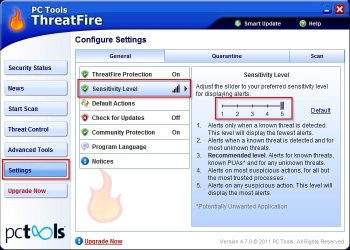
Alongside whatever firewall you actually use you can try Threatfire. If you crank up the settings to what I call "Paranoid Mode" then it will alert you on pretty much any connection attempt and prompt you to allow, deny and optionally remember your choice.

Adjust the slider as shown:

Threatfire.jpg

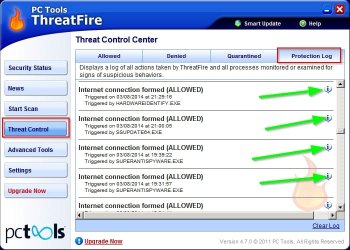
See the protection log and click the info symbol for detailed information:

Threatfire1.jpg

Threatfire direct download link:

http://www.threatfire.com/files/tfinstall.exe
 

My Computer My Computer

Computer type
Laptop
Computer Manufacturer/Model Number
ASUS
OS
Microsoft Windows 7 Home Premium 64-bit 7601 Multiprocessor Free Service Pack 1
CPU
AMD C-60 APU with Radeon(tm) HD Graphics
Motherboard
ASUSTeK COMPUTER INC. X501U
Memory
4.00 GB
Graphics Card(s)
AMD Radeon HD 6290 Graphics
Sound Card
(1) AMD High Definition Audio Device (2) Realtek High Defi
Screen Resolution
1366 x 768 x 32 bits (4294967296 colors) @ 60 Hz
Hard Drives
Hitachi HTS545050A7E380 SATA Disk Device
Antivirus
Comodo CIS & FW, SecureAplus App Whitelisting, Threatfire
Browser
Cyberfox 64bit, Opera 64bit, Airfox
Other Info
Spy-The-Spy, HitmanPro.Alert, Norton Connect Safe, MJRegWatcher, BitDefender TrafficLight, Voodoo Shield, Zemana AntiMalware
Panda is a cloud service, no need to 'update virus database', whenever you connect to internet the database is up to date on the server. With Avast (and others) you connect to internet and start browsing with outdated database. Thus I would recommend Panda for people who connect to internet not often (like me). I would say no matter what antivirus you use, it works the best if you are constantly online. What do you mean by avast for laptops?

Yes I know panda is cloud based. I stated avast is best for laptops as it uses definitions. Laptops can not always be connected to the net all the time. Avast uses definitions combined with streaming cloud updates.

Ayy! I clicked 'Malwarebytes' in your signature - it is linked to the exe file directly! Please change it.

Sorry there is a reason it is like that, I am not changing it.
 

My Computer My Computer

Computer type
PC/Desktop
Computer Manufacturer/Model Number
Custom Built
OS
Windows 10 Pro
CPU
AMD Ryzen 5 2400G Processor with Radeon RX Vega 11 Graphics
Motherboard
ASRock X470 Master SLI/AC AM4 AMD Promontory X470 SATA 6Gb/s
Memory
G.SKILL Ripjaws V Series 16GB (2 x 8GB) 288-Pin DDR4 SDRAM D
Graphics Card(s)
2047MB NVIDIA GeForce GTX 1060 6GB (EVGA)
Sound Card
Motherboard Built in
Monitor(s) Displays
Acer R240HY bidx 23.8-Inch IPS HDMI DVI VGA (1920 x 1080) Wi
Screen Resolution
1920 x 1080
Hard Drives
1TB Sandisk SSD PLUS (Main drive)
500 GB Seagate 7200 RPM (Games)
500 GB Western Digital 7200 RPM (Virtual Machines)
PSU
CORSAIR TX Series TX650M 650W 80+ Gold Modular Power Supply
Case
CORSAIR CARBIDE SPEC-02 Mid-Tower Gaming Case, Red LED Fan
Cooling
220mm, two 120mm, and four 60mm fans
Keyboard
Wired Dell keyboard
Mouse
Wireless Logitech mouse
Internet Speed
250mb down, 30mb up
Antivirus
Panda Cloud Antivirus
Browser
Chrome-ish x64
Other Info
Your awesome for reading this.
Sorry there is a reason it is like that, I am not changing it.
But this way you are giving no choice between free and pro version, I dont even know what I am downloading. Besides, some users may consider it as threat. In some forums direct links to executables are forbidden. Im not paranoid but we are in Sytem Security forum section after all ;)

Callender did the same but at least link is not hidden.

Alongside whatever firewall you actually use you can try Threatfire.
I will, thanks!
 

My Computer My Computer

Computer type
Laptop
Computer Manufacturer/Model Number
Lenovo
OS
Windows 10 Pro Insider Preview + WSL2
CPU
i5
Motherboard
Lenovo
Memory
8GB
Graphics Card(s)
Intel HD
Sound Card
HD Audio
Monitor(s) Displays
12"
Screen Resolution
1280x800
Hard Drives
500GB SSD
PSU
65W
Keyboard
QWERTY
Mouse
Trackpoint
Internet Speed
100Mb
Antivirus
none
Browser
Vivaldi
Link Is visable by hovering over it. The reason I do it that way is to many users click the wrong download button. This ensures they are downloading the right thing, and the site still gets visited.​
 

My Computer My Computer

Computer type
PC/Desktop
Computer Manufacturer/Model Number
Custom Built
OS
Windows 10 Pro
CPU
AMD Ryzen 5 2400G Processor with Radeon RX Vega 11 Graphics
Motherboard
ASRock X470 Master SLI/AC AM4 AMD Promontory X470 SATA 6Gb/s
Memory
G.SKILL Ripjaws V Series 16GB (2 x 8GB) 288-Pin DDR4 SDRAM D
Graphics Card(s)
2047MB NVIDIA GeForce GTX 1060 6GB (EVGA)
Sound Card
Motherboard Built in
Monitor(s) Displays
Acer R240HY bidx 23.8-Inch IPS HDMI DVI VGA (1920 x 1080) Wi
Screen Resolution
1920 x 1080
Hard Drives
1TB Sandisk SSD PLUS (Main drive)
500 GB Seagate 7200 RPM (Games)
500 GB Western Digital 7200 RPM (Virtual Machines)
PSU
CORSAIR TX Series TX650M 650W 80+ Gold Modular Power Supply
Case
CORSAIR CARBIDE SPEC-02 Mid-Tower Gaming Case, Red LED Fan
Cooling
220mm, two 120mm, and four 60mm fans
Keyboard
Wired Dell keyboard
Mouse
Wireless Logitech mouse
Internet Speed
250mb down, 30mb up
Antivirus
Panda Cloud Antivirus
Browser
Chrome-ish x64
Other Info
Your awesome for reading this.
Alongside whatever firewall you actually use you can try Threatfire. If you crank up the settings to what I call "Paranoid Mode" then it will alert you on pretty much any connection attempt and prompt you to allow, deny and optionally remember your choice.

but the options are: allow (to continue suspicious action, not necessarily internet access), kill process, kill+quarantine.

I only want to block internet access for given application not to kill it!

or I missed something?
 
Last edited:

My Computer My Computer

Computer type
Laptop
Computer Manufacturer/Model Number
Lenovo
OS
Windows 10 Pro Insider Preview + WSL2
CPU
i5
Motherboard
Lenovo
Memory
8GB
Graphics Card(s)
Intel HD
Sound Card
HD Audio
Monitor(s) Displays
12"
Screen Resolution
1280x800
Hard Drives
500GB SSD
PSU
65W
Keyboard
QWERTY
Mouse
Trackpoint
Internet Speed
100Mb
Antivirus
none
Browser
Vivaldi
Threatfire

Please accept my apologies. I'm so used to blocking unwanted connections that I rarely see a Threatfire alert and has actually forgotten that those options that you noticed are the correct ones. The idea is that you get notified about connections and either allow them or if an app is connecting when it doesn't need to like when it's just sending usage statistics you block it using your firewall rules and not Theatfire.

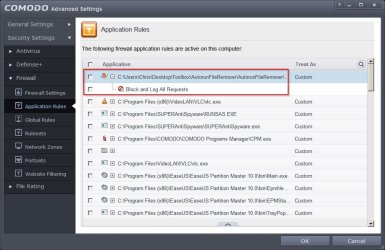
Here's an example:

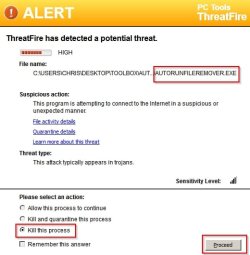
AutoRunFileRemover wants to connect. It's a safe process but is not updating and is just sending usage statistics.

I kill the process (but only this time).

ALERT.jpg

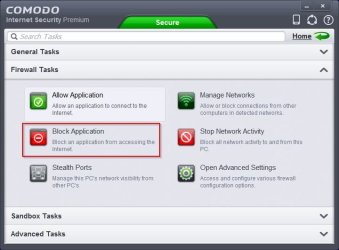
I block future connections using Firewall Rules and it won't connect again.

COMODO.jpg

COMODO Advanced Settings.jpg

If I see unwanted process or something dodgy then it's killed and quarantined.

Threatfire can bug the hell out of you for a few days with alerts but once it gets to learn your choices it settles down.
 

My Computer My Computer

Computer type
Laptop
Computer Manufacturer/Model Number
ASUS
OS
Microsoft Windows 7 Home Premium 64-bit 7601 Multiprocessor Free Service Pack 1
CPU
AMD C-60 APU with Radeon(tm) HD Graphics
Motherboard
ASUSTeK COMPUTER INC. X501U
Memory
4.00 GB
Graphics Card(s)
AMD Radeon HD 6290 Graphics
Sound Card
(1) AMD High Definition Audio Device (2) Realtek High Defi
Screen Resolution
1366 x 768 x 32 bits (4294967296 colors) @ 60 Hz
Hard Drives
Hitachi HTS545050A7E380 SATA Disk Device
Antivirus
Comodo CIS & FW, SecureAplus App Whitelisting, Threatfire
Browser
Cyberfox 64bit, Opera 64bit, Airfox
Other Info
Spy-The-Spy, HitmanPro.Alert, Norton Connect Safe, MJRegWatcher, BitDefender TrafficLight, Voodoo Shield, Zemana AntiMalware
Actually I REPLACED Tinywall with Comodo and after setting to 'custom' and tweaking application rules I am quite satisfied.
So when AutoRunFileRemover is trying to connect (for first time), you get 2 pop-ups (threatfire and comodo)?
 
Last edited:

My Computer My Computer

Computer type
Laptop
Computer Manufacturer/Model Number
Lenovo
OS
Windows 10 Pro Insider Preview + WSL2
CPU
i5
Motherboard
Lenovo
Memory
8GB
Graphics Card(s)
Intel HD
Sound Card
HD Audio
Monitor(s) Displays
12"
Screen Resolution
1280x800
Hard Drives
500GB SSD
PSU
65W
Keyboard
QWERTY
Mouse
Trackpoint
Internet Speed
100Mb
Antivirus
none
Browser
Vivaldi
Comodo vs Threatfire

Actually I REPLACED Tinywall with Comodo and after setting to 'custom' and tweaking application rules I am quite satisfied.
So when AutoRunFileRemover is trying to connect (for first time), you get 2 pop-ups (tinywall and comodo)?

Actually I switched off HIPS in Comodo and rely on Threatfire so I only see one pop up from Threatfire. I prefer it to Comodo's HIPS protection and i like the logging ability and have been using it for ages now. If you find that you prefer to rely on Comodo for connection alerts I don't really see a problem with that!

Also you might want to look at this but just read the Firewall information!

How to Install Comodo Firewall
 

My Computer My Computer

Computer type
Laptop
Computer Manufacturer/Model Number
ASUS
OS
Microsoft Windows 7 Home Premium 64-bit 7601 Multiprocessor Free Service Pack 1
CPU
AMD C-60 APU with Radeon(tm) HD Graphics
Motherboard
ASUSTeK COMPUTER INC. X501U
Memory
4.00 GB
Graphics Card(s)
AMD Radeon HD 6290 Graphics
Sound Card
(1) AMD High Definition Audio Device (2) Realtek High Defi
Screen Resolution
1366 x 768 x 32 bits (4294967296 colors) @ 60 Hz
Hard Drives
Hitachi HTS545050A7E380 SATA Disk Device
Antivirus
Comodo CIS & FW, SecureAplus App Whitelisting, Threatfire
Browser
Cyberfox 64bit, Opera 64bit, Airfox
Other Info
Spy-The-Spy, HitmanPro.Alert, Norton Connect Safe, MJRegWatcher, BitDefender TrafficLight, Voodoo Shield, Zemana AntiMalware
but threatfire will not detect more 'threats' than comodo (hips)?

thanks for link I was looking for some tutorial
 
Last edited:

My Computer My Computer

Computer type
Laptop
Computer Manufacturer/Model Number
Lenovo
OS
Windows 10 Pro Insider Preview + WSL2
CPU
i5
Motherboard
Lenovo
Memory
8GB
Graphics Card(s)
Intel HD
Sound Card
HD Audio
Monitor(s) Displays
12"
Screen Resolution
1280x800
Hard Drives
500GB SSD
PSU
65W
Keyboard
QWERTY
Mouse
Trackpoint
Internet Speed
100Mb
Antivirus
none
Browser
Vivaldi
Back
Top