SyncToy - Backup User Data

How to Use SyncToy for Data Backups

   Information
SyncToy is a FREE application for synchronising file and folders between different data locations/devices. It has a simple graphical interface and logic that makes it very easy to implement a robust backup routine for everyday data files (e.g. documents, music, photo's etc.).

This tutorial will show you how to:
  • Create simple backups from your computer to an external USB device
  • Execute the backup manually
  • Optionally execute the backup automatically using Windows Task Scheduler
SyncToy is probably the easiest way to ensure your important data files are backed up. It caters for the simple needs of novices or less experienced computer users, but also has some powerful features that more experienced users will appreciate.


You will firstly need to to download and install SyncToy. The current version is SyncToy 2.1.

:note: Download SyncToy:

For 32-bit versions of Windows 7:
Download


For 64-bit versions of Windows 7:
Download


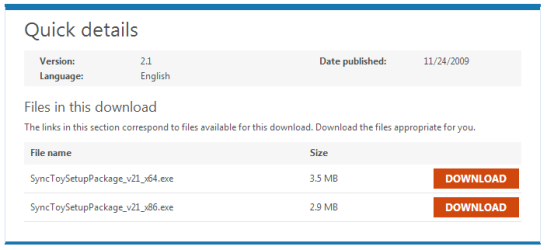
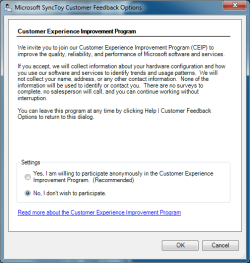
If you prefer, you can navigate to the Microsoft Download Centre and can choose the download from there:0.PNG
Choose:
  • SyncToySetupPackage_v21_x86.exe download for 32-bit versions of Windows 7
  • SyncToySetupPackage_v21_x64.exe download for 64-bit versions of Windows 7
   Note
If you currently use an earlier version of SyncToy, it is strongly recommended that you complete any existing folder synchronisation prior to installing SyncToy 2.1.

In order to run, SyncToy requires Microsoft Sync Framework 2.0 components. These are included in the SyncToy installation executable download.


:note: Installing SyncToy:

Install SyncToy by double-clicking the downloaded executable file.

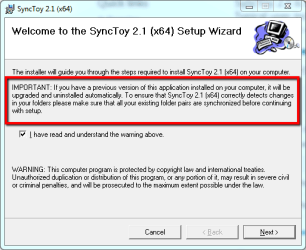
Take note of the important message on the first panel if you are currently using an earlier version of SyncToy. If this is your first installation of SyncToy, you can ignore the message.1.png
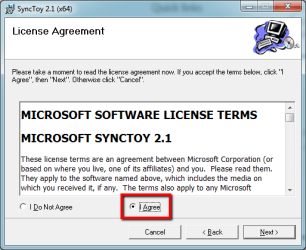
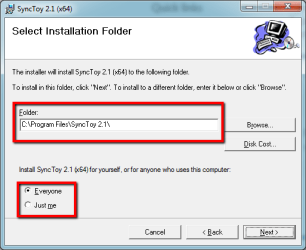
Now finalise the installation by completing the remaining panels as shown below. Once installed, SyncToy only occupies about 1.46 MB of disk space.2.png
3.png
4.png


:note: Understanding the SyncToy Concepts:

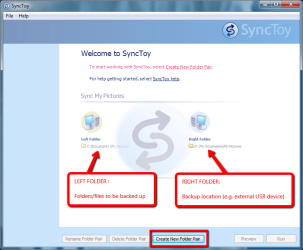
When you first open SyncToy, you will be presented with the main panel, as shown below.5.png
SyncToy employs simple logic to make effective backups. To use SyncToy you need to understand 3 key concepts:
  • the LEFT folder - the location of the folder you want to backup (e.g. My Music)
  • the RIGHT folder - the location to which the backup is to be made (e.g. external USB drive)
  • the Folder PAIR - the rule describing the backup between the LEFT and RIGHT folder
   Tip
Although SyncToy also allows for synchronisation from the RIGHT to LEFT folder if required, the easiest way to understand SyncToy is to remember the basic rule : LEFT folder to RIGHT folder using a FOLDER PAIR.


:note: Using SyncToy:

Backing-up or synchronising data using SyncToy involves creating, and then running, one or more folder pairs.

Step 1 - Creating a FOLDER PAIR:

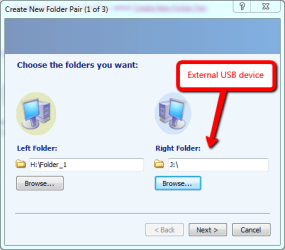
From the SyncToy main panel, select the button Create New Folder Pair. Select the LEFT and RIGHT folders using the browsing feature.7.png
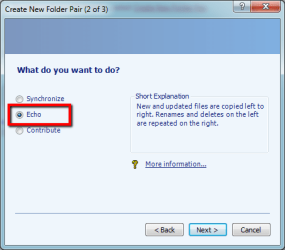
After clicking Next, you will be prompted to select the sychronisation method on the next panel. There are three choices:

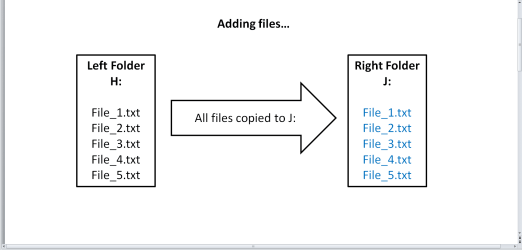
  • Echo
    - New and updated (renamed and deleted) files are copied LEFT to RIGHT only
    - Use this option if you want to backup data files one-way, from your computer to an external drive.

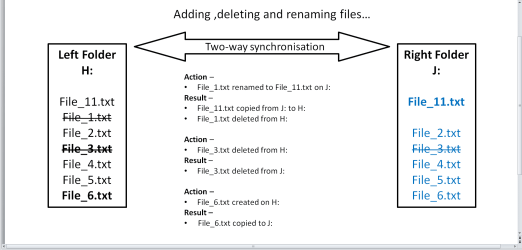
  • Synchronize
    - New and updated (renamed and deleted) files are copied BOTH ways
    - Use this option if you want to synchronise data files between two computers, or your computer and an external drive.

  • Contribute
    - New and updated (renamed) files are copied LEFT to RIGHT only. Deleted files are not mirrored.
    - Use this option if you want to backup data files one-way, with the exception of deleted files.
   Tip
The Echo option is the easiest method to achieve complete backups, especially for novices. It always follows the basic LEFT to RIGHT SyncToy copy rule.


   Note
How does ECHO work?echo_1.png
echo_2.png
echo_3.png
How does SYNCHRONIZE work?sync_1.png
How does CONTRIBUTE work?contri_1.png

Select the Echo option.8.png
Now provide a name for the FOLDER PAIR.9.png
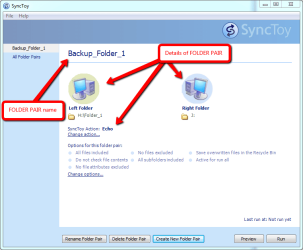
Click Finish to save the folder pair name. The FOLDER PAIR and its details will be shown on the main SyncToy panel.10.png
You can place additional conditions, such as wildcards to determine which files should be included or excluded from the folder pair once it is run. By default, all files are included for processing by SyncToy when the folder pair is run.

   Note
Folder pair information is saved to C:\{User}\AppData\Local\Microsoft\SyncToy\2.0 as shown below:14.png
In order to maintain the folder pair link, a file withe name convention SyncToy_{number}.dat is saved in the root of each folder in the pair.If you delete this file, you will be unable to run the folder pair.

Step 2 - Running a FOLDER PAIR:

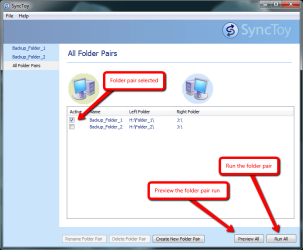
From the SyncToy main panel, select the folder pair you wish to run. The example below shows two folder pairs. The can select as many pairs as are available, or select individual pairs as required.11.png
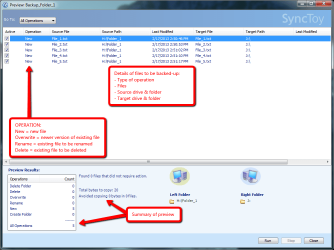
You can use the Preview All option to preview the actions of the selected folder pair.12.png
You Run All option will execute the folder pair to create the backup.13.png
   Tip
SyncToy actions are saved to SyncToyLog.txt in C:\{User}\AppData\Local\Microsoft\SyncToy\2.0


:note: Running SyncToy from Windows Task Scheduler:

SyncToy backups can be automated by adding it as a task to the Windows Task Scheduler.

Step 1 - Create the SyncToy FOLDER PAIR/S:

If you haven't already done so, use SyncToy to create the folder pair/s you wish to use to backup your data.

Step 2 - Add SyncToy as a Task to Windows Task Scheduler:

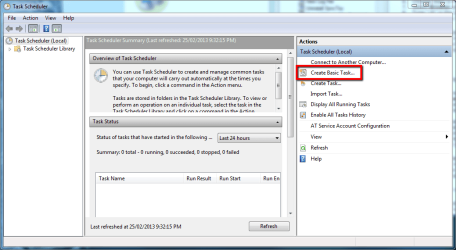
Click the :orb: orb, and then browse to All Programs > Accessories > System Tools and click Task Scheduler. From the main panel, click Create Basic Task as shown below.t1.png
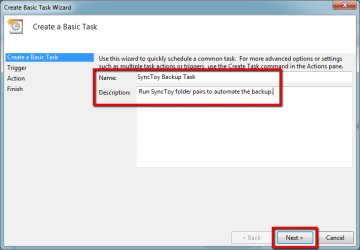
Provide a name and optional description for the task, and click Next.t2.png
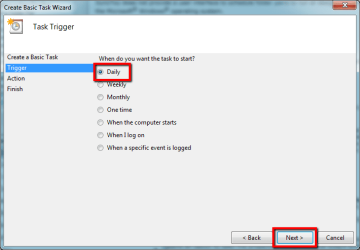
Now select the trigger that causes Task Scheduler to run the SyncToy backup - I use a Daily trigger.t3.png
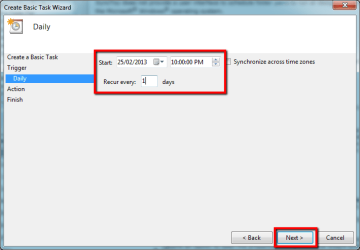
Specify the start date and time, and recurrence of the task, then click Next.t4.png
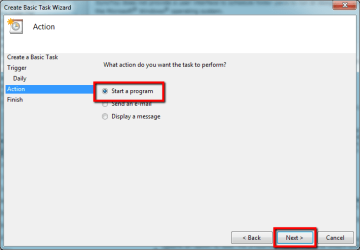
The action Task Scheduler should perform is to open a program - select that, and click Next.t5.png
Browse to the SyncToyCmd application.

   Tip
For 32-bit installations the default path is C:\Program Files (x86)\Synctoy2.1
For 64-bit installations the default path is C:\Program Files\Synctoy2.1

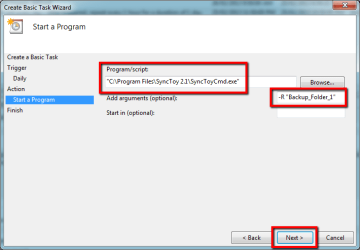
To have Task Scheduler run every folder pair, add -R in the Add arguments box. To run only a single folder pair, use -R and the folder pair name enclosed in double quotes, as shown in the example below. Click Next to proceed.t6.png
Click Finish to finalise the basic parameters of the task.t7.png
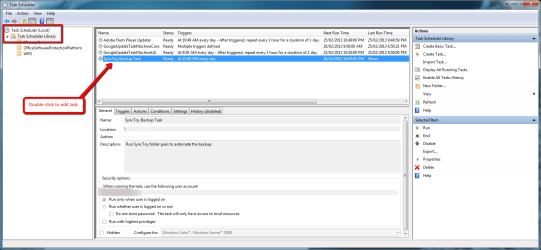
To specify additional parameters for the task, locate and double-click the task you just created.t8.png
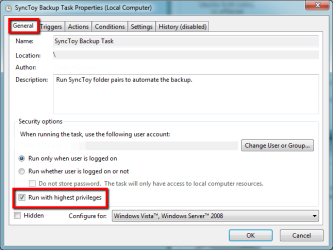
In the General tab, add a check mark in the Run with highest privileges option to force the task to run with administrator rights.t9.png
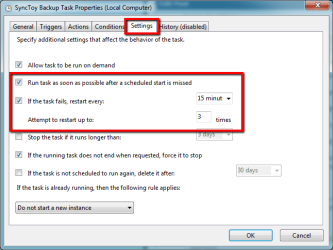
In the Settings tab, use the options shown below to ensure the task runs if the schedule is missed (e.g. the computer is turned off at the time the task is scheduled to run), or if the task fails to start.t10.png


That's all there is to SyncToy - if you don't already have a data file backup strategy, then I hope you find this useful.

Regards,
Golden

 
Last edited:
Excellent work, Colin! Thanks for sharing this.

Kari
 

My Computer

Computer type
Laptop
Computer Manufacturer/Model Number
HP ENVY 17-1150eg
OS
Windows 10 Pro x64 EN-GB
CPU
1.6 GHz Intel Core i7-720QM Processor
Memory
6 GB
Graphics Card(s)
ATI Mobility Radeon HD 5850 Graphics
Sound Card
Beats sound system with integrated subwoofer
Monitor(s) Displays
17" laptop display, 22" LED and 32" Full HD TV through HDMI
Screen Resolution
1600*900 (1), 1920*1080 (2&3)
Hard Drives
Internal: 2 x 500 GB SATA Hard Disk Drive 7200 rpm
External: 2TB for backups, 3TB USB3 network drive for media
Cooling
As Envy runs a bit warm, I have it on a Cooler Master pad
Keyboard
Logitech diNovo Media Desktop Laser (bluetooth)
Mouse
Logitech Performance Mouse MX
Internet Speed
50/10 Mbps VDSL
Antivirus
Windows Defender 4.3.9431.0
Browser
Maxthon 3.5.2., IE11
Cheers Golden nice one
 

My Computer

Computer Manufacturer/Model Number
W530-3630QM1
OS
windows 7 home 64bit
CPU
INTEL-CORE I7
Memory
16GB
Hard Drives
750GB
Browser
Chrome
Nice work Colin.

It's some time since I used Synctoy and had forgotten how simple it is to set up.
 

My Computer

Computer type
Laptop
Computer Manufacturer/Model Number
Hewlett-Packard/G62-107SA Notebook
OS
Microsoft Windows 7 Home Premium 64-bit Service Pack 1
CPU
Intel(R) Core(TM) i3 CPU M 330 @ 2.13GHz
Motherboard
Hewlett-Packard 1425
Memory
8 GB DDR3
Graphics Card(s)
Intel(R) HD Graphics
Sound Card
Realtek High Definition Audio
Monitor(s) Displays
Builtin
Screen Resolution
1366 x 768 x 32 bits (4294967296 colors) @ 60 Hz
Hard Drives
250 GB SATA Hard Disk Drive 7200 rpm
2TB Seagate GoFlex USB 2 Drive
1TB Iomega Prestige USB 2 Drive
1.5TB Iomega Prestige USB 2 Drive (Samsung)
2TB WD MyBook Live NAS.
Mouse
Logitech Anywhere MX
Internet Speed
152 Mbs download 10 Mbs upload
Antivirus
Norton 360
Browser
Chrome
Thanks guys.
 

My Computer

Computer type
PC/Desktop
Computer Manufacturer/Model Number
Golden Mk. I.4
OS
Windows 10 Pro x64 ; Xubuntu x64
CPU
Intel i7 860 @ 2.80 GHz O/C'ed to 4.0GHz
Motherboard
Gigabyte P55A-UD3R Rev.1. Award BIOS F13
Memory
16GB Corsair Vengance DDR3 @ 661 MHz Dual Channel (9-9-9-24)
Graphics Card(s)
EVGA NVidia GTX 560 1024MB
Sound Card
Realtek Integrated
Monitor(s) Displays
Dual Samsung SyncMaster 2494HS
Screen Resolution
1920*1080 and 1920*1080
Hard Drives
1*Samsung 840 EVO 120GB SSD;
1*OCZ Vertex 2 60GB SSD;
2*Samsung F3 SpinPoint 1TB in RAID0;
1*Samsung F1 SpinPoint 1TB;
2*Western Digital 1TB External USB 3.0
1*Western Digital 500GB External USB 3.0
1*Seagate 500GB External USB 2.0
PSU
Thermaltake ToughPower QFan 750W
Case
Thermaltake Element S VK60001W2Z
Cooling
Corsair H60 Water Cooling, 2*230mm and 2*80mm case fans
Keyboard
Logitech G110
Mouse
Logitech MX518
Nice job Golden. One of my favorite backup programs.
 

My Computers

System One System Two

  • Computer type
    PC/Desktop
    Computer Manufacturer/Model Number
    ALWAYS UNDER CONSTRUCTION
    OS
    Windows 11 Pro
    CPU
    Ryzen 9 5900X
    Motherboard
    Asus X570 Crosshair Viii Hero
    Memory
    32GB G Skill DDR4-3600
    Graphics Card(s)
    EVGA RTX 3080 FTW 3 Ultra
    Sound Card
    On Board/Sennheiser PC37X Headset
    Monitor(s) Displays
    3 X Asus 27"
    Screen Resolution
    2560x1440
    Hard Drives
    2 X 1 TB NVME drives
    PSU
    EVGA 850
    Case
    Phanteks Eclipse P400A
    Cooling
    EVGA 280 AIO
    Keyboard
    Logitech G510s/ Logitech G13
    Mouse
    Logitech G502
    Internet Speed
    24/1
    Antivirus
    ESET/MBAM Pro/SAS Pro
    Browser
    Chrome/ Firefox/ Edge
  • Computer type
    Laptop
    System Manufacturer/Model Number
    Dell 16 Plus
    OS
    Windows 11 Pro
    CPU
    Intel Ultra 9 288V
    Memory
    32 GB LPDDR5X 8533
    Monitor(s) Displays
    16" Mini-LED HDR600 Touch 90 Hz
    Screen Resolution
    2560X1600
    Hard Drives
    1 TB NVME
Thanks Steve.
 

My Computer

Computer type
PC/Desktop
Computer Manufacturer/Model Number
Golden Mk. I.4
OS
Windows 10 Pro x64 ; Xubuntu x64
CPU
Intel i7 860 @ 2.80 GHz O/C'ed to 4.0GHz
Motherboard
Gigabyte P55A-UD3R Rev.1. Award BIOS F13
Memory
16GB Corsair Vengance DDR3 @ 661 MHz Dual Channel (9-9-9-24)
Graphics Card(s)
EVGA NVidia GTX 560 1024MB
Sound Card
Realtek Integrated
Monitor(s) Displays
Dual Samsung SyncMaster 2494HS
Screen Resolution
1920*1080 and 1920*1080
Hard Drives
1*Samsung 840 EVO 120GB SSD;
1*OCZ Vertex 2 60GB SSD;
2*Samsung F3 SpinPoint 1TB in RAID0;
1*Samsung F1 SpinPoint 1TB;
2*Western Digital 1TB External USB 3.0
1*Western Digital 500GB External USB 3.0
1*Seagate 500GB External USB 2.0
PSU
Thermaltake ToughPower QFan 750W
Case
Thermaltake Element S VK60001W2Z
Cooling
Corsair H60 Water Cooling, 2*230mm and 2*80mm case fans
Keyboard
Logitech G110
Mouse
Logitech MX518
Thanks Greg.
 

My Computer

Computer type
PC/Desktop
Computer Manufacturer/Model Number
Golden Mk. I.4
OS
Windows 10 Pro x64 ; Xubuntu x64
CPU
Intel i7 860 @ 2.80 GHz O/C'ed to 4.0GHz
Motherboard
Gigabyte P55A-UD3R Rev.1. Award BIOS F13
Memory
16GB Corsair Vengance DDR3 @ 661 MHz Dual Channel (9-9-9-24)
Graphics Card(s)
EVGA NVidia GTX 560 1024MB
Sound Card
Realtek Integrated
Monitor(s) Displays
Dual Samsung SyncMaster 2494HS
Screen Resolution
1920*1080 and 1920*1080
Hard Drives
1*Samsung 840 EVO 120GB SSD;
1*OCZ Vertex 2 60GB SSD;
2*Samsung F3 SpinPoint 1TB in RAID0;
1*Samsung F1 SpinPoint 1TB;
2*Western Digital 1TB External USB 3.0
1*Western Digital 500GB External USB 3.0
1*Seagate 500GB External USB 2.0
PSU
Thermaltake ToughPower QFan 750W
Case
Thermaltake Element S VK60001W2Z
Cooling
Corsair H60 Water Cooling, 2*230mm and 2*80mm case fans
Keyboard
Logitech G110
Mouse
Logitech MX518
WoW Great Tut Golden,,It doesnt get better than Step by Step Configs..Thanks A Bunch to u & all the Amazeing Finds! :D
 

My Computer

Computer type
PC/Desktop
Computer Manufacturer/Model Number
HP
OS
Windows 7 Home Premium x64,Windows 8 Pro x64
CPU
AMD Athlon ll x 4 640@ 3000 MHz
Motherboard
FOXCONN 2AB1/ N-Alvorix-RS880-uATX
Memory
5120 MBDDR3-SDRAM
Graphics Card(s)
ATI Radeon HD 4200
Sound Card
Realtek High-Definition Audio
Monitor(s) Displays
Dell 23"
Screen Resolution
1920x1080
Hard Drives
Seagate ST375052 8AS SATA Disk Device (750GB)
Seagate Desktop (500gb) External Drive
DVD-Rom Drive- Hewlett-Packard DVD A DH16ABLH
Keyboard
HP 5309U model
Mouse
Logitech Optical wheel
Internet Speed
1.5mb
Antivirus
AVG Free 2013,Malwarebytes PRO
Browser
IE 9
:thumbsup:
 

My Computer

Computer type
PC/Desktop
Computer Manufacturer/Model Number
Golden Mk. I.4
OS
Windows 10 Pro x64 ; Xubuntu x64
CPU
Intel i7 860 @ 2.80 GHz O/C'ed to 4.0GHz
Motherboard
Gigabyte P55A-UD3R Rev.1. Award BIOS F13
Memory
16GB Corsair Vengance DDR3 @ 661 MHz Dual Channel (9-9-9-24)
Graphics Card(s)
EVGA NVidia GTX 560 1024MB
Sound Card
Realtek Integrated
Monitor(s) Displays
Dual Samsung SyncMaster 2494HS
Screen Resolution
1920*1080 and 1920*1080
Hard Drives
1*Samsung 840 EVO 120GB SSD;
1*OCZ Vertex 2 60GB SSD;
2*Samsung F3 SpinPoint 1TB in RAID0;
1*Samsung F1 SpinPoint 1TB;
2*Western Digital 1TB External USB 3.0
1*Western Digital 500GB External USB 3.0
1*Seagate 500GB External USB 2.0
PSU
Thermaltake ToughPower QFan 750W
Case
Thermaltake Element S VK60001W2Z
Cooling
Corsair H60 Water Cooling, 2*230mm and 2*80mm case fans
Keyboard
Logitech G110
Mouse
Logitech MX518
I have used SyncToy for a while and really like it. I use the Echo mode so any changes I make to the Left side (my PC) is duplicated on the Right side (storage disk). One problem that has been reported is sometimes any deletes or moves on the Left side do not get done on the Right side. I have found if you use the Preview option first, then it works correctly.

Jim :cool:
 

My Computer

Computer type
PC/Desktop
Computer Manufacturer/Model Number
Home Built
OS
Windows 8.1 Pro w/Media Center 64bit, Windows 7 HP 64bit
CPU
Phenom II X6 1100T
Motherboard
ASUS M5A99X EVO
Memory
Crucial Balistic 8gb DDR3-1866 CL9
Graphics Card(s)
MSI R6850 Cyclone IGD5 PE
Sound Card
On Board
Monitor(s) Displays
ASUS VE258Q 25" LED with DVI-HDMI-DisplayPort
Screen Resolution
1920 x 1080
Hard Drives
Two WD Cavier Black 2TB Sata III, WD My Book Essential 2TB USB 3.0
PSU
Seasonic X650 80 Plus GOLD Modular
Case
Corsair 400R
Cooling
Antec Kuhler H2O 620, Two 120mm and four 140mm
Keyboard
Logitech K120
Mouse
Logitech Marble Mouse USB, Logitech Precision Game Pad
Internet Speed
15MB
Antivirus
Norton IS 2013, Malwarebytes Pro Beta 2
Browser
IE-11, FF-27
Other Info
APC UPS ES 750, Netgear WNR3500L Gigabit & Wireless N Router with SamKnows Test Program, Motorola SB6120 Gigabit Cable Modem. Brother HL-2170W Laser Printer, Epson V300 Scanner
Last edited:
Hello Guys

I used the audit mode like it was descriped here in an excelent way by Kari. But - what about the Data Save routine? I wanted to backup with O&O DiskImage, but the 3TB disk is to large to backup. Btw: I only wonna backup the user Folder(s) and the program Data folder. But at least the last was is hidden. And even it would not be hidden, O&O can't save this by "saving data". Just to copy this went wrong, because there are lot's of links and hard links in there.

Does anybody have another idea to backup those (user)Datas without running a routine for the whole disk? Maybe sync Toy could become an option?

Would be great to share your backup solutions and ideas for systems like mine.

Win7 pro 64 bit
250GB SSD for System
3TB for Data and user Datas
3x3TB for Video
3TB, 2x2TB for external backups of the most important datas and files.

but no backup / no option for the hidden folder "Program Data"


Thank you so much for this helpful Forum and Tutorials around here

from Bonn

Thorsten
 

My Computer

Computer type
PC/Desktop
Computer Manufacturer/Model Number
custom build
OS
win7pro 64bit
CPU
i7
Motherboard
asus p7
Memory
16GB
Graphics Card(s)
nvidia
Hard Drives
System SSD, 5x3 TB Video Drives

My Computers

System One System Two

  • Computer type
    PC/Desktop
    Computer Manufacturer/Model Number
    ALWAYS UNDER CONSTRUCTION
    OS
    Windows 11 Pro
    CPU
    Ryzen 9 5900X
    Motherboard
    Asus X570 Crosshair Viii Hero
    Memory
    32GB G Skill DDR4-3600
    Graphics Card(s)
    EVGA RTX 3080 FTW 3 Ultra
    Sound Card
    On Board/Sennheiser PC37X Headset
    Monitor(s) Displays
    3 X Asus 27"
    Screen Resolution
    2560x1440
    Hard Drives
    2 X 1 TB NVME drives
    PSU
    EVGA 850
    Case
    Phanteks Eclipse P400A
    Cooling
    EVGA 280 AIO
    Keyboard
    Logitech G510s/ Logitech G13
    Mouse
    Logitech G502
    Internet Speed
    24/1
    Antivirus
    ESET/MBAM Pro/SAS Pro
    Browser
    Chrome/ Firefox/ Edge
  • Computer type
    Laptop
    System Manufacturer/Model Number
    Dell 16 Plus
    OS
    Windows 11 Pro
    CPU
    Intel Ultra 9 288V
    Memory
    32 GB LPDDR5X 8533
    Monitor(s) Displays
    16" Mini-LED HDR600 Touch 90 Hz
    Screen Resolution
    2560X1600
    Hard Drives
    1 TB NVME
Synctoy is a very good option and I use it for file and folder backups. It does a very good job and is very quick after the first time. Even better, it's free. We have an excellent tutorial on Sync Toy here http://www.sevenforums.com/tutorials/278866-synctoy-backup-user-data.html I would suggest you give it a try and see if it will suit your purposes.

When I tried to learn how to use Sync Toy a while back using the excellent tutorial you linked, I simply couldn't wrap my little mind around it (ADHD is sooo much fun). I later tried FreeFileSync and after using a video tutorial by one of our own (and please forgive me for not remembering whose it is) and regular one I found online and copied to a Word doc., I was able to "get" how FreeFileSync works. After having used FreeFileSync for a while, I can now make sense of Sync Toy (that was a DUH! moment).

I prefer FreeFileSync to Sync Toy because the HDDs I put my data backups on are subject to having the drive letter being changed. FreeFileSync has a feature one can choose that allows a drive to be identified by drive name instead of drive letter so, no matter what the drive letter is, the HDD can be identified by FreeFileSync. I can also view a comparison of the drives and/or folders being synced before actually doing the syncing (I rarely do, though).

FreeFileSync works so fast, I can now do daily backups in just a few minutes. I can do my antimalware quick scans and two backups (I keep two local backups) during the commercials of an hour long TV program (everything runs between the commercials). Most of the time, the backups take much less time than the scans. Since I save my boot drive images to one of the data HDDs in my computer, those also get backed up during the HDD's backup.

What I would love to find is a sync program that can also copy the files that were synced in a backup to another drive or folder.
 

My Computer

Computer type
PC/Desktop
Computer Manufacturer/Model Number
Custom Build
OS
Win 7 Ultimate 64 bit
CPU
Intel i7-3930K
Motherboard
ASUS P9X79 WS
Memory
Kingston HyperX Genesis 32GB Kit (8x4GB Modules) 1600MHz DDR
Graphics Card(s)
MSI R7850 Twin Frozr 2GD5/OC Radeon HD 7850 2GB 256-bit GDDR
Sound Card
Asus Xonar Essence STX
Monitor(s) Displays
3x Asus VG248QE 24", Vizio 32" TV
Screen Resolution
1920 x 1080, ?
Hard Drives
Samsung 128GB 840 Pro SSD (1),
Samsung 4TB 850 EVO SSDs (4)
Samsung 4TB 850 EVO SSDs (16) external backup drives used in 2.5" hot swap bays in the computer.
PSU
Corsair HX750w
Case
Antec Two Hundred v2 (modified)
Cooling
Cooler Master GeminII S524 120mm (fan replaced with a 140mm)
Keyboard
Logitech G510s
Mouse
Logitech M525 (two in use)
Internet Speed
=< 32Mbps down, 8Mbps up
Antivirus
AVAST!, MBAM, SAS, Spybot S&D (all but MBAM free) Glary Util
Browser
IE11
Other Info
LSI 9211-8i HBA card (8 SATA III ports), 2.5" & 3.5" Hot Swap Bays, HooToo HT-CR001 PCI-E to USB 3.0 Internal Hub + 6 Slot Card Reader, and LG Model CH12LS28 BD-ROM Optical Drive. Also, ScanSnap S1500 ADF duplexing scanner, Canon 9000F flat bed scanner, Corsair SP2500 2.1 speakers, Samsung CLP 415nw laser color printer, Cyberpower PP2200SW UPS
It was mine milady...


My Computer

Computer type
Laptop
Computer Manufacturer/Model Number
Hewlett-Packard/G62-107SA Notebook
OS
Microsoft Windows 7 Home Premium 64-bit Service Pack 1
CPU
Intel(R) Core(TM) i3 CPU M 330 @ 2.13GHz
Motherboard
Hewlett-Packard 1425
Memory
8 GB DDR3
Graphics Card(s)
Intel(R) HD Graphics
Sound Card
Realtek High Definition Audio
Monitor(s) Displays
Builtin
Screen Resolution
1366 x 768 x 32 bits (4294967296 colors) @ 60 Hz
Hard Drives
250 GB SATA Hard Disk Drive 7200 rpm
2TB Seagate GoFlex USB 2 Drive
1TB Iomega Prestige USB 2 Drive
1.5TB Iomega Prestige USB 2 Drive (Samsung)
2TB WD MyBook Live NAS.
Mouse
Logitech Anywhere MX
Internet Speed
152 Mbs download 10 Mbs upload
Antivirus
Norton 360
Browser
Chrome

My Computer

Computer type
PC/Desktop
Computer Manufacturer/Model Number
Custom Build
OS
Win 7 Ultimate 64 bit
CPU
Intel i7-3930K
Motherboard
ASUS P9X79 WS
Memory
Kingston HyperX Genesis 32GB Kit (8x4GB Modules) 1600MHz DDR
Graphics Card(s)
MSI R7850 Twin Frozr 2GD5/OC Radeon HD 7850 2GB 256-bit GDDR
Sound Card
Asus Xonar Essence STX
Monitor(s) Displays
3x Asus VG248QE 24", Vizio 32" TV
Screen Resolution
1920 x 1080, ?
Hard Drives
Samsung 128GB 840 Pro SSD (1),
Samsung 4TB 850 EVO SSDs (4)
Samsung 4TB 850 EVO SSDs (16) external backup drives used in 2.5" hot swap bays in the computer.
PSU
Corsair HX750w
Case
Antec Two Hundred v2 (modified)
Cooling
Cooler Master GeminII S524 120mm (fan replaced with a 140mm)
Keyboard
Logitech G510s
Mouse
Logitech M525 (two in use)
Internet Speed
=< 32Mbps down, 8Mbps up
Antivirus
AVAST!, MBAM, SAS, Spybot S&D (all but MBAM free) Glary Util
Browser
IE11
Other Info
LSI 9211-8i HBA card (8 SATA III ports), 2.5" & 3.5" Hot Swap Bays, HooToo HT-CR001 PCI-E to USB 3.0 Internal Hub + 6 Slot Card Reader, and LG Model CH12LS28 BD-ROM Optical Drive. Also, ScanSnap S1500 ADF duplexing scanner, Canon 9000F flat bed scanner, Corsair SP2500 2.1 speakers, Samsung CLP 415nw laser color printer, Cyberpower PP2200SW UPS
What I would love to find is a sync program that can also copy the files that were synced in a backup to another drive or folder.

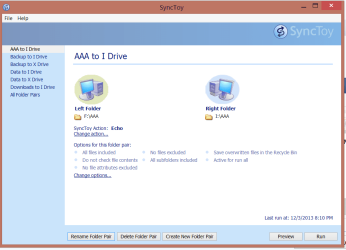
In SyncToy you just set up different parings. Some of my data is backed up to 2 external drives (I & X)

SyncToy.PNG

Jim :cool:
 

My Computer

Computer type
PC/Desktop
Computer Manufacturer/Model Number
Home Built
OS
Windows 8.1 Pro w/Media Center 64bit, Windows 7 HP 64bit
CPU
Phenom II X6 1100T
Motherboard
ASUS M5A99X EVO
Memory
Crucial Balistic 8gb DDR3-1866 CL9
Graphics Card(s)
MSI R6850 Cyclone IGD5 PE
Sound Card
On Board
Monitor(s) Displays
ASUS VE258Q 25" LED with DVI-HDMI-DisplayPort
Screen Resolution
1920 x 1080
Hard Drives
Two WD Cavier Black 2TB Sata III, WD My Book Essential 2TB USB 3.0
PSU
Seasonic X650 80 Plus GOLD Modular
Case
Corsair 400R
Cooling
Antec Kuhler H2O 620, Two 120mm and four 140mm
Keyboard
Logitech K120
Mouse
Logitech Marble Mouse USB, Logitech Precision Game Pad
Internet Speed
15MB
Antivirus
Norton IS 2013, Malwarebytes Pro Beta 2
Browser
IE-11, FF-27
Other Info
APC UPS ES 750, Netgear WNR3500L Gigabit & Wireless N Router with SamKnows Test Program, Motorola SB6120 Gigabit Cable Modem. Brother HL-2170W Laser Printer, Epson V300 Scanner
Back
Top