Solved Syprep/Image X procedure 'not recognised command in cmd prompt'

You are exporting the contents of your system registry hive to a registry file.

A registry file has the .reg extension.

Kaktus wants to look at that .reg file.

Simply post it up here.

If you look in your Windows \System32 folder , you will find tempkey.reg there.
 

My Computers My Computers

System One System Two

  • Computer type
    PC/Desktop
    OS
    7 X64
    CPU
    i5 8400
    Motherboard
    gigabyte b365m ds3h
    Memory
    2x8gb 3200mhz
    Hard Drives
    various
    PSU
    pure power 11 400w cm
    Case
    Coolermaster
    Cooling
    cryorig m9i
  • Computer type
    PC/Desktop
    OS
    7x64
    CPU
    g5400
    Motherboard
    ga b365m ds3h
    Memory
    8gb ddr4 2400
    PSU
    xfx pro 450w
Actually not all of your command lines were successful this time.

The middle one was not.

Here is the screen shot
 

Attachments

  • El Cmd Prompt - 3 code lines.png
    El Cmd Prompt - 3 code lines.png
    125.8 KB · Views: 13

My Computer My Computer

Computer type
Laptop
Computer Manufacturer/Model Number
Lenovo G570/20079
OS
Windows 7 Ultimate x64
CPU
Intel Pentium CPU B950 @ 2.10GHz, 2011 Mhz
Memory
4gb
Graphics Card(s)
Intel HD Graphics
Screen Resolution
1366 by 768 by 59 Hertz
Hard Drives
WDC ATA 465.76 GB
Keyboard
Lenovo
Internet Speed
5mb/s
Antivirus
AVG FREE
Browser
Google Chrome
Hi SIW2

Thank you for trying to clarify.

Now I understand.
 

My Computer My Computer

Computer type
Laptop
Computer Manufacturer/Model Number
Lenovo G570/20079
OS
Windows 7 Ultimate x64
CPU
Intel Pentium CPU B950 @ 2.10GHz, 2011 Mhz
Memory
4gb
Graphics Card(s)
Intel HD Graphics
Screen Resolution
1366 by 768 by 59 Hertz
Hard Drives
WDC ATA 465.76 GB
Keyboard
Lenovo
Internet Speed
5mb/s
Antivirus
AVG FREE
Browser
Google Chrome
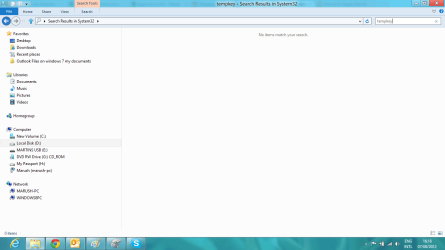
Dear Kaktussoft and SIW2, I have looked in the windows>system 32 folder and there is no tempkey.reg, or indeed any tempkey.

Again I've enclosed a snapshot to show you the search. Please see in the bar above that it is the results from that folder.

I've looked manually too, and it goes from te......to.......tf........without any tempkey folders in between, in the list of files.

At the moment it seems like anything I try is not working.

Do you think this syspreped system is repairable?

I'm trying everything you suggest.

Richard
 

My Computer My Computer

Computer type
Laptop
Computer Manufacturer/Model Number
Lenovo G570/20079
OS
Windows 7 Ultimate x64
CPU
Intel Pentium CPU B950 @ 2.10GHz, 2011 Mhz
Memory
4gb
Graphics Card(s)
Intel HD Graphics
Screen Resolution
1366 by 768 by 59 Hertz
Hard Drives
WDC ATA 465.76 GB
Keyboard
Lenovo
Internet Speed
5mb/s
Antivirus
AVG FREE
Browser
Google Chrome
This one has the snapshot
 

Attachments

  • Screenshot (7).png
    Screenshot (7).png
    40.7 KB · Views: 9

My Computer My Computer

Computer type
Laptop
Computer Manufacturer/Model Number
Lenovo G570/20079
OS
Windows 7 Ultimate x64
CPU
Intel Pentium CPU B950 @ 2.10GHz, 2011 Mhz
Memory
4gb
Graphics Card(s)
Intel HD Graphics
Screen Resolution
1366 by 768 by 59 Hertz
Hard Drives
WDC ATA 465.76 GB
Keyboard
Lenovo
Internet Speed
5mb/s
Antivirus
AVG FREE
Browser
Google Chrome
Here is the screen shot.

As for the tempkey.reg I didn't run it, I just put in the command lines.

reg load HKLM\tempkey d:\windows\system32\config\system
reg export HKLM\tempkey\setup tempkey.reg
reg unload HKLM\tempkey

All were successful.

I'll send a screen shot of what happens.

Thanks
thanks. D: is win7 and C: is win8. win7 partition has the actual boot files and bootmenu. Now I know how it's configured
 

My Computer My Computer

Computer type
Laptop
Computer Manufacturer/Model Number
ACER ASPIRE 5742G
OS
Microsoft Windows 7 Home Premium 64-bits 7601 Multiprocessor Free Service Pack 1
CPU
Intel(R) Core(TM) i3 CPU M 370 @ 2.40GHz
Motherboard
Acer Aspire 5742G
Memory
4,00 GB
Graphics Card(s)
ATI Mobility Radeon HD 5400 Series
Sound Card
(1) AMD High Definition Audio Device (2) Realtek High Defi
Screen Resolution
1366 x 768 x 32 bits (4294967296 colors) @ 60 Hz
Hard Drives
WDC WD5000BEVT-22ZAT0
In elevated command prompt:
Code:
reg load HKLM\tempkey d:\windows\system32\config\system
regedit
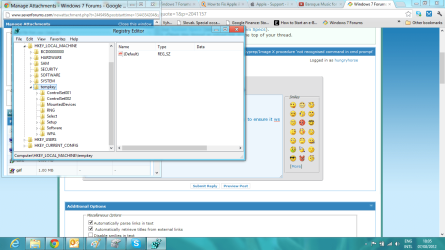
In regedit browse to HKEY_LOCAL_MACHINE\tempkey do you see a subkey setup?
If so click on it. And post screenshot. Keep the regedit screen opened and don't do the unload command yet.

Naamloos.png
 

My Computer My Computer

Computer type
Laptop
Computer Manufacturer/Model Number
ACER ASPIRE 5742G
OS
Microsoft Windows 7 Home Premium 64-bits 7601 Multiprocessor Free Service Pack 1
CPU
Intel(R) Core(TM) i3 CPU M 370 @ 2.40GHz
Motherboard
Acer Aspire 5742G
Memory
4,00 GB
Graphics Card(s)
ATI Mobility Radeon HD 5400 Series
Sound Card
(1) AMD High Definition Audio Device (2) Realtek High Defi
Screen Resolution
1366 x 768 x 32 bits (4294967296 colors) @ 60 Hz
Hard Drives
WDC WD5000BEVT-22ZAT0
In win8 elevated command prompt

Code:
reg  load  HKLM\tempkey  d:\windows\system32\config\system
reg  export  HKLM\tempkey\setup  tempkey.reg
reg unload HKLM\tempkey
post tempkey.reg
when posted.....
del tempkey.reg
In that elevated command prompt you see c:\windows\system32 as prompt all the time? If so it's file c:\windows\system32\tempkey.reg
post it (attach it to post as file)
Post c:\windows\system32\tempkey.reg
Not d:\windows\system32\tempkey.reg
 

My Computer My Computer

Computer type
Laptop
Computer Manufacturer/Model Number
ACER ASPIRE 5742G
OS
Microsoft Windows 7 Home Premium 64-bits 7601 Multiprocessor Free Service Pack 1
CPU
Intel(R) Core(TM) i3 CPU M 370 @ 2.40GHz
Motherboard
Acer Aspire 5742G
Memory
4,00 GB
Graphics Card(s)
ATI Mobility Radeon HD 5400 Series
Sound Card
(1) AMD High Definition Audio Device (2) Realtek High Defi
Screen Resolution
1366 x 768 x 32 bits (4294967296 colors) @ 60 Hz
Hard Drives
WDC WD5000BEVT-22ZAT0
Hi Kaktussoft,

Ok, now this I understood and your instructions worked and presented me withthe regedit from D: drive (windows 7)

I exported the tempkey folder to the desktop thinking that I could sent it to you but it failed. I hope by exporting it just took a copy.

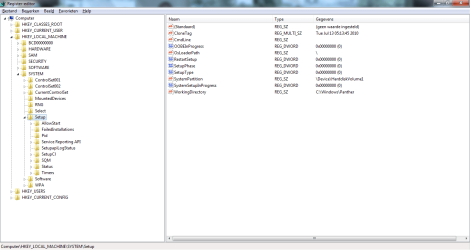
Anyway, here is a screen shot of what is in the tempkey folder.

Richard
 

Attachments

  • Screenshot (8).png
    Screenshot (8).png
    87.3 KB · Views: 5

My Computer My Computer

Computer type
Laptop
Computer Manufacturer/Model Number
Lenovo G570/20079
OS
Windows 7 Ultimate x64
CPU
Intel Pentium CPU B950 @ 2.10GHz, 2011 Mhz
Memory
4gb
Graphics Card(s)
Intel HD Graphics
Screen Resolution
1366 by 768 by 59 Hertz
Hard Drives
WDC ATA 465.76 GB
Keyboard
Lenovo
Internet Speed
5mb/s
Antivirus
AVG FREE
Browser
Google Chrome
Presumably the setup folder is the one you want? Or something in it?

Here is another scrn shot of the setup folder contents, with the right pane, showing files.
 

Attachments

  • Screenshot (9).png
    Screenshot (9).png
    80 KB · Views: 4

My Computer My Computer

Computer type
Laptop
Computer Manufacturer/Model Number
Lenovo G570/20079
OS
Windows 7 Ultimate x64
CPU
Intel Pentium CPU B950 @ 2.10GHz, 2011 Mhz
Memory
4gb
Graphics Card(s)
Intel HD Graphics
Screen Resolution
1366 by 768 by 59 Hertz
Hard Drives
WDC ATA 465.76 GB
Keyboard
Lenovo
Internet Speed
5mb/s
Antivirus
AVG FREE
Browser
Google Chrome
Presumably the setup folder is the one you want? Or something in it?

Here is another scrn shot of the setup folder contents, with the right pane, showing files.
They are not files, but settings!
click on tempkey\setup then in the right pane double click on a name and change its value. then press enter


"CmdLine"="" So make it empty

These values have to be changed to 0

"RestartSetup"=dword:00000000
"SetupType"=dword:00000000
"SystemSetupInProgress"=dword:00000000
"SetupPhase"=dword:00000000
"OOBEInProgress"=dword:00000000

Post screenshot afterwards
 

My Computer My Computer

Computer type
Laptop
Computer Manufacturer/Model Number
ACER ASPIRE 5742G
OS
Microsoft Windows 7 Home Premium 64-bits 7601 Multiprocessor Free Service Pack 1
CPU
Intel(R) Core(TM) i3 CPU M 370 @ 2.40GHz
Motherboard
Acer Aspire 5742G
Memory
4,00 GB
Graphics Card(s)
ATI Mobility Radeon HD 5400 Series
Sound Card
(1) AMD High Definition Audio Device (2) Realtek High Defi
Screen Resolution
1366 x 768 x 32 bits (4294967296 colors) @ 60 Hz
Hard Drives
WDC WD5000BEVT-22ZAT0
Kaktussoft,

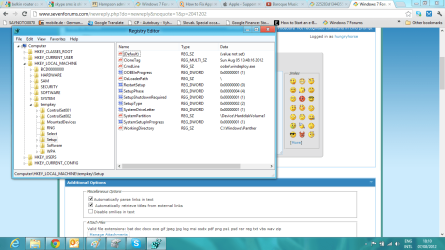
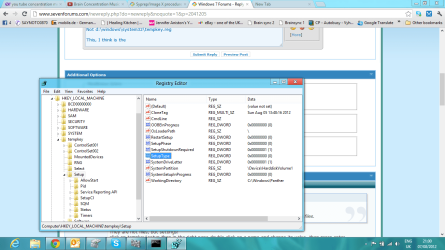
Here is the screen shot of the amended values (i selected modify on each one and changed the values as you asked)

On the cmdline one, i just deleted the value completely.

I haven't saved anything as yet, I'm waiting for you next steps.

By the way there was something you said in 49 above:

Post c:\windows\system32\tempkey.reg
Not d:\windows\system32\tempkey.reg

This, I think is the wrong way round. You surely cannot be intersted in c: tempkey because c: is windows 8. So if you wanted me to post anything it would be the d: tempkey, which is what is in the screen shots.
 

Attachments

  • Screenshot (10).png
    Screenshot (10).png
    64.8 KB · Views: 3

My Computer My Computer

Computer type
Laptop
Computer Manufacturer/Model Number
Lenovo G570/20079
OS
Windows 7 Ultimate x64
CPU
Intel Pentium CPU B950 @ 2.10GHz, 2011 Mhz
Memory
4gb
Graphics Card(s)
Intel HD Graphics
Screen Resolution
1366 by 768 by 59 Hertz
Hard Drives
WDC ATA 465.76 GB
Keyboard
Lenovo
Internet Speed
5mb/s
Antivirus
AVG FREE
Browser
Google Chrome
Kaktussoft,

Here is the screen shot of the amended values (i selected modify on each one and changed the values as you asked)

On the cmdline one, i just deleted the value completely.

I haven't saved anything as yet, I'm waiting for you next steps.

By the way there was something you said in 49 above:

Post c:\windows\system32\tempkey.reg
Not d:\windows\system32\tempkey.reg

This, I think is the wrong way round. You surely cannot be intersted in c: tempkey because c: is windows 8. So if you wanted me to post anything it would be the d: tempkey, which is what is in the screen shots.
Delete SetupShutdownRequired (by right clicking on it->delete. Or maybe better just rename the key so it's not used. Tell me when done

It sure is c:\windows\system32\tempkey.reg
That's the place where you saved the part of registry (win7 HKLM/system registry mounted on win8 HKLM\tempkey). tempkey.reg is there? I don't need it anymore
 

My Computer My Computer

Computer type
Laptop
Computer Manufacturer/Model Number
ACER ASPIRE 5742G
OS
Microsoft Windows 7 Home Premium 64-bits 7601 Multiprocessor Free Service Pack 1
CPU
Intel(R) Core(TM) i3 CPU M 370 @ 2.40GHz
Motherboard
Acer Aspire 5742G
Memory
4,00 GB
Graphics Card(s)
ATI Mobility Radeon HD 5400 Series
Sound Card
(1) AMD High Definition Audio Device (2) Realtek High Defi
Screen Resolution
1366 x 768 x 32 bits (4294967296 colors) @ 60 Hz
Hard Drives
WDC WD5000BEVT-22ZAT0
When finished with SetupShutdownRequired
  • close regedit
  • in elevated command prompt: reg unload HKLM\tempkey
Succeeded succesfully?
 

My Computer My Computer

Computer type
Laptop
Computer Manufacturer/Model Number
ACER ASPIRE 5742G
OS
Microsoft Windows 7 Home Premium 64-bits 7601 Multiprocessor Free Service Pack 1
CPU
Intel(R) Core(TM) i3 CPU M 370 @ 2.40GHz
Motherboard
Acer Aspire 5742G
Memory
4,00 GB
Graphics Card(s)
ATI Mobility Radeon HD 5400 Series
Sound Card
(1) AMD High Definition Audio Device (2) Realtek High Defi
Screen Resolution
1366 x 768 x 32 bits (4294967296 colors) @ 60 Hz
Hard Drives
WDC WD5000BEVT-22ZAT0
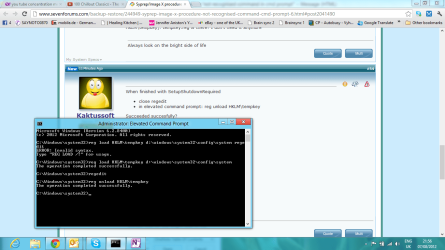
Yes. Sure did. Here is the screen shot. I hope it's oK I just deleted the systemshutdownrequired entry.

Still not sure what's going on with the c: d: thing.

As long as you know:

D: Original windows 7 that I am trying to recover that I stupidly syspreped and failed
C: Windows 8, loaded after windows 7, just as an isolated evaluation copy to see what it was like
 

Attachments

  • Screenshot (11).png
    Screenshot (11).png
    58 KB · Views: 2

My Computer My Computer

Computer type
Laptop
Computer Manufacturer/Model Number
Lenovo G570/20079
OS
Windows 7 Ultimate x64
CPU
Intel Pentium CPU B950 @ 2.10GHz, 2011 Mhz
Memory
4gb
Graphics Card(s)
Intel HD Graphics
Screen Resolution
1366 by 768 by 59 Hertz
Hard Drives
WDC ATA 465.76 GB
Keyboard
Lenovo
Internet Speed
5mb/s
Antivirus
AVG FREE
Browser
Google Chrome
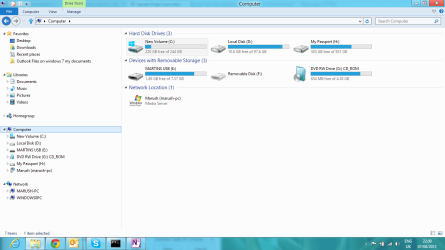
I think this basic snapshot of windows explorer Computer window, because you can see the windows 8 icon, there is the local disk, the recovery cd, and so on.
 

Attachments

  • Screenshot (12).png
    Screenshot (12).png
    49.2 KB · Views: 3

My Computer My Computer

Computer type
Laptop
Computer Manufacturer/Model Number
Lenovo G570/20079
OS
Windows 7 Ultimate x64
CPU
Intel Pentium CPU B950 @ 2.10GHz, 2011 Mhz
Memory
4gb
Graphics Card(s)
Intel HD Graphics
Screen Resolution
1366 by 768 by 59 Hertz
Hard Drives
WDC ATA 465.76 GB
Keyboard
Lenovo
Internet Speed
5mb/s
Antivirus
AVG FREE
Browser
Google Chrome
reg export HKLM\tempkey\setup tempkey.reg
means
export registry key HKLM\tempkey\setup to file tempkey.reg (can be normally editted using noted)
I didn't let you do this
reg export HKLM\tempkey\setup d:\somefolder\subfolder\tempkey.reg
I did let you specify no folder at all! So tempkey.reg will be made in current default folder.
And that's c:\windows\system32 . You see that on screenshot all the time!!
 

My Computer My Computer

Computer type
Laptop
Computer Manufacturer/Model Number
ACER ASPIRE 5742G
OS
Microsoft Windows 7 Home Premium 64-bits 7601 Multiprocessor Free Service Pack 1
CPU
Intel(R) Core(TM) i3 CPU M 370 @ 2.40GHz
Motherboard
Acer Aspire 5742G
Memory
4,00 GB
Graphics Card(s)
ATI Mobility Radeon HD 5400 Series
Sound Card
(1) AMD High Definition Audio Device (2) Realtek High Defi
Screen Resolution
1366 x 768 x 32 bits (4294967296 colors) @ 60 Hz
Hard Drives
WDC WD5000BEVT-22ZAT0
Now win7 thinks no setup, sysprep etc is in progress ... I hope it will boot(?) Try it.
It will hopefully boot. Even with a lot of errors... I don't care. If it boots we gonna try an upgrade install. So sort of repair install. That can only be done from within win7.

Does it boot to win7? If not... what error?
 

My Computer My Computer

Computer type
Laptop
Computer Manufacturer/Model Number
ACER ASPIRE 5742G
OS
Microsoft Windows 7 Home Premium 64-bits 7601 Multiprocessor Free Service Pack 1
CPU
Intel(R) Core(TM) i3 CPU M 370 @ 2.40GHz
Motherboard
Acer Aspire 5742G
Memory
4,00 GB
Graphics Card(s)
ATI Mobility Radeon HD 5400 Series
Sound Card
(1) AMD High Definition Audio Device (2) Realtek High Defi
Screen Resolution
1366 x 768 x 32 bits (4294967296 colors) @ 60 Hz
Hard Drives
WDC WD5000BEVT-22ZAT0
Well one thing is for sure Kaktussoft, you certainly know what you are doing:)

I restarted, selected windows 7 (recover), the only one available to me, and sure enough I was, shortly offered a screen where I could select safemode, or something else, something else, or start windows normally.

i hope I did the right thing, I booted in safe mood. No errors. It is my windows 7 desptop, roughly speaking, the task bar isn't the same (I don't have media player in my task bar for ex), it's all in big icons, because it's safe mode, but generally speaking, I'm pretty sure that is my system, before I syspreped.

Well done Kaktussoft, that is fantastic work, and a hell of a lot of patience. I thought I knew one or two things, but with you on the scene, I'm like an old grandad.

Could you make further suggestions as to how we can repair this fully?

Richard
p.s Can't post screen shot, using my friends computer to send this.
 

My Computer My Computer

Computer type
Laptop
Computer Manufacturer/Model Number
Lenovo G570/20079
OS
Windows 7 Ultimate x64
CPU
Intel Pentium CPU B950 @ 2.10GHz, 2011 Mhz
Memory
4gb
Graphics Card(s)
Intel HD Graphics
Screen Resolution
1366 by 768 by 59 Hertz
Hard Drives
WDC ATA 465.76 GB
Keyboard
Lenovo
Internet Speed
5mb/s
Antivirus
AVG FREE
Browser
Google Chrome
Well one thing is for sure Kaktussoft, you certainly know what you are doing:)

I restarted, selected windows 7 (recover), the only one available to me, and sure enough I was, shortly offered a screen where I could select safemode, or something else, something else, or start windows normally.

i hope I did the right thing, I booted in safe mood. No errors. It is my windows 7 desptop, roughly speaking, the task bar isn't the same (I don't have media player in my task bar for ex), it's all in big icons, because it's safe mode, but generally speaking, I'm pretty sure that is my system, before I syspreped.

Well done Kaktussoft, that is fantastic work, and a hell of a lot of patience. I thought I knew one or two things, but with you on the scene, I'm like an old grandad.

Could you make further suggestions as to how we can repair this fully?

Richard
p.s Can't post screen shot, using my friends computer to send this.
Geat so far!! But can you start win7 normally?
 

My Computer My Computer

Computer type
Laptop
Computer Manufacturer/Model Number
ACER ASPIRE 5742G
OS
Microsoft Windows 7 Home Premium 64-bits 7601 Multiprocessor Free Service Pack 1
CPU
Intel(R) Core(TM) i3 CPU M 370 @ 2.40GHz
Motherboard
Acer Aspire 5742G
Memory
4,00 GB
Graphics Card(s)
ATI Mobility Radeon HD 5400 Series
Sound Card
(1) AMD High Definition Audio Device (2) Realtek High Defi
Screen Resolution
1366 x 768 x 32 bits (4294967296 colors) @ 60 Hz
Hard Drives
WDC WD5000BEVT-22ZAT0
Back
Top