Solved Syprep/Image X procedure 'not recognised command in cmd prompt'

in normal mode (or maybe safe mode):
run msinfo32
is system name, country settings, time zone... all looks fine as it was?
in maintenance center.. is windows firewall enabled? Is windows update enabled?
right click computer->properties. Scroll down.. is windows activated?

All these things are part of Out of the Box Experience (OOBE for short). That fase hasn't been run.... I hope it still knows what settings originally were.
 
Last edited:

My Computer My Computer

Computer type
Laptop
Computer Manufacturer/Model Number
ACER ASPIRE 5742G
OS
Microsoft Windows 7 Home Premium 64-bits 7601 Multiprocessor Free Service Pack 1
CPU
Intel(R) Core(TM) i3 CPU M 370 @ 2.40GHz
Motherboard
Acer Aspire 5742G
Memory
4,00 GB
Graphics Card(s)
ATI Mobility Radeon HD 5400 Series
Sound Card
(1) AMD High Definition Audio Device (2) Realtek High Defi
Screen Resolution
1366 x 768 x 32 bits (4294967296 colors) @ 60 Hz
Hard Drives
WDC WD5000BEVT-22ZAT0
Don't know, I'll try to boot normally now.
 

My Computer My Computer

Computer type
Laptop
Computer Manufacturer/Model Number
Lenovo G570/20079
OS
Windows 7 Ultimate x64
CPU
Intel Pentium CPU B950 @ 2.10GHz, 2011 Mhz
Memory
4gb
Graphics Card(s)
Intel HD Graphics
Screen Resolution
1366 by 768 by 59 Hertz
Hard Drives
WDC ATA 465.76 GB
Keyboard
Lenovo
Internet Speed
5mb/s
Antivirus
AVG FREE
Browser
Google Chrome

My Computer My Computer

Computer type
Laptop
Computer Manufacturer/Model Number
ACER ASPIRE 5742G
OS
Microsoft Windows 7 Home Premium 64-bits 7601 Multiprocessor Free Service Pack 1
CPU
Intel(R) Core(TM) i3 CPU M 370 @ 2.40GHz
Motherboard
Acer Aspire 5742G
Memory
4,00 GB
Graphics Card(s)
ATI Mobility Radeon HD 5400 Series
Sound Card
(1) AMD High Definition Audio Device (2) Realtek High Defi
Screen Resolution
1366 x 768 x 32 bits (4294967296 colors) @ 60 Hz
Hard Drives
WDC WD5000BEVT-22ZAT0

My Computer My Computer

Computer type
Laptop
Computer Manufacturer/Model Number
ACER ASPIRE 5742G
OS
Microsoft Windows 7 Home Premium 64-bits 7601 Multiprocessor Free Service Pack 1
CPU
Intel(R) Core(TM) i3 CPU M 370 @ 2.40GHz
Motherboard
Acer Aspire 5742G
Memory
4,00 GB
Graphics Card(s)
ATI Mobility Radeon HD 5400 Series
Sound Card
(1) AMD High Definition Audio Device (2) Realtek High Defi
Screen Resolution
1366 x 768 x 32 bits (4294967296 colors) @ 60 Hz
Hard Drives
WDC WD5000BEVT-22ZAT0
Hi I'm sorry,


I sent you 2 quick posts, why did you not get them?

Booted normally, did the checks you said.

msinfo32 - info all correct
update - not activated
windows - not activated (3 days)
opened outlook - working fine
screen res and perspective is still blurred, fat, wide and squashed but can sort
Went to google chrome icon in start menu folder - attached to taskbar fine, but wouldn't load - think I can sort that.

It is now 97% back.

Richard
 

My Computer My Computer

Computer type
Laptop
Computer Manufacturer/Model Number
Lenovo G570/20079
OS
Windows 7 Ultimate x64
CPU
Intel Pentium CPU B950 @ 2.10GHz, 2011 Mhz
Memory
4gb
Graphics Card(s)
Intel HD Graphics
Screen Resolution
1366 by 768 by 59 Hertz
Hard Drives
WDC ATA 465.76 GB
Keyboard
Lenovo
Internet Speed
5mb/s
Antivirus
AVG FREE
Browser
Google Chrome
HI Kaktussoft,

This is absolutely brilliant!! Fantastic.

I'm really 98% there, thank you so much, for your time, your patience, your wisdom. Unbelievably insight.

The system does boot slowly, should I still try to repair?

I use Advanced System Care and I can use it to do deep clean, which corrects a lot of things.

I'm worried about the activation, as I've no idea where my key is. This laptop has a key I think under the battery, but it doesn't relate to this version of windows, which is a version my brother gave me donkeys years ago (he's got some sort of MS installers package which gives him licences to a few copies).

Not sure what to do now, if you have any more suggestions great. If not, you have been amazing, and I cannot thank you enough.

Richard

p.s. I'll forget all about the sysprep, it's way beyond me.
 

My Computer My Computer

Computer type
Laptop
Computer Manufacturer/Model Number
Lenovo G570/20079
OS
Windows 7 Ultimate x64
CPU
Intel Pentium CPU B950 @ 2.10GHz, 2011 Mhz
Memory
4gb
Graphics Card(s)
Intel HD Graphics
Screen Resolution
1366 by 768 by 59 Hertz
Hard Drives
WDC ATA 465.76 GB
Keyboard
Lenovo
Internet Speed
5mb/s
Antivirus
AVG FREE
Browser
Google Chrome
By the way screen res is good now, after downloading 2 intel graphics updates.

Richard
 

My Computer My Computer

Computer type
Laptop
Computer Manufacturer/Model Number
Lenovo G570/20079
OS
Windows 7 Ultimate x64
CPU
Intel Pentium CPU B950 @ 2.10GHz, 2011 Mhz
Memory
4gb
Graphics Card(s)
Intel HD Graphics
Screen Resolution
1366 by 768 by 59 Hertz
Hard Drives
WDC ATA 465.76 GB
Keyboard
Lenovo
Internet Speed
5mb/s
Antivirus
AVG FREE
Browser
Google Chrome
put windows updates to download automatically.. at least to the setting you wish.
Activate your windows copy.
windows firewall enable it it (if you want)
google chrome can be uninstalled and installed.

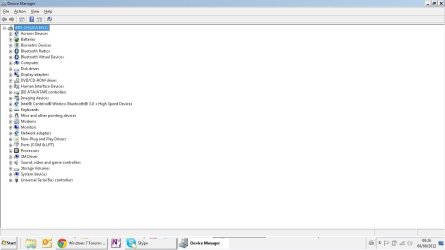
post screenshot of device management. Any exclamation marks there?
 

My Computer My Computer

Computer type
Laptop
Computer Manufacturer/Model Number
ACER ASPIRE 5742G
OS
Microsoft Windows 7 Home Premium 64-bits 7601 Multiprocessor Free Service Pack 1
CPU
Intel(R) Core(TM) i3 CPU M 370 @ 2.40GHz
Motherboard
Acer Aspire 5742G
Memory
4,00 GB
Graphics Card(s)
ATI Mobility Radeon HD 5400 Series
Sound Card
(1) AMD High Definition Audio Device (2) Realtek High Defi
Screen Resolution
1366 x 768 x 32 bits (4294967296 colors) @ 60 Hz
Hard Drives
WDC WD5000BEVT-22ZAT0
By the way, can I get it to boot straight into windows 7? Should I go into bios startup and select that way?

It seems to start with a windows 8 boot platform, all the graphics during startup are windows 8 indications, then comes the blue screen which is definitely w8 with the big squares, then I select windows 7 recovery square.

A bit long winded, i'll guess that you know how to fix that in a second.

Richard
 

My Computer My Computer

Computer type
Laptop
Computer Manufacturer/Model Number
Lenovo G570/20079
OS
Windows 7 Ultimate x64
CPU
Intel Pentium CPU B950 @ 2.10GHz, 2011 Mhz
Memory
4gb
Graphics Card(s)
Intel HD Graphics
Screen Resolution
1366 by 768 by 59 Hertz
Hard Drives
WDC ATA 465.76 GB
Keyboard
Lenovo
Internet Speed
5mb/s
Antivirus
AVG FREE
Browser
Google Chrome
I use Advanced System Care and I can use it to do deep clean, which corrects a lot of things.
=>don't use it yet. I don't know that software. At least create a manual "restore point" prior to using that software!
Post screenshit of device management please
 

My Computer My Computer

Computer type
Laptop
Computer Manufacturer/Model Number
ACER ASPIRE 5742G
OS
Microsoft Windows 7 Home Premium 64-bits 7601 Multiprocessor Free Service Pack 1
CPU
Intel(R) Core(TM) i3 CPU M 370 @ 2.40GHz
Motherboard
Acer Aspire 5742G
Memory
4,00 GB
Graphics Card(s)
ATI Mobility Radeon HD 5400 Series
Sound Card
(1) AMD High Definition Audio Device (2) Realtek High Defi
Screen Resolution
1366 x 768 x 32 bits (4294967296 colors) @ 60 Hz
Hard Drives
WDC WD5000BEVT-22ZAT0
By the way, can I get it to boot straight into windows 7? Should I go into bios startup and select that way?

It seems to start with a windows 8 boot platform, all the graphics during startup are windows 8 indications, then comes the blue screen which is definitely w8 with the big squares, then I select windows 7 recovery square.

A bit long winded, i'll guess that you know how to fix that in a second.

Richard
first fix win7
 

My Computer My Computer

Computer type
Laptop
Computer Manufacturer/Model Number
ACER ASPIRE 5742G
OS
Microsoft Windows 7 Home Premium 64-bits 7601 Multiprocessor Free Service Pack 1
CPU
Intel(R) Core(TM) i3 CPU M 370 @ 2.40GHz
Motherboard
Acer Aspire 5742G
Memory
4,00 GB
Graphics Card(s)
ATI Mobility Radeon HD 5400 Series
Sound Card
(1) AMD High Definition Audio Device (2) Realtek High Defi
Screen Resolution
1366 x 768 x 32 bits (4294967296 colors) @ 60 Hz
Hard Drives
WDC WD5000BEVT-22ZAT0
In the Windows start menu right click computer and this time select manage, in the window that opens in the left pane select Device Manager, (at the top click view and select Show Hidden Devices=>not neccesary now.


Post screenhost of device mangement
 

My Computer My Computer

Computer type
Laptop
Computer Manufacturer/Model Number
ACER ASPIRE 5742G
OS
Microsoft Windows 7 Home Premium 64-bits 7601 Multiprocessor Free Service Pack 1
CPU
Intel(R) Core(TM) i3 CPU M 370 @ 2.40GHz
Motherboard
Acer Aspire 5742G
Memory
4,00 GB
Graphics Card(s)
ATI Mobility Radeon HD 5400 Series
Sound Card
(1) AMD High Definition Audio Device (2) Realtek High Defi
Screen Resolution
1366 x 768 x 32 bits (4294967296 colors) @ 60 Hz
Hard Drives
WDC WD5000BEVT-22ZAT0
By the way, can I get it to boot straight into windows 7? Should I go into bios startup and select that way?

It seems to start with a windows 8 boot platform, all the graphics during startup are windows 8 indications, then comes the blue screen which is definitely w8 with the big squares, then I select windows 7 recovery square.

A bit long winded, i'll guess that you know how to fix that in a second.

Richard
Do you want me to remove win8 bootmanger, but still be able to boot to win8?
Please insert win7 install DVD and look if bootsect is on it. Probably in \windows\system32\sources (?)
In root of DVD is bootmgr?
What is drive ketter of DVD if booted in in win7?

Please respond. And post "device management" screenshot. You don't have activation key I know. Respond to all other questions as well!

gonna sleep in 15 minutes
 

My Computer My Computer

Computer type
Laptop
Computer Manufacturer/Model Number
ACER ASPIRE 5742G
OS
Microsoft Windows 7 Home Premium 64-bits 7601 Multiprocessor Free Service Pack 1
CPU
Intel(R) Core(TM) i3 CPU M 370 @ 2.40GHz
Motherboard
Acer Aspire 5742G
Memory
4,00 GB
Graphics Card(s)
ATI Mobility Radeon HD 5400 Series
Sound Card
(1) AMD High Definition Audio Device (2) Realtek High Defi
Screen Resolution
1366 x 768 x 32 bits (4294967296 colors) @ 60 Hz
Hard Drives
WDC WD5000BEVT-22ZAT0
Kaktussoft,

So sorry I didn't get back before you went to sleep.

Quite honestly, I got confuse in these posts, I got one email, I open the posts, and I find that you have posted 3 more posts.

Sometimes the forum view gives newest post on the top, other views, newest post on the bottom. The info just doesn't come in, in a simple way. You are probably used to it by now.

Anyway, here is scrn shot of

ASC software, I started using couple of years back because was top recommended by PC Mag US and UK. Renowned for having no naughty malware etc. It just asks you to upgrade to their premium version now and again, and I guess many probably do.

Anyway as per your recommendation, am holding fire on that. Here is the screen shot, will read again your post about boot cd. I changed the settings now, for the blue windows screen to choose default system as windows 7, and reduced the waiting time to 5 seconds, so I guess that's pretty good. But when it selects windows 7 it effectively reboots again, and that is where it's time consuming.

So yes, I'd like to keep windows 8 bootable should I want to somehow, but for the computer to boot straight into windows 7 in every day practice.

Thanks again for all you work - the system is going great, but I'm sure you probably that it needs some repair somewhere behind the scenes.

Richard
 

My Computer My Computer

Computer type
Laptop
Computer Manufacturer/Model Number
Lenovo G570/20079
OS
Windows 7 Ultimate x64
CPU
Intel Pentium CPU B950 @ 2.10GHz, 2011 Mhz
Memory
4gb
Graphics Card(s)
Intel HD Graphics
Screen Resolution
1366 by 768 by 59 Hertz
Hard Drives
WDC ATA 465.76 GB
Keyboard
Lenovo
Internet Speed
5mb/s
Antivirus
AVG FREE
Browser
Google Chrome
Apologies again, meant to say in last email, here is the scrn shot of dvc manager with hidden devices unhidden
 

Attachments

  • Scrn Sht  - DeviceManager 2.jpg
    Scrn Sht - DeviceManager 2.jpg
    54.5 KB · Views: 4

My Computer My Computer

Computer type
Laptop
Computer Manufacturer/Model Number
Lenovo G570/20079
OS
Windows 7 Ultimate x64
CPU
Intel Pentium CPU B950 @ 2.10GHz, 2011 Mhz
Memory
4gb
Graphics Card(s)
Intel HD Graphics
Screen Resolution
1366 by 768 by 59 Hertz
Hard Drives
WDC ATA 465.76 GB
Keyboard
Lenovo
Internet Speed
5mb/s
Antivirus
AVG FREE
Browser
Google Chrome
Ahhhhhhh now the penny has dropped with the c: and d: drive.

When windows 8 is booted, it thinks that the system drive is the c drive and the other is d.

However, when windows 7 is booted, it thinks it's system drive is the c drive and the other is the d drive.

Sorry, didn't know that.
 

My Computer My Computer

Computer type
Laptop
Computer Manufacturer/Model Number
Lenovo G570/20079
OS
Windows 7 Ultimate x64
CPU
Intel Pentium CPU B950 @ 2.10GHz, 2011 Mhz
Memory
4gb
Graphics Card(s)
Intel HD Graphics
Screen Resolution
1366 by 768 by 59 Hertz
Hard Drives
WDC ATA 465.76 GB
Keyboard
Lenovo
Internet Speed
5mb/s
Antivirus
AVG FREE
Browser
Google Chrome
Ahhhhhhh now the penny has dropped with the c: and d: drive.

When windows 8 is booted, it thinks that the system drive is the c drive and the other is d.

However, when windows 7 is booted, it thinks it's system drive is the c drive and the other is the d drive.

Sorry, didn't know that.
Drive letters are just logical references to a volume. You can change them using diskmangement. But never change C (it is denied by win7 anyway) because all software and windows points to C. All drive letters are stored in registry. Something like:
Drive_D signatureOfDisk_startsectorOfPartition
Disksignature is kind of physical disk label. If you reattach the disk to another sata cable, so swapping disk3 and disk4 for example doesn't confuse win7.

If you change the startsectorOfPartition you (win7) is in trouble and assigns another drive letter.

it is stored in regsitry so only valid within that OS.
Editing the MountedDevices Registry Key
 

My Computer My Computer

Computer type
Laptop
Computer Manufacturer/Model Number
ACER ASPIRE 5742G
OS
Microsoft Windows 7 Home Premium 64-bits 7601 Multiprocessor Free Service Pack 1
CPU
Intel(R) Core(TM) i3 CPU M 370 @ 2.40GHz
Motherboard
Acer Aspire 5742G
Memory
4,00 GB
Graphics Card(s)
ATI Mobility Radeon HD 5400 Series
Sound Card
(1) AMD High Definition Audio Device (2) Realtek High Defi
Screen Resolution
1366 x 768 x 32 bits (4294967296 colors) @ 60 Hz
Hard Drives
WDC WD5000BEVT-22ZAT0
Apologies again, meant to say in last email, here is the scrn shot of dvc manager with hidden devices unhidden
device manager looks fine! all drivers loaded...no errors
 

My Computer My Computer

Computer type
Laptop
Computer Manufacturer/Model Number
ACER ASPIRE 5742G
OS
Microsoft Windows 7 Home Premium 64-bits 7601 Multiprocessor Free Service Pack 1
CPU
Intel(R) Core(TM) i3 CPU M 370 @ 2.40GHz
Motherboard
Acer Aspire 5742G
Memory
4,00 GB
Graphics Card(s)
ATI Mobility Radeon HD 5400 Series
Sound Card
(1) AMD High Definition Audio Device (2) Realtek High Defi
Screen Resolution
1366 x 768 x 32 bits (4294967296 colors) @ 60 Hz
Hard Drives
WDC WD5000BEVT-22ZAT0

My Computer My Computer

Computer type
Laptop
Computer Manufacturer/Model Number
ACER ASPIRE 5742G
OS
Microsoft Windows 7 Home Premium 64-bits 7601 Multiprocessor Free Service Pack 1
CPU
Intel(R) Core(TM) i3 CPU M 370 @ 2.40GHz
Motherboard
Acer Aspire 5742G
Memory
4,00 GB
Graphics Card(s)
ATI Mobility Radeon HD 5400 Series
Sound Card
(1) AMD High Definition Audio Device (2) Realtek High Defi
Screen Resolution
1366 x 768 x 32 bits (4294967296 colors) @ 60 Hz
Hard Drives
WDC WD5000BEVT-22ZAT0
I see, thanks for that, learned something new there.

Windows firewall enabled by the way.

Last thing, which is extremely weird and I had such a difficult time with this when I loaded windows 7 on to this laptop initially (before the sysprep accident) was with icons in taskbar, those with arrows those without, pinning to the start menu and so on.

It went like this:

a) Icons wouldnt pin to task bar (none, with arrows or without)
b) Icons wouldn't pin to start menu
c) I ran some small fix in relation to .ink file, but wasn't sure what i was doing
d) found a windows fix tool in ASC, which fixed things like this
e) one time or another could pin to start menu but double click wouldn't start app
f) eventually could start apps in start menu
g) finally, after using ASC fix tool again for icons (or something like that), could pin to taskbar, and everything worked.

The whole process took a week.

Now at the moment everything works, but google chrome, when dragged to task bar from start menu folder (under all programs) will not load. Don't know why.

In short, my sysprep saga, has slightly undone, 1 of the above bits of progress again.

You might ask, how do I open chrome? Well it just so happened that I had saved a page with chrome on the desktop, and that opens, to that saved page, and then I change the url and off I go. Hardly convenient though.

There must be one last tweak somewhere that i can find so google icon in taskbar will actually respond to double click
Richard
 

My Computer My Computer

Computer type
Laptop
Computer Manufacturer/Model Number
Lenovo G570/20079
OS
Windows 7 Ultimate x64
CPU
Intel Pentium CPU B950 @ 2.10GHz, 2011 Mhz
Memory
4gb
Graphics Card(s)
Intel HD Graphics
Screen Resolution
1366 by 768 by 59 Hertz
Hard Drives
WDC ATA 465.76 GB
Keyboard
Lenovo
Internet Speed
5mb/s
Antivirus
AVG FREE
Browser
Google Chrome
Back
Top