USB Windows 7 Installation Key Drive - Create

How to Create a Bootable Windows 7 Installation USB Flash Drive


   Information
This will show you how to create a USB flash key drive that you can boot from to install Windows 7 with.
   Tip
If the USB flash drive is of sufficient capacity, say 8GB, then after copying the Windows 7 installation DVD onto it, you can create a new folder (ex: Device Drivers) in the USB key and place all of your latest driver installation files in it. This way you will have them handy to manually install the drivers after installing Windows 7 from the USB key.
   Note
If you booted from the USB drive to install Windows 7, then you may need to change the hard drive back to being listed before the USB key in the boot order in BIOS after the computer restarts during installation to prevent the computer from booting right back into the USB key starting the installation process over and over.
   Warning

  • The USB key needs to be at least 4 GB in size.
  • This will delete everything on the USB key. Be sure to save anything that you do not want to lose on it somewhere else.
  • Before installing Windows 7 from the USB key, you will need to:
    • Enable Legacy USB storage detect in the BIOS.
  • When ready to install Windows 7 from the USB key:
    • Connect the USB key.
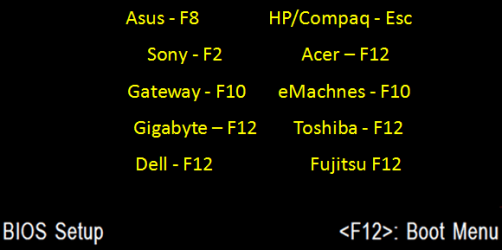
    • Restart the computer, and keep tapping the F key (see screenshot below) responsible to open the Boot Menu screen for the brand and model of your motherboard or computer until it does.

      • Boot-Menu.png
    • Select the USB key to boot from.
    • Start installing Windows 7.

CONTENTS:
  • Option One: Use "Windows 7 USB/DVD Download Tool" to Create Bootable Windows 7 Installation USB
  • Option Two: Use "Rufus" to Create Bootable Windows 7 Installation USB
  • Option Three: Manually Create Bootable Windows 7 Installation USB Flash Drive


OPTION ONE

Use "Windows 7 USB/DVD Download Tool" to Create Bootable Windows 7 Installation USB


   Tip
If you do not have a Windows 7 ISO file, then you can either download the latest ISO version at the links below.

:ar: Microsoft Software Recovery

:ar: Microsoft: Windows 7 Direct Download Links

You could also use a free program like ImgBurn or ISODisk to create a ISO from your Windows 7 installation DVD.


1. For how, see the Part 2 section here: Windows 7 USB/DVD Download Tool.


OPTION TWO

Use "Rufus" to Create Bootable Windows 7 Installation USB


1. Download the latest version of Rufus at the link below, and save it's .exe file to your desktop.
:ar: Rufus - Create bootable USB drives the easy way
   Note
This is a standalone exe file that doesn't install anything to your PC.

For Rufus FAQs, see: https://github.com/pbatard/rufus/wiki/FAQ
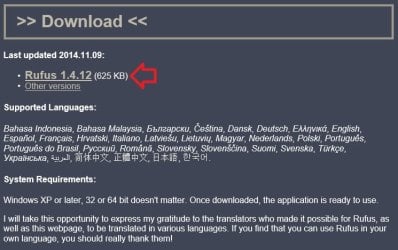

download_rufus.jpg
2. Connect your USB flash drive if you have not already.

3. Run the rufus_v###.exe file, and click/tap on Yes if prompted by UAC.
NOTE: ### = latest version number.

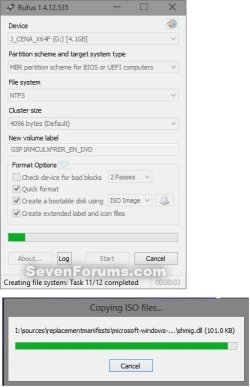
4. Set Rufus with the settings below: (see screenshot below step 5)

  • [Under Device, select the USB flash drive you want to format and use.
  • Under Format Options, check Create a bootable disk using, click/tap on the browse icon to navigate to and select your 64-bit Windows 7 ISO file.
  • Under Partition scheme and target system type, select MBR partition scheme for BIOS or UEFI computers.
  • Under File system, select NTFS.
  • Under Cluster size, select the (Default) (ex: 16 kilobytes or 4096 bytes) it has listed.
  • Under Format Options, check Quick format.
  • Under Format Options, check Create extended label and icon files.
  • Under New volume label, you can enter any name you like for the USB flash drive, or leave the default name.
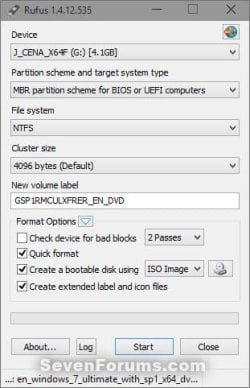
5. When ready, click/tap on Start. (see screenshot below)
Rufus-1.jpg
6. Click/tap on OK to confirm. (see screenshot below)
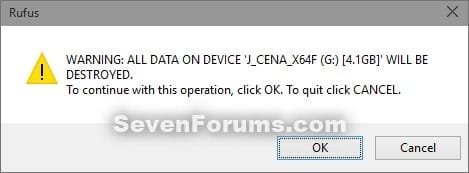
Rufus-2.jpg
7. Rufus will now start creating the bootable UEFI USB flash drive. (see screenshot below)
Rufus-3.jpg
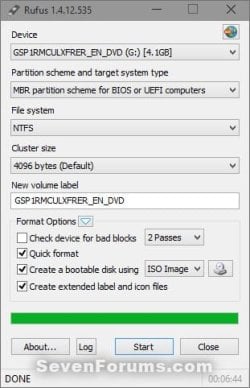
8. When Rufus is "DONE", you can close Rufus. (see screenshot below)
NOTE: It could take a little while to finish.
Rufus-4.jpg
9. You are now ready to installWindows 7 with your bootable USB flash drive.


OPTION THREE

Manually Create Bootable Windows 7 Installation USB Flash Drive


   Warning
Using this method:
  • You will only be able to create a 64-bit Windows 7 bootable USB flash drive if your current Windows 7 installation is also 64-bit.
  • You will be able to create a 32-bit Windows 7 bootable USB flash drive if your current Windows 7 installation is 32-bit or 64-bit.
64-bit installation + 64-bit ISO = 64-bit flash drive
64-bit installation + 32-bit ISO = 32-bit flash drive
32-bit installation + 32-bit ISO = 32-bit flash drive
32-bit installation + 64-bit ISO = unable to create

1. Plug the USB key in.

2. If AutoPlay opens a pop-up for the USB key, then just close it.
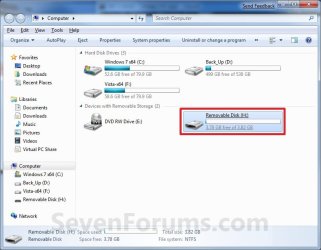
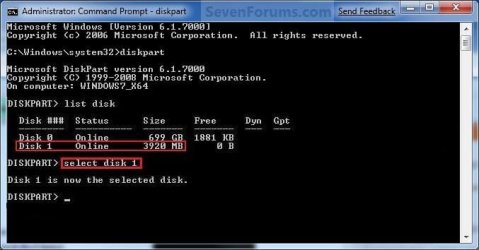
NOTE: Make note of what the drive size is for the USB key for use in step 6 below. You can also open Computer (step 19) to see what the drive size is to. For example, mine is 3920 MB. (See screenshot below)
Computer.jpg
3. Open an elevated command prompt.

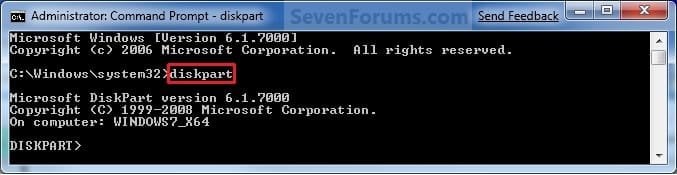
4. In the elevated command prompt, type diskpart and press Enter. (See screenshot below)
Step1.jpg
5. In the elevated command prompt, type list disk and press Enter. (See screenshot below)
NOTE: Make note of what disk # your USB key is listed as to use in step 6 below. You can also look for the drive size (step 2) of the USB key to help ID the disk number. For example, mine is listed as Disk 1 here for the 3920 MB disk.
Step2.jpg
6. In the elevated command prompt, type select disk # (your USB disk #) and press Enter. (See screenshot below)
NOTE: For example, my USB key is listed as Disk 1, so I would type select disk 1 and press Enter.
Step3.jpg
7. In the elevated command prompt, type clean and press Enter. (See screenshot below)
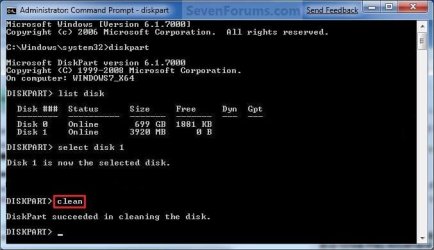
Step4.jpg
8. In the elevated command prompt, type create partition primary and press Enter. (See screenshot below)
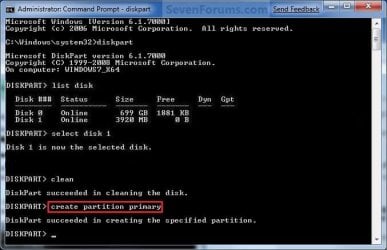
Step5.jpg
9. In the elevated command prompt, type select partition 1 and press Enter. (See screenshot below)
Step6.jpg
10. In the elevated command prompt, type active and press Enter. (See screenshot below)
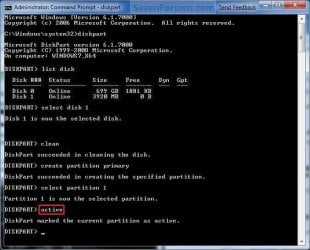
Step7.jpg
11. In the elevated command prompt, type in the command below to format the USB as NTFS or FAT32, and press Enter. (See screenshot below)
NOTE: This may take a few moments to finish formatting the USB key.

   Note
You can substitute Windows 7 within quotes in the commands below with whatever name (drive label) you would like to have displayed for the USB drive instead.

See also: Choosing between NTFS, FAT, and FAT32


FAT32 volume labels
  • If you have an UEFI instead of BIOS motherboard, then you will need to use FAT32 and not NTFS.
  • Volume labels can contain as many as 11 characters and can include spaces but no tabs.
  • Volume labels cannot contain the following characters: ? / \ | . , ; : + = [ ] < > "
  • Volume labels are stored as uppercase regardless of whether they contain lowercase letters.
NTFS volume labels

  • Volume labels can contain as many as 32 characters.
format fs=ntfs label="Windows 7" quick

OR

format fs=fat32 label="Windows 7" quick
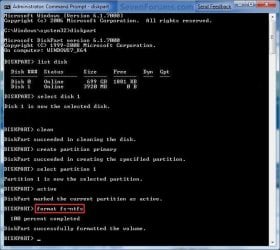
Step8.jpg
12. If AutoPlay opens a pop-up for the USB key, then just close it.

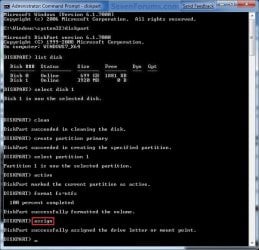
13. In the elevated command prompt, type assign and press Enter. (See screenshot below)
NOTE: This will assign a new drive letter to the USB key. Make note of the new USB drive letter to use in step 22 below. For example, mine is now H.
Step9.jpg
14. If AutoPlay opens a pop-up for the USB key, then just close it.

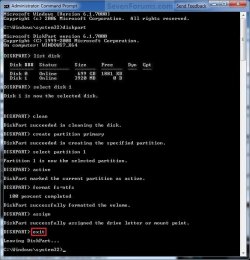
15. In the elevated command prompt, type exit and press Enter. (See screenshot below)
NOTE: This will exit you from DiskPart from step 4.
Step10.jpg
16. Close the elevated command prompt.

17. Insert your Windows 7 installation DVD into the DVD drive.

18. If AutoPlay opens a pop-up for the Windows 7 installation DVD, then just close it.

19. Open the Start Menu, right click on the Computer button, and click on Open.

20. Right click on the DVD drive (ex: E: ) that has the Windows 7 installation DVD in it, and click on Open. (See screenshot below)
Open.jpg
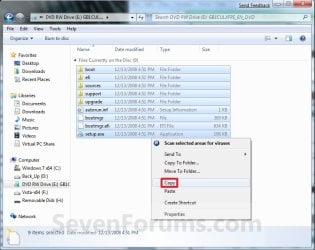
21. Highlight all of the contents, right click on the highlighted contents, and click on Copy. (See screenshot below)
NOTE: You will need to copy all of the files and folders on the Windows 7 installation DVD to the USB key.
Copy.jpg
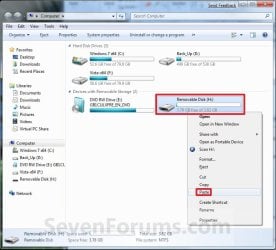
22. Go back to Computer, right click on the USB key drive (ex: H ), and click on Paste. (See screenshot below)
Paste.jpg
23. The contents of the Windows 7 installation DVD will now start copying over to the USB key. (See screenshot below)
NOTE: This may take a few moments to complete.
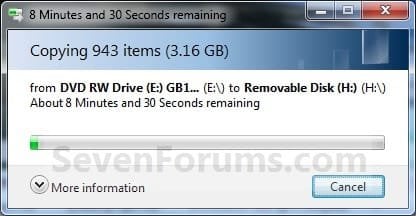
Copying.jpg
24. When finished, you can close the Computer window and unplug the USB key.

25. You now have a Windows 7 Installation USB key. ;)

   Warning
If you have UEFI instead of BIOS motherboard, then you will need to temporarily disable Secure Boot to use the USB to install Windows. After installation is complete, you can enable Secure Boot again.

That's it,
Shawn


Attachments

  • Computer-9.jpg
    Computer-9.jpg
    57 KB · Views: 103
  • UltrISO-8.jpg
    UltrISO-8.jpg
    34.5 KB · Views: 11,724
  • UltrISO-7.jpg
    UltrISO-7.jpg
    9.5 KB · Views: 11,222
  • UltrISO-6.jpg
    UltrISO-6.jpg
    23.1 KB · Views: 12,843
  • UltrISO-5.jpg
    UltrISO-5.jpg
    72.2 KB · Views: 15,194
  • UltrISO-3.jpg
    UltrISO-3.jpg
    69.4 KB · Views: 13,576
  • UltrISO-2.jpg
    UltrISO-2.jpg
    51.3 KB · Views: 13,126
Last edited:
Hello Steven, and welcome to Seven Forums. :)

If you have an extra 2.5" hard drive available and able to replace the hard drive in the laptop, you might replace the current hard drive as a test to see if the current one may have died.
 

My Computer My Computer

Computer type
PC/Desktop
Computer Manufacturer/Model Number
Self built custom
OS
64-bit Windows 11 Pro for Workstations
CPU
Intel i7-8700K OC'd to 5 GHz
Motherboard
ASUS ROG Maximus XI Formula Z390
Memory
64 GB (4x16GB) G.SKILL TridentZ RGB DDR4 3600 MHz
Graphics Card(s)
ASUS ROG-STRIX-GTX1080TI-O11G-GAMING
Sound Card
Integrated
Monitor(s) Displays
2 x Samsung Odyssey G7 27"
Screen Resolution
2560x1440
Hard Drives
1TB Samsung 990 PRO M.2,
4TB Samsung 990 PRO PRO M.2,
TerraMaster F8 SSD Plus NAS
PSU
Seasonic Prime Titanium 850W
Case
Thermaltake Core P3
Cooling
Corsair Hydro H115i
Keyboard
Logitech wireless K800
Mouse
Logitech MX Master 4
Internet Speed
2 Gb/s Download and 100 Mb/s Upload
Antivirus
Malwarebyte Anti-Malware Premium
Browser
Google Chrome
Other Info
Logitech Z625 speaker system,
Logitech BRIO 4K Pro webcam,
HP Color LaserJet Pro MFP M477fdn,
APC SMART-UPS RT 1000 XL - SURT1000XLI,
Galaxy S23 Plus phone
Hello Steven, and welcome to Seven Forums. :)

If you have an extra 2.5" hard drive available and able to replace the hard drive in the laptop, you might replace the current hard drive as a test to see if the current one may have died.

Sir. Brink, Thank you so much for the warm welcome and replying. I don't have extra 2.5" hard drive. :( I just copied those file in a internet cafe and I think they're windows is OEM because I suppose to create a System Repair Disc but I'm receiving an error, Is there any other option? I think I have also lack of files copied on my bootable USB like what I mentioned earier I only have the ( Boot Folder "EFI is inside the folder" and the Auto run from Rufus). I need to go back and forth to fix it.. :cry:
 

My Computer My Computer

Computer type
Laptop
Computer Manufacturer/Model Number
TOSHIBA TECRA R840
OS
Windows 7 Ultimate 64/32 bit
CPU
Intel (R) Core (TM) i5-2520M
Motherboard
N/A
Memory
8192 MB
Graphics Card(s)
N/A
Hard Drives
C:
Mouse
LENOVO CNC:C-9207
Internet Speed
1 MBPS (SUCKS)
Antivirus
Microsoft Essentials
Browser
Google Chrome and Internet Explorer
Other Info
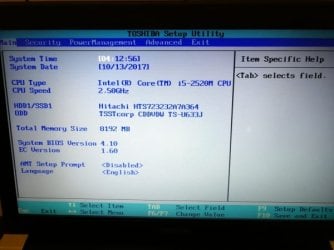
CPU Speed: 2.50GHz
System Bios Version: 4.10
EC Version: 1.60
If able, you could try creating a System Repair Disc on another computer, and see if you're able to boot from it on your laptop.
 

My Computer My Computer

Computer type
PC/Desktop
Computer Manufacturer/Model Number
Self built custom
OS
64-bit Windows 11 Pro for Workstations
CPU
Intel i7-8700K OC'd to 5 GHz
Motherboard
ASUS ROG Maximus XI Formula Z390
Memory
64 GB (4x16GB) G.SKILL TridentZ RGB DDR4 3600 MHz
Graphics Card(s)
ASUS ROG-STRIX-GTX1080TI-O11G-GAMING
Sound Card
Integrated
Monitor(s) Displays
2 x Samsung Odyssey G7 27"
Screen Resolution
2560x1440
Hard Drives
1TB Samsung 990 PRO M.2,
4TB Samsung 990 PRO PRO M.2,
TerraMaster F8 SSD Plus NAS
PSU
Seasonic Prime Titanium 850W
Case
Thermaltake Core P3
Cooling
Corsair Hydro H115i
Keyboard
Logitech wireless K800
Mouse
Logitech MX Master 4
Internet Speed
2 Gb/s Download and 100 Mb/s Upload
Antivirus
Malwarebyte Anti-Malware Premium
Browser
Google Chrome
Other Info
Logitech Z625 speaker system,
Logitech BRIO 4K Pro webcam,
HP Color LaserJet Pro MFP M477fdn,
APC SMART-UPS RT 1000 XL - SURT1000XLI,
Galaxy S23 Plus phone
If able, you could try creating a System Repair Disc on another computer, and see if you're able to boot from it on your laptop.

Alright I will do it and I will let you know if what will be the result. Anything else besides on System Repair Disc, EFI, and BOOTABLE USB? Do you also want me to send you some screenshots on whats going on with my Laptop amd BIOS? Thank you so much! 🙏🏻
 

My Computer My Computer

Computer type
Laptop
Computer Manufacturer/Model Number
TOSHIBA TECRA R840
OS
Windows 7 Ultimate 64/32 bit
CPU
Intel (R) Core (TM) i5-2520M
Motherboard
N/A
Memory
8192 MB
Graphics Card(s)
N/A
Hard Drives
C:
Mouse
LENOVO CNC:C-9207
Internet Speed
1 MBPS (SUCKS)
Antivirus
Microsoft Essentials
Browser
Google Chrome and Internet Explorer
Other Info
CPU Speed: 2.50GHz
System Bios Version: 4.10
EC Version: 1.60
Sure, you can post any screenshots to show what's happening to see if anything may stand out.

If all else fails, you should be able to go to your laptop's website to download and create installation media from to use to do a factory reset with.
 

My Computer My Computer

Computer type
PC/Desktop
Computer Manufacturer/Model Number
Self built custom
OS
64-bit Windows 11 Pro for Workstations
CPU
Intel i7-8700K OC'd to 5 GHz
Motherboard
ASUS ROG Maximus XI Formula Z390
Memory
64 GB (4x16GB) G.SKILL TridentZ RGB DDR4 3600 MHz
Graphics Card(s)
ASUS ROG-STRIX-GTX1080TI-O11G-GAMING
Sound Card
Integrated
Monitor(s) Displays
2 x Samsung Odyssey G7 27"
Screen Resolution
2560x1440
Hard Drives
1TB Samsung 990 PRO M.2,
4TB Samsung 990 PRO PRO M.2,
TerraMaster F8 SSD Plus NAS
PSU
Seasonic Prime Titanium 850W
Case
Thermaltake Core P3
Cooling
Corsair Hydro H115i
Keyboard
Logitech wireless K800
Mouse
Logitech MX Master 4
Internet Speed
2 Gb/s Download and 100 Mb/s Upload
Antivirus
Malwarebyte Anti-Malware Premium
Browser
Google Chrome
Other Info
Logitech Z625 speaker system,
Logitech BRIO 4K Pro webcam,
HP Color LaserJet Pro MFP M477fdn,
APC SMART-UPS RT 1000 XL - SURT1000XLI,
Galaxy S23 Plus phone
Sure, you can post any screenshots to show what's happening to see if anything may stand out.

If all else fails, you should be able to go to your laptop's website to download and create installation media from to use to do a factory reset with.

Sorry. I'll save it in my Email and upload it later. It takes time for me to upload the pictures via Android Device
 

Attachments

  • IMG_20171013_041031.jpg
    IMG_20171013_041031.jpg
    373.4 KB · Views: 60
  • IMG_20171013_041050.jpg
    IMG_20171013_041050.jpg
    443.6 KB · Views: 56

My Computer My Computer

Computer type
Laptop
Computer Manufacturer/Model Number
TOSHIBA TECRA R840
OS
Windows 7 Ultimate 64/32 bit
CPU
Intel (R) Core (TM) i5-2520M
Motherboard
N/A
Memory
8192 MB
Graphics Card(s)
N/A
Hard Drives
C:
Mouse
LENOVO CNC:C-9207
Internet Speed
1 MBPS (SUCKS)
Antivirus
Microsoft Essentials
Browser
Google Chrome and Internet Explorer
Other Info
CPU Speed: 2.50GHz
System Bios Version: 4.10
EC Version: 1.60
Sorry. I'll save it in my Email and upload it later. It takes time for me to upload the pictures via Android Device

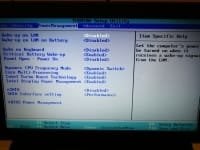
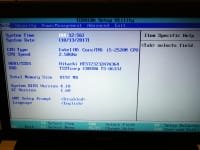
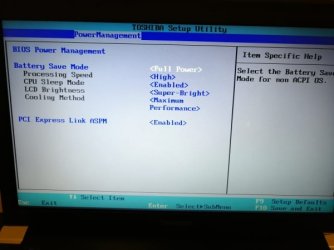
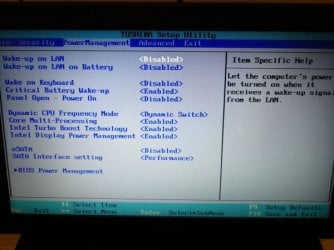
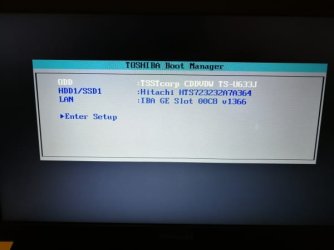
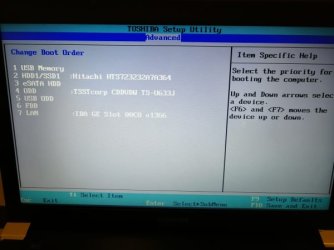
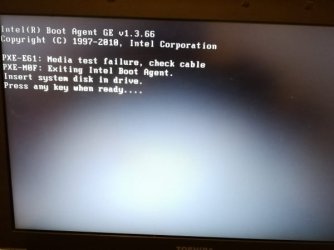
Hi, Brink this are the continuation of the pictures :)
 

Attachments

  • IMG_20171013_041252_resized.jpg
    IMG_20171013_041252_resized.jpg
    5.2 KB · Views: 118
  • IMG_20171013_041239_resized.jpg
    IMG_20171013_041239_resized.jpg
    4.7 KB · Views: 118
  • IMG_20171013_041224_resized.jpg
    IMG_20171013_041224_resized.jpg
    5.4 KB · Views: 119
  • IMG_20171013_041204_resized.jpg
    IMG_20171013_041204_resized.jpg
    5.2 KB · Views: 119
  • IMG_20171013_041145_resized.jpg
    IMG_20171013_041145_resized.jpg
    3.4 KB · Views: 114
Last edited:

My Computer My Computer

Computer type
Laptop
Computer Manufacturer/Model Number
TOSHIBA TECRA R840
OS
Windows 7 Ultimate 64/32 bit
CPU
Intel (R) Core (TM) i5-2520M
Motherboard
N/A
Memory
8192 MB
Graphics Card(s)
N/A
Hard Drives
C:
Mouse
LENOVO CNC:C-9207
Internet Speed
1 MBPS (SUCKS)
Antivirus
Microsoft Essentials
Browser
Google Chrome and Internet Explorer
Other Info
CPU Speed: 2.50GHz
System Bios Version: 4.10
EC Version: 1.60
Hi, Brink this are the continuation of the pictures :)

Sorry for the 1st batch of pictures that I posted 1 hour ago, I changed their pixels because I keep on receiving an error every time I upload those pictures now I was able to checked everything and I was able to get the correct size. :) My Apologies for the administrators and staff. :)
 

Attachments

  • IMG_20171013_041252_resized.jpg
    IMG_20171013_041252_resized.jpg
    32.8 KB · Views: 124
  • IMG_20171013_041239_resized.jpg
    IMG_20171013_041239_resized.jpg
    25.6 KB · Views: 117
  • IMG_20171013_041224_resized.jpg
    IMG_20171013_041224_resized.jpg
    33.6 KB · Views: 129
  • IMG_20171013_041204_resized.jpg
    IMG_20171013_041204_resized.jpg
    30.2 KB · Views: 116
  • IMG_20171013_041145_resized.jpg
    IMG_20171013_041145_resized.jpg
    16.4 KB · Views: 114

My Computer My Computer

Computer type
Laptop
Computer Manufacturer/Model Number
TOSHIBA TECRA R840
OS
Windows 7 Ultimate 64/32 bit
CPU
Intel (R) Core (TM) i5-2520M
Motherboard
N/A
Memory
8192 MB
Graphics Card(s)
N/A
Hard Drives
C:
Mouse
LENOVO CNC:C-9207
Internet Speed
1 MBPS (SUCKS)
Antivirus
Microsoft Essentials
Browser
Google Chrome and Internet Explorer
Other Info
CPU Speed: 2.50GHz
System Bios Version: 4.10
EC Version: 1.60
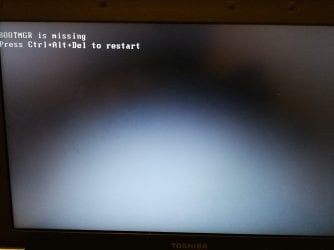
Sir. Brink, I already inserted my BOOTABLE USB in my last picture but still receiving another error...
 

Attachments

  • IMG_20171013_041320_resized.jpg
    IMG_20171013_041320_resized.jpg
    23.9 KB · Views: 120
  • IMG_20171013_041455_resized.jpg
    IMG_20171013_041455_resized.jpg
    21 KB · Views: 130

My Computer My Computer

Computer type
Laptop
Computer Manufacturer/Model Number
TOSHIBA TECRA R840
OS
Windows 7 Ultimate 64/32 bit
CPU
Intel (R) Core (TM) i5-2520M
Motherboard
N/A
Memory
8192 MB
Graphics Card(s)
N/A
Hard Drives
C:
Mouse
LENOVO CNC:C-9207
Internet Speed
1 MBPS (SUCKS)
Antivirus
Microsoft Essentials
Browser
Google Chrome and Internet Explorer
Other Info
CPU Speed: 2.50GHz
System Bios Version: 4.10
EC Version: 1.60
I have a good news, I'm currently at the office and borrowed my Moms DELL INSPIRON 14 3000 Series Laptop and she's currently running Windows 10 and all her files are complete and everything runs smoothly. I was able to check her C: and the "SYSTEM PROTECTION is ON" and there is an option to create an image or System Repair Disc from Windows 7. What should I do?:banghead:
 

My Computer My Computer

Computer type
Laptop
Computer Manufacturer/Model Number
TOSHIBA TECRA R840
OS
Windows 7 Ultimate 64/32 bit
CPU
Intel (R) Core (TM) i5-2520M
Motherboard
N/A
Memory
8192 MB
Graphics Card(s)
N/A
Hard Drives
C:
Mouse
LENOVO CNC:C-9207
Internet Speed
1 MBPS (SUCKS)
Antivirus
Microsoft Essentials
Browser
Google Chrome and Internet Explorer
Other Info
CPU Speed: 2.50GHz
System Bios Version: 4.10
EC Version: 1.60
Your Mother's factory image will not work on your laptop.

The error messages you're getting indicate that you may have a dead hard drive.

To verify this, you can create bootable "SeaTools for DOS" media to boot from and run on your laptop.

:ar: https://www.seagate.com/support/downloads/seatools/seatools-dos-master/

If the hard drive checks out ok, then create a startup repair disc on your Mother's laptop, boot from it on your laptop, and run a startup repair.

:ar: System Repair Disc - Create - Windows 7 Help Forums

:ar: Startup Repair - Windows 7 Help Forums
 

My Computer My Computer

Computer type
PC/Desktop
Computer Manufacturer/Model Number
Self built custom
OS
64-bit Windows 11 Pro for Workstations
CPU
Intel i7-8700K OC'd to 5 GHz
Motherboard
ASUS ROG Maximus XI Formula Z390
Memory
64 GB (4x16GB) G.SKILL TridentZ RGB DDR4 3600 MHz
Graphics Card(s)
ASUS ROG-STRIX-GTX1080TI-O11G-GAMING
Sound Card
Integrated
Monitor(s) Displays
2 x Samsung Odyssey G7 27"
Screen Resolution
2560x1440
Hard Drives
1TB Samsung 990 PRO M.2,
4TB Samsung 990 PRO PRO M.2,
TerraMaster F8 SSD Plus NAS
PSU
Seasonic Prime Titanium 850W
Case
Thermaltake Core P3
Cooling
Corsair Hydro H115i
Keyboard
Logitech wireless K800
Mouse
Logitech MX Master 4
Internet Speed
2 Gb/s Download and 100 Mb/s Upload
Antivirus
Malwarebyte Anti-Malware Premium
Browser
Google Chrome
Other Info
Logitech Z625 speaker system,
Logitech BRIO 4K Pro webcam,
HP Color LaserJet Pro MFP M477fdn,
APC SMART-UPS RT 1000 XL - SURT1000XLI,
Galaxy S23 Plus phone
Your Mother's factory image will not work on your laptop.

The error messages you're getting indicate that you may have a dead hard drive.

To verify this, you can create bootable "SeaTools for DOS" media to boot from and run on your laptop.

:ar: https://www.seagate.com/support/downloads/seatools/seatools-dos-master/

If the hard drive checks out ok, then create a startup repair disc on your Mother's laptop, boot from it on your laptop, and run a startup repair.

:ar: System Repair Disc - Create - Windows 7 Help Forums

:ar: Startup Repair - Windows 7 Help Forums

That's a great news! I'll go ahead and try to download SEATOOLS for DOS then once the Hard Drive is not deadI can go ahead and create a System Repair Disc so I can move forward with the BOOTMGR is Missing.
 

My Computer My Computer

Computer type
Laptop
Computer Manufacturer/Model Number
TOSHIBA TECRA R840
OS
Windows 7 Ultimate 64/32 bit
CPU
Intel (R) Core (TM) i5-2520M
Motherboard
N/A
Memory
8192 MB
Graphics Card(s)
N/A
Hard Drives
C:
Mouse
LENOVO CNC:C-9207
Internet Speed
1 MBPS (SUCKS)
Antivirus
Microsoft Essentials
Browser
Google Chrome and Internet Explorer
Other Info
CPU Speed: 2.50GHz
System Bios Version: 4.10
EC Version: 1.60
Sir. Brink, Why my SEAGATE is not running? 😔
 

Attachments

  • IMG_1632.jpg
    IMG_1632.jpg
    1 MB · Views: 104

My Computer My Computer

Computer type
Laptop
Computer Manufacturer/Model Number
TOSHIBA TECRA R840
OS
Windows 7 Ultimate 64/32 bit
CPU
Intel (R) Core (TM) i5-2520M
Motherboard
N/A
Memory
8192 MB
Graphics Card(s)
N/A
Hard Drives
C:
Mouse
LENOVO CNC:C-9207
Internet Speed
1 MBPS (SUCKS)
Antivirus
Microsoft Essentials
Browser
Google Chrome and Internet Explorer
Other Info
CPU Speed: 2.50GHz
System Bios Version: 4.10
EC Version: 1.60

My Computer My Computer

Computer type
PC/Desktop
Computer Manufacturer/Model Number
Self built custom
OS
64-bit Windows 11 Pro for Workstations
CPU
Intel i7-8700K OC'd to 5 GHz
Motherboard
ASUS ROG Maximus XI Formula Z390
Memory
64 GB (4x16GB) G.SKILL TridentZ RGB DDR4 3600 MHz
Graphics Card(s)
ASUS ROG-STRIX-GTX1080TI-O11G-GAMING
Sound Card
Integrated
Monitor(s) Displays
2 x Samsung Odyssey G7 27"
Screen Resolution
2560x1440
Hard Drives
1TB Samsung 990 PRO M.2,
4TB Samsung 990 PRO PRO M.2,
TerraMaster F8 SSD Plus NAS
PSU
Seasonic Prime Titanium 850W
Case
Thermaltake Core P3
Cooling
Corsair Hydro H115i
Keyboard
Logitech wireless K800
Mouse
Logitech MX Master 4
Internet Speed
2 Gb/s Download and 100 Mb/s Upload
Antivirus
Malwarebyte Anti-Malware Premium
Browser
Google Chrome
Other Info
Logitech Z625 speaker system,
Logitech BRIO 4K Pro webcam,
HP Color LaserJet Pro MFP M477fdn,
APC SMART-UPS RT 1000 XL - SURT1000XLI,
Galaxy S23 Plus phone
Just to confirm, did you follow all the step at Seagate below to create the bootable DVD or USB, and boot from it?

https://www.seagate.com/support/downloads/seatools/seatools-dos-master/

Yes, I was able to follow the steps. What I did is I extract the SEAGATE files to my boot USB using 7-Zip 64bit (should I change it to 32bit?) then changed the ima to img, by the way I just bought a new B.CD for the System Repair Disc just in case..

1 more thing I remember my RUFUS file system is Fat32 and create using DOS
 

My Computer My Computer

Computer type
Laptop
Computer Manufacturer/Model Number
TOSHIBA TECRA R840
OS
Windows 7 Ultimate 64/32 bit
CPU
Intel (R) Core (TM) i5-2520M
Motherboard
N/A
Memory
8192 MB
Graphics Card(s)
N/A
Hard Drives
C:
Mouse
LENOVO CNC:C-9207
Internet Speed
1 MBPS (SUCKS)
Antivirus
Microsoft Essentials
Browser
Google Chrome and Internet Explorer
Other Info
CPU Speed: 2.50GHz
System Bios Version: 4.10
EC Version: 1.60

My Computer My Computer

Computer type
PC/Desktop
Computer Manufacturer/Model Number
Self built custom
OS
64-bit Windows 11 Pro for Workstations
CPU
Intel i7-8700K OC'd to 5 GHz
Motherboard
ASUS ROG Maximus XI Formula Z390
Memory
64 GB (4x16GB) G.SKILL TridentZ RGB DDR4 3600 MHz
Graphics Card(s)
ASUS ROG-STRIX-GTX1080TI-O11G-GAMING
Sound Card
Integrated
Monitor(s) Displays
2 x Samsung Odyssey G7 27"
Screen Resolution
2560x1440
Hard Drives
1TB Samsung 990 PRO M.2,
4TB Samsung 990 PRO PRO M.2,
TerraMaster F8 SSD Plus NAS
PSU
Seasonic Prime Titanium 850W
Case
Thermaltake Core P3
Cooling
Corsair Hydro H115i
Keyboard
Logitech wireless K800
Mouse
Logitech MX Master 4
Internet Speed
2 Gb/s Download and 100 Mb/s Upload
Antivirus
Malwarebyte Anti-Malware Premium
Browser
Google Chrome
Other Info
Logitech Z625 speaker system,
Logitech BRIO 4K Pro webcam,
HP Color LaserJet Pro MFP M477fdn,
APC SMART-UPS RT 1000 XL - SURT1000XLI,
Galaxy S23 Plus phone
That wouldn't work to make it bootable.

Instead you must burn the ISO to the USB using the steps below instead.

How to burn an .iso image onto a CD/DVD-ROM

I agree with you. Actually a few mins ago I was able to read some blog and 3rd parties will not work with SEAGATE it should be a normal USB drive when you extract the files, then you cannot copy "BURN" image of an ISO to CD.
 

My Computer My Computer

Computer type
Laptop
Computer Manufacturer/Model Number
TOSHIBA TECRA R840
OS
Windows 7 Ultimate 64/32 bit
CPU
Intel (R) Core (TM) i5-2520M
Motherboard
N/A
Memory
8192 MB
Graphics Card(s)
N/A
Hard Drives
C:
Mouse
LENOVO CNC:C-9207
Internet Speed
1 MBPS (SUCKS)
Antivirus
Microsoft Essentials
Browser
Google Chrome and Internet Explorer
Other Info
CPU Speed: 2.50GHz
System Bios Version: 4.10
EC Version: 1.60

My Computer My Computer

Computer type
PC/Desktop
Computer Manufacturer/Model Number
Self built custom
OS
64-bit Windows 11 Pro for Workstations
CPU
Intel i7-8700K OC'd to 5 GHz
Motherboard
ASUS ROG Maximus XI Formula Z390
Memory
64 GB (4x16GB) G.SKILL TridentZ RGB DDR4 3600 MHz
Graphics Card(s)
ASUS ROG-STRIX-GTX1080TI-O11G-GAMING
Sound Card
Integrated
Monitor(s) Displays
2 x Samsung Odyssey G7 27"
Screen Resolution
2560x1440
Hard Drives
1TB Samsung 990 PRO M.2,
4TB Samsung 990 PRO PRO M.2,
TerraMaster F8 SSD Plus NAS
PSU
Seasonic Prime Titanium 850W
Case
Thermaltake Core P3
Cooling
Corsair Hydro H115i
Keyboard
Logitech wireless K800
Mouse
Logitech MX Master 4
Internet Speed
2 Gb/s Download and 100 Mb/s Upload
Antivirus
Malwarebyte Anti-Malware Premium
Browser
Google Chrome
Other Info
Logitech Z625 speaker system,
Logitech BRIO 4K Pro webcam,
HP Color LaserJet Pro MFP M477fdn,
APC SMART-UPS RT 1000 XL - SURT1000XLI,
Galaxy S23 Plus phone
I like using Rufus to create a bootable USB with an ISO.

Rufus - Create bootable USB drives the easy way

Agreed! if you will see the comparison from other tools/apps rufus is the best and fastest of them all for ISOs. I think I get it, I'll just use the B.CD for SEAGATE and follow all the steps. I'll keep you updated Sir. Brink. THANK YOU SO MUCH! :)
 

My Computer My Computer

Computer type
Laptop
Computer Manufacturer/Model Number
TOSHIBA TECRA R840
OS
Windows 7 Ultimate 64/32 bit
CPU
Intel (R) Core (TM) i5-2520M
Motherboard
N/A
Memory
8192 MB
Graphics Card(s)
N/A
Hard Drives
C:
Mouse
LENOVO CNC:C-9207
Internet Speed
1 MBPS (SUCKS)
Antivirus
Microsoft Essentials
Browser
Google Chrome and Internet Explorer
Other Info
CPU Speed: 2.50GHz
System Bios Version: 4.10
EC Version: 1.60
Hi, Sir. Brink. I was able to run SEAGATE and do a Long Test Right away and the result is Passed, Why it only show 1 passed? After I removed the CD and reboot my computer I'm still receiving BOOT MGR is missing. I forgot to create a system repair disc. Sorry..
 

My Computer My Computer

Computer type
Laptop
Computer Manufacturer/Model Number
TOSHIBA TECRA R840
OS
Windows 7 Ultimate 64/32 bit
CPU
Intel (R) Core (TM) i5-2520M
Motherboard
N/A
Memory
8192 MB
Graphics Card(s)
N/A
Hard Drives
C:
Mouse
LENOVO CNC:C-9207
Internet Speed
1 MBPS (SUCKS)
Antivirus
Microsoft Essentials
Browser
Google Chrome and Internet Explorer
Other Info
CPU Speed: 2.50GHz
System Bios Version: 4.10
EC Version: 1.60
Back
Top