SysPrep Product ID question

fsantiago

New member
Local time
11:43 AM
Messages
6
Good morning to all,

I have a question and hopefully someone can answer it because I have searched high and low to no avail. I am creating a custom image for our department using SysPrep and Symantec System Recovery. The image works when I restore it to other machines in the environment but what I have noticed is that the machines all have the same Product ID. Windows activates after the machines are joined to the domain through KMS. The test machines are working fine all activated but with the same Product ID. I can't seem to find any information about this online. If more information is needed to properly help me please let me know.
 

My Computer

OS
Windows 7 Enterprise
I actually did. I ran the command from an admin command prompt. I captured the image after it shut down. This is the command. sysprep.exe /generalize /oobe /shutdown /unattend:sysprep.xml

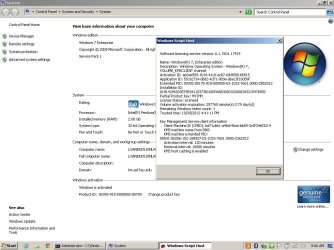
This is the Product ID the test machine are getting.
 

Attachments

  • KMS info_Product ID.jpg
    KMS info_Product ID.jpg
    90 KB · Views: 13

My Computer

OS
Windows 7 Enterprise
Hi Fsantiago, welcome to the Seven Forums.

Although the generalize switch used when image is sysprepped does reset SID, it does not affect or change Product Key (ID).

You should put the VLK runtime key inside Microsoft-Windows-Shell-Setup > ProductKey tags to be run on Specialize configuration pass. This is important: VLK runtime should be on Shell-Setup component! The runtime key is then changed to permanent key during OOBE pass.

Kari
 

My Computer

Computer type
Laptop
Computer Manufacturer/Model Number
HP ENVY 17-1150eg
OS
Windows 10 Pro x64 EN-GB
CPU
1.6 GHz Intel Core i7-720QM Processor
Memory
6 GB
Graphics Card(s)
ATI Mobility Radeon HD 5850 Graphics
Sound Card
Beats sound system with integrated subwoofer
Monitor(s) Displays
17" laptop display, 22" LED and 32" Full HD TV through HDMI
Screen Resolution
1600*900 (1), 1920*1080 (2&3)
Hard Drives
Internal: 2 x 500 GB SATA Hard Disk Drive 7200 rpm
External: 2TB for backups, 3TB USB3 network drive for media
Cooling
As Envy runs a bit warm, I have it on a Cooler Master pad
Keyboard
Logitech diNovo Media Desktop Laser (bluetooth)
Mouse
Logitech Performance Mouse MX
Internet Speed
50/10 Mbps VDSL
Antivirus
Windows Defender 4.3.9431.0
Browser
Maxthon 3.5.2., IE11
Since we use KMS to activate windows after the machine is joined to the domain would I have to just input the Windows 7 Enterprise Key? They are not joined to the domain during SysPrep. Also is this example correct if I were to add it to my xml file? It is only part of it. Thanks!


<?xml version="1.0" encoding="utf-8"?>
<unattend xmlns="urn:schemas-microsoft-com:unattend">
<settings pass="specialize">
<component name="Microsoft-Windows-Shell-Setup" processorArchitecture="x86" publicKeyToken="31bf3856ad364e35" language="neutral" versionScope="nonSxS" xmlns:wcm="http://schemas.microsoft.com/WMIConfig/2002/State" xmlns:xsi="http://www.w3.org/2001/XMLSchema-instance">
<ShowWindowsLive>false</ShowWindowsLive>
<TimeZone>Eastern Standard Time</TimeZone>
<CopyProfile>true</CopyProfile>
<ProductKey></ProductKey>
</component>
<component name="Microsoft-Windows-IE-InternetExplorer" processorArchitecture="x86" publicKeyToken="31bf3856ad364e35" language="neutral" versionScope="nonSxS" xmlns:wcm="http://schemas.microsoft.com/WMIConfig/2002/State" xmlns:xsi="http://www.w3.org/2001/XMLSchema-instance">
<ShowMenuBar>true</ShowMenuBar>
<Home_Page>http://nursing.fau.edu</Home_Page>
<DisableFirstRunWizard>true</DisableFirstRunWizard>
<DisableWelcomePage>true</DisableWelcomePage>
</component>
</settings>
 
Last edited:

My Computer

OS
Windows 7 Enterprise
Put the MAK / KMS key between the <component name="Microsoft-Windows-Shell-Setup> tags before anything else, for instance like this:
Code:
<component name="Microsoft-Windows-Shell-Setup" processorArchitecture="x86" publicKeyToken="31bf3856ad364e35" language="neutral" versionScope="nonSxS" xmlns:wcm="http://schemas.microsoft.com/WMIConfig/2002/State" xmlns:xsi="http://www.w3.org/2001/XMLSchema-instance">
<ProductKey>XXXXX-XXXXX-XXXXX-XXXXX-XXXXX</ProductKey>
<ShowWindowsLive>false</ShowWindowsLive>
<TimeZone>Eastern Standard Time</TimeZone>
<CopyProfile>true</CopyProfile>
</component>
It should work.

BTW, edit your previous post to take the Product Key away!!! You can replace it with Xs.

Kari
 

My Computer

Computer type
Laptop
Computer Manufacturer/Model Number
HP ENVY 17-1150eg
OS
Windows 10 Pro x64 EN-GB
CPU
1.6 GHz Intel Core i7-720QM Processor
Memory
6 GB
Graphics Card(s)
ATI Mobility Radeon HD 5850 Graphics
Sound Card
Beats sound system with integrated subwoofer
Monitor(s) Displays
17" laptop display, 22" LED and 32" Full HD TV through HDMI
Screen Resolution
1600*900 (1), 1920*1080 (2&3)
Hard Drives
Internal: 2 x 500 GB SATA Hard Disk Drive 7200 rpm
External: 2TB for backups, 3TB USB3 network drive for media
Cooling
As Envy runs a bit warm, I have it on a Cooler Master pad
Keyboard
Logitech diNovo Media Desktop Laser (bluetooth)
Mouse
Logitech Performance Mouse MX
Internet Speed
50/10 Mbps VDSL
Antivirus
Windows Defender 4.3.9431.0
Browser
Maxthon 3.5.2., IE11
Thank you Kari. Is it suppose to be Xs in the answer file? Just got a little confused since that is a public key.

I will test this out and see if it works. Thank you!
 

My Computer

OS
Windows 7 Enterprise
No :).

Although we try to be honest and show we are against piracy here on the Seven Forums, the pirates are everywhere and product keys valuable for them, so I meant you should use for instance X's here when posting, instead of posting a valid product key. The sooner you edit your post to remove the key, the better.

An answer file should and must have a valid MAK / KMS or VLK runtime key.

Kari
 

My Computer

Computer type
Laptop
Computer Manufacturer/Model Number
HP ENVY 17-1150eg
OS
Windows 10 Pro x64 EN-GB
CPU
1.6 GHz Intel Core i7-720QM Processor
Memory
6 GB
Graphics Card(s)
ATI Mobility Radeon HD 5850 Graphics
Sound Card
Beats sound system with integrated subwoofer
Monitor(s) Displays
17" laptop display, 22" LED and 32" Full HD TV through HDMI
Screen Resolution
1600*900 (1), 1920*1080 (2&3)
Hard Drives
Internal: 2 x 500 GB SATA Hard Disk Drive 7200 rpm
External: 2TB for backups, 3TB USB3 network drive for media
Cooling
As Envy runs a bit warm, I have it on a Cooler Master pad
Keyboard
Logitech diNovo Media Desktop Laser (bluetooth)
Mouse
Logitech Performance Mouse MX
Internet Speed
50/10 Mbps VDSL
Antivirus
Windows Defender 4.3.9431.0
Browser
Maxthon 3.5.2., IE11
Good.

Come back to tell how it went.
 

My Computer

Computer type
Laptop
Computer Manufacturer/Model Number
HP ENVY 17-1150eg
OS
Windows 10 Pro x64 EN-GB
CPU
1.6 GHz Intel Core i7-720QM Processor
Memory
6 GB
Graphics Card(s)
ATI Mobility Radeon HD 5850 Graphics
Sound Card
Beats sound system with integrated subwoofer
Monitor(s) Displays
17" laptop display, 22" LED and 32" Full HD TV through HDMI
Screen Resolution
1600*900 (1), 1920*1080 (2&3)
Hard Drives
Internal: 2 x 500 GB SATA Hard Disk Drive 7200 rpm
External: 2TB for backups, 3TB USB3 network drive for media
Cooling
As Envy runs a bit warm, I have it on a Cooler Master pad
Keyboard
Logitech diNovo Media Desktop Laser (bluetooth)
Mouse
Logitech Performance Mouse MX
Internet Speed
50/10 Mbps VDSL
Antivirus
Windows Defender 4.3.9431.0
Browser
Maxthon 3.5.2., IE11
Hi, I am more of a Backup Exec gal, but I think for what type of imaging and deployment needs something along the lines of Symantec Ghost better suited for your needs. Symantec System Recovery is more for a Disaster recover of individual machines.
 

My Computer

OS
32
I haven't tried the new answer file yet but I will also try Backup Exec. Thank you!
 

My Computer

OS
Windows 7 Enterprise
I am having a similar issue. The clone machines are having similar product id. This is the command. sysprep.exe /generalize /oobe /shutdown. I am unable to create a new answer file from boot.wim. The boot.wim is from a custom windows iso. Error log when trying to add boot.wim in the windows image
1. How can I create a new answer file without boot.wim?
2. How do I resolve the similar product id problem?
 

Attachments

Last edited:

My Computer

Computer type
Laptop
Computer Manufacturer/Model Number
Acer Aspire 4736G
OS
Windows 7 Ultimate x64
CPU
Intel Core 2 Duo processor T6500
Motherboard
Acer
Memory
4GB
Graphics Card(s)
NVIDIA GeForce G105M
Hard Drives
320GB
Antivirus
AVG
Browser
Firefox
Back
Top