System Devices show no drivers installed in Device Manager

kyleknapp

New member
Local time
7:29 AM
Messages
37
In Device Manager, I notice several devices under System Devices that have no drivers installed.

  • Direct Memory Access Controller
  • High Precision Event Timer
  • Intel(R) 6 Series/C200 Series Chipset Family SMBus Controller - 1C22
  • Intel(R) 82801 PCI Bridge - 244E
  • Numeric Data Processor
  • Programmable interrupt controller
  • System Speaker
  • System Timer
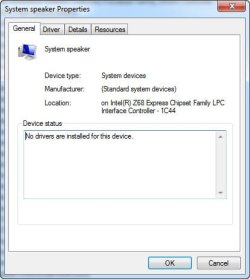
on each of these, the General tab says "No drivers are installed for this device"
https://www.sevenforums.com/attachment.php?attachmentid=398895&stc=1&d=1495250966

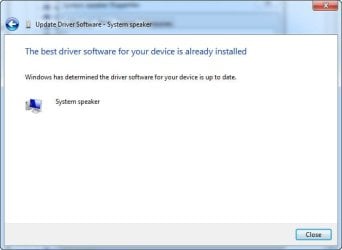
Despite this, the "Driver" tab shows a Microsoft driver installed version installed, and when I attempt to update it, I get this:
https://www.sevenforums.com/attachment.php?attachmentid=398896&stc=1&d=1495250966


There are no warnings, no yellow exclamation marks, just the statement that no drivers are installed. What does this mean?

I use this computer for audio recording, and have recently experienced an increase in audio dropouts. I wonder if this might be related?
 

Attachments
  • 2017-05-19_211549.jpg
    2017-05-19_211549.jpg
    22.4 KB · Views: 28
  • already installed.jpg
    already installed.jpg
    20 KB · Views: 28

My Computer My Computer

OS
Windows 7 Professional 64bit
I would start by installing (reinstalling?) the Intel motherboard chipset drivers. The devices you list are covered by the chipset drivers. You can get them at the PC vendor or direct from Intel Intel | Data Center Solutions, IOT, and PC Innovation

They may be related to your dropouts. But, run the Latency Mon program and see what it tells you.
http://www.resplendence.com/latencymon

I too have a home recording studio, using Sonar Platinum and an MOTU 896Mk3 Hybrid
 

My Computer My Computer

Computer type
PC/Desktop
Computer Manufacturer/Model Number
My Own Build
OS
Windows 10 64 bit
CPU
Intel i7 6700K
Motherboard
ASUS ROG Maximus VIII Hero
Memory
16GB Corsair Dominator
Graphics Card(s)
Intel CPU Graphics
Sound Card
RealTek
Monitor(s) Displays
27" Dell S2719dgf
Screen Resolution
2560X1440
Hard Drives
1 TB Samsung 850 EVO SSD for Win 10 Pro
500GB Samsung 850 EVO SSD for Win 10 Insider
2 TB drive for backup
PSU
EVGA Supernova 750G2
Case
BeQuiet Silent Base 600
Cooling
Deepcool Captain 120EX
Keyboard
Microsoft Wireless 2000
Mouse
Microsoft wireless
Internet Speed
100 MB/sec (Cable)
Antivirus
Microsoft Defender and Malwarebytes
Browser
Edge/Firefox
Other Info
Cakewalk (Sonar) by BandLab and Studio One 4.1 Pro recording studio software. MOTU 896Mk3 Hybrid recording interface, Frontier Tranzport wireless control unit, Behringer X-Touch Control Surface.
Five USB connected optical drives for CD Audio production using Nero BurningROM
Certainly the drivers and dropouts are related.
If you are having a pre-build machine, check for any maintenance tool on manufacturer's website.
Otherwise, as fireberd suggested, check directly with the manufacturer of your chip.

There happens to be an update utility in the link below for Intel 6 series:
Downloads for Intel® Chipset Software Installation Utility
 

My Computer My Computer

Computer type
Laptop
Computer Manufacturer/Model Number
Lenovo
OS
Windows 7 Professional 64bit
CPU
Intel Core i5 3230M
Memory
6144MB RAM
Graphics Card(s)
Nvidia GeForce 635M
Thanks for the response. I've been working on this problem for months with no success. Here is a LatencyMon screenshot.
https://cdn.sevenforums.com/images/styles/window7/attach/jpg.gif

I've had a discussion going for awhile on this indierecordingdepot thread. Lots of ideas offered, none helped.

I posted this particular question here because it looked like more of a Windows problem (I'll post anything I learn here over there as well).

I tried reinstalling the chipset drivers (I got them here). After running the install program, nothing changed in the Device Manager.

FWIW, all but one of these devices shows the same Microsoft Driver (version 6.1.7601.17514, 6/21/2006)
but the "Intel(R) 6 Series/C200 Series Chipset Family SMBus Controller - 1C22" device shows an Intel driver (version 9.2.0.1035, 7/25/2013).
 

Attachments

  • LatencyMon_2017-05-20.jpg
    LatencyMon_2017-05-20.jpg
    129.8 KB · Views: 2

My Computer My Computer

OS
Windows 7 Professional 64bit
checking your Intel update utility link now...
 

My Computer My Computer

OS
Windows 7 Professional 64bit
downloaded and ran the update utility - it produces a list of drivers installed and latest versions. There was nothing in the list. (When I clicked the "Older Drivers" tab, it offered an HD Graphics Driver, but no chipset drivers)

My MB is a Gigabyte Z68A-D3H-B3 (Socket 1155), btw
 

My Computer My Computer

OS
Windows 7 Professional 64bit
You could try removing whatever chipset drivers you have installed now, cleaning up with CCleaner - standard scan and then registry clean and then launch the update utility again?
 

My Computer My Computer

Computer type
Laptop
Computer Manufacturer/Model Number
Lenovo
OS
Windows 7 Professional 64bit
CPU
Intel Core i5 3230M
Memory
6144MB RAM
Graphics Card(s)
Nvidia GeForce 635M
Can you help me? I'm not sure how to do that. If I just uninstall the devices in question from the Device Manager, do I risk crippling my computer? Should I reboot before or after running the update utility? (Is the Intel utility really applicable, since the board is made by Gigabyte, or should I run Gigabyte's Chipset driver installer?)
 

My Computer My Computer

OS
Windows 7 Professional 64bit
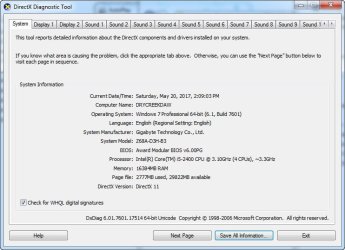
Drivers are easily removed through Device Manager. As for the chipset check with dxdiag - Start -> Run -> type in dxdiag and take a look at 'Processor'.
 

My Computer My Computer

Computer type
Laptop
Computer Manufacturer/Model Number
Lenovo
OS
Windows 7 Professional 64bit
CPU
Intel Core i5 3230M
Memory
6144MB RAM
Graphics Card(s)
Nvidia GeForce 635M

Attachments

  • DxDiag 2017-05-20_142405.jpg
    DxDiag 2017-05-20_142405.jpg
    56.1 KB · Views: 19

My Computer My Computer

OS
Windows 7 Professional 64bit
When you first power on the PC do you get any diagnostic beeps or diagnostic motherboard display for any errors?

Those errors do suggest likely motherboard Intel chipset problems. Possibly a CMOS (BIOS) reset may help.

This is definitely a PC problem, not a DAW/recording problem.
 

My Computer My Computer

Computer type
PC/Desktop
Computer Manufacturer/Model Number
My Own Build
OS
Windows 10 64 bit
CPU
Intel i7 6700K
Motherboard
ASUS ROG Maximus VIII Hero
Memory
16GB Corsair Dominator
Graphics Card(s)
Intel CPU Graphics
Sound Card
RealTek
Monitor(s) Displays
27" Dell S2719dgf
Screen Resolution
2560X1440
Hard Drives
1 TB Samsung 850 EVO SSD for Win 10 Pro
500GB Samsung 850 EVO SSD for Win 10 Insider
2 TB drive for backup
PSU
EVGA Supernova 750G2
Case
BeQuiet Silent Base 600
Cooling
Deepcool Captain 120EX
Keyboard
Microsoft Wireless 2000
Mouse
Microsoft wireless
Internet Speed
100 MB/sec (Cable)
Antivirus
Microsoft Defender and Malwarebytes
Browser
Edge/Firefox
Other Info
Cakewalk (Sonar) by BandLab and Studio One 4.1 Pro recording studio software. MOTU 896Mk3 Hybrid recording interface, Frontier Tranzport wireless control unit, Behringer X-Touch Control Surface.
Five USB connected optical drives for CD Audio production using Nero BurningROM
Also, look at the BIOS and see if all the devices are being recognized in the BIOS.
 

My Computer My Computer

Computer type
PC/Desktop
Computer Manufacturer/Model Number
My Own Build
OS
Windows 10 64 bit
CPU
Intel i7 6700K
Motherboard
ASUS ROG Maximus VIII Hero
Memory
16GB Corsair Dominator
Graphics Card(s)
Intel CPU Graphics
Sound Card
RealTek
Monitor(s) Displays
27" Dell S2719dgf
Screen Resolution
2560X1440
Hard Drives
1 TB Samsung 850 EVO SSD for Win 10 Pro
500GB Samsung 850 EVO SSD for Win 10 Insider
2 TB drive for backup
PSU
EVGA Supernova 750G2
Case
BeQuiet Silent Base 600
Cooling
Deepcool Captain 120EX
Keyboard
Microsoft Wireless 2000
Mouse
Microsoft wireless
Internet Speed
100 MB/sec (Cable)
Antivirus
Microsoft Defender and Malwarebytes
Browser
Edge/Firefox
Other Info
Cakewalk (Sonar) by BandLab and Studio One 4.1 Pro recording studio software. MOTU 896Mk3 Hybrid recording interface, Frontier Tranzport wireless control unit, Behringer X-Touch Control Surface.
Five USB connected optical drives for CD Audio production using Nero BurningROM
no, no diagnostic beeps or indications of anything wrong at startup.

I'm not sure what you're suggesting regarding devices recognized in the BIOS. What devices would I look for? I spent a long time in the BIOS a few days ago looking for a way to adjust the PCI timer (someone suggested that might be my problem, as my recording interface uses a pair of legacy PCI cards), but I found nothing resembling that there.
 

My Computer My Computer

OS
Windows 7 Professional 64bit
I don't have access to your BIOS format but some will show disabled or missing devices. Maybe a BIOS (CMOS memory) reset should be done. If the BIOS does not "see" a device, Windows will not either.
 

My Computer My Computer

Computer type
PC/Desktop
Computer Manufacturer/Model Number
My Own Build
OS
Windows 10 64 bit
CPU
Intel i7 6700K
Motherboard
ASUS ROG Maximus VIII Hero
Memory
16GB Corsair Dominator
Graphics Card(s)
Intel CPU Graphics
Sound Card
RealTek
Monitor(s) Displays
27" Dell S2719dgf
Screen Resolution
2560X1440
Hard Drives
1 TB Samsung 850 EVO SSD for Win 10 Pro
500GB Samsung 850 EVO SSD for Win 10 Insider
2 TB drive for backup
PSU
EVGA Supernova 750G2
Case
BeQuiet Silent Base 600
Cooling
Deepcool Captain 120EX
Keyboard
Microsoft Wireless 2000
Mouse
Microsoft wireless
Internet Speed
100 MB/sec (Cable)
Antivirus
Microsoft Defender and Malwarebytes
Browser
Edge/Firefox
Other Info
Cakewalk (Sonar) by BandLab and Studio One 4.1 Pro recording studio software. MOTU 896Mk3 Hybrid recording interface, Frontier Tranzport wireless control unit, Behringer X-Touch Control Surface.
Five USB connected optical drives for CD Audio production using Nero BurningROM
If you do need to see if you have any problem devices, then you can run my batch script below to produce an output file that tells you what the problem devices are, and the errors associated with them!

Under the heading msinfo32 [MS System Information] - Problem Devices . . ., please run MS_Info32_Find_Problem_Devices.bat, Option [2] and from here => BATCH PROGRAMS [Standalone] and then upload the results using the tutorial at the bottom of the above link [Upload to SevenForums . . .] and someone will look at it for you.

INFORMATION: I have written quite a few batch scripts in order to streamline processes, avoid possible typing errors, and save time hunting around for specific Windows and tabs etc. It is just quicker and easier for users to run the batch script and then upload the results for us to look at.

I hope this helps!
 

My Computer My Computer

Computer type
Laptop
Computer Manufacturer/Model Number
Fujitsu LIFEBOOK
OS
Win 7 HP SP1 64-bit Vista HB SP2 32-bit Linux Mint 18.3
CPU
Intel(R) Pentium(R) CPU P6200 @ 2.13GHz
Motherboard
FUJITSU FJNBB06
Memory
4.00 GB
Graphics Card(s)
Intel(R) Graphics Media Accelerator HD
Sound Card
[1] Realtek High Definition Audio [2] Intel(R) Display Audio
Screen Resolution
1366 x 768 x 32 bits (4294967296 colors) @ 59 Hz
Hard Drives
TOSHIBA MK5076GSX
Antivirus
AVG FREE
Are there any problems shown in the Sound tabs?
 

My Computer My Computer

Computer type
Laptop
Computer Manufacturer/Model Number
Dell M6500 Precision Work Station
OS
Windows 7 Pro SP1 64 bit
Memory
8 GB
Screen Resolution
1920x
Internet Speed
30 Mbps
Antivirus
Norton Security
Browser
IE 11
Back
Top