
Recently got a new hard drive to reinstall Windows 7 onto as my 5 year old 500GB HDD as you can imagine was running slow.
(Installed straight from ISO on my D: drive because I do not have a CD Drive or a memory stick big enough to fit the ISO)
So once it was all installed I decided to wipe the original hard drive (c: which still contained the old OS files) using CCleaners "Drive wiper" tool because I wanted to start from scratch.
However once it was done and I went to format the hard drive it wouldn't allow me. "Windows was unable to complete the format"
Looked at disk management and it looks like this
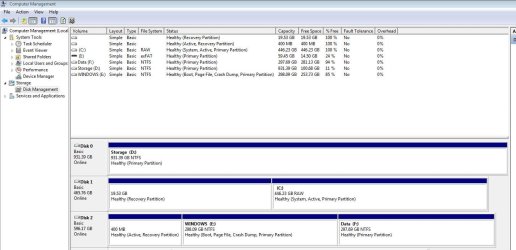
As you can see the System files are not contained within the windows e: on disk2 where I reinstalled windows but inside the RAW c: where Windows 7 used to be installed.
I am extremely confused because if I wiped the whole hard drive why is "System" still present on that disk and not on my e: drive?
I haven't turned my PC off as I am worried it is not going to boot. I have tried BCDboot to try and copy the files over but it did not work I presume because the disk is RAW or am I misunderstanding how it is meant to work ? Is there anyway I can move the system files to the E: drive and allow me to format the RAW drive so I can use it for storage? Help! :shock:
(Installed straight from ISO on my D: drive because I do not have a CD Drive or a memory stick big enough to fit the ISO)
So once it was all installed I decided to wipe the original hard drive (c: which still contained the old OS files) using CCleaners "Drive wiper" tool because I wanted to start from scratch.
However once it was done and I went to format the hard drive it wouldn't allow me. "Windows was unable to complete the format"
Looked at disk management and it looks like this
As you can see the System files are not contained within the windows e: on disk2 where I reinstalled windows but inside the RAW c: where Windows 7 used to be installed.
I am extremely confused because if I wiped the whole hard drive why is "System" still present on that disk and not on my e: drive?
I haven't turned my PC off as I am worried it is not going to boot. I have tried BCDboot to try and copy the files over but it did not work I presume because the disk is RAW or am I misunderstanding how it is meant to work ? Is there anyway I can move the system files to the E: drive and allow me to format the RAW drive so I can use it for storage? Help! :shock:
My Computer
- Computer type
- PC/Desktop
- Computer Manufacturer/Model Number
- Custom Build
- OS
- Windows 7 Ultimate 64bit
- CPU
- I5-3470
- Memory
- 8192 DDR3


