Unable to format external hard drive (single RAW partition)

Senator

New member
Local time
6:37 AM
Messages
29
I am quickly discovering all I don’t know about formatting and organizing hard drives. I have an old 2.5 inch, 160GB Segate laptop hard drive, which I have connected using a USB enclosure. At one time, it had a copy of Windows XP, but after I upgraded to a larger hard drive, I used this one for backups and misc file storage.

Recently, I decided to see if I could Restore a recently built Windows 7 image (on another PC) onto this HD. In preparation, I decided to “clean up” the drive so I did a series of activities to try and remove old files and make the HD as clean as possible for the new image. These activities included removing partitions and other disc cleaning procedures. All this has left me with a single RAW partition and all sorts of errors when I attempt to format the drive. I am unable to format the drive. Here is what it looks like in Disk Management.

Disk Management 1.png

I have no interest in recovering any data from the HD. I merely want it formatted and ready to accept the image file when I attempt the Recovery process. Right now, I can see the HD in Disk Management, but if I click on the drive in Windows Explorer it says it needs to be formatted. If I attempt to format the drive it fails.

I’ve read so many posts that I’m now just running in circles because I’m not sure how much I’m reading is applicable to my situation and what is not.

Any suggestions will be much appreciated.
 

My Computer My Computer

Computer type
PC/Desktop
Computer Manufacturer/Model Number
HP
OS
Windows 7 Professional 64bit
CPU
Core2 Duo
Memory
4GB
Hard Drives
1TB WD

My Computer My Computer

Computer type
PC/Desktop
Computer Manufacturer/Model Number
Built them myself, Science Experiments !
OS
Win7 Enterprise, Win7 x86 (Ult 7600), Win7 x64 Ult 7600, TechNet RTM on AMD x64 (2.8Ghz)
CPU
AMD fx8350 4ghz, AMD-32 2400mhz, AMD-64 3200mhz, AMDx64 2.8G
Motherboard
SIS 755, ECS-K8M890M-M (Ult 7600), GigaByte & others
Memory
2gb, 4gb on the Ult 7600, 4gb on Technet RTM, 32gb on FX8350
Graphics Card(s)
Draw my own Graphics, several nVidia cards
Sound Card
on motherboard
Monitor(s) Displays
19" flat scr, 28" I-Inc widescr,22" Emprex Widescr, 23" Acer
Screen Resolution
1280 x 1024, 1440 x 900, 1920 x 1080
Hard Drives
6 pata Ide HD's & 2 Sata HD's
added 80gb external on Ult 7600 computer,
numerous extra 1tb, 2TB, 3Tb SATA HD's
A collection of ext HD Docks w/ HDs
PSU
430w, 550w, 600w, 700, 800, etc
Case
All Generic Full Towers
Cooling
Open Air & a few fans, some w/ colored LEDs
Keyboard
Compaq & Dell recycled from GoodWill
Mouse
Made in China Optical Wired Mouse
Internet Speed
Fast Cable InterNet
Antivirus
AVG Free on 24 different Desktops, NO Problems!
Browser
IE 8 is preferred, but use FireFox sometimes
Other Info
Linksys Routers, switches, & Hubs
Too Many USB Flash Drives to count, Biggest is 64GB !
Eight computers in my home network.
Sixteen computers at my business network.
Linked via TeamViewer !
Lots of old used spare computer parts everywhere!
......... If I attempt to format the drive it fails.........

What exactly is the error message you get when you try to format? Please post a screenshot of the same. This may perhaps give a clue of what exactly is happening to someone in the know of things.(even if itsn't me. :))
 

My Computer My Computer

OS
Windows 7 Home Premium 32 bit
I swear, I tried formatting this drive at least 10 times and it failed every time. Then when I did it again for the purpose of showing you what the error message looked like, IT WORKED! It formatted successfully! It must be all the good karma you folks are putting off. :D

Now on to the next stage of the project, which may need to be a different thread. Although I don't think I'm completely past the formatting / partitioning issue.

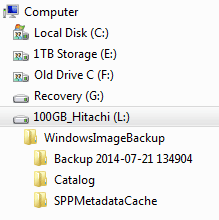
My plan is to put this HD, the 160GB Segate, into my HP DV6000 laptop as drive C, so there is nothing on Drive C. Then connect another (Hitachi 100GB) external (USB enclosure) to the DV6000 with the Windows 7 image on it. See the contents of the drive below when viewed on another PC.

100GB Hitachi.png

This where I only know enough to be dangerous.

Given that I may have screwed up the Master Boot Record and any other files that are on drive C, is it even possible to boot for the purpose of preparing drive C for Windows 7? Also, will it be possible to boot from the external drive containing the Windows 7 image I created for another machine?

Last time I tried, when drive C was just the un-formatted RAW partition, I couldn't load Windows 7 from the DVD. It said it could not format the drive or something similar. In any event, I had to abort the Windows 7 install. And, even before trying to install Windows 7, I tried using the Recovery process when Windows 7 was loaded into memory from the DVD. And yes, in addition to the image file I created, I also have an OEM Windows 7 Pro DVD available if needed.

I haven't turned on the DV6000 yet. I thought I would wait to get some feedback first. You folks are great and this is a real quality forum!

Cheers
 

My Computer My Computer

Computer type
PC/Desktop
Computer Manufacturer/Model Number
HP
OS
Windows 7 Professional 64bit
CPU
Core2 Duo
Memory
4GB
Hard Drives
1TB WD
Back
Top