System Folders Invisible Despite Settings in Folder Management

aggielaw

New member
Local time
3:52 PM
Messages
2
Hi all. I've just spent several hours trying to delete my idstore.sst in the PeerNetworking folder. I managed to find the file, although I don't recall how I found it, unfortunately).

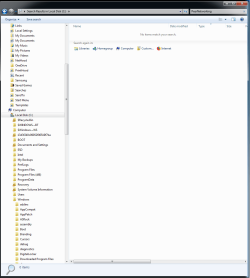
My problem, though, is that despite having "show hidden files" checked and "hide system files and folders" and "hide empty folders" unchecked I still cannot see certain system folders, such as PeerNetworking.

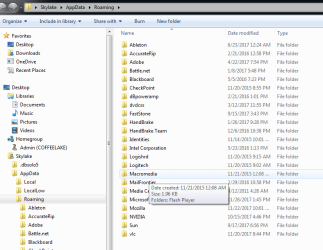
In what I suspect is a related issue, CCleaner pointed me to some temp files I could delete. I tried to navigate to the files, but the containing folders below appdata/local/microsoft did not appear. When I navigated backward using the address bar the folders show as empty even though they are not.

Also, none of these folders or files appear in a search.

I've attached screenshots of PeerNetworking not appearing in file explorer or when searched for when I search the c: drive for it.


Any advice on what the problem is would be greatly appreciated!
 

Attachments
  • No PeerNetworking Folder in Explorer.png
    No PeerNetworking Folder in Explorer.png
    26.8 KB · Views: 1
  • No PeerNetworking in Search.png
    No PeerNetworking in Search.png
    34.3 KB · Views: 0

My Computer My Computer

At a glance

Windows 7 Professional 64-bitCore i7 930 Batch 3001A922Corsair Dominator TR3X6G1600C8D (3x2GB)Nvidia GTX 470 (using GTX260 216 during troub...
OS
Windows 7 Professional 64-bit
CPU
Core i7 930 Batch 3001A922
Motherboard
Asus P6X58D Premium
Memory
Corsair Dominator TR3X6G1600C8D (3x2GB)
Graphics Card(s)
Nvidia GTX 470 (using GTX260 216 during troubleshooting)
Monitor(s) Displays
LG L246BN-WP
Hard Drives
Intel X-25M G2
WD 1TB Black
PSU
Corsair HX850
Case
HAF 932
Cooling
Megahalems w/ 87cfm Yate Loons in push/pull
Stuff Happens! Right?

And since no two computers are ever exactly alike, hitting the right fix for yours might take some doing.

But, just let me say, that within the first five minutes after I install an OS, (anything from XP to 10) I run a little script to "Show Hidden files". Here's that vb script:

' Script to toggle Windows Explorer display of hidden files,
' super-hidden files, and file name extensions

Option Explicit
Dim dblHiddenData, strHiddenKey, strSuperHiddenKey, strFileExtKey
Dim strKey, WshShell
On Error Resume Next

strKey = "HKCU\Software\Microsoft\Windows\CurrentVersion\Explorer\Advanced"
strHiddenKey = strKey & "\Hidden"
strSuperHiddenKey = strKey & "\ShowSuperHidden"
strFileExtKey = strKey & "\HideFileExt"

Set WshShell = WScript.CreateObject("WScript.Shell")
dblHiddenData = WshShell.RegRead(strHiddenKey)

If dblHiddenData = 2 Then
WshShell.RegWrite strHiddenKey, 1, "REG_DWORD"
WshShell.RegWrite strSuperHiddenKey, 1, "REG_DWORD"
WshShell.RegWrite strFileExtKey, 0, "REG_DWORD"
WScript.Echo "Windows Explorer will show hidden files and file " & _
"name extensions. You might need to change to another folder " & _
"or press F5 to refresh the view for the change to take effect."

Else
WshShell.RegWrite strHiddenKey, 2, "REG_DWORD"
WshShell.RegWrite strSuperHiddenKey, 0, "REG_DWORD"
WshShell.RegWrite strFileExtKey, 1, "REG_DWORD"
WScript.Echo "Windows Explorer will not show hidden files or file " & _
"name extensions. (These are the default settings.) You might " & _
"need to change to another folder or press F5 to refresh the " & _
"view for the change to take effect."

End If

This script 'Toggles' the action, so if I ever want to UNDO what I did the first time I ran the script, I just run it again and it UN-Does the "Show Hidden Files" action.

After that, I have NO problems seeing or working with system files.

The second thing I would normally run is a little utility called "Grant Admin Full Control".
I call that "Take Ownership" on steroids! :sarc:
That allows me to fully take ownership of any file or folder in the PC. It runs from the Right Click context menu.
"Grand Admin Full control" is easy to find and down load from the internet.
Grant Admin Full Control - Download

Just out of the box, Most versions of Windows are a real DOG! They are all loaded with SAFE Defaults and a lot of restricted access. It does take some Tweaking and Tuning to get it to where it's User Friendly. On my own PC, I'm the builder, I'm the owner, and I'm the only operator and absolutely Nothing can tell me "you don't have permission......". I also disable UAC. What a POC that is!!! That's just how I roll!

Good Luck Mate!
Happy Holidays!
TechnoMage :cool:
 

My Computer My Computer

At a glance

Win 7 Pro, SP1, x86, Win-11/Pro/64AMD8GB CrucialVarious
Computer type
PC/Desktop
Computer Manufacturer/Model Number
Various
OS
Win 7 Pro, SP1, x86, Win-11/Pro/64
CPU
AMD
Motherboard
Various
Memory
8GB Crucial
Graphics Card(s)
Various
Sound Card
OnBoard
Monitor(s) Displays
Acer 21.5"
Hard Drives
Crucial SSD, 500 GB
PSU
OEM
Case
SFF Slim Line Case
Cooling
OEM
Keyboard
eMachines
Mouse
Logitech Wireless
Internet Speed
varies
Antivirus
Windows Defender/Super Anti-Spyware
Browser
Firefox
Back
Top