System Image Backup

grndprix

New member
Local time
8:49 AM
Messages
4
Does anyone know: is the actual backup image created during a system image backup available to be viewed in a directory tree structure anywhere ?

My interest stems from having executed the backup (successfully) onto an external drive from within a 2 500 GB disk RAID 0 environment, comprising several partitions striped across the disks.

Would the disk 0 image have been copied in its entirety, or would all system info as striped across both disks have been copied ?

Likewise, what will the restore operation actually write back, and to where ?
 

My Computer

OS
Win7
Welcome!

I am by no means the expert on RAID, but I know a bit.

I believe it depends on whether you have a hardware RAID controller or you are using a mirror from Windows. If you have a hardware array, the OS views it as one drive. If not, then you might run into issues.

Hope someone else can come along and correct/add to this.

~JK
 

My Computer

Computer Manufacturer/Model Number
Custom
OS
Windows 7 Professional x64
CPU
Intel i7 2600K OC'd @ 4620 MHz
Motherboard
Asus P8Z68-V Pro
Memory
16GB GSkill Sniper 2133 Mhz (4x4GB)
Graphics Card(s)
EVGA GeForce GTX 480 SuperClocked+
Sound Card
Realtek High Definition Audio
Monitor(s) Displays
2x Acer S273HLbmii 27"
Screen Resolution
2 x 1920x1080
Hard Drives
64GB Crucial M4 SSD

Storage: Hitachi 1TB 5400RPM, Samsung 1.5TB 5400RPM
PSU
Corsair HW Series 750w (modular)
Case
Cooler Master HAF 932 Advanced Blue Edition
Cooling
CM Hyper 212+ CPU cooler, 3x 230mm + 1x 140mm case fans
Keyboard
Logitech MK320 (wireless)
Mouse
Logitech MK320 (wireless)
Internet Speed
30 Mb/s : 2 Mb/s
Hardware RAID controller

Thanks JK, yes the RAID architecture is run by:

Intel(R) ICH7R/DH SATA RAID Controller

I'm guessing that if I have a successful (C) partition image backup, along with the associated system & registry critical info that has been automatically selected, a restore to 2 naked disks would reproduce an operable system.

This ignores, of course, all other personal files, apps, etc.
 

My Computer

OS
Win7
Backup software

Hi CC:

The system image backup was created using the Win7 system imaging feature.

I also have the Win7 backup run on a regular basis to capture normal files, etc.

My primary backup procedure however uses StorageCraft's Shadow Protect package. It'a a very capable package that can do in the home what normally occurs in the office. I do a weekly full backup of selected partitions, and a daily incremental of those partitions which reflects changes only. Layered on top of that, I do a separate monthly full backup. In this fashion, I can go back anywhere from 1 day to 6 months to find, retrieve, recover, etc. And yes, this package provides the mount/dismount to provide visibility of the saved partitions. It's all fully automatic, and set to run after midnight when I'm usually on the pillow and not on the keyboard.

These daily/weekly/monthly backups go onto external WD 500GB MyBook drives.

As a note of caution, while backups are of paramount importance, there is also a risk of being too backed-up. Lacking a structured hierarchy to the backup environment (as described above) can lead to having a backup library that is too current, resulting in the inability to retrieve a dataset that is old enough to not contain the undesirable that is causing the search for a backup copy to begin with.

:)
 

My Computer

OS
Win7
Go to Disk Management, Click Action>Attach Vhd>browse to the backup image.

It should be mounted as a virtual hard drive - you can view like any other drive.
 

My Computers

System One System Two

  • Computer type
    PC/Desktop
    OS
    7 X64
    CPU
    i5 8400
    Motherboard
    gigabyte b365m ds3h
    Memory
    2x8gb 3200mhz
    Hard Drives
    various
    PSU
    pure power 11 400w cm
    Case
    Coolermaster
    Cooling
    cryorig m9i
  • Computer type
    PC/Desktop
    OS
    7x64
    CPU
    g5400
    Motherboard
    ga b365m ds3h
    Memory
    8gb ddr4 2400
    PSU
    xfx pro 450w
Go to Disk Management, Click Action>Attach Vhd>browse to the backup image.

It should be mounted as a virtual hard drive - you can view like any other drive.

I never knew that, great info!
 

My Computer

Computer Manufacturer/Model Number
Home built
OS
Windows 7 Home Premium x64
CPU
Phenom II X4 955 BE
Motherboard
Asus Sabertooth 990FX
Memory
8 GB OCZ BE 1667
Graphics Card(s)
EVGA GeForce GTX470 SC
Monitor(s) Displays
BenQ 19"
Screen Resolution
1280x1024
Hard Drives
256 GB OCZ Vertex 3 SSD
2x WD 1 TB
1x WD 2 TB
PSU
Thermaltake 850W
Case
Coolermaster Cosmos 1000
Cooling
Air
Keyboard
Logitech
Mouse
Cyborg R.A.T 7
Internet Speed
Standard RR
Quote: Originally Posted by SIW2

Thanks for the tip SIW2.
Worked just fine.

:)
 

My Computer

OS
Win7
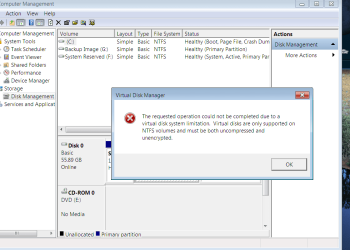
Si, when I browse to the Win7 backup image on my laptop I'm traveling with now, I get this:

Capture.PNG

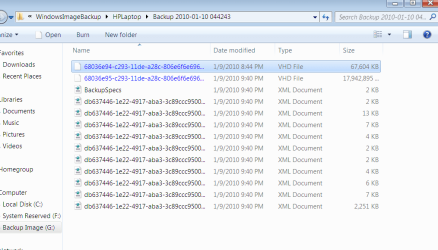
I noticed earlier that file compression was enabled on Recov partition properties. I unchecked it and cannot see that the files are compressed. But they are strangely showing in blue in explorer:

Capture1.PNG

Any suggestions?
 
Back
Top