Solved System Image Startup Issues

traptw1thin

New member
Local time
8:49 AM
Messages
14
After installing windows on my brand new computer, I made a system image on my HDD. The OS is on my SSD. Before the making the system image when i started up the computer it took <10 seconds at the windows logo before getting to the logon screen. Now that I have a system image on my HDD it takes about a minute at the windows logo before getting to the logon screen. I know that the system image is definitely the problem as I've tried reformatting the HDD, restarting (<10 sec wait is back) and then redoing the system image, which brings the long wait back.
 

My Computer

OS
windows 7 home premium 64 bit
Try renaming the system image folder.

See if that helps.

BTW -windows system image is being removed in windows 8.

So if you want to make images - might as well start using a 3rd party program to do it now.

There a good free versions from Macrium, Paragon , ( Easeus have one - but their latest is very annoying. )
 

My Computers

System One System Two

  • Computer type
    PC/Desktop
    OS
    7 X64
    CPU
    i5 8400
    Motherboard
    gigabyte b365m ds3h
    Memory
    2x8gb 3200mhz
    Hard Drives
    various
    PSU
    pure power 11 400w cm
    Case
    Coolermaster
    Cooling
    cryorig m9i
  • Computer type
    PC/Desktop
    OS
    7x64
    CPU
    g5400
    Motherboard
    ga b365m ds3h
    Memory
    8gb ddr4 2400
    PSU
    xfx pro 450w
Do you mean rename the main folder. and does it matter what I rename it to?
 

My Computer

OS
windows 7 home premium 64 bit
Yes, just rename it - doesn't matter what, just stick -orig on the end of the folder name .

If you want to restore from it, you will need to rename it back first.
 

My Computers

System One System Two

  • Computer type
    PC/Desktop
    OS
    7 X64
    CPU
    i5 8400
    Motherboard
    gigabyte b365m ds3h
    Memory
    2x8gb 3200mhz
    Hard Drives
    various
    PSU
    pure power 11 400w cm
    Case
    Coolermaster
    Cooling
    cryorig m9i
  • Computer type
    PC/Desktop
    OS
    7x64
    CPU
    g5400
    Motherboard
    ga b365m ds3h
    Memory
    8gb ddr4 2400
    PSU
    xfx pro 450w
I tried this, it unfortunately had no effect whatsoever.
 

My Computer

OS
windows 7 home premium 64 bit
It was worth a go.

Strange - perhaps it is taking a while trying to find the volume shadow copy storage on your HDD.

You could try removing that and see if it helps.

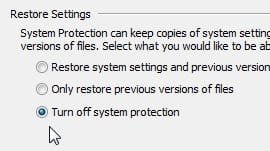
You should find it in System Protection - select the HDD , select configure , dot turn off system protection, Apply, OK.
 

My Computers

System One System Two

  • Computer type
    PC/Desktop
    OS
    7 X64
    CPU
    i5 8400
    Motherboard
    gigabyte b365m ds3h
    Memory
    2x8gb 3200mhz
    Hard Drives
    various
    PSU
    pure power 11 400w cm
    Case
    Coolermaster
    Cooling
    cryorig m9i
  • Computer type
    PC/Desktop
    OS
    7x64
    CPU
    g5400
    Motherboard
    ga b365m ds3h
    Memory
    8gb ddr4 2400
    PSU
    xfx pro 450w
dont turn off or do turn off system protection? and what other side effects will this have?
 

My Computer

OS
windows 7 home premium 64 bit
Dot .i.e , put a dot in the little circle.

DOT.jpg

Then Apply, OK.

Yes turn it off for the HDD.

When you save a windows image to a drive, it automatically creates shadow storage on that drive. When you make another image - it puts the older files into shadow storage. That is why it is there.
 

My Computers

System One System Two

  • Computer type
    PC/Desktop
    OS
    7 X64
    CPU
    i5 8400
    Motherboard
    gigabyte b365m ds3h
    Memory
    2x8gb 3200mhz
    Hard Drives
    various
    PSU
    pure power 11 400w cm
    Case
    Coolermaster
    Cooling
    cryorig m9i
  • Computer type
    PC/Desktop
    OS
    7x64
    CPU
    g5400
    Motherboard
    ga b365m ds3h
    Memory
    8gb ddr4 2400
    PSU
    xfx pro 450w
so what does turning off system protection do? I just don't want to do something to mess up the computer "turning off system protection" just sounds bad, but it may just be poor language choice on windows part, so im wondering what it does, or what system protection i am disabling.
 

My Computer

OS
windows 7 home premium 64 bit
It is just shadow copy storage.

Shadow storage on your own system/boot drive, e.g. C is used for system restore and previous versions.

On your HDD it is used exactly as described in my previous post.

A lot of people turn it off altogether on all drives because it takes up space.

The shadow storage area is just a volume carved out of an existing partition.

Think of it as another partition - your original partition is now 2 partitions.

You can't see the new one - it is hidden from view.

Windows can use that new hidden partition to store things.

When you made your system image, windows will have made a shadow storage area ( hidden partition , if you like ) on your external HD.

The next time you make a system image - it puts the old files into that hidden partition.

The system image you can actually see is the newest one.

[I have taken some liberties with technical accuracy to make that understandable]
 

My Computers

System One System Two

  • Computer type
    PC/Desktop
    OS
    7 X64
    CPU
    i5 8400
    Motherboard
    gigabyte b365m ds3h
    Memory
    2x8gb 3200mhz
    Hard Drives
    various
    PSU
    pure power 11 400w cm
    Case
    Coolermaster
    Cooling
    cryorig m9i
  • Computer type
    PC/Desktop
    OS
    7x64
    CPU
    g5400
    Motherboard
    ga b365m ds3h
    Memory
    8gb ddr4 2400
    PSU
    xfx pro 450w
Windows system image is not very reliable, or flexible. It hasn't been all that popular, either.
 

My Computers

System One System Two

  • Computer type
    PC/Desktop
    OS
    7 X64
    CPU
    i5 8400
    Motherboard
    gigabyte b365m ds3h
    Memory
    2x8gb 3200mhz
    Hard Drives
    various
    PSU
    pure power 11 400w cm
    Case
    Coolermaster
    Cooling
    cryorig m9i
  • Computer type
    PC/Desktop
    OS
    7x64
    CPU
    g5400
    Motherboard
    ga b365m ds3h
    Memory
    8gb ddr4 2400
    PSU
    xfx pro 450w
I went to turn off system protection and it was alread off for the HDD. It's on for the SSD I dont know if this matters. Also not sure if its pertinent but its an internal HDD not external.
 

My Computer

OS
windows 7 home premium 64 bit
That's unusual if you just created a system image on that drive.

See if you can find it like this:

open an elevated command prompt and type:

vssadmin list shadowstorage

then press enter

You will get something like this:

Microsoft Windows [Version 6.1.7601]
Copyright (c) 2009 Microsoft Corporation. All rights reserved.

C:\Windows\System32>vssadmin list shadowstorage
vssadmin 1.1 - Volume Shadow Copy Service administrative command-line tool
(C) Copyright 2001-2005 Microsoft Corp.

Shadow Copy Storage association
For volume: (D:)\\?\Volume{3f6d44d7-6def-11e1-a06b-806e6f6e6963}\
Shadow Copy Storage volume: (D:)\\?\Volume{3f6d44d7-6def-11e1-a06b-806e6f6e69
63}\
Used Shadow Copy Storage space: 0 B (0%)
Allocated Shadow Copy Storage space: 0 B (0%)
Maximum Shadow Copy Storage space: 320 MB (1%)

Shadow Copy Storage association
For volume: (G:)\\?\Volume{3f6d44d9-6def-11e1-a06b-806e6f6e6963}\
Shadow Copy Storage volume: (G:)\\?\Volume{3f6d44d9-6def-11e1-a06b-806e6f6e69
63}\
Used Shadow Copy Storage space: 27.375 MB (0%)
Allocated Shadow Copy Storage space: 320 MB (0%)
Maximum Shadow Copy Storage space: 1.05 GB (1%)

Shadow Copy Storage association
For volume: (I:)\\?\Volume{3f6d44db-6def-11e1-a06b-806e6f6e6963}\
Shadow Copy Storage volume: (I:)\\?\Volume{3f6d44db-6def-11e1-a06b-806e6f6e69
63}\
Used Shadow Copy Storage space: 389.75 MB (1%)
Allocated Shadow Copy Storage space: 673.016 MB (2%)
Maximum Shadow Copy Storage space: 3.847 GB (15%)
 

My Computers

System One System Two

  • Computer type
    PC/Desktop
    OS
    7 X64
    CPU
    i5 8400
    Motherboard
    gigabyte b365m ds3h
    Memory
    2x8gb 3200mhz
    Hard Drives
    various
    PSU
    pure power 11 400w cm
    Case
    Coolermaster
    Cooling
    cryorig m9i
  • Computer type
    PC/Desktop
    OS
    7x64
    CPU
    g5400
    Motherboard
    ga b365m ds3h
    Memory
    8gb ddr4 2400
    PSU
    xfx pro 450w
how do i open an "elevated command prompt"?
 

My Computer

OS
windows 7 home premium 64 bit
It will be under E for elevated in the Tutorials section .

Tutorials link is at the top of this page

Click Tutorials (at the top of this page)

In the window that opens , click windows7-tutorial index.

Click E

It is the fourth one down
 

My Computers

System One System Two

  • Computer type
    PC/Desktop
    OS
    7 X64
    CPU
    i5 8400
    Motherboard
    gigabyte b365m ds3h
    Memory
    2x8gb 3200mhz
    Hard Drives
    various
    PSU
    pure power 11 400w cm
    Case
    Coolermaster
    Cooling
    cryorig m9i
  • Computer type
    PC/Desktop
    OS
    7x64
    CPU
    g5400
    Motherboard
    ga b365m ds3h
    Memory
    8gb ddr4 2400
    PSU
    xfx pro 450w
so am i right in thinking i need to be on the computer with the problem to do this?
 

My Computer

OS
windows 7 home premium 64 bit
Another possibility is that the alignment on your SSD has been mucked up. Run these commands in elevated command prompt:

Diskpart
List disk

Select disk n
List partition

Then tell me what the offset is. It should be a number that you can divide by 4.
 

My Computer

Computer Manufacturer/Model Number
HP, Dell, Gateway, Toshiba - 4 laptops and 2 desktops
OS
Vista, Windows7, Mint Mate, Zorin, Windows 8
CPU
from 1.6GHz Duo to i7
Monitor(s) Displays
2x HP w2207
Hard Drives
5x HDD, 7x SSD, 12x Externals
Keyboard
with trackball - no mices
Mouse
Trackball mice
Internet Speed
DSL 6000
ok so i did both things in elevated command prompt for SIW2: i got for my HDD

Used shadow copy storage space: 24.594 MB (0%)
Allocated Shadow Copy storage space: 2.93 GB (0%)
Maximum shadow copy storage space: 419.159 GB (15%)


for my SSD:

Used shadow copy storage space: 1.191 GB (2%)
Allocated Shadow Copy storage space: 1.503 GB (2%)
Maximum shadow copy storage space: 1.461 GB (2%)

What do i do with this information?


For whs: i got

Partition 1 offset: 1024 KB
Partition 2 offset: 101 MB <----not divisible by 4, i know so what does that mean?/how do i fix it?

BTW thanks so much for helping me, I'm just trying to get my first computer build to work and I know almost nothing.
 

My Computer

OS
windows 7 home premium 64 bit
Your alignment is fine. No problems there. The 101MB is fine because that is 101.000KB which is divisible by 4. The divison is always at the KB level.
 

My Computer

Computer Manufacturer/Model Number
HP, Dell, Gateway, Toshiba - 4 laptops and 2 desktops
OS
Vista, Windows7, Mint Mate, Zorin, Windows 8
CPU
from 1.6GHz Duo to i7
Monitor(s) Displays
2x HP w2207
Hard Drives
5x HDD, 7x SSD, 12x Externals
Keyboard
with trackball - no mices
Mouse
Trackball mice
Internet Speed
DSL 6000
You can try deleting it from your HD and see if that was causing the problem.

There is a tutorial on how to do that.

Shadow Copies - Delete
 

My Computers

System One System Two

  • Computer type
    PC/Desktop
    OS
    7 X64
    CPU
    i5 8400
    Motherboard
    gigabyte b365m ds3h
    Memory
    2x8gb 3200mhz
    Hard Drives
    various
    PSU
    pure power 11 400w cm
    Case
    Coolermaster
    Cooling
    cryorig m9i
  • Computer type
    PC/Desktop
    OS
    7x64
    CPU
    g5400
    Motherboard
    ga b365m ds3h
    Memory
    8gb ddr4 2400
    PSU
    xfx pro 450w
Back
Top