System Imaging Tool W7

I don't think it maters if the recovery environment is 32 bit. See SIW2's comments (post #85) and my experience with Macrium pe (32 bit) on the Hiren's CD.
Yesterday I restored my complete x64 system (50GB) using the latest x64 Macrium imaging (image made 23 Jan 11) with the Hiren's Macrium pe.

Fundamentally Hiren's has a mini XP license and I assume use the Bartpe.
I am unsure about the legality of this "license"
 
Last edited:

My Computer

Computer type
PC/Desktop
Computer Manufacturer/Model Number
Own build
OS
Windows 7x64 Home Premium SP1
CPU
Intel i7 2600k
Motherboard
ASUS P8Z68 Deluxe
Memory
G.Skill Ripjaws (DDR3-1600) 2x4GB
Graphics Card(s)
Nvidia GeForce GTS 450; Intel HD Graphics 3000(GT2+)
Monitor(s) Displays
Dell Ultrasharp IPS panel U2311H, Samsung SyncMaster P2350
Screen Resolution
1920x1080
Hard Drives
Samsung 850 Pro SSD 256GB, Samsung SSD 840 120GB, Seagates 1TB Barracuda ST31000528AS x2
PSU
Seasonic M12II 520W
Case
Lian Li Lancool PC-K60
Cooling
Case: 1x120mm, 3x140mm CPU: Hyper 212+
Keyboard
Logitech MK520 (wireless)
Mouse
Logitech MK520
Internet Speed
6-7 Mbps
Antivirus
Norton Security Premium, Malwarebytes on 2 (MSE on 3rd PC)
Browser
FireFox
Other Info
Audio: Logitech Z523 2.1
I don't think it maters if the recovery environment is 32 bit. See SIW2's comments (post #85) and my experience with Macrium pe (32 bit) on the Hiren's CD.
Yesterday I restored my complete x64 system (50GB) using the latest x64 Macrium imaging (image made 23 Jan 11) with the Hiren's Macrium pe.

Fundamentally Hiren's has a mini XP license and I assume use the Bartpe.

That's not what I was concerned with. I don't know whether you can mix and match x86 and x64 programs in a PE environment.
 

My Computer

Computer type
Laptop
Computer Manufacturer/Model Number
Hewlett-Packard/G62-107SA Notebook
OS
Microsoft Windows 7 Home Premium 64-bit Service Pack 1
CPU
Intel(R) Core(TM) i3 CPU M 330 @ 2.13GHz
Motherboard
Hewlett-Packard 1425
Memory
8 GB DDR3
Graphics Card(s)
Intel(R) HD Graphics
Sound Card
Realtek High Definition Audio
Monitor(s) Displays
Builtin
Screen Resolution
1366 x 768 x 32 bits (4294967296 colors) @ 60 Hz
Hard Drives
250 GB SATA Hard Disk Drive 7200 rpm
2TB Seagate GoFlex USB 2 Drive
1TB Iomega Prestige USB 2 Drive
1.5TB Iomega Prestige USB 2 Drive (Samsung)
2TB WD MyBook Live NAS.
Mouse
Logitech Anywhere MX
Internet Speed
152 Mbs download 10 Mbs upload
Antivirus
Norton 360
Browser
Chrome
Great Kado - yes you can use dism to mount if you like - just thought most would find Gimagex easier - it's free and it runs straight off in windows 7 - no need to install anything.

You can't run a 64 bit coded app. in 32 bit pe.

You can't run a 32 bit coded app. in 64 bit pe - unless you put in a large syswow directory and all the relevant reg entries - pointless, really - just use 32 pe instead. ( I admit, I have built a 64 bit pe3 with syswow and can run most things in there fine - it's a lot of effort and there is no practical advantage - it's also bigger and heavier on the ram )

That's why 32 bit pe is much more useful - virtually every app. you will want to use is 32 bit coded and they work fine - even if your installed windows is 64 bit.
 

My Computers

System One System Two

  • Computer type
    PC/Desktop
    OS
    7 X64
    CPU
    i5 8400
    Motherboard
    gigabyte b365m ds3h
    Memory
    2x8gb 3200mhz
    Hard Drives
    various
    PSU
    pure power 11 400w cm
    Case
    Coolermaster
    Cooling
    cryorig m9i
  • Computer type
    PC/Desktop
    OS
    7x64
    CPU
    g5400
    Motherboard
    ga b365m ds3h
    Memory
    8gb ddr4 2400
    PSU
    xfx pro 450w
So I probably wouldn't bother with a customized 64 bit pe. Of course use the 64 bit repair disk for it's intended purpose which includes of course 64 bit windows images. Then use a customized 32 bit pe to run x86 apps. and will cater for Macrium.
I wonder if any of my licensed x86 apps would run from a pe environment.
 

My Computer

Computer type
PC/Desktop
Computer Manufacturer/Model Number
Own build
OS
Windows 7x64 Home Premium SP1
CPU
Intel i7 2600k
Motherboard
ASUS P8Z68 Deluxe
Memory
G.Skill Ripjaws (DDR3-1600) 2x4GB
Graphics Card(s)
Nvidia GeForce GTS 450; Intel HD Graphics 3000(GT2+)
Monitor(s) Displays
Dell Ultrasharp IPS panel U2311H, Samsung SyncMaster P2350
Screen Resolution
1920x1080
Hard Drives
Samsung 850 Pro SSD 256GB, Samsung SSD 840 120GB, Seagates 1TB Barracuda ST31000528AS x2
PSU
Seasonic M12II 520W
Case
Lian Li Lancool PC-K60
Cooling
Case: 1x120mm, 3x140mm CPU: Hyper 212+
Keyboard
Logitech MK520 (wireless)
Mouse
Logitech MK520
Internet Speed
6-7 Mbps
Antivirus
Norton Security Premium, Malwarebytes on 2 (MSE on 3rd PC)
Browser
FireFox
Other Info
Audio: Logitech Z523 2.1
Great Kado - yes you can use dism to mount if you like - just thought most would find Gimagex easier - it's free and it runs straight off in windows 7 - no need to install anything.

You can't run a 64 bit coded app. in 32 bit pe.

You can't run a 32 bit coded app. in 64 bit pe - unless you put in a large syswow directory and all the relevant reg entries - pointless, really - just use 32 pe instead. ( I admit, I have built a 64 bit pe3 with syswow and can run most things in there fine - it's a lot of effort and there is no practical advantage - it's also bigger and heavier on the ram )

That's why 32 bit pe is much more useful - virtually every app. you will want to use is 32 bit coded and they work fine - even if your installed windows is 64 bit.

I did try Gimagex and it complained that I needed the WAIK to run it. Maybe it's not in home premium. Dismgui doesn't need installing either.
 

My Computer

Computer type
Laptop
Computer Manufacturer/Model Number
Hewlett-Packard/G62-107SA Notebook
OS
Microsoft Windows 7 Home Premium 64-bit Service Pack 1
CPU
Intel(R) Core(TM) i3 CPU M 330 @ 2.13GHz
Motherboard
Hewlett-Packard 1425
Memory
8 GB DDR3
Graphics Card(s)
Intel(R) HD Graphics
Sound Card
Realtek High Definition Audio
Monitor(s) Displays
Builtin
Screen Resolution
1366 x 768 x 32 bits (4294967296 colors) @ 60 Hz
Hard Drives
250 GB SATA Hard Disk Drive 7200 rpm
2TB Seagate GoFlex USB 2 Drive
1TB Iomega Prestige USB 2 Drive
1.5TB Iomega Prestige USB 2 Drive (Samsung)
2TB WD MyBook Live NAS.
Mouse
Logitech Anywhere MX
Internet Speed
152 Mbs download 10 Mbs upload
Antivirus
Norton 360
Browser
Chrome
Which apps. do you have in mind?

I wonder if any of my licensed x86 apps would run from a pe environment.
 

My Computers

System One System Two

  • Computer type
    PC/Desktop
    OS
    7 X64
    CPU
    i5 8400
    Motherboard
    gigabyte b365m ds3h
    Memory
    2x8gb 3200mhz
    Hard Drives
    various
    PSU
    pure power 11 400w cm
    Case
    Coolermaster
    Cooling
    cryorig m9i
  • Computer type
    PC/Desktop
    OS
    7x64
    CPU
    g5400
    Motherboard
    ga b365m ds3h
    Memory
    8gb ddr4 2400
    PSU
    xfx pro 450w
That's odd, I haven't got waik on my 7 installtions, and Gimagex runs fine.

It also runs fine in pe - just chuck the 32 bit Gimagex in your pe system32 folder , fire it up by typing Gimagex at the macrium command prompt.


Great Kado - yes you can use dism to mount if you like - just thought most would find Gimagex easier - it's free and it runs straight off in windows 7 - no need to install anything.

You can't run a 64 bit coded app. in 32 bit pe.

You can't run a 32 bit coded app. in 64 bit pe - unless you put in a large syswow directory and all the relevant reg entries - pointless, really - just use 32 pe instead. ( I admit, I have built a 64 bit pe3 with syswow and can run most things in there fine - it's a lot of effort and there is no practical advantage - it's also bigger and heavier on the ram )

That's why 32 bit pe is much more useful - virtually every app. you will want to use is 32 bit coded and they work fine - even if your installed windows is 64 bit.

I did try Gimagex and it complained that I needed the WAIK to run it. Maybe it's not in home premium. Dismgui doesn't need installing either.
 

My Computers

System One System Two

  • Computer type
    PC/Desktop
    OS
    7 X64
    CPU
    i5 8400
    Motherboard
    gigabyte b365m ds3h
    Memory
    2x8gb 3200mhz
    Hard Drives
    various
    PSU
    pure power 11 400w cm
    Case
    Coolermaster
    Cooling
    cryorig m9i
  • Computer type
    PC/Desktop
    OS
    7x64
    CPU
    g5400
    Motherboard
    ga b365m ds3h
    Memory
    8gb ddr4 2400
    PSU
    xfx pro 450w
Great Kado - yes you can use dism to mount if you like - just thought most would find Gimagex easier - it's free and it runs straight off in windows 7 - no need to install anything.

You can't run a 64 bit coded app. in 32 bit pe.

You can't run a 32 bit coded app. in 64 bit pe - unless you put in a large syswow directory and all the relevant reg entries - pointless, really - just use 32 pe instead. ( I admit, I have built a 64 bit pe3 with syswow and can run most things in there fine - it's a lot of effort and there is no practical advantage - it's also bigger and heavier on the ram )

That's why 32 bit pe is much more useful - virtually every app. you will want to use is 32 bit coded and they work fine - even if your installed windows is 64 bit.
You know, this is getting to be more than a short project....

Finally I resolved the issue with my system, worked with the "wim" via DISM from my 64-bit OS, created a bootable USB stick, added the necessary Macrium files (thanks kado..), and booted the darn thing. It did boot, but "reflectpe.exe" did not run; instead the program complained about missing some subsystem. Now I know why, thanks SIW...

On the flip side, and since I have the bootable USB stick, just need to get a 32-bit rescue disk. I have a laptop with Windows 7 Enterprise 32-bit, that should work, right?
 

My Computer

Computer type
PC/Desktop
Computer Manufacturer/Model Number
Custom built at Home
OS
Windows 7 64-bit, Windows 8.1 64-bit, OSX El Capitan, Windows 10 (VMware)
CPU
Intel i5-3350P 3.1 GHz
Motherboard
Gigabyte GA-Z77X-UP5 TH
Memory
16 GBs GSkill Sniper
Graphics Card(s)
Radeon HD 7850
Sound Card
VIA HD Audio
Monitor(s) Displays
Dell U2410 24"
Screen Resolution
1920x1200
Hard Drives
1 x Intel 520 240 GBs
1 x Seagate 1TBs SATA 2.0,
1 x Seagate 1TBs eSATA 2.0
PSU
Thermaltake 850W
Case
Antec P183
Cooling
Noctua NH-D14 Heatsink 2 x 120mm fans, 4 x 120mm case fans
Keyboard
Dell Multimedia keyboard
Mouse
Logitech Trackball
Internet Speed
28.5 Mb/s
Yes , add 32 bit macrium files to 32 bit pe
 

My Computers

System One System Two

  • Computer type
    PC/Desktop
    OS
    7 X64
    CPU
    i5 8400
    Motherboard
    gigabyte b365m ds3h
    Memory
    2x8gb 3200mhz
    Hard Drives
    various
    PSU
    pure power 11 400w cm
    Case
    Coolermaster
    Cooling
    cryorig m9i
  • Computer type
    PC/Desktop
    OS
    7x64
    CPU
    g5400
    Motherboard
    ga b365m ds3h
    Memory
    8gb ddr4 2400
    PSU
    xfx pro 450w
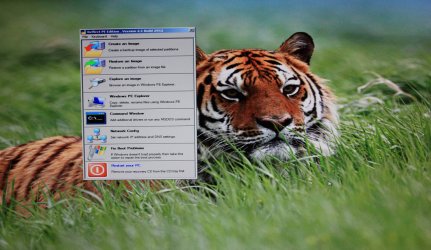
Yeah, that works:

reflectpe.jpg

The USB loads faster than the CD, but the boot image is still reminiscent of Vista . Oh well, as long as it works...
Thanks guys for the feedback...
 

My Computer

Computer type
PC/Desktop
Computer Manufacturer/Model Number
Custom built at Home
OS
Windows 7 64-bit, Windows 8.1 64-bit, OSX El Capitan, Windows 10 (VMware)
CPU
Intel i5-3350P 3.1 GHz
Motherboard
Gigabyte GA-Z77X-UP5 TH
Memory
16 GBs GSkill Sniper
Graphics Card(s)
Radeon HD 7850
Sound Card
VIA HD Audio
Monitor(s) Displays
Dell U2410 24"
Screen Resolution
1920x1200
Hard Drives
1 x Intel 520 240 GBs
1 x Seagate 1TBs SATA 2.0,
1 x Seagate 1TBs eSATA 2.0
PSU
Thermaltake 850W
Case
Antec P183
Cooling
Noctua NH-D14 Heatsink 2 x 120mm fans, 4 x 120mm case fans
Keyboard
Dell Multimedia keyboard
Mouse
Logitech Trackball
Internet Speed
28.5 Mb/s
Not sure what you mean by
the boot image is still reminiscent of Vista
/.

Perhaps you would prefer a different screen res. 1024x768 will probably look a lot better.
 

My Computers

System One System Two

  • Computer type
    PC/Desktop
    OS
    7 X64
    CPU
    i5 8400
    Motherboard
    gigabyte b365m ds3h
    Memory
    2x8gb 3200mhz
    Hard Drives
    various
    PSU
    pure power 11 400w cm
    Case
    Coolermaster
    Cooling
    cryorig m9i
  • Computer type
    PC/Desktop
    OS
    7x64
    CPU
    g5400
    Motherboard
    ga b365m ds3h
    Memory
    8gb ddr4 2400
    PSU
    xfx pro 450w
That's odd, I haven't got waik on my 7 installtions, and Gimagex runs fine.

It also runs fine in pe - just chuck the 32 bit Gimagex in your pe system32 folder , fire it up by typing Gimagex at the macrium command prompt.


Great Kado - yes you can use dism to mount if you like - just thought most would find Gimagex easier - it's free and it runs straight off in windows 7 - no need to install anything.

You can't run a 64 bit coded app. in 32 bit pe.

You can't run a 32 bit coded app. in 64 bit pe - unless you put in a large syswow directory and all the relevant reg entries - pointless, really - just use 32 pe instead. ( I admit, I have built a 64 bit pe3 with syswow and can run most things in there fine - it's a lot of effort and there is no practical advantage - it's also bigger and heavier on the ram )

That's why 32 bit pe is much more useful - virtually every app. you will want to use is 32 bit coded and they work fine - even if your installed windows is 64 bit.

I did try Gimagex and it complained that I needed the WAIK to run it. Maybe it's not in home premium. Dismgui doesn't need installing either.

Mmm yes you are right it does work. Perhaps I should not have read the help first which says that you do.


Update: Wingapi.dll the help talks about being in the WAIK seems to be a part of windows 7 and is in the PE3 as well.
 
Last edited:

My Computer

Computer type
Laptop
Computer Manufacturer/Model Number
Hewlett-Packard/G62-107SA Notebook
OS
Microsoft Windows 7 Home Premium 64-bit Service Pack 1
CPU
Intel(R) Core(TM) i3 CPU M 330 @ 2.13GHz
Motherboard
Hewlett-Packard 1425
Memory
8 GB DDR3
Graphics Card(s)
Intel(R) HD Graphics
Sound Card
Realtek High Definition Audio
Monitor(s) Displays
Builtin
Screen Resolution
1366 x 768 x 32 bits (4294967296 colors) @ 60 Hz
Hard Drives
250 GB SATA Hard Disk Drive 7200 rpm
2TB Seagate GoFlex USB 2 Drive
1TB Iomega Prestige USB 2 Drive
1.5TB Iomega Prestige USB 2 Drive (Samsung)
2TB WD MyBook Live NAS.
Mouse
Logitech Anywhere MX
Internet Speed
152 Mbs download 10 Mbs upload
Antivirus
Norton 360
Browser
Chrome
Not sure what you mean by
the boot image is still reminiscent of Vista
/.

Perhaps you would prefer a different screen res. 1024x768 will probably look a lot better.
During the boot up process, such as the loading status bar and its color, it looks like Vista type of loading and not Windows 7.

It is from a 1024x768 screen resolution, re-sized in Photoshop and lowered the color from 32 to 16-bits to make it a small picture size for the forum.

Since it is a USB stick, theoretically I could just install the ATI driver for running the rescue disc in 1920x1080 resolution. The chances are that the answer is no, maybe some of the subsystem isn't in place for the install.Hopefully, I'll never have to use it anyway...
 

My Computer

Computer type
PC/Desktop
Computer Manufacturer/Model Number
Custom built at Home
OS
Windows 7 64-bit, Windows 8.1 64-bit, OSX El Capitan, Windows 10 (VMware)
CPU
Intel i5-3350P 3.1 GHz
Motherboard
Gigabyte GA-Z77X-UP5 TH
Memory
16 GBs GSkill Sniper
Graphics Card(s)
Radeon HD 7850
Sound Card
VIA HD Audio
Monitor(s) Displays
Dell U2410 24"
Screen Resolution
1920x1200
Hard Drives
1 x Intel 520 240 GBs
1 x Seagate 1TBs SATA 2.0,
1 x Seagate 1TBs eSATA 2.0
PSU
Thermaltake 850W
Case
Antec P183
Cooling
Noctua NH-D14 Heatsink 2 x 120mm fans, 4 x 120mm case fans
Keyboard
Dell Multimedia keyboard
Mouse
Logitech Trackball
Internet Speed
28.5 Mb/s
I've had nothing but trouble with the later versions of Acronis TIH. Their product seems to be going downhill, each version seems worse and has more issues and good features from previous versions dropped, new useless features added and a more confusing GUI interface each release. This is sad to me since when I first got it, back in version 9 I think, it was pretty good. I

The only part of Acronis that has remained good is the disk cloning. I use that frequently and it is reliable. I just cloned my system disk onto a new one last night. So I just use the free Western Digital version for that.

Apart from that I use Synctoy for data backups and Windows 7 for an image backup.
 

My Computer

Computer type
PC/Desktop
Computer Manufacturer/Model Number
Home built (GeneO industries)/Model 4
OS
Windows 10 Pro. EFI boot partition, full EFI boot
CPU
i7 4770k 4.4GHz (44-44-43-43 turbo) @ 1.248V
Motherboard
ASUS Maximus VI Hero
Memory
16GB (8GBx2) @2200 MHz G.skill Sniper 10-11-10-30-1, 1.6V
Graphics Card(s)
MSI GTX 970 Gaming 4G
Sound Card
Onboard SupremeFX Audio
Monitor(s) Displays
NEC Spectraview 2490WUXi-SV
Screen Resolution
1920 x 1200
Hard Drives
Samsung 850 Pro 256GB (OS), Samsung 2x 128GB 840 Pro SSD in RAID0, 3x WD Blue 6Gb/s 1TB RAID0, WD 2TB Black external USB 3.0, 2TB WD20EARS Green external USB 3.0, 2x 500GB Seagate and 1 750 GB external USB, 1x 350GB external USB3
PSU
Seasonic X-850 (2012 KM3 model)
Case
Fractal Design Define R4
Cooling
NH-D14, NF-F12, NF-A15; NF-P14, NF-P12,NF-A14, S12A PWM
Keyboard
Cooler Master Storm Quickfire Rapid - Brown
Mouse
Logitech G602
Internet Speed
126.4 Mb/s down, 24.3 Mb/s up
Other Info
USB 3.0 x8 , SATA III x8, eSATA, USB 2.0 x6. Samsung DVD R/W drive.

WEI: CPU 7.8, Memory 7.9, Graphics 7.9, Disk 7.9
lol Croozng - i meant if you set winpe 3 screen resolution to a higher value it is more attractive than the default 800x600. You can use an xml file to set it during boot.

Nothing to do with your uploaded screnshot.

Odd you get the Vista loading bars - doesn't happen to me.
 

My Computers

System One System Two

  • Computer type
    PC/Desktop
    OS
    7 X64
    CPU
    i5 8400
    Motherboard
    gigabyte b365m ds3h
    Memory
    2x8gb 3200mhz
    Hard Drives
    various
    PSU
    pure power 11 400w cm
    Case
    Coolermaster
    Cooling
    cryorig m9i
  • Computer type
    PC/Desktop
    OS
    7x64
    CPU
    g5400
    Motherboard
    ga b365m ds3h
    Memory
    8gb ddr4 2400
    PSU
    xfx pro 450w
To get back on topic - you can type bmrui at macrium command prompt to start up win sys img gui - peculiarly, it only works if you made the image in 32 bit o/s.

If you type wbadmin.exe instead - you can restore win sys img irrespective of the bit version it was created under.
 

My Computers

System One System Two

  • Computer type
    PC/Desktop
    OS
    7 X64
    CPU
    i5 8400
    Motherboard
    gigabyte b365m ds3h
    Memory
    2x8gb 3200mhz
    Hard Drives
    various
    PSU
    pure power 11 400w cm
    Case
    Coolermaster
    Cooling
    cryorig m9i
  • Computer type
    PC/Desktop
    OS
    7x64
    CPU
    g5400
    Motherboard
    ga b365m ds3h
    Memory
    8gb ddr4 2400
    PSU
    xfx pro 450w
lol Croozng - i meant if you set winpe 3 screen resolution to a higher value it is more attractive than the default 800x600. You can use an xml file to set it during boot.

Nothing to do with your uploaded screnshot.

Odd you get the Vista loading bars - doesn't happen to me.
Oh, I didn't even realize that the default is 800x600; the pictures that I've taken with the camera were huge...

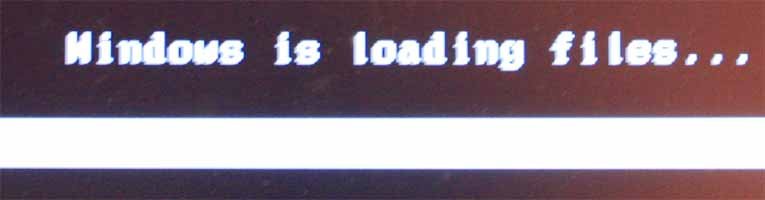
Here are some of the lousy images for the Vista loading bars:

rescue load.jpg

Now, this is really lousy image since it was going by so fast:

status bar.jpg

Notice the greenish-yellow Vista color...
 

My Computer

Computer type
PC/Desktop
Computer Manufacturer/Model Number
Custom built at Home
OS
Windows 7 64-bit, Windows 8.1 64-bit, OSX El Capitan, Windows 10 (VMware)
CPU
Intel i5-3350P 3.1 GHz
Motherboard
Gigabyte GA-Z77X-UP5 TH
Memory
16 GBs GSkill Sniper
Graphics Card(s)
Radeon HD 7850
Sound Card
VIA HD Audio
Monitor(s) Displays
Dell U2410 24"
Screen Resolution
1920x1200
Hard Drives
1 x Intel 520 240 GBs
1 x Seagate 1TBs SATA 2.0,
1 x Seagate 1TBs eSATA 2.0
PSU
Thermaltake 850W
Case
Antec P183
Cooling
Noctua NH-D14 Heatsink 2 x 120mm fans, 4 x 120mm case fans
Keyboard
Dell Multimedia keyboard
Mouse
Logitech Trackball
Internet Speed
28.5 Mb/s
To get back on topic - you can type bmrui at macrium command prompt to start up win sys img gui - peculiarly, it only works if you made the image in 32 bit o/s.

If you type wbadmin.exe instead - you can restore win sys img irrespective of the bit version it was created under.
The background image is the same resolution and color depth as the original was, 1024x768 24-bit; it is actually the same size as well, 2.25MBs. And yes, I created it in a 64-bit environment, including Photoshop...

I've searched for the xml file to change the resolution of the rescue desktop, but I didn't find any. Where do you adjust the screen resolution for the desktop?
 

My Computer

Computer type
PC/Desktop
Computer Manufacturer/Model Number
Custom built at Home
OS
Windows 7 64-bit, Windows 8.1 64-bit, OSX El Capitan, Windows 10 (VMware)
CPU
Intel i5-3350P 3.1 GHz
Motherboard
Gigabyte GA-Z77X-UP5 TH
Memory
16 GBs GSkill Sniper
Graphics Card(s)
Radeon HD 7850
Sound Card
VIA HD Audio
Monitor(s) Displays
Dell U2410 24"
Screen Resolution
1920x1200
Hard Drives
1 x Intel 520 240 GBs
1 x Seagate 1TBs SATA 2.0,
1 x Seagate 1TBs eSATA 2.0
PSU
Thermaltake 850W
Case
Antec P183
Cooling
Noctua NH-D14 Heatsink 2 x 120mm fans, 4 x 120mm case fans
Keyboard
Dell Multimedia keyboard
Mouse
Logitech Trackball
Internet Speed
28.5 Mb/s
Hi,

You could mount the wim you already made, put init.xml in yourmountfolder\Users\Default\Documents

View attachment init.zip

Replace starnet.cmd ( in yourmountfolder\windows\system32 ) with this one

View attachment startnet.zip

To adjust res after you booted up you can put this in system32 , then call it up from macrium command prompt by typing:

autodisplay

View attachment AutoDisplay.zip

When it pops up, put a dot in the res. you want and click the middle button at the bottom to Apply.
 

My Computers

System One System Two

  • Computer type
    PC/Desktop
    OS
    7 X64
    CPU
    i5 8400
    Motherboard
    gigabyte b365m ds3h
    Memory
    2x8gb 3200mhz
    Hard Drives
    various
    PSU
    pure power 11 400w cm
    Case
    Coolermaster
    Cooling
    cryorig m9i
  • Computer type
    PC/Desktop
    OS
    7x64
    CPU
    g5400
    Motherboard
    ga b365m ds3h
    Memory
    8gb ddr4 2400
    PSU
    xfx pro 450w
Hi,

You could mount the wim you already made, put init.xml in yourmountfolder\Users\Default\Documents

View attachment 135737

Replace starnet.cmd ( in yourmountfolder\windows\system32 ) with this one

View attachment 135738

To adjust res after you booted up you can put this in system32 , then call it up from macrium command prompt by typing:

autodisplay

View attachment 135739

When it pops up, put a dot in the res. you want and click the middle button at the bottom to Apply.
Thanks SIW for your help...

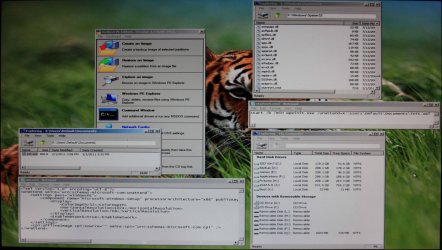
The autodisplay command worked and set the resolution via this command to the max at 1400x1050 32-bit color:

1400x1050.jpg

On the other hand starting WinPE with resolution 1024x768 did not work, despite all files had been loaded:

1400x1050_text.jpg

The picture was taken after the "autodisplay" adjusted the resolution.

This is fine as it is and your help is greatly appreciated, thanks again...
 

My Computer

Computer type
PC/Desktop
Computer Manufacturer/Model Number
Custom built at Home
OS
Windows 7 64-bit, Windows 8.1 64-bit, OSX El Capitan, Windows 10 (VMware)
CPU
Intel i5-3350P 3.1 GHz
Motherboard
Gigabyte GA-Z77X-UP5 TH
Memory
16 GBs GSkill Sniper
Graphics Card(s)
Radeon HD 7850
Sound Card
VIA HD Audio
Monitor(s) Displays
Dell U2410 24"
Screen Resolution
1920x1200
Hard Drives
1 x Intel 520 240 GBs
1 x Seagate 1TBs SATA 2.0,
1 x Seagate 1TBs eSATA 2.0
PSU
Thermaltake 850W
Case
Antec P183
Cooling
Noctua NH-D14 Heatsink 2 x 120mm fans, 4 x 120mm case fans
Keyboard
Dell Multimedia keyboard
Mouse
Logitech Trackball
Internet Speed
28.5 Mb/s
Back
Top