Solved System Loses Power Randomly

SFC had a ton of fixes too but the last entry said everything was fixed.

Code:
2015-06-13 20:38:58, 
Info                  
CSI    000007ad [SR] Verify and Repair Transaction completed. All 
files and registry keys listed in this transaction  have been successfully 
repaired

Reboot then run SFC again. It may take up to three runs to repair.
 

My Computer

Computer type
PC/Desktop
Computer Manufacturer/Model Number
Built 2/11/2011
OS
Windows 7 Pro-x64
CPU
i7-2600 3.4GHz - 3.8GHz Turbo
Motherboard
Intel DH67BL-B3
Memory
8Gb - 2x4GB, Muskin 991770 PC3-1333
Graphics Card(s)
Integrated Intel HD 2000
Sound Card
Integrated Intel 10.1 HD, RealTek ALC892
Monitor(s) Displays
Asus LCD VH222H, Haier HL24XSL2a
Screen Resolution
1920x1080, 1920x1080
Hard Drives
Crucial SSD C300-128Gb,
Western Digital WD5002AALX - 500Gb,
Western Digital WD7501AALS - 750Gb
PSU
Seasonic 650W 80+ Gold Modular
Case
Rosewill Defender
Cooling
Stock CPU, Four 120mm case fans, PCH fan added
Keyboard
Logitech EX100 Y-RBH94 Wireless
Mouse
Logitech EX100 M-RCE95 Wireless
Internet Speed
3.0/1.5 Mbs
Antivirus
Microsoft Security Essentials
Browser
Microsoft Internet Explorer 11
Other Info
Antec Veris Premier-Multimedia IR Station,
Cyber Accoustics-3602 Speakers,
AFT XM-5U Card Reader,
Hauppauge TV-HVR-2250,
Sony LX300 USB Turntable
SFC had a ton of fixes too but the last entry said everything was fixed.

Code:
2015-06-13 20:38:58, 
Info                  
CSI    000007ad [SR] Verify and Repair Transaction completed. All 
files and registry keys listed in this transaction  have been successfully 
repaired
Reboot then run SFC again. It may take up to three runs to repair.

Will do this now.
 

My Computer

Computer type
PC/Desktop
Computer Manufacturer/Model Number
Custom Build
OS
Windows 7 Ultimate x64
CPU
Intel Core i7 Socket 1156 LGA
Motherboard
Asus P7P55D-E LX
Memory
Corsair Dominator 4GB DDR3
Graphics Card(s)
Gainward GTX 460
Monitor(s) Displays
Acer V243HL
Screen Resolution
1920x1080
Hard Drives
Western Digital 1TB HDD
PSU
Antec TruePower 650W
Case
Antec 300
Cooling
Thermalrite CPU Cooler
Antivirus
Avast Anti-Virus
Just a quick update.

I've run chkdsk twice and it's finding a lot of errors so I'm thinking of running it another 3x times just to fully fix anything that's wrong. So far I've only managed to run SFC twice and both times its said it found some errors and was unable to fix them but in the log it says it fixed everything - very confusing.

Also I've run Defraggler as I had 20GB in fragmented files. This seems to have increased my 'Random Read Speed' from 7.9Mb/s to 2900Mb/s - this is a great improvement!

Once I've run SFC and Chkdsk a few more times I'll upload a new BSOD zip for you all to take a look at.

Once again thanks for taking the time to help me with this issue.
 

My Computer

Computer type
PC/Desktop
Computer Manufacturer/Model Number
Custom Build
OS
Windows 7 Ultimate x64
CPU
Intel Core i7 Socket 1156 LGA
Motherboard
Asus P7P55D-E LX
Memory
Corsair Dominator 4GB DDR3
Graphics Card(s)
Gainward GTX 460
Monitor(s) Displays
Acer V243HL
Screen Resolution
1920x1080
Hard Drives
Western Digital 1TB HDD
PSU
Antec TruePower 650W
Case
Antec 300
Cooling
Thermalrite CPU Cooler
Antivirus
Avast Anti-Virus
Hi Carwiz + Guests,

So I have been getting some BSODs - first time in 5 years! Turns out it was my Marvell Driver causing the BSODs, I have now reinstalled it and all is working well.

Now you suggested I run SFC and chkdsk - the problem i'm having is that:

  1. I run SFC /SCANNOW - this runs fine, tells me it couldn't fix some things
  2. I then run chkdsk /r (it runs at start-up) this finds and fixes some stuff but then deletes 4x unindexed files.
  3. I then fail to logon because 4x system files are missing
  4. I have to boot from the Windows 7 disk and then run SFC /SCANNOW
  5. SFC fixes the issue
Now this is just a vicious circle I keep going round in. Its just strange chkdsk deletes something it's not supposed to.


What shall I do?


Thanks
 

My Computer

Computer type
PC/Desktop
Computer Manufacturer/Model Number
Custom Build
OS
Windows 7 Ultimate x64
CPU
Intel Core i7 Socket 1156 LGA
Motherboard
Asus P7P55D-E LX
Memory
Corsair Dominator 4GB DDR3
Graphics Card(s)
Gainward GTX 460
Monitor(s) Displays
Acer V243HL
Screen Resolution
1920x1080
Hard Drives
Western Digital 1TB HDD
PSU
Antec TruePower 650W
Case
Antec 300
Cooling
Thermalrite CPU Cooler
Antivirus
Avast Anti-Virus
You never mentioned BSODs before. :confused:

You should only have to run Chkdsk once. If it is continually finding errors, you still have a driver problem and the disk is corrupt. SFC draws files from the driver store which also sounds corrupt. You may need to do a full format with repair to get out of it. Is this drive a SSD or HDD? Check with the OEM to see if there's a firmware update for it and what it proposes to fix.

What "Marvell Driver" did you install and where did you get it? I tried to navigate the ASUS site and kept getting everything but support and drivers. What a stressful event. :) The thought of making my next MB an ASUS is quickly disappearing.

I also couldn't get to your motherboard specs. I think someone mentioned earlier to get off the Marvell controller. That sounds like a good idea but I can't get to your MB specs to see if you have an alternate controller.

I would start collecting what personal data/files you can. It looks like a Clean Install may be in your future. :(
 

My Computer

Computer type
PC/Desktop
Computer Manufacturer/Model Number
Built 2/11/2011
OS
Windows 7 Pro-x64
CPU
i7-2600 3.4GHz - 3.8GHz Turbo
Motherboard
Intel DH67BL-B3
Memory
8Gb - 2x4GB, Muskin 991770 PC3-1333
Graphics Card(s)
Integrated Intel HD 2000
Sound Card
Integrated Intel 10.1 HD, RealTek ALC892
Monitor(s) Displays
Asus LCD VH222H, Haier HL24XSL2a
Screen Resolution
1920x1080, 1920x1080
Hard Drives
Crucial SSD C300-128Gb,
Western Digital WD5002AALX - 500Gb,
Western Digital WD7501AALS - 750Gb
PSU
Seasonic 650W 80+ Gold Modular
Case
Rosewill Defender
Cooling
Stock CPU, Four 120mm case fans, PCH fan added
Keyboard
Logitech EX100 Y-RBH94 Wireless
Mouse
Logitech EX100 M-RCE95 Wireless
Internet Speed
3.0/1.5 Mbs
Antivirus
Microsoft Security Essentials
Browser
Microsoft Internet Explorer 11
Other Info
Antec Veris Premier-Multimedia IR Station,
Cyber Accoustics-3602 Speakers,
AFT XM-5U Card Reader,
Hauppauge TV-HVR-2250,
Sony LX300 USB Turntable
What "Marvell Driver" did you install and where did you get it? I tried to navigate the ASUS site and kept getting everything but support and drivers. What a stressful event. :) The thought of making my next MB an ASUS is quickly disappearing.

Drivers are here,

https://www.asus.com/Motherboards/P7P55DE_LX/HelpDesk_Download/

I also couldn't get to your motherboard specs. I think someone mentioned earlier to get off the Marvell controller. That sounds like a good idea but I can't get to your MB specs to see if you have an alternate controller.

Specs are here,

https://www.asus.com/Motherboards/P7P55DE_LX/specifications/
 

My Computer

Computer type
PC/Desktop
Computer Manufacturer/Model Number
Self Built
OS
Win 10 Pro x64
CPU
Intel I5-2500K @3.3GHz
Motherboard
Asrock P67 Extreme4
Memory
16GB G.Skill Ripjaws X (4x4GB)
Graphics Card(s)
EVGA GeForce 750 Ti SC 2GB
Sound Card
ASUS Xonar DG 5.1 Channels 24-bit 96KHz PCI Interface Sound
Monitor(s) Displays
auria eq2367
Screen Resolution
1920 x 1080
Hard Drives
250GB Samsung 850 EVO SSD
1TB WD Blue
1TB Hitachi
PSU
SeaSonic X 650W 80 Plus Gold
Case
Corsair Obsidian 750D
Cooling
Corsair H60, Three 140mm case fans
Keyboard
Logitech Wireless Keyboard K520
Mouse
Logitech Wireless Mouse M310
Internet Speed
Wave Broadband ~ 100 dn 5 up
Antivirus
Windows Defender, Malwarebytes Premium
Browser
Edge, IE11, Chrome
Other Info
Laptop specs: HP g7-1365dx /
CPU: AMD A6-3420M APU with Radeon(tm) HD Graphics /
RAM: Crucial 8Gb (2x4Gb) /
SSD: Crucial M4-CT128M4SSD2 ATA Device/ FW 000F /
GFX: AMD Radeon HD 6520G /
OS: Windows 10 Pro x64
You never mentioned BSODs before. :confused:

Yes that's because i've NEVER had a BSOD before :D - Don't worry i've fixed it though.

You should only have to run Chkdsk once. If it is continually finding errors, you still have a driver problem and the disk is corrupt. SFC draws files from the driver store which also sounds corrupt. You may need to do a full format with repair to get out of it. Is this drive a SSD or HDD? Check with the OEM to see if there's a firmware update for it and what it proposes to fix.

It is a HDD
Here is a link to my Hard Drive, I don't know where to get firmware for my HDD, could you possibly help me with that?

Name of HDD: WDC WD1002FAEX-00Y9A0
Specs: Untitled Page


What "Marvell Driver" did you install and where did you get it? I tried to navigate the ASUS site and kept getting everything but support and drivers. What a stressful event. :) The thought of making my next MB an ASUS is quickly disappearing.

Marvell Driver: https://www.asus.com/Motherboards/P7P55DE_LX/HelpDesk_Download/

You have to select 'Windows 7 64-bit'

I also couldn't get to your motherboard specs. I think someone mentioned earlier to get off the Marvell controller. That sounds like a good idea but I can't get to your MB specs to see if you have an alternate controller.

Motherboard Specs: https://www.asus.com/Motherboards/P7P55DE_LX/specifications/

I would start collecting what personal data/files you can. It looks like a Clean Install may be in your future. :(

I've already backed up my files!

Thanks again for all your help.
 

My Computer

Computer type
PC/Desktop
Computer Manufacturer/Model Number
Custom Build
OS
Windows 7 Ultimate x64
CPU
Intel Core i7 Socket 1156 LGA
Motherboard
Asus P7P55D-E LX
Memory
Corsair Dominator 4GB DDR3
Graphics Card(s)
Gainward GTX 460
Monitor(s) Displays
Acer V243HL
Screen Resolution
1920x1080
Hard Drives
Western Digital 1TB HDD
PSU
Antec TruePower 650W
Case
Antec 300
Cooling
Thermalrite CPU Cooler
Antivirus
Avast Anti-Virus
EDIT:

So you know how I was saying that my HDD was only showing 3Gb/s speed even though it was connected to a Marvell 6Gb/s Slot?

The HDD speed problem has now been solved, see later post for details.

Turns out it may not be Marvells fault! I've been searching online for a patch for my hard-drive and i've come across these two forum posts, both of which indicate that the HDD is at fault and is in SATA II mode rather than SATA III.

Link 1: https://vip.asus.com/forum/view.asp...rd_id=1&model=P6X58D-E&SLanguage=en-us&page=2

Link 2: WD Caviar Black. - Hard Drives - Storage

I haven't found the patch yet but hopefully i'll come across it soon, if any of you guys find it before I post back, please link to it!

Thanks.
 
Last edited:

My Computer

Computer type
PC/Desktop
Computer Manufacturer/Model Number
Custom Build
OS
Windows 7 Ultimate x64
CPU
Intel Core i7 Socket 1156 LGA
Motherboard
Asus P7P55D-E LX
Memory
Corsair Dominator 4GB DDR3
Graphics Card(s)
Gainward GTX 460
Monitor(s) Displays
Acer V243HL
Screen Resolution
1920x1080
Hard Drives
Western Digital 1TB HDD
PSU
Antec TruePower 650W
Case
Antec 300
Cooling
Thermalrite CPU Cooler
Antivirus
Avast Anti-Virus
I keep hearing you wouldn't need it, but is your SATA cable SATA3? Blue or red?

By the way it won't change anything if it is in SATA2 mode, HDD speed is not capable of SATA3 speed anyway.

Slim chance, is there any jumper set on the HDD? I guess it would be SATA1 if there were but who knows :)
 

My Computer

Computer type
PC/Desktop
Computer Manufacturer/Model Number
Custom Build
OS
Windows 7 Ultimate x64 SP1
CPU
AMD Phenom 2 1090T
Motherboard
Gigabyte GA-890FXA-UD5
Memory
2x8GB Kingston HyperX Fury Black 1600Mhz Unganged
Graphics Card(s)
MSI GTX 970 Gaming 4G
Sound Card
Realtek On-Board HD 7.1 Audio / Logitech G35
Monitor(s) Displays
3xAcer GD245HQ
Screen Resolution
1920x1080
Hard Drives
Samsung 850 Pro 512GB SSD - OS /
WD Caviar Black SATA 3 - 1 TBx2 - Dynamic RAID 0 /
WD Caviar Green SATA 2 - 640GBx2 - Dynamic RAID 0 /
WD Caviar Green SATA 2 - 640GB - Internal Backup /
Seagate Barracude SATA 3 - 3TB - External Backup/ Sync
PSU
HighPower 1000W
Case
Cooler Master HAF 932
Cooling
Noctua NH-D14
Keyboard
Logitech G19
Mouse
Logitech G500
Internet Speed
100/4 Mbit Cable (100GB quota)
Antivirus
ZoneAlarm Extreme Security / MBAM Pro / MBAE Free / SAS Free
Browser
IE 11 - Firefox - Chrome
Other Info
Logitech F710/ G27/ G940/ Z5500 // TrackIR 5 // Nvidia 3D Surround Vision
I keep hearing you wouldn't need it, but is your SATA cable SATA3? Blue or red?

By the way it won't change anything if it is in SATA2 mode, HDD speed is not capable of SATA3 speed anyway.

Slim chance, is there any jumper set on the HDD? I guess it would be SATA1 if there were but who knows :)

SATA cables don't matter, I've seen numerous posts stating that the cable isn't that much of an issue. For your question though my cable is black and has printed on it '6Gb/s' the cable came with my motherboard.

As for my hard drive if you take a look at the link I posted earlier then you will see my hard drive is capable of SATA 3 and 6Gb/s. Even says so on the sticker on the hard drive!

Finally, no I don't have any jumpers set on it.
 

My Computer

Computer type
PC/Desktop
Computer Manufacturer/Model Number
Custom Build
OS
Windows 7 Ultimate x64
CPU
Intel Core i7 Socket 1156 LGA
Motherboard
Asus P7P55D-E LX
Memory
Corsair Dominator 4GB DDR3
Graphics Card(s)
Gainward GTX 460
Monitor(s) Displays
Acer V243HL
Screen Resolution
1920x1080
Hard Drives
Western Digital 1TB HDD
PSU
Antec TruePower 650W
Case
Antec 300
Cooling
Thermalrite CPU Cooler
Antivirus
Avast Anti-Virus
SATA III - 6Gb/s Mode

So I have now solved the issue where my hard drive was showing as a SATA II device with speed 3Gb/s when it was connected to a SATA III - 6Gb/s port.

This issue was NOT caused by the Marvell SATA Controller as pointed out by some members earlier, instead this was down to a firmware mis-programming on my Western Digital HDD.

This firmware issue relates to the following Western Digital Hard Drives:

  • WD1002FAEX-00Y9A0
  • WD7502AAEX-00Y9A0
  • WD6402AAEX-00Y9A0
  • WD5002AAEX-00Y9A0
  • WD5002AAEX-32Y9A0
To fix this issue I had to do the following:

Note: Before doing any of the the HDD must be set in AHCI mode not IDE. For details on how to do this visit this link from a thread on this forum: http://www.sevenforums.com/tutorials/61869-ahci-enable-windows-7-vista.html


  1. Find an empty USB Stick
  2. Format the USB as FAT (not FAT32)
  3. Create a USB boot drive using unetbootin: UNetbootin - Homepage and Downloads
  4. When it opens choose FreeDOS, select the USB Drive and then press "OK"
  5. Copy the file "WdSSpd.exe" on it - This is attached below
  6. Shutdown PC
  7. Connect your HDD to a SATA port (that isn't a 6Gb/s slot) on your motherboard.
  8. Change BIOS to boot using the USB Stick
  9. Boot into the USB Stick > Press "Default" > Press "FreeDOS Live CD" (Option 5)
  10. When "A:\" appears type: "C:" then hit ENTER
  11. Type "dir" then hit ENTER
  12. Type the following: "wdsspd.exe -A" (There is a space between the .exe and the dash)
  13. Wait about 10-20 seconds to let it apply the fix.
  14. Shutdown PC
  15. Replace HDD back into a SATA III port
  16. Change BIOS to boot using the HDD
  17. Restart PC - Voila! Your WD HDD should now be running with a 6Gb/s Transfer Speed!
Hopefully this will help someone in the future. The firmware file from WD took me a very long time to find so I've uploaded it here for ease of finding it in the future.
 

Attachments

Last edited:

My Computer

Computer type
PC/Desktop
Computer Manufacturer/Model Number
Custom Build
OS
Windows 7 Ultimate x64
CPU
Intel Core i7 Socket 1156 LGA
Motherboard
Asus P7P55D-E LX
Memory
Corsair Dominator 4GB DDR3
Graphics Card(s)
Gainward GTX 460
Monitor(s) Displays
Acer V243HL
Screen Resolution
1920x1080
Hard Drives
Western Digital 1TB HDD
PSU
Antec TruePower 650W
Case
Antec 300
Cooling
Thermalrite CPU Cooler
Antivirus
Avast Anti-Virus
I wish you had done a HDD benchmark before and after the firmware update :)
What if we didn't have a SATA II controller?
 

My Computer

Computer type
PC/Desktop
Computer Manufacturer/Model Number
Custom Build
OS
Windows 7 Ultimate x64 SP1
CPU
AMD Phenom 2 1090T
Motherboard
Gigabyte GA-890FXA-UD5
Memory
2x8GB Kingston HyperX Fury Black 1600Mhz Unganged
Graphics Card(s)
MSI GTX 970 Gaming 4G
Sound Card
Realtek On-Board HD 7.1 Audio / Logitech G35
Monitor(s) Displays
3xAcer GD245HQ
Screen Resolution
1920x1080
Hard Drives
Samsung 850 Pro 512GB SSD - OS /
WD Caviar Black SATA 3 - 1 TBx2 - Dynamic RAID 0 /
WD Caviar Green SATA 2 - 640GBx2 - Dynamic RAID 0 /
WD Caviar Green SATA 2 - 640GB - Internal Backup /
Seagate Barracude SATA 3 - 3TB - External Backup/ Sync
PSU
HighPower 1000W
Case
Cooler Master HAF 932
Cooling
Noctua NH-D14
Keyboard
Logitech G19
Mouse
Logitech G500
Internet Speed
100/4 Mbit Cable (100GB quota)
Antivirus
ZoneAlarm Extreme Security / MBAM Pro / MBAE Free / SAS Free
Browser
IE 11 - Firefox - Chrome
Other Info
Logitech F710/ G27/ G940/ Z5500 // TrackIR 5 // Nvidia 3D Surround Vision
I wish you had done a HDD benchmark before and after the firmware update :)
What if we didn't have a SATA II controller?

I did do a benchmark before using Defraggler:

Before Read Speed: 2800Mb/s - Average
After Read Speed: 5900Mb/s - Average

I don't quite understand your second question?
 

My Computer

Computer type
PC/Desktop
Computer Manufacturer/Model Number
Custom Build
OS
Windows 7 Ultimate x64
CPU
Intel Core i7 Socket 1156 LGA
Motherboard
Asus P7P55D-E LX
Memory
Corsair Dominator 4GB DDR3
Graphics Card(s)
Gainward GTX 460
Monitor(s) Displays
Acer V243HL
Screen Resolution
1920x1080
Hard Drives
Western Digital 1TB HDD
PSU
Antec TruePower 650W
Case
Antec 300
Cooling
Thermalrite CPU Cooler
Antivirus
Avast Anti-Virus
That bench is not true as in it only shows the interface speed not the actual transfer speed. A HDD can't transfer that much data regardless it is SATA II or III. I was hoping like a HDTune or AS SSD sequential read/write.

7. Connect your HDD to a SATA II port on your motherboard.

What if we don't have such a port? Will it not work connected to a SATA III port?
 

My Computer

Computer type
PC/Desktop
Computer Manufacturer/Model Number
Custom Build
OS
Windows 7 Ultimate x64 SP1
CPU
AMD Phenom 2 1090T
Motherboard
Gigabyte GA-890FXA-UD5
Memory
2x8GB Kingston HyperX Fury Black 1600Mhz Unganged
Graphics Card(s)
MSI GTX 970 Gaming 4G
Sound Card
Realtek On-Board HD 7.1 Audio / Logitech G35
Monitor(s) Displays
3xAcer GD245HQ
Screen Resolution
1920x1080
Hard Drives
Samsung 850 Pro 512GB SSD - OS /
WD Caviar Black SATA 3 - 1 TBx2 - Dynamic RAID 0 /
WD Caviar Green SATA 2 - 640GBx2 - Dynamic RAID 0 /
WD Caviar Green SATA 2 - 640GB - Internal Backup /
Seagate Barracude SATA 3 - 3TB - External Backup/ Sync
PSU
HighPower 1000W
Case
Cooler Master HAF 932
Cooling
Noctua NH-D14
Keyboard
Logitech G19
Mouse
Logitech G500
Internet Speed
100/4 Mbit Cable (100GB quota)
Antivirus
ZoneAlarm Extreme Security / MBAM Pro / MBAE Free / SAS Free
Browser
IE 11 - Firefox - Chrome
Other Info
Logitech F710/ G27/ G940/ Z5500 // TrackIR 5 // Nvidia 3D Surround Vision
That bench is not true as in it only shows the interface speed not the actual transfer speed. A HDD can't transfer that much data regardless it is SATA II or III. I was hoping like a HDTune or AS SSD sequential read/write.

7. Connect your HDD to a SATA II port on your motherboard.

What if we don't have such a port? Will it not work connected to a SATA III port?

What tool would you suggest for running a benchmark on the HDD? I would like to run one anyway to see some statistics.

Also for the port question, my motherboard (as most of them are similar) has 2x SATA 3 6Gb/s slots which are run on a Marvell controller and 6x SATA ports on an Asus Controller. In the BIOS only the 6x ports show up the other two don't. If you were to do this for your PC you would have to check the BIOS to see which SATA ports show and plug the HDD into one of those. If it is already in a port that is shown in the BIOS then no swap/change is necessary.

Hope this clarifys things.
 

My Computer

Computer type
PC/Desktop
Computer Manufacturer/Model Number
Custom Build
OS
Windows 7 Ultimate x64
CPU
Intel Core i7 Socket 1156 LGA
Motherboard
Asus P7P55D-E LX
Memory
Corsair Dominator 4GB DDR3
Graphics Card(s)
Gainward GTX 460
Monitor(s) Displays
Acer V243HL
Screen Resolution
1920x1080
Hard Drives
Western Digital 1TB HDD
PSU
Antec TruePower 650W
Case
Antec 300
Cooling
Thermalrite CPU Cooler
Antivirus
Avast Anti-Virus

My Computer

Computer type
PC/Desktop
Computer Manufacturer/Model Number
Self Built
OS
Win 10 Pro x64
CPU
Intel I5-2500K @3.3GHz
Motherboard
Asrock P67 Extreme4
Memory
16GB G.Skill Ripjaws X (4x4GB)
Graphics Card(s)
EVGA GeForce 750 Ti SC 2GB
Sound Card
ASUS Xonar DG 5.1 Channels 24-bit 96KHz PCI Interface Sound
Monitor(s) Displays
auria eq2367
Screen Resolution
1920 x 1080
Hard Drives
250GB Samsung 850 EVO SSD
1TB WD Blue
1TB Hitachi
PSU
SeaSonic X 650W 80 Plus Gold
Case
Corsair Obsidian 750D
Cooling
Corsair H60, Three 140mm case fans
Keyboard
Logitech Wireless Keyboard K520
Mouse
Logitech Wireless Mouse M310
Internet Speed
Wave Broadband ~ 100 dn 5 up
Antivirus
Windows Defender, Malwarebytes Premium
Browser
Edge, IE11, Chrome
Other Info
Laptop specs: HP g7-1365dx /
CPU: AMD A6-3420M APU with Radeon(tm) HD Graphics /
RAM: Crucial 8Gb (2x4Gb) /
SSD: Crucial M4-CT128M4SSD2 ATA Device/ FW 000F /
GFX: AMD Radeon HD 6520G /
OS: Windows 10 Pro x64
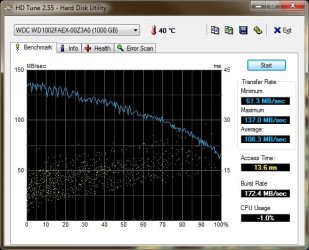
HD Tune website - get the normal version
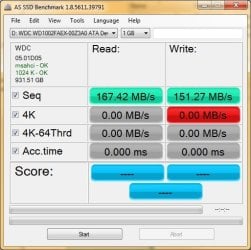
Download AS SSD Benchmark - MajorGeeks - this is for SSDs and 4K tests are slow as hell on HDDs, so stop the test after sequential read/write is finished or wait if you wish :)

AS SSD - WD Caviar Black RAID0
AS SSD 1.8 19-06-2015 - WD Black RAID0.jpg

HDTune - WD Caviar Black RAID0
HDTune_WD_Black_RAID0_19-6-2015.jpg

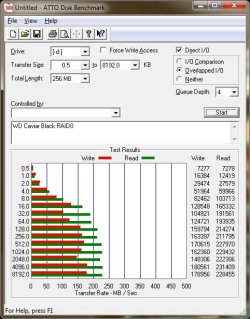
ATTO
ATTO_19-6-2015-queue 4-WD Black RAID0.jpg
 

My Computer

Computer type
PC/Desktop
Computer Manufacturer/Model Number
Custom Build
OS
Windows 7 Ultimate x64 SP1
CPU
AMD Phenom 2 1090T
Motherboard
Gigabyte GA-890FXA-UD5
Memory
2x8GB Kingston HyperX Fury Black 1600Mhz Unganged
Graphics Card(s)
MSI GTX 970 Gaming 4G
Sound Card
Realtek On-Board HD 7.1 Audio / Logitech G35
Monitor(s) Displays
3xAcer GD245HQ
Screen Resolution
1920x1080
Hard Drives
Samsung 850 Pro 512GB SSD - OS /
WD Caviar Black SATA 3 - 1 TBx2 - Dynamic RAID 0 /
WD Caviar Green SATA 2 - 640GBx2 - Dynamic RAID 0 /
WD Caviar Green SATA 2 - 640GB - Internal Backup /
Seagate Barracude SATA 3 - 3TB - External Backup/ Sync
PSU
HighPower 1000W
Case
Cooler Master HAF 932
Cooling
Noctua NH-D14
Keyboard
Logitech G19
Mouse
Logitech G500
Internet Speed
100/4 Mbit Cable (100GB quota)
Antivirus
ZoneAlarm Extreme Security / MBAM Pro / MBAE Free / SAS Free
Browser
IE 11 - Firefox - Chrome
Other Info
Logitech F710/ G27/ G940/ Z5500 // TrackIR 5 // Nvidia 3D Surround Vision
Thanks for jumping in everyone. My connection has been up and down since TS Bill blew by. Lots of rain and wind but spared the worst since I was on the West side of the storm.
 

My Computer

Computer type
PC/Desktop
Computer Manufacturer/Model Number
Built 2/11/2011
OS
Windows 7 Pro-x64
CPU
i7-2600 3.4GHz - 3.8GHz Turbo
Motherboard
Intel DH67BL-B3
Memory
8Gb - 2x4GB, Muskin 991770 PC3-1333
Graphics Card(s)
Integrated Intel HD 2000
Sound Card
Integrated Intel 10.1 HD, RealTek ALC892
Monitor(s) Displays
Asus LCD VH222H, Haier HL24XSL2a
Screen Resolution
1920x1080, 1920x1080
Hard Drives
Crucial SSD C300-128Gb,
Western Digital WD5002AALX - 500Gb,
Western Digital WD7501AALS - 750Gb
PSU
Seasonic 650W 80+ Gold Modular
Case
Rosewill Defender
Cooling
Stock CPU, Four 120mm case fans, PCH fan added
Keyboard
Logitech EX100 Y-RBH94 Wireless
Mouse
Logitech EX100 M-RCE95 Wireless
Internet Speed
3.0/1.5 Mbs
Antivirus
Microsoft Security Essentials
Browser
Microsoft Internet Explorer 11
Other Info
Antec Veris Premier-Multimedia IR Station,
Cyber Accoustics-3602 Speakers,
AFT XM-5U Card Reader,
Hauppauge TV-HVR-2250,
Sony LX300 USB Turntable
Right guys, i'll be running the benchmark later.

Unfortunately i think my Marvell controller has gone funny and is causing BSODs so i've taken LaybackBears's advice and have connected my HDD to the Intel SATA port on my Motherboard.

However, there are loads of 'atapi' errors showing in the event log and they only started after plugging in my HDD into the Intel SATA port.

I've attached a new log zip file - If you could list every problem you guys come across in the logs then I will endeavour to sort each one of them out, step-by-step.

Thanks,

MistUnleashed
 
Last edited:

My Computer

Computer type
PC/Desktop
Computer Manufacturer/Model Number
Custom Build
OS
Windows 7 Ultimate x64
CPU
Intel Core i7 Socket 1156 LGA
Motherboard
Asus P7P55D-E LX
Memory
Corsair Dominator 4GB DDR3
Graphics Card(s)
Gainward GTX 460
Monitor(s) Displays
Acer V243HL
Screen Resolution
1920x1080
Hard Drives
Western Digital 1TB HDD
PSU
Antec TruePower 650W
Case
Antec 300
Cooling
Thermalrite CPU Cooler
Antivirus
Avast Anti-Virus
Does your motherboard support AHCI SATA mode or just RAID?

You can try uninstalling Intel drivers(Intel RST - RapidStorageTech) so that msahci take over. Both are enabled (from driver_status.txt) and I guess iaStorV is in charge at the moment. You can check with starting AS SSD, it will show in upper left.
 

My Computer

Computer type
PC/Desktop
Computer Manufacturer/Model Number
Custom Build
OS
Windows 7 Ultimate x64 SP1
CPU
AMD Phenom 2 1090T
Motherboard
Gigabyte GA-890FXA-UD5
Memory
2x8GB Kingston HyperX Fury Black 1600Mhz Unganged
Graphics Card(s)
MSI GTX 970 Gaming 4G
Sound Card
Realtek On-Board HD 7.1 Audio / Logitech G35
Monitor(s) Displays
3xAcer GD245HQ
Screen Resolution
1920x1080
Hard Drives
Samsung 850 Pro 512GB SSD - OS /
WD Caviar Black SATA 3 - 1 TBx2 - Dynamic RAID 0 /
WD Caviar Green SATA 2 - 640GBx2 - Dynamic RAID 0 /
WD Caviar Green SATA 2 - 640GB - Internal Backup /
Seagate Barracude SATA 3 - 3TB - External Backup/ Sync
PSU
HighPower 1000W
Case
Cooler Master HAF 932
Cooling
Noctua NH-D14
Keyboard
Logitech G19
Mouse
Logitech G500
Internet Speed
100/4 Mbit Cable (100GB quota)
Antivirus
ZoneAlarm Extreme Security / MBAM Pro / MBAE Free / SAS Free
Browser
IE 11 - Firefox - Chrome
Other Info
Logitech F710/ G27/ G940/ Z5500 // TrackIR 5 // Nvidia 3D Surround Vision
Back
Top