System Paging File

boeingaviation

New member
Local time
2:58 AM
Messages
61
Hi There,

I was wondering if someone with more knowledge than me can assist.

I have 16GB DDR3 1600 Ram installed on Windows 7 SP1 64 Bit.

Here is a screenshot of my Paging file tab showing what's allocated:

C Drive = System Managed
X Drive (FSX) = System Managed
P Driver (Prepar3D) = System managed.

Can someone please clarify why I have 48GB of paging file enabled. My computer is running as it should and gaming is fine, however I don't have 48GB of RAM installed (if that's where Paging generates from), so why is that number so.....and should I manually set a custom amount.

Thanks in advance.
 

My Computer

Computer type
PC/Desktop
OS
Windows 7 Pro 64-bit
CPU
Intel i7 4790K Haswell Devils Canyon
Motherboard
Asus Maximus VII Ranger ROG
Memory
Kingston Hyper X Savage Red 1600MHZ/16GB
Graphics Card(s)
EVGA GTX970 FTW ACX 2.0
Sound Card
On Board
Monitor(s) Displays
Asus 22" LCD, AOC 17" CRT
Screen Resolution
1680x1050
Hard Drives
Samsung 840EVO 250GB SSD (Windows Driver)
WD Elements 640GB External
WD Elements Portable 2TB External
WD Caviar Blue 500GB
WD Caviar Black 1TB
PSU
EVGA Supernova G2 750W Fully Modular
Case
Antect 1200 V3
Cooling
Corsair H80i Liquid Cooling
Keyboard
Genius Keyboard
Mouse
Logitech Wireless Mouse
Internet Speed
Cable
Antivirus
Nod32 Antivirus
Browser
Google Chrome
Look at it again. 48 MB not GB.

On my systems I just let Windows 7 manage pagefile and all memory process.
 
Last edited:

My Computer

Computer type
PC/Desktop
Computer Manufacturer/Model Number
Home made Desktop
OS
Windows 10 Pro. 64/ version 1709 Windows 7 Pro/64
CPU
Intel i7-6800K @ 4.3
Motherboard
ASUS X-99 Deluxe II
Memory
Corsair Platinum 16 gig @2400
Graphics Card(s)
EVGA GTX 1070 OC
Monitor(s) Displays
Asus 27" LED LCD/VE278Q
Screen Resolution
1920-1080 or 1280-720 HDMI
Hard Drives
INTEL SSD 730-240 Gb Sata 3.0/
PSU
EVGA Platium 1200W
Case
Phanteks Luxe Tempered Glass 8 fans/ one radiator
Cooling
XSPC/ Water Cooled CPU
Keyboard
Das 4 Professional
Mouse
Logitech M705/MX Anywhere 2-S
Internet Speed
100 mbits
Antivirus
Microsoft Security Essentials/ Malwarebytes Premium 3.0/ SAS
Browser
I.E. 11 default/Firefox/ ISP Time Warner Cable/Spectrum
Other Info
LG BluRay Burner/
Sound system-KLipsch-THX/
Icy Dock ssd Hot Swap bays.
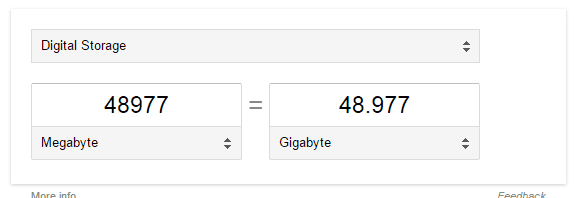
Isnt 48977mb 48GB as 1000mb=1GB
 

My Computer

Computer type
PC/Desktop
OS
Windows 7 Pro 64-bit
CPU
Intel i7 4790K Haswell Devils Canyon
Motherboard
Asus Maximus VII Ranger ROG
Memory
Kingston Hyper X Savage Red 1600MHZ/16GB
Graphics Card(s)
EVGA GTX970 FTW ACX 2.0
Sound Card
On Board
Monitor(s) Displays
Asus 22" LCD, AOC 17" CRT
Screen Resolution
1680x1050
Hard Drives
Samsung 840EVO 250GB SSD (Windows Driver)
WD Elements 640GB External
WD Elements Portable 2TB External
WD Caviar Blue 500GB
WD Caviar Black 1TB
PSU
EVGA Supernova G2 750W Fully Modular
Case
Antect 1200 V3
Cooling
Corsair H80i Liquid Cooling
Keyboard
Genius Keyboard
Mouse
Logitech Wireless Mouse
Internet Speed
Cable
Antivirus
Nod32 Antivirus
Browser
Google Chrome

My Computer

Computer type
PC/Desktop
Computer Manufacturer/Model Number
Self Built
OS
Win 10 Pro x64
CPU
Intel I5-2500K @3.3GHz
Motherboard
Asrock P67 Extreme4
Memory
16GB G.Skill Ripjaws X (4x4GB)
Graphics Card(s)
EVGA GeForce 750 Ti SC 2GB
Sound Card
ASUS Xonar DG 5.1 Channels 24-bit 96KHz PCI Interface Sound
Monitor(s) Displays
auria eq2367
Screen Resolution
1920 x 1080
Hard Drives
250GB Samsung 850 EVO SSD
1TB WD Blue
1TB Hitachi
PSU
SeaSonic X 650W 80 Plus Gold
Case
Corsair Obsidian 750D
Cooling
Corsair H60, Three 140mm case fans
Keyboard
Logitech Wireless Keyboard K520
Mouse
Logitech Wireless Mouse M310
Internet Speed
Wave Broadband ~ 100 dn 5 up
Antivirus
Windows Defender, Malwarebytes Premium
Browser
Edge, IE11, Chrome
Other Info
Laptop specs: HP g7-1365dx /
CPU: AMD A6-3420M APU with Radeon(tm) HD Graphics /
RAM: Crucial 8Gb (2x4Gb) /
SSD: Crucial M4-CT128M4SSD2 ATA Device/ FW 000F /
GFX: AMD Radeon HD 6520G /
OS: Windows 10 Pro x64
So is that normal to have that much on paging file or should i set a custom size?
 

My Computer

Computer type
PC/Desktop
OS
Windows 7 Pro 64-bit
CPU
Intel i7 4790K Haswell Devils Canyon
Motherboard
Asus Maximus VII Ranger ROG
Memory
Kingston Hyper X Savage Red 1600MHZ/16GB
Graphics Card(s)
EVGA GTX970 FTW ACX 2.0
Sound Card
On Board
Monitor(s) Displays
Asus 22" LCD, AOC 17" CRT
Screen Resolution
1680x1050
Hard Drives
Samsung 840EVO 250GB SSD (Windows Driver)
WD Elements 640GB External
WD Elements Portable 2TB External
WD Caviar Blue 500GB
WD Caviar Black 1TB
PSU
EVGA Supernova G2 750W Fully Modular
Case
Antect 1200 V3
Cooling
Corsair H80i Liquid Cooling
Keyboard
Genius Keyboard
Mouse
Logitech Wireless Mouse
Internet Speed
Cable
Antivirus
Nod32 Antivirus
Browser
Google Chrome
boeing, as the description states, that is the combined (meaning as it is accounted for across all drives), system managed paging file system allocated. That allocation is managed by the system and is not relative to physical memory ,but virtual space available for paging use. And yes 48XXX MB is 48 GB. LaybackBear may not have had that 2nd cup of coffee yet.
 

My Computer

Computer type
PC/Desktop
Computer Manufacturer/Model Number
custom build
OS
Microsoft Windows 7 Ultimate 64-bit 7601 Multiprocessor Free Service Pack 1
CPU
AMD FX(tm)-6100 Six-Core Processor
Motherboard
ASUSTeK Computer INC. M5A78L-M LX PLUS
Memory
4.00 GB
Graphics Card(s)
AMD Radeon HD 6450
Sound Card
(1) AMD High Definition Audio Device (2) Realtek High Defi
Monitor(s) Displays
Toshiba 47ZV650U 47" LCD 240Hz
Screen Resolution
1920 x 1080 x 32 bits (4294967296 colors) @ 60 Hz
Hard Drives
(1) HDT722516DLA380 ATA Device (2) Hitachi HDS721025CLA382 ATA Device (3) ST4000VN000-1H4168 ATA Device (4) Generic STORAGE DEVICE USB Device (5) Generic STORAGE DEVICE USB Device (6) Generic STORAGE DEVICE USB Device (7) Generic STORAGE
PSU
Corsair CX430M
Case
WMI (Waste Management Incorporated)
Cooling
Yes, it's very cool.
Keyboard
Bluetooth KB & Mousepad
Internet Speed
Fios 15/5 and it sucks when Verizon is throttling it down
Antivirus
Avast, MSE and Malwarebytes
Browser
Firefox v.41.0.2 and IE 11
Other Info
2 years old and so far this rig still kicks butt
Making a fresh pot as I post. I need some help getting my 3 brain cells working again.
 

My Computer

Computer type
PC/Desktop
Computer Manufacturer/Model Number
Home made Desktop
OS
Windows 10 Pro. 64/ version 1709 Windows 7 Pro/64
CPU
Intel i7-6800K @ 4.3
Motherboard
ASUS X-99 Deluxe II
Memory
Corsair Platinum 16 gig @2400
Graphics Card(s)
EVGA GTX 1070 OC
Monitor(s) Displays
Asus 27" LED LCD/VE278Q
Screen Resolution
1920-1080 or 1280-720 HDMI
Hard Drives
INTEL SSD 730-240 Gb Sata 3.0/
PSU
EVGA Platium 1200W
Case
Phanteks Luxe Tempered Glass 8 fans/ one radiator
Cooling
XSPC/ Water Cooled CPU
Keyboard
Das 4 Professional
Mouse
Logitech M705/MX Anywhere 2-S
Internet Speed
100 mbits
Antivirus
Microsoft Security Essentials/ Malwarebytes Premium 3.0/ SAS
Browser
I.E. 11 default/Firefox/ ISP Time Warner Cable/Spectrum
Other Info
LG BluRay Burner/
Sound system-KLipsch-THX/
Icy Dock ssd Hot Swap bays.
A 48GB paging file does seem excessive. If you are running a SSD you can reduce the page file to 1GB or 2GB. You also have 16GB of RAM, so try a smaller page file size & see how you go.

Use the method that you have in first post & select Custom Size & remember that the setting requires MB so to get say 2GB you need to type in 2000MB.
 

My Computer

Computer type
PC/Desktop
Computer Manufacturer/Model Number
Self built using existing case
OS
Windows 7 Home Premium 64 bit sp1
CPU
Intel i5 3570 3.4Ghz Ivy Bridge SKT 1155 quad core
Motherboard
Gigabyte Z77-HD3 SKT 1155 2xSata 3, 4x USB 3.0
Memory
G-Skill Rip Jaws 16Gb (8x2) DDR3 -1600 PC3 12800 CL 10 red
Graphics Card(s)
Gigabyte NVIDIA GT610 1Gb DDR3 810/1200 PCI-E 2.0 Silent
Sound Card
NVIDIA High Definition & Realtech High Definition Audio
Monitor(s) Displays
2 x Philips 226V4L 16:9 aspect ratio
Screen Resolution
1920 x 1080 HD
Hard Drives
Samsung 840 Pro 256gb SSD, SATA 3.
Hitachi Touro Portable 1tb, USB 3.0 HDD used for image b/ups.
PSU
Corsair VS450
Case
Codeng
Cooling
PSU fan & CPU fan
Keyboard
Logitech
Mouse
Logitech Wireless trackball M570
Internet Speed
Wireless 3G. 3mg down & 550kb up.
Antivirus
Bitdefender Internet Security 2020
Browser
Opera (Current Version) & Firefox
Other Info
MS Office 2013 Pro. Davis weather station software. MGE Nova 600 avr UPS.
So would I set all 3 of those drives in my screenshot which are currently "system managed" to 2GB each.

My Windows drive is on an SSD.
 

My Computer

Computer type
PC/Desktop
OS
Windows 7 Pro 64-bit
CPU
Intel i7 4790K Haswell Devils Canyon
Motherboard
Asus Maximus VII Ranger ROG
Memory
Kingston Hyper X Savage Red 1600MHZ/16GB
Graphics Card(s)
EVGA GTX970 FTW ACX 2.0
Sound Card
On Board
Monitor(s) Displays
Asus 22" LCD, AOC 17" CRT
Screen Resolution
1680x1050
Hard Drives
Samsung 840EVO 250GB SSD (Windows Driver)
WD Elements 640GB External
WD Elements Portable 2TB External
WD Caviar Blue 500GB
WD Caviar Black 1TB
PSU
EVGA Supernova G2 750W Fully Modular
Case
Antect 1200 V3
Cooling
Corsair H80i Liquid Cooling
Keyboard
Genius Keyboard
Mouse
Logitech Wireless Mouse
Internet Speed
Cable
Antivirus
Nod32 Antivirus
Browser
Google Chrome
Not sure how it would ever get to 48 GB with only 16 GB of memory, the page file is usually the same as the amount of memory installed.

With 16 GB of memory or higher, I don`t even use a page file. (just my personal choice)

Never seen another drive other then C even use a page file.

But I have no clue what your P and X partitions are either.

Set each to 4 GB max.
 

My Computer

Computer type
PC/Desktop
Computer Manufacturer/Model Number
Skylake Special #666
OS
Windows 10 Pro x64
CPU
Intel Core i7 6700K
Motherboard
Asus Sabertooth Z170 Mark 1
Memory
GSkill TridentZ RGB 16GB 3600 16-16-16-36
Graphics Card(s)
EVGA GTX 980 Ti SC x2
Sound Card
Realtek High Definition
Monitor(s) Displays
AOC G2460PG
Screen Resolution
1920 x 1080 144Hz
Hard Drives
Samsung 860 Pro 256GB, Seagate Barracuda 4TB x2
PSU
EVGA 1000 P2, EVGA White Custom Braided Cables
Case
Corsair Vengeance C70 Gunmetal Black
Cooling
Corsair H100i v2, Corsair ML120 x2, Thermal Grizzly Kryonaut
Keyboard
Logitech G910 Orion Spectrum
Mouse
Logitech G700s
Internet Speed
Verizon Fios Quantum Gateway 75/75
Antivirus
Windows Defender, Malwarebytes Free 3.8.3
Browser
Chrome
Other Info
Corsair SP120 x4, LG Blu-ray Drive, Durabrand HT-395 100 Watt Dolby Digital Amp, Corsair H2100 Wireless 7.1 Headset
The Windows drive is the most important, so try setting that at 2GB & see how you go.

Alternatively, if you don't want to reduce it that much you can type in the Recommended Setting or you could use that for the other drives.
 

My Computer

Computer type
PC/Desktop
Computer Manufacturer/Model Number
Self built using existing case
OS
Windows 7 Home Premium 64 bit sp1
CPU
Intel i5 3570 3.4Ghz Ivy Bridge SKT 1155 quad core
Motherboard
Gigabyte Z77-HD3 SKT 1155 2xSata 3, 4x USB 3.0
Memory
G-Skill Rip Jaws 16Gb (8x2) DDR3 -1600 PC3 12800 CL 10 red
Graphics Card(s)
Gigabyte NVIDIA GT610 1Gb DDR3 810/1200 PCI-E 2.0 Silent
Sound Card
NVIDIA High Definition & Realtech High Definition Audio
Monitor(s) Displays
2 x Philips 226V4L 16:9 aspect ratio
Screen Resolution
1920 x 1080 HD
Hard Drives
Samsung 840 Pro 256gb SSD, SATA 3.
Hitachi Touro Portable 1tb, USB 3.0 HDD used for image b/ups.
PSU
Corsair VS450
Case
Codeng
Cooling
PSU fan & CPU fan
Keyboard
Logitech
Mouse
Logitech Wireless trackball M570
Internet Speed
Wireless 3G. 3mg down & 550kb up.
Antivirus
Bitdefender Internet Security 2020
Browser
Opera (Current Version) & Firefox
Other Info
MS Office 2013 Pro. Davis weather station software. MGE Nova 600 avr UPS.
My P partition is for prepar3d. X is for flight sim X.

So I would be quite safe to just turn the paging file off or set a custom size of 2GB for OS drive?

Paging file wasn't enabled on the X & P drives so I enabled it and set to "system managed".

Few things have been funny like this after doing my repair install a couple months ago using the COEM win 7 pro 64 bit download from Microsoft.

Everything however is running normally, and after the repair install I don't use a lot of ram compared to before where I was using almost 12GB sometimes whilst playing flight sim. Now max I've seen used is 5.5gb.
 

My Computer

Computer type
PC/Desktop
OS
Windows 7 Pro 64-bit
CPU
Intel i7 4790K Haswell Devils Canyon
Motherboard
Asus Maximus VII Ranger ROG
Memory
Kingston Hyper X Savage Red 1600MHZ/16GB
Graphics Card(s)
EVGA GTX970 FTW ACX 2.0
Sound Card
On Board
Monitor(s) Displays
Asus 22" LCD, AOC 17" CRT
Screen Resolution
1680x1050
Hard Drives
Samsung 840EVO 250GB SSD (Windows Driver)
WD Elements 640GB External
WD Elements Portable 2TB External
WD Caviar Blue 500GB
WD Caviar Black 1TB
PSU
EVGA Supernova G2 750W Fully Modular
Case
Antect 1200 V3
Cooling
Corsair H80i Liquid Cooling
Keyboard
Genius Keyboard
Mouse
Logitech Wireless Mouse
Internet Speed
Cable
Antivirus
Nod32 Antivirus
Browser
Google Chrome

My Computer

Computer type
PC/Desktop
Computer Manufacturer/Model Number
medionl/Aspire 6930G/acer x55a
OS
W7 home premium 32bit/W7HP 64bit/w10 tp insider ring
CPU
E5300 dual core
Motherboard
medion MS7366
Memory
3gb
Graphics Card(s)
Nvidia Geforce 7100 Nforce 630i
Monitor(s) Displays
avixc
Internet Speed
n (isp resticted to 72)
Antivirus
mse/pands
Browser
palemoon
Other Info
Belkin Fd7050 n USB using Railink RT2870 drivers, more upto date
Hi Roy,

Thanks for that link. I've had a quick look at it so correct me if I'm wrong but I should have 1.5x the amount of installed RAM as the page file on C drive?

So for 16GB I could set a custom size of 24GB, or have I got that completely wrong?

There's nothing wrong with the pc at all working perfectly fine just a large page file.
 

My Computer

Computer type
PC/Desktop
OS
Windows 7 Pro 64-bit
CPU
Intel i7 4790K Haswell Devils Canyon
Motherboard
Asus Maximus VII Ranger ROG
Memory
Kingston Hyper X Savage Red 1600MHZ/16GB
Graphics Card(s)
EVGA GTX970 FTW ACX 2.0
Sound Card
On Board
Monitor(s) Displays
Asus 22" LCD, AOC 17" CRT
Screen Resolution
1680x1050
Hard Drives
Samsung 840EVO 250GB SSD (Windows Driver)
WD Elements 640GB External
WD Elements Portable 2TB External
WD Caviar Blue 500GB
WD Caviar Black 1TB
PSU
EVGA Supernova G2 750W Fully Modular
Case
Antect 1200 V3
Cooling
Corsair H80i Liquid Cooling
Keyboard
Genius Keyboard
Mouse
Logitech Wireless Mouse
Internet Speed
Cable
Antivirus
Nod32 Antivirus
Browser
Google Chrome
If you enabled the page file on those partitions, then I would turn it back off, you don`t need it on those partitions.

24 GB is wayyyy tooooo much, set it to 8 GB on C, that is more then enough.
 

My Computer

Computer type
PC/Desktop
Computer Manufacturer/Model Number
Skylake Special #666
OS
Windows 10 Pro x64
CPU
Intel Core i7 6700K
Motherboard
Asus Sabertooth Z170 Mark 1
Memory
GSkill TridentZ RGB 16GB 3600 16-16-16-36
Graphics Card(s)
EVGA GTX 980 Ti SC x2
Sound Card
Realtek High Definition
Monitor(s) Displays
AOC G2460PG
Screen Resolution
1920 x 1080 144Hz
Hard Drives
Samsung 860 Pro 256GB, Seagate Barracuda 4TB x2
PSU
EVGA 1000 P2, EVGA White Custom Braided Cables
Case
Corsair Vengeance C70 Gunmetal Black
Cooling
Corsair H100i v2, Corsair ML120 x2, Thermal Grizzly Kryonaut
Keyboard
Logitech G910 Orion Spectrum
Mouse
Logitech G700s
Internet Speed
Verizon Fios Quantum Gateway 75/75
Antivirus
Windows Defender, Malwarebytes Free 3.8.3
Browser
Chrome
Other Info
Corsair SP120 x4, LG Blu-ray Drive, Durabrand HT-395 100 Watt Dolby Digital Amp, Corsair H2100 Wireless 7.1 Headset
My OS has never set system managed anywhere near that high (and I also have 16 gig ram), my best guess is your system has at some point been under heavy memory pressure and the pagefile got enlarged as a result.

Also the 1.5x ram rule I dont follow anymore more, at least on desktops. Dont disable the pagefile but I suggest maybe a min of 2 and max of 8 gig dynamic size (or if on a hdd to avoid fragmentation set min/max both to 8gig).
 

My Computer

Computer type
PC/Desktop
Computer Manufacturer/Model Number
home built
OS
windows 8.1 Pro x64
CPU
intel i5 4670k @ 4.3ghz
Motherboard
asus z87-plus
Memory
16 gig ram ddr3 @ 1600 corsair vengeance
Graphics Card(s)
evga 970 GTX 4 GIG FTW ACX 2.0
Sound Card
asus xonar D2X
Monitor(s) Displays
benq gw2765ht
Screen Resolution
2560x1440
Hard Drives
Samsung 850 pro SSD 512gig - boot device wooosh
WD black cavalier 640gig WD6401AALS
Seagate 500gig ST3500630AS
WD 2TB Green WDC20EARS
2 x WD Red 3TB WD30EFRX
Samsung 750gig HD753LG - on asmedia controller
PSU
coolermaster silent pro 600watt modular
Case
fractal define R4
Cooling
artic freezer i30, 3 case fans
Keyboard
microsoft business ps2 keyboard
Mouse
microsoft optical black mouse
Internet Speed
80/20 FTTC SkyBB
Antivirus
Nod32 AV v8, HitmanProAlert, SRP, System Hardening
Browser
Chrome x64
Other Info
Intel controller is in AHCI mode currently using IaSTOR 12.8.0.1016 drivers
...however I don't have 48GB of RAM installed (if that's where Paging generates from)..
The large size of your page file did not come from your amount of installed RAM; but, the recommended amount (24GB) is determined by the amount of RAM installed.

The large size of your page file DID come from somewhere. There are tools that you can use to try and find out why the file is that large. Process Monitor can show you what apps write to that page file. The default filters exclude the page file. Just change that filter to include the page file. Let us know if you need help doing that.

On my desktop (16GB RAM), the page file is managed by the OS.
It just sits at 1GB...
...unless I'm doing weird testing
(like 4000 tabs in Pale Moon)
...then I've seen the page file grow go to 60GB.
 

My Computer

Computer type
Laptop
Computer Manufacturer/Model Number
Employer provided Dell Latitude
OS
W7 Pro SP1 64bit
CPU
i7
Memory
8GB
Graphics Card(s)
Intel HD Graphics
Hard Drives
crappy SSD
Antivirus
Employer mandated Symantec Endpoint Protection
Browser
Pale Moon 64bit, IE11 64bit & Chrome 64bit
I do it simple and understand it simple.

I let Windows 7 manage memory and page file. The system will adjust the page file as needed.
If you have it set to system manage and you get a memory pop up means one thing.
What ever you are doing on your system needs more physical ram because the system is unable to correctly manage memory
according to the demand of the system. Do less at one time with your system or just add more physical ram. Done.

boeingaviation has 16 gigs of physical ram. He/she would have to be doing some serious things like CAD to worry about page filling.

If Windows 7 can't figure out how to use memory I sure as hell can't.
Yes I tried to out smart Windows 7 memory management, just like we did in XP. All I did is no improvements or I made it worse.
Maybe I'm just to dumb to out smart system manage memory.
 

My Computer

Computer type
PC/Desktop
Computer Manufacturer/Model Number
Home made Desktop
OS
Windows 10 Pro. 64/ version 1709 Windows 7 Pro/64
CPU
Intel i7-6800K @ 4.3
Motherboard
ASUS X-99 Deluxe II
Memory
Corsair Platinum 16 gig @2400
Graphics Card(s)
EVGA GTX 1070 OC
Monitor(s) Displays
Asus 27" LED LCD/VE278Q
Screen Resolution
1920-1080 or 1280-720 HDMI
Hard Drives
INTEL SSD 730-240 Gb Sata 3.0/
PSU
EVGA Platium 1200W
Case
Phanteks Luxe Tempered Glass 8 fans/ one radiator
Cooling
XSPC/ Water Cooled CPU
Keyboard
Das 4 Professional
Mouse
Logitech M705/MX Anywhere 2-S
Internet Speed
100 mbits
Antivirus
Microsoft Security Essentials/ Malwarebytes Premium 3.0/ SAS
Browser
I.E. 11 default/Firefox/ ISP Time Warner Cable/Spectrum
Other Info
LG BluRay Burner/
Sound system-KLipsch-THX/
Icy Dock ssd Hot Swap bays.
It's most likely related to some heavy flightsim activity, looking at the name on that drive,

paging%20file_zpsmjb1bzb9.jpg


Lockheed Martin - Prepar3D

I can see something like that growing pretty large.
 

My Computer

Computer type
PC/Desktop
Computer Manufacturer/Model Number
Self Built
OS
Win 10 Pro x64
CPU
Intel I5-2500K @3.3GHz
Motherboard
Asrock P67 Extreme4
Memory
16GB G.Skill Ripjaws X (4x4GB)
Graphics Card(s)
EVGA GeForce 750 Ti SC 2GB
Sound Card
ASUS Xonar DG 5.1 Channels 24-bit 96KHz PCI Interface Sound
Monitor(s) Displays
auria eq2367
Screen Resolution
1920 x 1080
Hard Drives
250GB Samsung 850 EVO SSD
1TB WD Blue
1TB Hitachi
PSU
SeaSonic X 650W 80 Plus Gold
Case
Corsair Obsidian 750D
Cooling
Corsair H60, Three 140mm case fans
Keyboard
Logitech Wireless Keyboard K520
Mouse
Logitech Wireless Mouse M310
Internet Speed
Wave Broadband ~ 100 dn 5 up
Antivirus
Windows Defender, Malwarebytes Premium
Browser
Edge, IE11, Chrome
Other Info
Laptop specs: HP g7-1365dx /
CPU: AMD A6-3420M APU with Radeon(tm) HD Graphics /
RAM: Crucial 8Gb (2x4Gb) /
SSD: Crucial M4-CT128M4SSD2 ATA Device/ FW 000F /
GFX: AMD Radeon HD 6520G /
OS: Windows 10 Pro x64
You hit the nail on the head Derek :)

I`m sure those 2 programs use a lot of memory, but 48 GB seems excessive, who knows for sure.
 

My Computer

Computer type
PC/Desktop
Computer Manufacturer/Model Number
Skylake Special #666
OS
Windows 10 Pro x64
CPU
Intel Core i7 6700K
Motherboard
Asus Sabertooth Z170 Mark 1
Memory
GSkill TridentZ RGB 16GB 3600 16-16-16-36
Graphics Card(s)
EVGA GTX 980 Ti SC x2
Sound Card
Realtek High Definition
Monitor(s) Displays
AOC G2460PG
Screen Resolution
1920 x 1080 144Hz
Hard Drives
Samsung 860 Pro 256GB, Seagate Barracuda 4TB x2
PSU
EVGA 1000 P2, EVGA White Custom Braided Cables
Case
Corsair Vengeance C70 Gunmetal Black
Cooling
Corsair H100i v2, Corsair ML120 x2, Thermal Grizzly Kryonaut
Keyboard
Logitech G910 Orion Spectrum
Mouse
Logitech G700s
Internet Speed
Verizon Fios Quantum Gateway 75/75
Antivirus
Windows Defender, Malwarebytes Free 3.8.3
Browser
Chrome
Other Info
Corsair SP120 x4, LG Blu-ray Drive, Durabrand HT-395 100 Watt Dolby Digital Amp, Corsair H2100 Wireless 7.1 Headset
Back
Top