System partition suddenly full

f6gnz

New member
Local time
7:36 AM
Messages
8
My System partition with Win7 home is 160GB out of which only about 1/3 was used. Suddenly, I see this partition in red saying I have only about 5GB free space left!
Tried Disk Cleanup and could obtain only 148 MB gain!

What happens??? How to recover free space???
 

My Computer My Computer

At a glance

Windows 7 Home Premium 32 bitIntel Core I5 M4504GBNVIDIA Geforce 330M
Computer type
Laptop
Computer Manufacturer/Model Number
Dell Vostro 3700
OS
Windows 7 Home Premium 32 bit
CPU
Intel Core I5 M450
Memory
4GB
Graphics Card(s)
NVIDIA Geforce 330M
Hard Drives
300GB
Antivirus
ESET NOD32
Browser
Firefox

My Computer My Computer

At a glance

Windows 10 Pro. 64/ version 1709 Windows 7 Pr...Intel i7-6800K @ 4.3Corsair Platinum 16 gig @2400EVGA GTX 1070 OC
Computer type
PC/Desktop
Computer Manufacturer/Model Number
Home made Desktop
OS
Windows 10 Pro. 64/ version 1709 Windows 7 Pro/64
CPU
Intel i7-6800K @ 4.3
Motherboard
ASUS X-99 Deluxe II
Memory
Corsair Platinum 16 gig @2400
Graphics Card(s)
EVGA GTX 1070 OC
Monitor(s) Displays
Asus 27" LED LCD/VE278Q
Screen Resolution
1920-1080 or 1280-720 HDMI
Hard Drives
INTEL SSD 730-240 Gb Sata 3.0/
PSU
EVGA Platium 1200W
Case
Phanteks Luxe Tempered Glass 8 fans/ one radiator
Cooling
XSPC/ Water Cooled CPU
Keyboard
Das 4 Professional
Mouse
Logitech M705/MX Anywhere 2-S
Internet Speed
100 mbits
Antivirus
Microsoft Security Essentials/ Malwarebytes Premium 3.0/ SAS
Browser
I.E. 11 default/Firefox/ ISP Time Warner Cable/Spectrum
Other Info
LG BluRay Burner/
Sound system-KLipsch-THX/
Icy Dock ssd Hot Swap bays.
Thanks a lot Layback Bear. Will try the recommendations. Already tried cccleaner's Disk Analyzer, checked all file types, and it had found that most of the partition was used by some "other files" ! ? Could not find out what are these "other files".

I understand that by the time the partition use grows, but in my case this growth is SUDDEN, it just grew up from about 50 GB used to close to 160 GB! So, something has been done by Win7 or when Win10 tried to install itself (I reserved Win10 but after system check it said my graphic NVIDIA Geforce 330M card was not compatible, so I had to stay with Win7 as there is no 330M driver update for laptops with Hybrid Power technology). But, in the Win update log I see many times Win10 upgrade fail. So, maybe the problem is there, but I do not know how to stop Win10 upgrades and keep Win7 upgrades ongoing...
 

My Computer My Computer

At a glance

Windows 7 Home Premium 32 bitIntel Core I5 M4504GBNVIDIA Geforce 330M
Computer type
Laptop
Computer Manufacturer/Model Number
Dell Vostro 3700
OS
Windows 7 Home Premium 32 bit
CPU
Intel Core I5 M450
Memory
4GB
Graphics Card(s)
NVIDIA Geforce 330M
Hard Drives
300GB
Antivirus
ESET NOD32
Browser
Firefox
Download Tree Size Free.

It will give you a good look at where the space is being used.

Probably an app doing something you don't know about. Maybe a backup app, anti-virus, a game, could be most anything.
 

My Computer My Computer

At a glance

Windows 7 Home Premium SP1, 64-bitIntel Skylake i5-6600K, not overclocked8 GB HyperX DDR4-2666 (2 x 4 GB)none; graphics are integrated on CPU
Computer type
PC/Desktop
Computer Manufacturer/Model Number
Ignatz Special; 4 speed manual gearbox; factory air conditioning; one of one
OS
Windows 7 Home Premium SP1, 64-bit
CPU
Intel Skylake i5-6600K, not overclocked
Motherboard
AsRock Z170M Extreme 4, micro ATX
Memory
8 GB HyperX DDR4-2666 (2 x 4 GB)
Graphics Card(s)
none; graphics are integrated on CPU
Sound Card
onboard: Realtek ALC1150; external: USB Behringer UF0-202
Monitor(s) Displays
Dell S2340M 23 inch IPS
Screen Resolution
1600 x 900
Hard Drives
System: Crucial MX100 series SSD, 128 GB;
Data: Samsung Spinpoint 103SJ, 1 TB;
Backup: WD Caviar Green WD30EZRX-00D8PB0, 3 TB
PSU
Rosewill SilentNight 500 watt fanless, semi-modular
Case
Antec Solo II
Cooling
Noctua NH-U12S; Noctua F12 intake, Noctua S12A exhaust
Keyboard
Microsoft 200 6JH-00001 USB
Mouse
Dell or Microsoft optical wired; USB
Antivirus
Microsoft Security Essentials and Malwarebytes Premium
Browser
Pale Moon
Other Info
All fans PWM; speeds at idle: CPU circa 500 rpm; intake circa 600 rpm; exhaust circa 600 rpm; CPU temps 27 idle and 47 C load in a warm room (27 C/81 F) when running Intel Extreme Tuning Utility stress test.
JUST FOUND SOMETHING:
cccleaner by making Disk Analuzis, indicates in many "Othere files" that they are all in c:/System volume information folder.
I see they are growing more and more and there is a lot of them 2-3 GB and most of them accumulated starting in August 2015 !

I think these files are responsible for the partition going full. Can I simply delete them from the System Volume info folder and how to stop them appearing again??
 

My Computer My Computer

At a glance

Windows 7 Home Premium 32 bitIntel Core I5 M4504GBNVIDIA Geforce 330M
Computer type
Laptop
Computer Manufacturer/Model Number
Dell Vostro 3700
OS
Windows 7 Home Premium 32 bit
CPU
Intel Core I5 M450
Memory
4GB
Graphics Card(s)
NVIDIA Geforce 330M
Hard Drives
300GB
Antivirus
ESET NOD32
Browser
Firefox
Sounds like System Restore points.

Run Tree Size Free to find out.

Post a screen shot of its output.

Are you using Avast anti-virus?
 

My Computer My Computer

At a glance

Windows 7 Home Premium SP1, 64-bitIntel Skylake i5-6600K, not overclocked8 GB HyperX DDR4-2666 (2 x 4 GB)none; graphics are integrated on CPU
Computer type
PC/Desktop
Computer Manufacturer/Model Number
Ignatz Special; 4 speed manual gearbox; factory air conditioning; one of one
OS
Windows 7 Home Premium SP1, 64-bit
CPU
Intel Skylake i5-6600K, not overclocked
Motherboard
AsRock Z170M Extreme 4, micro ATX
Memory
8 GB HyperX DDR4-2666 (2 x 4 GB)
Graphics Card(s)
none; graphics are integrated on CPU
Sound Card
onboard: Realtek ALC1150; external: USB Behringer UF0-202
Monitor(s) Displays
Dell S2340M 23 inch IPS
Screen Resolution
1600 x 900
Hard Drives
System: Crucial MX100 series SSD, 128 GB;
Data: Samsung Spinpoint 103SJ, 1 TB;
Backup: WD Caviar Green WD30EZRX-00D8PB0, 3 TB
PSU
Rosewill SilentNight 500 watt fanless, semi-modular
Case
Antec Solo II
Cooling
Noctua NH-U12S; Noctua F12 intake, Noctua S12A exhaust
Keyboard
Microsoft 200 6JH-00001 USB
Mouse
Dell or Microsoft optical wired; USB
Antivirus
Microsoft Security Essentials and Malwarebytes Premium
Browser
Pale Moon
Other Info
All fans PWM; speeds at idle: CPU circa 500 rpm; intake circa 600 rpm; exhaust circa 600 rpm; CPU temps 27 idle and 47 C load in a warm room (27 C/81 F) when running Intel Extreme Tuning Utility stress test.
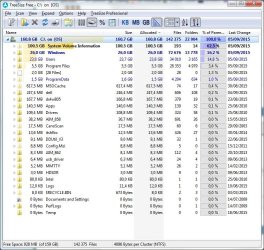
Hi, I attached the Tree Size Free screenshot. I definitely shows that my partition is eaten by the restore points. And, cccleaner shows that a huge part of them was created in August, when Windows 7 tried to upgrade to Win10 several times and upgrade always failed because my graphic card Geforce 330M driver is not compatible with Win 10 (My Dell laptop uses Hybrid power Technology).
So, I need to do two things:
- get rid of many restore points
- find how to stop upgrades to Win10 but keep upgrades for Win 7
Any help will be appreciated !
 

Attachments

  • Tree Size Free of System Partition.jpg
    Tree Size Free of System Partition.jpg
    103.7 KB · Views: 0

My Computer My Computer

At a glance

Windows 7 Home Premium 32 bitIntel Core I5 M4504GBNVIDIA Geforce 330M
Computer type
Laptop
Computer Manufacturer/Model Number
Dell Vostro 3700
OS
Windows 7 Home Premium 32 bit
CPU
Intel Core I5 M450
Memory
4GB
Graphics Card(s)
NVIDIA Geforce 330M
Hard Drives
300GB
Antivirus
ESET NOD32
Browser
Firefox
For System Restore points:

Control panel/system/system protection/configure

At that location, you can turn off restore points or delete them.

Keep an eye on it. If they recur, you need to find out why. One good suspect is Avast anti-virus, if you use it.
 

My Computer My Computer

At a glance

Windows 7 Home Premium SP1, 64-bitIntel Skylake i5-6600K, not overclocked8 GB HyperX DDR4-2666 (2 x 4 GB)none; graphics are integrated on CPU
Computer type
PC/Desktop
Computer Manufacturer/Model Number
Ignatz Special; 4 speed manual gearbox; factory air conditioning; one of one
OS
Windows 7 Home Premium SP1, 64-bit
CPU
Intel Skylake i5-6600K, not overclocked
Motherboard
AsRock Z170M Extreme 4, micro ATX
Memory
8 GB HyperX DDR4-2666 (2 x 4 GB)
Graphics Card(s)
none; graphics are integrated on CPU
Sound Card
onboard: Realtek ALC1150; external: USB Behringer UF0-202
Monitor(s) Displays
Dell S2340M 23 inch IPS
Screen Resolution
1600 x 900
Hard Drives
System: Crucial MX100 series SSD, 128 GB;
Data: Samsung Spinpoint 103SJ, 1 TB;
Backup: WD Caviar Green WD30EZRX-00D8PB0, 3 TB
PSU
Rosewill SilentNight 500 watt fanless, semi-modular
Case
Antec Solo II
Cooling
Noctua NH-U12S; Noctua F12 intake, Noctua S12A exhaust
Keyboard
Microsoft 200 6JH-00001 USB
Mouse
Dell or Microsoft optical wired; USB
Antivirus
Microsoft Security Essentials and Malwarebytes Premium
Browser
Pale Moon
Other Info
All fans PWM; speeds at idle: CPU circa 500 rpm; intake circa 600 rpm; exhaust circa 600 rpm; CPU temps 27 idle and 47 C load in a warm room (27 C/81 F) when running Intel Extreme Tuning Utility stress test.
System partition full!

Thank you very much for all the help!
My problem is solved after configuring the System Protection and deleting restore points and changing reserved space for new ones to 10%.
I do not use Avast but NOD32 as antivirus.
Best regards to all that helped .
 

My Computer My Computer

At a glance

Windows 7 Home Premium 32 bitIntel Core I5 M4504GBNVIDIA Geforce 330M
Computer type
Laptop
Computer Manufacturer/Model Number
Dell Vostro 3700
OS
Windows 7 Home Premium 32 bit
CPU
Intel Core I5 M450
Memory
4GB
Graphics Card(s)
NVIDIA Geforce 330M
Hard Drives
300GB
Antivirus
ESET NOD32
Browser
Firefox
Back
Top