System Process consuming a whole CPU core randomly.

Blake81

New member
So, I have this old Win7 laptop that I use for old games and is sharing a KVM with my current Win11 machine. Recently (as in, within the last 2-3 months), when I spend a few days without using it and switch back onto it, I find that one of its CPU's cores (it has four) is all the way to 100%, all of which comes from the System process in Taskmgr. If I restart the PC, all goes back to normal and will work without issue for a few days, then the same thing happens.

Any idea of what can I do to figure what's causing this? I've already stripped this PC of any software that I thought could be causing this, but can't seem to find the cause.

Thanks in advance.
 

My Computer

Computer type
PC/Desktop
OS
Windows 7 Ultimate SP1 x64
CPU
Intel(R) Core(TM) i7-7700 CPU @ 3.60GHz
Motherboard
Asrock Z279 Extreme 4
Memory
32 GB
Graphics Card(s)
NVIDIA GeForce RTX 2060
whats the other part of the description....(nvidia/antimalware/etc.... got about 20 on my rig)
any chance of a screenshot
 

My Computer

Computer type
PC/Desktop
Computer Manufacturer/Model Number
medionl/Aspire 6930G/acer x55a
OS
W7 home premium 32bit/W7HP 64bit/w10 tp insider ring
CPU
E5300 dual core
Motherboard
medion MS7366
Memory
3gb
Graphics Card(s)
Nvidia Geforce 7100 Nforce 630i
Monitor(s) Displays
avixc
Internet Speed
n (isp resticted to 72)
Antivirus
mse/pands
Browser
palemoon
Other Info
Belkin Fd7050 n USB using Railink RT2870 drivers, more upto date
whats the other part of the description....(nvidia/antimalware/etc.... got about 20 on my rig)
any chance of a screenshot
OK, so the laptop is an Acer Aspire E3-111
OS: Win7 Home Premium
RAM: 8GB
GPU: Intel HD
CPU: Intel N2940

Laptop is forever offline (blocked on router and subnet mask), so the AV was removed long ago. Also, Windows Update (which was my first suspect) has been disabled right on the Service long before this issue began.

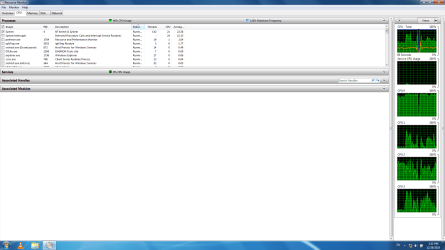
As for a screencap, I had to wait for it to happen again. Here you go:
Leak.png

It seems to be the System and System Interrupts, which AFAIK, is in charge of drivers and the like.
 

My Computer

Computer type
PC/Desktop
OS
Windows 7 Ultimate SP1 x64
CPU
Intel(R) Core(TM) i7-7700 CPU @ 3.60GHz
Motherboard
Asrock Z279 Extreme 4
Memory
32 GB
Graphics Card(s)
NVIDIA GeForce RTX 2060
NO.....blocking via ~ Router/Subnet does not stop any installed program from "phoning home"
you need to adjust the settings for all MS and third party programs so they won't

note
most programs have a limited time-frame in which updating will last
 

My Computer

Computer type
PC/Desktop
Computer Manufacturer/Model Number
medionl/Aspire 6930G/acer x55a
OS
W7 home premium 32bit/W7HP 64bit/w10 tp insider ring
CPU
E5300 dual core
Motherboard
medion MS7366
Memory
3gb
Graphics Card(s)
Nvidia Geforce 7100 Nforce 630i
Monitor(s) Displays
avixc
Internet Speed
n (isp resticted to 72)
Antivirus
mse/pands
Browser
palemoon
Other Info
Belkin Fd7050 n USB using Railink RT2870 drivers, more upto date
NO.....blocking via ~ Router/Subnet does not stop any installed program from "phoning home"
you need to adjust the settings for all MS and third party programs so they won't

note
most programs have a limited time-frame in which updating will last

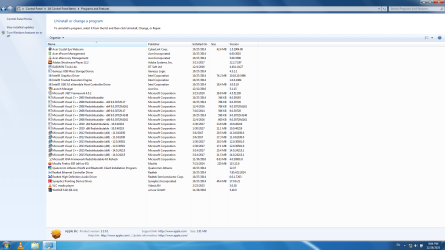
The only program left that could possibly be trying to phone home is Daemon Tools, and I know it's not. I disabled the "Check for Updates" and "Send Statistics". Beyond that... I am unsure of what could be. When I said I stripped this PC of most apps, I meant it; this is all that's left installed:
Programs.png

Do any of them seem like it could be the guilty party?
 

My Computer

Computer type
PC/Desktop
OS
Windows 7 Ultimate SP1 x64
CPU
Intel(R) Core(TM) i7-7700 CPU @ 3.60GHz
Motherboard
Asrock Z279 Extreme 4
Memory
32 GB
Graphics Card(s)
NVIDIA GeForce RTX 2060
hi...
.adobe/daemon/mozilla/vlc will Highly likely be phoning home

unsure
acer launch manager/MS xna/winrar

from Admin tools
open task scheduler

click on both major settings Local and library
another window will appear showing whats scheduled ready to be "updated"
 

My Computer

Computer type
PC/Desktop
Computer Manufacturer/Model Number
medionl/Aspire 6930G/acer x55a
OS
W7 home premium 32bit/W7HP 64bit/w10 tp insider ring
CPU
E5300 dual core
Motherboard
medion MS7366
Memory
3gb
Graphics Card(s)
Nvidia Geforce 7100 Nforce 630i
Monitor(s) Displays
avixc
Internet Speed
n (isp resticted to 72)
Antivirus
mse/pands
Browser
palemoon
Other Info
Belkin Fd7050 n USB using Railink RT2870 drivers, more upto date
I actually might have solved the issue. I heard from a source that sometimes, the wireless can cause this problem. So I went and disabled the WiFi on Device Manager. Hasn't done it again since early morning.

I'll be monitoring it for a few days and see if it happens again.

EDIT: Nvm, false alarm. Did it again, it just took longer.

- - - Updated - - -

hi...
.adobe/daemon/mozilla/vlc will Highly likely be phoning home

unsure
acer launch manager/MS xna/winrar

OK, Adobe Flash has updates disabled (Otherwise it would had already died from the "Killswitch Update" it got a few years back."), same with Daemon and VLC. Mozilla didn't allow me to fully disable them on the app so did it via Regedit (now it shows "Updates blocked by admin").


from Admin tools
open task scheduler
click on both major settings Local and library
another window will appear showing whats scheduled ready to be "updated"

I'm having a bit of a hard time finding the "Major settings" in Local and Library. Where is it usually found?
 
Last edited:

My Computer

Computer type
PC/Desktop
OS
Windows 7 Ultimate SP1 x64
CPU
Intel(R) Core(TM) i7-7700 CPU @ 3.60GHz
Motherboard
Asrock Z279 Extreme 4
Memory
32 GB
Graphics Card(s)
NVIDIA GeForce RTX 2060

My Computers

System One System Two

sorry updating the thread didn't give me a notification

when you open task schedular
left hand side gives those 2 headings
click on them individually
then in the centre window it will list any permanent jobs

note in the right hand window there is also an option to show all running tasks


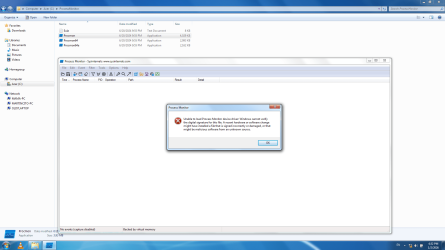
re Procmon ---- possibly the culprit... as its failing and likely retrying

run sfc /scannow

from an admin command prompt
chkdsk/r

and from the ms catalogue (you can download it via another comp to usb and run it from that)
kb947821
 

My Computer

Computer type
PC/Desktop
Computer Manufacturer/Model Number
medionl/Aspire 6930G/acer x55a
OS
W7 home premium 32bit/W7HP 64bit/w10 tp insider ring
CPU
E5300 dual core
Motherboard
medion MS7366
Memory
3gb
Graphics Card(s)
Nvidia Geforce 7100 Nforce 630i
Monitor(s) Displays
avixc
Internet Speed
n (isp resticted to 72)
Antivirus
mse/pands
Browser
palemoon
Other Info
Belkin Fd7050 n USB using Railink RT2870 drivers, more upto date
sorry updating the thread didn't give me a notification

when you open task schedular
left hand side gives those 2 headings
click on them individually
then in the centre window it will list any permanent jobs

note in the right hand window there is also an option to show all running tasks


re Procmon ---- possibly the culprit... as its failing and likely retrying

run sfc /scannow

from an admin command prompt
chkdsk/r

and from the ms catalogue (you can download it via another comp to usb and run it from that)
kb947821


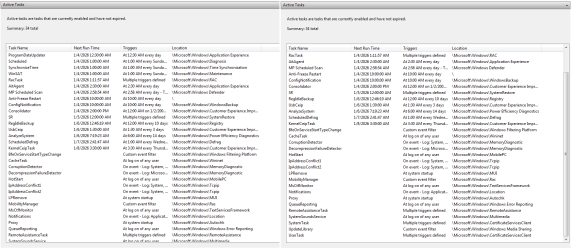
OK, center window in Task Scheduler shows these tasks active. Do any of them looks suspicious? (The one called anti-freeze is my own temp fix for this issue, which is to make the PC restart itself every 24 hours)
Tasks.png

As for the running tasks, it was only this three:
Alltasks.png
No idea what they are.

Where would I find that "re Procmon"?

Did the chkdsk and scannow, all came normal.

What does that kb947821 do?
 

My Computer

Computer type
PC/Desktop
OS
Windows 7 Ultimate SP1 x64
CPU
Intel(R) Core(TM) i7-7700 CPU @ 3.60GHz
Motherboard
Asrock Z279 Extreme 4
Memory
32 GB
Graphics Card(s)
NVIDIA GeForce RTX 2060
that kb is MS's w7s os repair tool (w11 equivalent Dism.restore health)
 

My Computer

Computer type
PC/Desktop
Computer Manufacturer/Model Number
medionl/Aspire 6930G/acer x55a
OS
W7 home premium 32bit/W7HP 64bit/w10 tp insider ring
CPU
E5300 dual core
Motherboard
medion MS7366
Memory
3gb
Graphics Card(s)
Nvidia Geforce 7100 Nforce 630i
Monitor(s) Displays
avixc
Internet Speed
n (isp resticted to 72)
Antivirus
mse/pands
Browser
palemoon
Other Info
Belkin Fd7050 n USB using Railink RT2870 drivers, more upto date
that kb is MS's w7s os repair tool (w11 equivalent Dism.restore health)

OK, so finally got the time today to install the tool. Am I supposed to simply install it or is there something else I must run somewhere?
 

My Computer

Computer type
PC/Desktop
OS
Windows 7 Ultimate SP1 x64
CPU
Intel(R) Core(TM) i7-7700 CPU @ 3.60GHz
Motherboard
Asrock Z279 Extreme 4
Memory
32 GB
Graphics Card(s)
NVIDIA GeForce RTX 2060
download then run
 

My Computer

Computer type
PC/Desktop
Computer Manufacturer/Model Number
medionl/Aspire 6930G/acer x55a
OS
W7 home premium 32bit/W7HP 64bit/w10 tp insider ring
CPU
E5300 dual core
Motherboard
medion MS7366
Memory
3gb
Graphics Card(s)
Nvidia Geforce 7100 Nforce 630i
Monitor(s) Displays
avixc
Internet Speed
n (isp resticted to 72)
Antivirus
mse/pands
Browser
palemoon
Other Info
Belkin Fd7050 n USB using Railink RT2870 drivers, more upto date

My Computer

Computer type
PC/Desktop
OS
Windows 7 Ultimate SP1 x64
CPU
Intel(R) Core(TM) i7-7700 CPU @ 3.60GHz
Motherboard
Asrock Z279 Extreme 4
Memory
32 GB
Graphics Card(s)
NVIDIA GeForce RTX 2060
never known it run that long.......should have timed out

please goto
c>windows>logs>cbs

in this subfolder there should be a file labled SURT
please copy/paste the contents
 

My Computer

Computer type
PC/Desktop
Computer Manufacturer/Model Number
medionl/Aspire 6930G/acer x55a
OS
W7 home premium 32bit/W7HP 64bit/w10 tp insider ring
CPU
E5300 dual core
Motherboard
medion MS7366
Memory
3gb
Graphics Card(s)
Nvidia Geforce 7100 Nforce 630i
Monitor(s) Displays
avixc
Internet Speed
n (isp resticted to 72)
Antivirus
mse/pands
Browser
palemoon
Other Info
Belkin Fd7050 n USB using Railink RT2870 drivers, more upto date
Back
Top