System Recovery Question

CHADSKI22

New member
Local time
4:28 PM
Messages
5
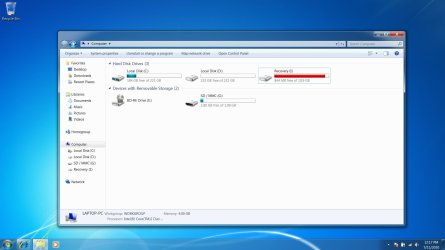
I was recently trying out the Windows 7 Recovery tools. I went through the motions of creating an image, but I did not save the image to any media. Now, when I go into My Computer, I have a "Recovery I" drive listed in red with my other two hard drives. How can I eliminate this drive?
 

My Computer

OS
Windows 7
That is your OEM Recovery partition, No Data should be add.

You will need to delete all data that you added.

Have you made your OEM Recovery DVD's?
 

My Computer

OS
ME/XP/Vista/Win7
I already have a hidden recovery partition on Drive C. That is what was puzzling. So if I delete the data on "I", that should disappear?
 

My Computer

OS
Windows 7
The first partition is for repair.
C: is OS
D: is Data
I: is reinstalling OS.
Delete all the Data you have add, not the OEM data.
 

My Computer

OS
ME/XP/Vista/Win7
OK. I have deleted the data, but the "I" Drive is still listed. Do I need to reboot to eliminate it?
 

My Computer

OS
Windows 7
I answered my own question. The drive is now gone upon reboot. Thanks for your help.
 

My Computer

OS
Windows 7
Reread my post.

I:is reinstalling OS.
Delete all the Data you have add, not the OEM data.
 

My Computer

OS
ME/XP/Vista/Win7
Back
Top