
System Repair Disc - Create

How to Create a Windows 7 System Repair Disc

   Information
This will show you how to create a Windows 7 system repair disc to be able to use to boot to system recovery options to help recover your Windows 7 installation if you don't have a Windows installation disc, can't find your Windows installation disc, or can't access the recovery options provided by your computer manufacturer.

A system repair disc is not able to install Windows 7.

   Note
If you are unable to boot your Windows 7 to create a Windows 7 System Repair Disc, then you could create it on another computer to use on your computer.

   Warning

  • A system repair disc is not the same as a OEM factory recovery/restore disc.
  • A system repair disc is not an installation disc. You cannot do a repair install or install Windows 7 with a system repair disc.
  • A system repair disc can only be used to repair Windows 7 through the system recovery options.
  • 32-bit System Repair Disc can only be created on a 32-bit Windows 7.
  • 64-bit System Repair Disc can only be created on a 64-bit Windows 7.
  • 32-bit System Repair Disc can only be used to repair a 32-bit Windows 7.
  • 64-bit System Repair Disc can only be used to repair a 64-bit Windows 7.

:note: For Windows 10, see the following link - System Repair Disc - Create in Windows 10 - Windows 10 Tutorials

EXAMPLE: System Recovery Options
NOTE: Using the System Repair Disc that you have created below, you can boot to the system recovery options screen below.
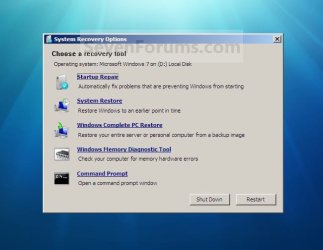
System_Recovery_Options.jpg


Here's How:
1. Open the Start Menu, then type recdisc.exe in the search box and press Enter.
A) Go to step 3.
OR

2. Open the Control Panel (icons view), and click on the Backup and Restore icon.
A) Click on the Create a System repair disc link in the left blue pane. (See screenshot below)
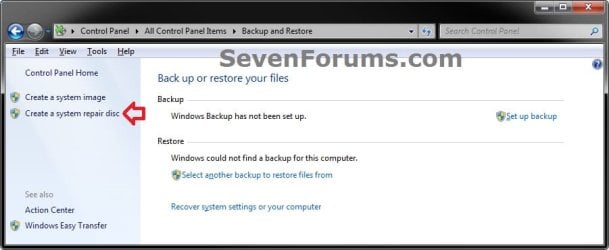
Backup_and_Restore.jpg
3. Insert a blank unformatted CD or DVD into your CD/DVD drive and click on the Create disc button. (See screenshot below)
NOTE: If you are prompted to insert a Windows installation disc, it means that the files needed to create the system repair disc cannot be found on your computer. Insert a Windows 7 installation disc.
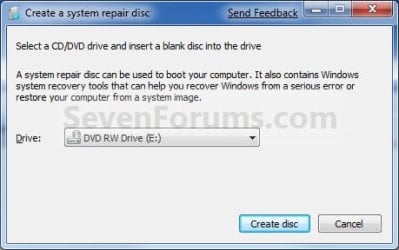
Step1.jpg
4. It will now start creating the System Repair Disc. (See screenshot below)
NOTE: If a AutoPlay window pops up, just close it.
Step2.jpg
5. When it's finished, click on the Close button. (See screenshot below)
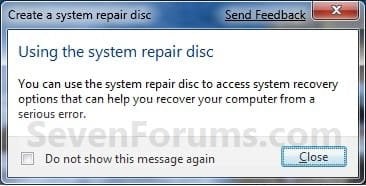
Step3.jpg
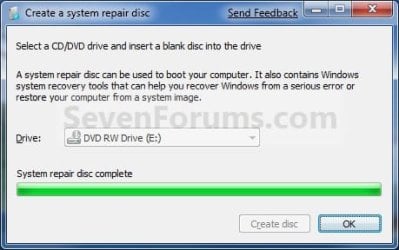
6. Click on OK. (See screenshot below)
Step4.jpg
7. Remove and label your new Windows 7 System Repair Disc from the CD/DVD drive.

   Tip
If you would like to create a bootable System Repair USB flash drive, then you could use the free program ImgBurn to create an ISO file with this Windows 7 System Repair Disc (DVD), then use the Part 1 section in the tutorial below to extract the ISO file to a USB flash drive.

Windows 7 USB/DVD Download Tool


That's it,
Shawn


Last edited:
can i use this repair disk solving the problem such as restart loop after starting windows?
 

My Computer

Computer type
PC/Desktop
OS
Windows 7 Ultimate x32

My Computer

Computer type
PC/Desktop
Computer Manufacturer/Model Number
Self built custom
OS
64-bit Windows 11 Pro for Workstations
CPU
Intel i7-8700K OC'd to 5 GHz
Motherboard
ASUS ROG Maximus XI Formula Z390
Memory
64 GB (4x16GB) G.SKILL TridentZ RGB DDR4 3600 MHz
Graphics Card(s)
ASUS ROG-STRIX-GTX1080TI-O11G-GAMING
Sound Card
Integrated
Monitor(s) Displays
2 x Samsung Odyssey G7 27"
Screen Resolution
2560x1440
Hard Drives
1TB Samsung 990 PRO M.2,
4TB Samsung 990 PRO PRO M.2,
TerraMaster F8 SSD Plus NAS
PSU
Seasonic Prime Titanium 850W
Case
Thermaltake Core P3
Cooling
Corsair Hydro H115i
Keyboard
Logitech wireless K800
Mouse
Logitech MX Master 4
Internet Speed
2 Gb/s Download and 100 Mb/s Upload
Antivirus
Malwarebyte Anti-Malware Premium
Browser
Google Chrome
Other Info
Logitech Z625 speaker system,
Logitech BRIO 4K Pro webcam,
HP Color LaserJet Pro MFP M477fdn,
APC SMART-UPS RT 1000 XL - SURT1000XLI,
Galaxy S23 Plus phone
How much space will occupy for system repair disk on CD or dvd? I am using windows 7 ultimate.
 

My Computer

Computer type
PC/Desktop
OS
Windows 7 Ultimate x32
How much space will occupy for system repair disk on CD or dvd? I am using windows 7 ultimate.

Hello Ganesh,

It only needs about 150 MB of space since it's not an installation DVD, so any DVD can be used. :)
 

My Computer

Computer type
PC/Desktop
Computer Manufacturer/Model Number
Self built custom
OS
64-bit Windows 11 Pro for Workstations
CPU
Intel i7-8700K OC'd to 5 GHz
Motherboard
ASUS ROG Maximus XI Formula Z390
Memory
64 GB (4x16GB) G.SKILL TridentZ RGB DDR4 3600 MHz
Graphics Card(s)
ASUS ROG-STRIX-GTX1080TI-O11G-GAMING
Sound Card
Integrated
Monitor(s) Displays
2 x Samsung Odyssey G7 27"
Screen Resolution
2560x1440
Hard Drives
1TB Samsung 990 PRO M.2,
4TB Samsung 990 PRO PRO M.2,
TerraMaster F8 SSD Plus NAS
PSU
Seasonic Prime Titanium 850W
Case
Thermaltake Core P3
Cooling
Corsair Hydro H115i
Keyboard
Logitech wireless K800
Mouse
Logitech MX Master 4
Internet Speed
2 Gb/s Download and 100 Mb/s Upload
Antivirus
Malwarebyte Anti-Malware Premium
Browser
Google Chrome
Other Info
Logitech Z625 speaker system,
Logitech BRIO 4K Pro webcam,
HP Color LaserJet Pro MFP M477fdn,
APC SMART-UPS RT 1000 XL - SURT1000XLI,
Galaxy S23 Plus phone
So 150 mb means CD is enough, I will burn on CD instead of dvd. Thanks for information about the space. :), but how to burn on USB?
 

My Computer

Computer type
PC/Desktop
OS
Windows 7 Ultimate x32
There's not an option to do so on a USB.

If you have retail installation media, you could use it instead since it includes this already.
 

My Computer

Computer type
PC/Desktop
Computer Manufacturer/Model Number
Self built custom
OS
64-bit Windows 11 Pro for Workstations
CPU
Intel i7-8700K OC'd to 5 GHz
Motherboard
ASUS ROG Maximus XI Formula Z390
Memory
64 GB (4x16GB) G.SKILL TridentZ RGB DDR4 3600 MHz
Graphics Card(s)
ASUS ROG-STRIX-GTX1080TI-O11G-GAMING
Sound Card
Integrated
Monitor(s) Displays
2 x Samsung Odyssey G7 27"
Screen Resolution
2560x1440
Hard Drives
1TB Samsung 990 PRO M.2,
4TB Samsung 990 PRO PRO M.2,
TerraMaster F8 SSD Plus NAS
PSU
Seasonic Prime Titanium 850W
Case
Thermaltake Core P3
Cooling
Corsair Hydro H115i
Keyboard
Logitech wireless K800
Mouse
Logitech MX Master 4
Internet Speed
2 Gb/s Download and 100 Mb/s Upload
Antivirus
Malwarebyte Anti-Malware Premium
Browser
Google Chrome
Other Info
Logitech Z625 speaker system,
Logitech BRIO 4K Pro webcam,
HP Color LaserJet Pro MFP M477fdn,
APC SMART-UPS RT 1000 XL - SURT1000XLI,
Galaxy S23 Plus phone
sorry, I dont understand this line: Remove and label your new Windows 7 System Repair Disc from the CD/DVD drive means what?
 

My Computer

Computer type
PC/Desktop
OS
Windows 7 Ultimate x32
It means to write what you want on the label (sticker) on the top of the CD/DVD to help you know what it is for. :)
 

My Computer

Computer type
PC/Desktop
Computer Manufacturer/Model Number
Self built custom
OS
64-bit Windows 11 Pro for Workstations
CPU
Intel i7-8700K OC'd to 5 GHz
Motherboard
ASUS ROG Maximus XI Formula Z390
Memory
64 GB (4x16GB) G.SKILL TridentZ RGB DDR4 3600 MHz
Graphics Card(s)
ASUS ROG-STRIX-GTX1080TI-O11G-GAMING
Sound Card
Integrated
Monitor(s) Displays
2 x Samsung Odyssey G7 27"
Screen Resolution
2560x1440
Hard Drives
1TB Samsung 990 PRO M.2,
4TB Samsung 990 PRO PRO M.2,
TerraMaster F8 SSD Plus NAS
PSU
Seasonic Prime Titanium 850W
Case
Thermaltake Core P3
Cooling
Corsair Hydro H115i
Keyboard
Logitech wireless K800
Mouse
Logitech MX Master 4
Internet Speed
2 Gb/s Download and 100 Mb/s Upload
Antivirus
Malwarebyte Anti-Malware Premium
Browser
Google Chrome
Other Info
Logitech Z625 speaker system,
Logitech BRIO 4K Pro webcam,
HP Color LaserJet Pro MFP M477fdn,
APC SMART-UPS RT 1000 XL - SURT1000XLI,
Galaxy S23 Plus phone
Thank you once again, hopefully this fixes my gaming rigs problem with the bootmgr missing. :huh:
 

My Computer

Computer type
PC/Desktop
Computer Manufacturer/Model Number
Custom Build
OS
Windows 7 Ultimate x64
CPU
Intel Core i5-3570K Quad-Core Processor 3.4GHz
Motherboard
ASUS P8Z77-V
Memory
8GB Corsair Vengance 1600MHz
Graphics Card(s)
EVGA GeForce GTX 970 Super Clocked ACX 2.0 4GB GDDR5
Monitor(s) Displays
HANNS-G HL229
Screen Resolution
1920 x 1080
Hard Drives
WD Blue 1TB, WD Blue 500GB, 120GB - Samsung 840 Series SSD (not hooked up.)
PSU
OCZ 600W
Case
Antec Twelve Hundred V3 Black Steel ATX Full Tower
Keyboard
Logitech G105 - Call of Duty MW3 Edition
Mouse
Etekcity® Scroll FLY 3200 DPI Wired
Internet Speed
28Mbps
Antivirus
Malwarebytes
Browser
Google Chrome
Hi, is the system repair disk the same for any Win7 Home Premium x64bit machine? I already have one created from another laptop. Do I need to make another one from my own laptop?
 

My Computer

Computer type
Laptop
Computer Manufacturer/Model Number
Toshiba
OS
Windows 7 Home Premium 64bit
Hello lc007, :)

It'll also need to be for the same edition of Windows you have.
 

My Computer

Computer type
PC/Desktop
Computer Manufacturer/Model Number
Self built custom
OS
64-bit Windows 11 Pro for Workstations
CPU
Intel i7-8700K OC'd to 5 GHz
Motherboard
ASUS ROG Maximus XI Formula Z390
Memory
64 GB (4x16GB) G.SKILL TridentZ RGB DDR4 3600 MHz
Graphics Card(s)
ASUS ROG-STRIX-GTX1080TI-O11G-GAMING
Sound Card
Integrated
Monitor(s) Displays
2 x Samsung Odyssey G7 27"
Screen Resolution
2560x1440
Hard Drives
1TB Samsung 990 PRO M.2,
4TB Samsung 990 PRO PRO M.2,
TerraMaster F8 SSD Plus NAS
PSU
Seasonic Prime Titanium 850W
Case
Thermaltake Core P3
Cooling
Corsair Hydro H115i
Keyboard
Logitech wireless K800
Mouse
Logitech MX Master 4
Internet Speed
2 Gb/s Download and 100 Mb/s Upload
Antivirus
Malwarebyte Anti-Malware Premium
Browser
Google Chrome
Other Info
Logitech Z625 speaker system,
Logitech BRIO 4K Pro webcam,
HP Color LaserJet Pro MFP M477fdn,
APC SMART-UPS RT 1000 XL - SURT1000XLI,
Galaxy S23 Plus phone
Hello again Brink! Both machines are running Win7 Home Premium x64 bit. That's the same edition, right?
 

My Computer

Computer type
Laptop
Computer Manufacturer/Model Number
Toshiba
OS
Windows 7 Home Premium 64bit
Yep, that's right. You're good to go then. :)
 

My Computer

Computer type
PC/Desktop
Computer Manufacturer/Model Number
Self built custom
OS
64-bit Windows 11 Pro for Workstations
CPU
Intel i7-8700K OC'd to 5 GHz
Motherboard
ASUS ROG Maximus XI Formula Z390
Memory
64 GB (4x16GB) G.SKILL TridentZ RGB DDR4 3600 MHz
Graphics Card(s)
ASUS ROG-STRIX-GTX1080TI-O11G-GAMING
Sound Card
Integrated
Monitor(s) Displays
2 x Samsung Odyssey G7 27"
Screen Resolution
2560x1440
Hard Drives
1TB Samsung 990 PRO M.2,
4TB Samsung 990 PRO PRO M.2,
TerraMaster F8 SSD Plus NAS
PSU
Seasonic Prime Titanium 850W
Case
Thermaltake Core P3
Cooling
Corsair Hydro H115i
Keyboard
Logitech wireless K800
Mouse
Logitech MX Master 4
Internet Speed
2 Gb/s Download and 100 Mb/s Upload
Antivirus
Malwarebyte Anti-Malware Premium
Browser
Google Chrome
Other Info
Logitech Z625 speaker system,
Logitech BRIO 4K Pro webcam,
HP Color LaserJet Pro MFP M477fdn,
APC SMART-UPS RT 1000 XL - SURT1000XLI,
Galaxy S23 Plus phone
:thumbsup:
 

My Computer

Computer type
PC/Desktop
Computer Manufacturer/Model Number
Self built custom
OS
64-bit Windows 11 Pro for Workstations
CPU
Intel i7-8700K OC'd to 5 GHz
Motherboard
ASUS ROG Maximus XI Formula Z390
Memory
64 GB (4x16GB) G.SKILL TridentZ RGB DDR4 3600 MHz
Graphics Card(s)
ASUS ROG-STRIX-GTX1080TI-O11G-GAMING
Sound Card
Integrated
Monitor(s) Displays
2 x Samsung Odyssey G7 27"
Screen Resolution
2560x1440
Hard Drives
1TB Samsung 990 PRO M.2,
4TB Samsung 990 PRO PRO M.2,
TerraMaster F8 SSD Plus NAS
PSU
Seasonic Prime Titanium 850W
Case
Thermaltake Core P3
Cooling
Corsair Hydro H115i
Keyboard
Logitech wireless K800
Mouse
Logitech MX Master 4
Internet Speed
2 Gb/s Download and 100 Mb/s Upload
Antivirus
Malwarebyte Anti-Malware Premium
Browser
Google Chrome
Other Info
Logitech Z625 speaker system,
Logitech BRIO 4K Pro webcam,
HP Color LaserJet Pro MFP M477fdn,
APC SMART-UPS RT 1000 XL - SURT1000XLI,
Galaxy S23 Plus phone
:cry:

My Windows 7 Pro 64bit system is no longer booting. When I start the PC I get the POST screen, then when the Windows logo is supposed to appear I just get a black text screen with the "_" cursor slowly moving down the screen about 1 line every second.

I'm guessing my boot record is messed up and I want to try and repair it, BUT when I boot from my installation DVD and choose to repair it doesn't show any Windows installations. If I select to look for a driver I can see the system drive with all my files on it, so I know the Windows drive is working.

I just went to my second Win 7 Pro 64 system and tried to create a repair CD as laid out in this post, but the CD does not boot. Any ideas why the "Create a system repair disk" would work without any errors, but the resulting CD would not be bootable?
 

My Computer

Computer type
PC/Desktop
Computer Manufacturer/Model Number
Custom build
OS
Windows 7 Pro 64bit
CPU
AMD FX 6350 Six core CPU @ 3.9Ghz
Motherboard
Asus m5a88-m
Memory
24GB
Graphics Card(s)
nVidia GeForce GTX 660
Sound Card
Onboard
Monitor(s) Displays
Vizio 32" TV + 24" Asus
Screen Resolution
1980x1200 (x2)
Hard Drives
240Gb OCZ Agility 3 (C:)
1TB Western Digital (D:)
120Gb OCZ Agility 3 (E:)
PSU
Corsair
Case
Centurion
Keyboard
Microsoft Wireless 3000 v2
Mouse
Microsoft Wireless 3000
Antivirus
MSE
Hello Calab, :)

Did you see the black "Press a key to boot from CD/DVD" screen at boot to boot from the CD/DVD?
 

My Computer

Computer type
PC/Desktop
Computer Manufacturer/Model Number
Self built custom
OS
64-bit Windows 11 Pro for Workstations
CPU
Intel i7-8700K OC'd to 5 GHz
Motherboard
ASUS ROG Maximus XI Formula Z390
Memory
64 GB (4x16GB) G.SKILL TridentZ RGB DDR4 3600 MHz
Graphics Card(s)
ASUS ROG-STRIX-GTX1080TI-O11G-GAMING
Sound Card
Integrated
Monitor(s) Displays
2 x Samsung Odyssey G7 27"
Screen Resolution
2560x1440
Hard Drives
1TB Samsung 990 PRO M.2,
4TB Samsung 990 PRO PRO M.2,
TerraMaster F8 SSD Plus NAS
PSU
Seasonic Prime Titanium 850W
Case
Thermaltake Core P3
Cooling
Corsair Hydro H115i
Keyboard
Logitech wireless K800
Mouse
Logitech MX Master 4
Internet Speed
2 Gb/s Download and 100 Mb/s Upload
Antivirus
Malwarebyte Anti-Malware Premium
Browser
Google Chrome
Other Info
Logitech Z625 speaker system,
Logitech BRIO 4K Pro webcam,
HP Color LaserJet Pro MFP M477fdn,
APC SMART-UPS RT 1000 XL - SURT1000XLI,
Galaxy S23 Plus phone
Nope... Just a message about the media not being bootable and to press any key.

I was able to get my system working though. I had to go into the BIOS and mess with the UEFI settings to get my installation DVD to detect the Windows installation.

All is well again on my PC. :geek:
 

My Computer

Computer type
PC/Desktop
Computer Manufacturer/Model Number
Custom build
OS
Windows 7 Pro 64bit
CPU
AMD FX 6350 Six core CPU @ 3.9Ghz
Motherboard
Asus m5a88-m
Memory
24GB
Graphics Card(s)
nVidia GeForce GTX 660
Sound Card
Onboard
Monitor(s) Displays
Vizio 32" TV + 24" Asus
Screen Resolution
1980x1200 (x2)
Hard Drives
240Gb OCZ Agility 3 (C:)
1TB Western Digital (D:)
120Gb OCZ Agility 3 (E:)
PSU
Corsair
Case
Centurion
Keyboard
Microsoft Wireless 3000 v2
Mouse
Microsoft Wireless 3000
Antivirus
MSE
And if you have an install dvd you don`t really need to create a system repair disc, but nice to have an extra :)
 

My Computer

Computer type
PC/Desktop
Computer Manufacturer/Model Number
Skylake Special #666
OS
Windows 10 Pro x64
CPU
Intel Core i7 6700K
Motherboard
Asus Sabertooth Z170 Mark 1
Memory
GSkill TridentZ RGB 16GB 3600 16-16-16-36
Graphics Card(s)
EVGA GTX 980 Ti SC x2
Sound Card
Realtek High Definition
Monitor(s) Displays
AOC G2460PG
Screen Resolution
1920 x 1080 144Hz
Hard Drives
Samsung 860 Pro 256GB, Seagate Barracuda 4TB x2
PSU
EVGA 1000 P2, EVGA White Custom Braided Cables
Case
Corsair Vengeance C70 Gunmetal Black
Cooling
Corsair H100i v2, Corsair ML120 x2, Thermal Grizzly Kryonaut
Keyboard
Logitech G910 Orion Spectrum
Mouse
Logitech G700s
Internet Speed
Verizon Fios Quantum Gateway 75/75
Antivirus
Windows Defender, Malwarebytes Free 3.8.3
Browser
Chrome
Other Info
Corsair SP120 x4, LG Blu-ray Drive, Durabrand HT-395 100 Watt Dolby Digital Amp, Corsair H2100 Wireless 7.1 Headset
I always prefer to have an installation DVD or USB instead as well. :)
 

My Computer

Computer type
PC/Desktop
Computer Manufacturer/Model Number
Self built custom
OS
64-bit Windows 11 Pro for Workstations
CPU
Intel i7-8700K OC'd to 5 GHz
Motherboard
ASUS ROG Maximus XI Formula Z390
Memory
64 GB (4x16GB) G.SKILL TridentZ RGB DDR4 3600 MHz
Graphics Card(s)
ASUS ROG-STRIX-GTX1080TI-O11G-GAMING
Sound Card
Integrated
Monitor(s) Displays
2 x Samsung Odyssey G7 27"
Screen Resolution
2560x1440
Hard Drives
1TB Samsung 990 PRO M.2,
4TB Samsung 990 PRO PRO M.2,
TerraMaster F8 SSD Plus NAS
PSU
Seasonic Prime Titanium 850W
Case
Thermaltake Core P3
Cooling
Corsair Hydro H115i
Keyboard
Logitech wireless K800
Mouse
Logitech MX Master 4
Internet Speed
2 Gb/s Download and 100 Mb/s Upload
Antivirus
Malwarebyte Anti-Malware Premium
Browser
Google Chrome
Other Info
Logitech Z625 speaker system,
Logitech BRIO 4K Pro webcam,
HP Color LaserJet Pro MFP M477fdn,
APC SMART-UPS RT 1000 XL - SURT1000XLI,
Galaxy S23 Plus phone
Back
Top