System Restore not holding restore points

prossv

New member
Local time
8:54 AM
Messages
7
System restore is on and set to max space on C drive (918GB)

When I create a restore point, it take s a min or two then says it creates successfully, but when I open system restore, it shows no restore points.

I have already made sure that the Volume Shadow Copy Service is Running & set on Automatic AND I Reset the Repository.

Still it does not work.

Thank you for any further ideas.
 

My Computer My Computer

Computer Manufacturer/Model Number
Gateway DX4831
OS
Windows 7 Home
CPU
Intel i3 2.93Ghz
Memory
6GB
Hard Drives
1 - 900GB
System restore is on and set to max space on C drive (918GB) <- -

Hello prossv, welcome to Seven Forums!


Surly this must be an error, the allotted storage space can't be set this high?
 

My Computer My Computer

Computer Manufacturer/Model Number
* BFK Customs *
OS
W 7 64-bit Ultimate
CPU
Intel Q9550 Yorkfield
Motherboard
ASUS P5Q Pro
Memory
8GB Dominator 8500C5D
Graphics Card(s)
ATI : XFX 5870
Sound Card
Realtek HD Audio 7-1
Monitor(s) Displays
1x 47" LCD HDMI & 3x 26" LCD HDMI
Screen Resolution
1920x1080P & 1920x1200
Hard Drives
1x 80GB Intel X25-M G2 SSD : 1x 500GB & 1x 640GB WD Caviar Black(s)
PSU
Corsair 620HX
Case
Cooler Master RC-690
Cooling
Tuniq Tower 120, 2x 140mm and 3x 120mm case fans
Keyboard
Microsoft 500
Mouse
Razer Diamondback 3G
Internet Speed
14 Mb/s
Other Info
1x Koutech 3Gb/s SATA HDD Hot Swap Rack
Hello Prossv, and welcome to Seven Forums.

I noticed that sometimes it may take bit afterwards for the created restore point to actually show up listed in system protection.

Hope this helps,
Shawn
 

My Computer My Computer

Computer type
PC/Desktop
Computer Manufacturer/Model Number
Self built custom
OS
64-bit Windows 11 Pro for Workstations
CPU
Intel i7-8700K OC'd to 5 GHz
Motherboard
ASUS ROG Maximus XI Formula Z390
Memory
64 GB (4x16GB) G.SKILL TridentZ RGB DDR4 3600 MHz
Graphics Card(s)
ASUS ROG-STRIX-GTX1080TI-O11G-GAMING
Sound Card
Integrated
Monitor(s) Displays
2 x Samsung Odyssey G7 27"
Screen Resolution
2560x1440
Hard Drives
1TB Samsung 990 PRO M.2,
4TB Samsung 990 PRO PRO M.2,
TerraMaster F8 SSD Plus NAS
PSU
Seasonic Prime Titanium 850W
Case
Thermaltake Core P3
Cooling
Corsair Hydro H115i
Keyboard
Logitech wireless K800
Mouse
Logitech MX Master 4
Internet Speed
2 Gb/s Download and 100 Mb/s Upload
Antivirus
Malwarebyte Anti-Malware Premium
Browser
Google Chrome
Other Info
Logitech Z625 speaker system,
Logitech BRIO 4K Pro webcam,
HP Color LaserJet Pro MFP M477fdn,
APC SMART-UPS RT 1000 XL - SURT1000XLI,
Galaxy S23 Plus phone
Surly this must be an error, the allotted storage space can't be set this high?

Hello Ted,

Nope. It will allow you to set the max storage size for restore points to be as high as the size of the drive. Of course it will only actually use up to the amount of free space on the drive though.

Max.jpg
 

My Computer My Computer

Computer type
PC/Desktop
Computer Manufacturer/Model Number
Self built custom
OS
64-bit Windows 11 Pro for Workstations
CPU
Intel i7-8700K OC'd to 5 GHz
Motherboard
ASUS ROG Maximus XI Formula Z390
Memory
64 GB (4x16GB) G.SKILL TridentZ RGB DDR4 3600 MHz
Graphics Card(s)
ASUS ROG-STRIX-GTX1080TI-O11G-GAMING
Sound Card
Integrated
Monitor(s) Displays
2 x Samsung Odyssey G7 27"
Screen Resolution
2560x1440
Hard Drives
1TB Samsung 990 PRO M.2,
4TB Samsung 990 PRO PRO M.2,
TerraMaster F8 SSD Plus NAS
PSU
Seasonic Prime Titanium 850W
Case
Thermaltake Core P3
Cooling
Corsair Hydro H115i
Keyboard
Logitech wireless K800
Mouse
Logitech MX Master 4
Internet Speed
2 Gb/s Download and 100 Mb/s Upload
Antivirus
Malwarebyte Anti-Malware Premium
Browser
Google Chrome
Other Info
Logitech Z625 speaker system,
Logitech BRIO 4K Pro webcam,
HP Color LaserJet Pro MFP M477fdn,
APC SMART-UPS RT 1000 XL - SURT1000XLI,
Galaxy S23 Plus phone
I would suggest to set the shadowstorage to 20GB - or something like that. 918GB sounds odd, although possible.

If you want to verify whether restore points are present, open an elevated Command Prompt and run this command:

vssadmin list shadows

That will show you all the restore points. They are dated.
 

My Computer My Computer

Computer Manufacturer/Model Number
HP, Dell, Gateway, Toshiba - 4 laptops and 2 desktops
OS
Vista, Windows7, Mint Mate, Zorin, Windows 8
CPU
from 1.6GHz Duo to i7
Monitor(s) Displays
2x HP w2207
Hard Drives
5x HDD, 7x SSD, 12x Externals
Keyboard
with trackball - no mices
Mouse
Trackball mice
Internet Speed
DSL 6000
Surly this must be an error, the allotted storage space can't be set this high?

Hello Ted,

Nope. It will allow you to set the max storage size for restore points to be as high as the size of the drive. Of course it will only actually use up to the amount of free space on the drive though.

View attachment 143379

Thanks Shawn, I assumed it was a typo, though for the life of me I can't understand why someone would want to attempt to save so many system restore points as they lose their viability as they age.
 

My Computer My Computer

Computer Manufacturer/Model Number
* BFK Customs *
OS
W 7 64-bit Ultimate
CPU
Intel Q9550 Yorkfield
Motherboard
ASUS P5Q Pro
Memory
8GB Dominator 8500C5D
Graphics Card(s)
ATI : XFX 5870
Sound Card
Realtek HD Audio 7-1
Monitor(s) Displays
1x 47" LCD HDMI & 3x 26" LCD HDMI
Screen Resolution
1920x1080P & 1920x1200
Hard Drives
1x 80GB Intel X25-M G2 SSD : 1x 500GB & 1x 640GB WD Caviar Black(s)
PSU
Corsair 620HX
Case
Cooler Master RC-690
Cooling
Tuniq Tower 120, 2x 140mm and 3x 120mm case fans
Keyboard
Microsoft 500
Mouse
Razer Diamondback 3G
Internet Speed
14 Mb/s
Other Info
1x Koutech 3Gb/s SATA HDD Hot Swap Rack
I have seen this before. It was not the user setting to maximum but some monkey wrench in the system. Do not remember the details though.
 

My Computer My Computer

Computer Manufacturer/Model Number
HP, Dell, Gateway, Toshiba - 4 laptops and 2 desktops
OS
Vista, Windows7, Mint Mate, Zorin, Windows 8
CPU
from 1.6GHz Duo to i7
Monitor(s) Displays
2x HP w2207
Hard Drives
5x HDD, 7x SSD, 12x Externals
Keyboard
with trackball - no mices
Mouse
Trackball mice
Internet Speed
DSL 6000
Thanks for the replys.

A little history: This is a relatively new PC, maybe 4 mos, and it's been working great, except for this glitch, which I've been working on for about a week now. In the proccess of investigating, I found some minor spyware. In trying to fix that, I tweaked the REG, and ended up having to re-install Windows 7 :shock:.

I was happy to see that System Restore seemed to work after that. I could create a restore point and it would show up in SR.

But then a short time later, perhaps after all of the updates - or maybe just a simple re-boot - the restore points disappeared.

Then I tried all of the other measures listed above, to no avail.

I would LOVE to have my entire system working properly, but I've already spent WAAAAY too much time on this issue.
 

My Computer My Computer

Computer Manufacturer/Model Number
Gateway DX4831
OS
Windows 7 Home
CPU
Intel i3 2.93Ghz
Memory
6GB
Hard Drives
1 - 900GB
I would suggest to set the shadowstorage to 20GB - or something like that. 918GB sounds odd, although possible.

If you want to verify whether restore points are present, open an elevated Command Prompt and run this command:

vssadmin list shadows

That will show you all the restore points. They are dated.


This confirms there are no restore points
 

My Computer My Computer

Computer Manufacturer/Model Number
Gateway DX4831
OS
Windows 7 Home
CPU
Intel i3 2.93Ghz
Memory
6GB
Hard Drives
1 - 900GB
I keep mine set at 4GB and use Brink's script(s) to auto-create restore points both when the system is restarted and using the Task Scheduler to create points daily, using these methods there is always a 'fresh supply' of points if/when needed.

System Restore Point : Create at System Startup


I imagine the OP would have better success if the allotted space was set to a more realistic size.
 

My Computer My Computer

Computer Manufacturer/Model Number
* BFK Customs *
OS
W 7 64-bit Ultimate
CPU
Intel Q9550 Yorkfield
Motherboard
ASUS P5Q Pro
Memory
8GB Dominator 8500C5D
Graphics Card(s)
ATI : XFX 5870
Sound Card
Realtek HD Audio 7-1
Monitor(s) Displays
1x 47" LCD HDMI & 3x 26" LCD HDMI
Screen Resolution
1920x1080P & 1920x1200
Hard Drives
1x 80GB Intel X25-M G2 SSD : 1x 500GB & 1x 640GB WD Caviar Black(s)
PSU
Corsair 620HX
Case
Cooler Master RC-690
Cooling
Tuniq Tower 120, 2x 140mm and 3x 120mm case fans
Keyboard
Microsoft 500
Mouse
Razer Diamondback 3G
Internet Speed
14 Mb/s
Other Info
1x Koutech 3Gb/s SATA HDD Hot Swap Rack
Ted, what do you regard as a "more realistic size"?
 

My Computer My Computer

Computer Manufacturer/Model Number
HP, Dell, Gateway, Toshiba - 4 laptops and 2 desktops
OS
Vista, Windows7, Mint Mate, Zorin, Windows 8
CPU
from 1.6GHz Duo to i7
Monitor(s) Displays
2x HP w2207
Hard Drives
5x HDD, 7x SSD, 12x Externals
Keyboard
with trackball - no mices
Mouse
Trackball mice
Internet Speed
DSL 6000
Reset space to 20GB, then had inspiration to turn off System Restore.

Rebooted, then turned it on and tried again.

Samo, samo. It said it created a point, but did not show up in SR or vssadmin list shadows
 

My Computer My Computer

Computer Manufacturer/Model Number
Gateway DX4831
OS
Windows 7 Home
CPU
Intel i3 2.93Ghz
Memory
6GB
Hard Drives
1 - 900GB
This is indeed puzzling. I have to think.

In the meantime make a check whether the shadowstorage is really defined. Use.

vssadmin list shadowstorage
 

My Computer My Computer

Computer Manufacturer/Model Number
HP, Dell, Gateway, Toshiba - 4 laptops and 2 desktops
OS
Vista, Windows7, Mint Mate, Zorin, Windows 8
CPU
from 1.6GHz Duo to i7
Monitor(s) Displays
2x HP w2207
Hard Drives
5x HDD, 7x SSD, 12x Externals
Keyboard
with trackball - no mices
Mouse
Trackball mice
Internet Speed
DSL 6000
Ted, what do you regard as a "more realistic size"?

Hello mate.


I keep mine at 4GB and I have it creating a new point once a day and there are 13 restore points present, one a day for the last 2 weeks, as new ones are created the older ones are removed.

If there's a need to do a system restore it is usually for something that just happened, thus not needing a point from a month ago.

Truly, as points age they are less reliable and I don't see a need to accumulate more than a couple weeks' worth; not-to-mention, why waste all that storage space.
 

My Computer My Computer

Computer Manufacturer/Model Number
* BFK Customs *
OS
W 7 64-bit Ultimate
CPU
Intel Q9550 Yorkfield
Motherboard
ASUS P5Q Pro
Memory
8GB Dominator 8500C5D
Graphics Card(s)
ATI : XFX 5870
Sound Card
Realtek HD Audio 7-1
Monitor(s) Displays
1x 47" LCD HDMI & 3x 26" LCD HDMI
Screen Resolution
1920x1080P & 1920x1200
Hard Drives
1x 80GB Intel X25-M G2 SSD : 1x 500GB & 1x 640GB WD Caviar Black(s)
PSU
Corsair 620HX
Case
Cooler Master RC-690
Cooling
Tuniq Tower 120, 2x 140mm and 3x 120mm case fans
Keyboard
Microsoft 500
Mouse
Razer Diamondback 3G
Internet Speed
14 Mb/s
Other Info
1x Koutech 3Gb/s SATA HDD Hot Swap Rack
Sounds like a viable strategy. I rely more on my images anyhow. But on the Data Partition I like to have many restore points because I have the habit of deleting stuff that should have stayed - LOL.
 

My Computer My Computer

Computer Manufacturer/Model Number
HP, Dell, Gateway, Toshiba - 4 laptops and 2 desktops
OS
Vista, Windows7, Mint Mate, Zorin, Windows 8
CPU
from 1.6GHz Duo to i7
Monitor(s) Displays
2x HP w2207
Hard Drives
5x HDD, 7x SSD, 12x Externals
Keyboard
with trackball - no mices
Mouse
Trackball mice
Internet Speed
DSL 6000
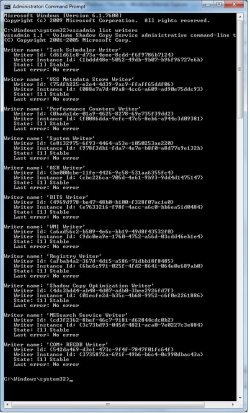
@Prossv, would you pleas run another command:

vssadmin list writers

and see whether any writers are listed with errors. You find that here (see pic)
 

Attachments

  • 2011-03-13_1720.png
    2011-03-13_1720.png
    5.9 KB · Views: 5

My Computer My Computer

Computer Manufacturer/Model Number
HP, Dell, Gateway, Toshiba - 4 laptops and 2 desktops
OS
Vista, Windows7, Mint Mate, Zorin, Windows 8
CPU
from 1.6GHz Duo to i7
Monitor(s) Displays
2x HP w2207
Hard Drives
5x HDD, 7x SSD, 12x Externals
Keyboard
with trackball - no mices
Mouse
Trackball mice
Internet Speed
DSL 6000
11 writers. All stable w no errors.
 

Attachments

  • vsslistwriters.jpg
    vsslistwriters.jpg
    106 KB · Views: 18

My Computer My Computer

Computer Manufacturer/Model Number
Gateway DX4831
OS
Windows 7 Home
CPU
Intel i3 2.93Ghz
Memory
6GB
Hard Drives
1 - 900GB
Huh, terrible black cmd window. Maybe you want to change that: cmd window setup on Vimeo

But back to your problem. I am out of ideas now. Have to think harder - LOL.
 

My Computer My Computer

Computer Manufacturer/Model Number
HP, Dell, Gateway, Toshiba - 4 laptops and 2 desktops
OS
Vista, Windows7, Mint Mate, Zorin, Windows 8
CPU
from 1.6GHz Duo to i7
Monitor(s) Displays
2x HP w2207
Hard Drives
5x HDD, 7x SSD, 12x Externals
Keyboard
with trackball - no mices
Mouse
Trackball mice
Internet Speed
DSL 6000
Prossv,

Are you using any programs like CCleaner after creating the restore point that has an option to delete restore points.

Are you dual booting with XP? There is a known issue with XP deleting Windows 7 and Vista restore points everytime XP is started up in a multiboot setup.

For now, you might see if running a SFC /SCANNOW command may be able to find and fix any corrupted system files that may a cause of this. If errors are found, then you may need to run SFC and restart a few times to fix them all.

Afterwards, create a restore point, then see if it is listed in System Protection (step 7 at this link) after restarting the computer.
 

My Computer My Computer

Computer type
PC/Desktop
Computer Manufacturer/Model Number
Self built custom
OS
64-bit Windows 11 Pro for Workstations
CPU
Intel i7-8700K OC'd to 5 GHz
Motherboard
ASUS ROG Maximus XI Formula Z390
Memory
64 GB (4x16GB) G.SKILL TridentZ RGB DDR4 3600 MHz
Graphics Card(s)
ASUS ROG-STRIX-GTX1080TI-O11G-GAMING
Sound Card
Integrated
Monitor(s) Displays
2 x Samsung Odyssey G7 27"
Screen Resolution
2560x1440
Hard Drives
1TB Samsung 990 PRO M.2,
4TB Samsung 990 PRO PRO M.2,
TerraMaster F8 SSD Plus NAS
PSU
Seasonic Prime Titanium 850W
Case
Thermaltake Core P3
Cooling
Corsair Hydro H115i
Keyboard
Logitech wireless K800
Mouse
Logitech MX Master 4
Internet Speed
2 Gb/s Download and 100 Mb/s Upload
Antivirus
Malwarebyte Anti-Malware Premium
Browser
Google Chrome
Other Info
Logitech Z625 speaker system,
Logitech BRIO 4K Pro webcam,
HP Color LaserJet Pro MFP M477fdn,
APC SMART-UPS RT 1000 XL - SURT1000XLI,
Galaxy S23 Plus phone
This is a fresh installl of Windows 7 home. No CCleaner. Only McAfee Security Center (out of desperation, I added System Restore to trusted programs)

No Dual boot.

Is there a difference between SFC /Scannow and file checking initiated on the C: drive in Windows explorer? (under Properties > Tools)

I ran that and found almost nothing. See the details below.

Tried again and still no restore points.

The odd thing here is that I'm getting the same prob after a re-install of Windows 7 from the Gateway recovery disk. Maybe a problem with the original image/install?


Code:
Log Name: Application
Source: Microsoft-Windows-Wininit
Date: 3/13/2011 11:24:59 PM
Event ID: 1001
Task Category: None
Level: Information
Keywords: Classic
User: N/A
Computer: GATEWAYDESKTOP
Description:
 
Checking file system on C:
The type of the file system is NTFS.
Volume label is Gateway.
A disk check has been scheduled.
Windows will now check the disk. 
CHKDSK is verifying files (stage 1 of 5)...
212992 file records processed. 
File verification completed.
81 large file records processed. 
0 bad file records processed. 
0 EA records processed. 
60 reparse records processed. 
CHKDSK is verifying indexes (stage 2 of 5)...
260956 index entries processed. 
Index verification completed.
0 unindexed files scanned. 
0 unindexed files recovered. 
CHKDSK is verifying security descriptors (stage 3 of 5)...
212992 file SDs/SIDs processed. 
Cleaning up 525 unused index entries from index $SII of file 0x9.
Cleaning up 525 unused index entries from index $SDH of file 0x9.
Cleaning up 525 unused security descriptors.
Security descriptor verification completed.
23983 data files processed. 
CHKDSK is verifying Usn Journal...
37599688 USN bytes processed. 
Usn Journal verification completed.
CHKDSK is verifying file data (stage 4 of 5)...
212976 files processed. 
File data verification completed.
CHKDSK is verifying free space (stage 5 of 5)...
222111355 free clusters processed. 
Free space verification is complete.
Windows has checked the file system and found no problems.
963025919 KB total disk space.
74152704 KB in 148379 files.
81776 KB in 23984 indexes.
40 KB in bad sectors.
345979 KB in use by the system.
65536 KB occupied by the log file.
888445420 KB available on disk.
4096 bytes in each allocation unit.
240756479 total allocation units on disk.
222111355 allocation units available on disk.
Internal Info:
00 40 03 00 57 a1 02 00 44 a4 04 00 00 00 00 00 [email protected].......
5c 00 00 00 3c 00 00 00 00 00 00 00 00 00 00 00 \...<...........
00 00 00 00 00 00 00 00 00 00 00 00 00 00 00 00 ................
Windows has finished checking your disk.
Please wait while your computer restarts.
Event Xml:
<Event xmlns="[URL="http://schemas.microsoft.com/win/2004/08/events/event"]Error[/URL]">
<System>
<Provider Name="Microsoft-Windows-Wininit" Guid="{206f6dea-d3c5-4d10-bc72-989f03c8b84b}" EventSourceName="Wininit" />
<EventID Qualifiers="16384">1001</EventID>
<Version>0</Version>
<Level>4</Level>
<Task>0</Task>
<Opcode>0</Opcode>
<Keywords>0x80000000000000</Keywords>
<TimeCreated SystemTime="2011-03-14T04:24:59.000000000Z" />
<EventRecordID>1607</EventRecordID>
<Correlation />
<Execution ProcessID="0" ThreadID="0" />
<Channel>Application</Channel>
<Computer>GATEWAYDESKTOP</Computer>
<Security />
</System>
<EventData>
<Data>
 

My Computer My Computer

Computer Manufacturer/Model Number
Gateway DX4831
OS
Windows 7 Home
CPU
Intel i3 2.93Ghz
Memory
6GB
Hard Drives
1 - 900GB
Back
Top