Solved System restore not working after BSOD

xdya

New member
Local time
9:58 AM
Messages
41
Hi, I would need some advice with Win 7 system restore :)
A couple of days ago my laptop, a Sony Vaio, had a BSOD (it just flashed, I don't know what it said) after having woken up from hibernation. After that Windows didn't want to boot. So I went in RE to system restore and tried to restore it. I won't bore you with the details but after a lot of error messages I somehow managed to log in as admin and start rstrui. It turned out, I have two images. For one (my twice-a-week-instant-restore-point) I get the message that the image file is missing. When I try the other one (Windows Update on the same day as this happened, I don't know if this can be the cause. Well, either this or the laptop falling off a table some days before the BSOD.) I get an error message again, it says I should run chkdsk /R. Since I can use the command prompt I tried this but it was slow as hell. I mean there were like 450 000 pieces of data and it analysed one in 1 min.
So my question is. Do you think, I have other options than reinstalling the whole system? I have already done it once, like a year ago when the same thing happened, and I want to avoid it by all means having to do that again. It was an ordeal of two days and I didn't quite enjoy it.
I'm not in a hurry because I have dual boot and my Linux works just fine but I still would be thankful for some suggestions.
Thank you in advance :)
 

My Computer

Computer type
PC/Desktop
Computer Manufacturer/Model Number
Sony Vaio VPCSB4M9E
OS
Windows 7 Professional 64 bit (German)
CPU
Intel® Core™ i3-2350M Prozessor
Memory
6 GB
Graphics Card(s)
Intel® HD Graphics 3000 AMD Radeon® HD 6470M
Antivirus
Avast! Free
Browser
Torch
Welcome
Our knowledgeable members do not even use System Restore. Download the free Macrium Reflect. Make an image of your HD and put in on an external drive. Do this once a week. Now no matter what happens, virus, cant boot, anything that happens, you can replace your OS with the image. It saved me twice. This is much better than SR. With restore you may lose recent downloads, with Macrium, if you update after every download, you will lose nothing when you use the image. Good luck
Macrium Reflect FREE Edition - Information and download
I would bite the bullet reinstall. make and image and every week thereafter. In that way you will always have an image of when the install was in pristine condition.
 

My Computer

Computer type
PC/Desktop
Computer Manufacturer/Model Number
Dell XPS 420
OS
Windows 10, Home Clean Install
CPU
Intel Core2 processsor Q8200(2.33Ghz 1333FSB) Quad Core Tech
Motherboard
Dell
Memory
6 gb
Graphics Card(s)
ATI Radeon 256MB HD3650
Sound Card
Intergrated 7.1 Channel Audio
Monitor(s) Displays
Dell SP2009W 20"
Hard Drives
640 GB Serial ATA Hard drive
Cooling
Fan
Keyboard
Dell USB Keyboard
Mouse
Dell Premium Optical USB
Internet Speed
DSL 2.85
What EXACT message when trying to restore from most recent restore point?
Code:
chkdsk/f  c:

Any errors? All repaired? Do it twice to see if it repaired all errors.

Code:
dir  c:\users
Has C drive a folder called Users and your user account is shown in output?
 

My Computer

Computer type
Laptop
Computer Manufacturer/Model Number
ACER ASPIRE 5742G
OS
Microsoft Windows 7 Home Premium 64-bits 7601 Multiprocessor Free Service Pack 1
CPU
Intel(R) Core(TM) i3 CPU M 370 @ 2.40GHz
Motherboard
Acer Aspire 5742G
Memory
4,00 GB
Graphics Card(s)
ATI Mobility Radeon HD 5400 Series
Sound Card
(1) AMD High Definition Audio Device (2) Realtek High Defi
Screen Resolution
1366 x 768 x 32 bits (4294967296 colors) @ 60 Hz
Hard Drives
WDC WD5000BEVT-22ZAT0
After that Windows didn't want to boot
BSOD? Error message? At which stage?
 

My Computer

Computer type
Laptop
Computer Manufacturer/Model Number
ACER ASPIRE 5742G
OS
Microsoft Windows 7 Home Premium 64-bits 7601 Multiprocessor Free Service Pack 1
CPU
Intel(R) Core(TM) i3 CPU M 370 @ 2.40GHz
Motherboard
Acer Aspire 5742G
Memory
4,00 GB
Graphics Card(s)
ATI Mobility Radeon HD 5400 Series
Sound Card
(1) AMD High Definition Audio Device (2) Realtek High Defi
Screen Resolution
1366 x 768 x 32 bits (4294967296 colors) @ 60 Hz
Hard Drives
WDC WD5000BEVT-22ZAT0
Hey, thanks for the response. I can run chkdsk but it looks like it will take quite literally months to complete. I will try it again but I it's irrationally slow. I get the error message described here Restore operation by using Backup and Restore may fail in Windows 7 SP1 when I try the most recent restore point. My user account is shown alright. I have seen the blue screen for a half second, I really don't know what it said.
 

My Computer

Computer type
PC/Desktop
Computer Manufacturer/Model Number
Sony Vaio VPCSB4M9E
OS
Windows 7 Professional 64 bit (German)
CPU
Intel® Core™ i3-2350M Prozessor
Memory
6 GB
Graphics Card(s)
Intel® HD Graphics 3000 AMD Radeon® HD 6470M
Antivirus
Avast! Free
Browser
Torch
Welcome
Our knowledgeable members do not even use System Restore. Download the free Macrium Reflect. Make an image of your HD and put in on an external drive. Do this once a week. Now no matter what happens, virus, cant boot, anything that happens, you can replace your OS with the image. It saved me twice. This is much better than SR. With restore you may lose recent downloads, with Macrium, if you update after every download, you will lose nothing when you use the image. Good luck
Macrium Reflect FREE Edition - Information and download
I would bite the bullet reinstall. make and image and every week thereafter. In that way you will always have an image of when the install was in pristine condition.

Yes, backup/restore is a great tool, but if you restore to 2 years ago (original installation), you lose all your favorites and data documents, etc. that you've done over the past 2 years. Even if you backed up all your data and favorites, you still have to go through the process of copying them to the directories where you normally store them.
 

My Computer

Computer type
PC/Desktop
Computer Manufacturer/Model Number
Systemax
OS
Windows 7 32-bit
CPU
Intel E4500
Motherboard
Asus P5GC
Memory
1GB
Graphics Card(s)
GeForce 8400 GS
Hard Drives
Three
Antivirus
None
Browser
IE11
yeah well it's not like i don't have backups. i have backup of everything and my partitions are also untouched. my data on the c: drive is ok, too. i just don't feel like re-installing windows and that what's my question was about. i just wanted to know if i have other options right now that could save me the trouble...
 

My Computer

Computer type
PC/Desktop
Computer Manufacturer/Model Number
Sony Vaio VPCSB4M9E
OS
Windows 7 Professional 64 bit (German)
CPU
Intel® Core™ i3-2350M Prozessor
Memory
6 GB
Graphics Card(s)
Intel® HD Graphics 3000 AMD Radeon® HD 6470M
Antivirus
Avast! Free
Browser
Torch
Hey, thanks for the response. I can run chkdsk but it looks like it will take quite literally months to complete. I will try it again but I it's irrationally slow. I get the error message described here Restore operation by using Backup and Restore may fail in Windows 7 SP1 when I try the most recent restore point. My user account is shown alright. I have seen the blue screen for a half second, I really don't know what it said.
Did you install that fixit? Can you boot to http://www.sevenforums.com/tutorials/668-system-recovery-options.html and run "system restore" succesfully in that mode?

http://www.sevenforums.com/tutorials/666-advanced-boot-options.html then "Disable Automatic Restart on System Failure" to be able to see the BSOD.
 

My Computer

Computer type
Laptop
Computer Manufacturer/Model Number
ACER ASPIRE 5742G
OS
Microsoft Windows 7 Home Premium 64-bits 7601 Multiprocessor Free Service Pack 1
CPU
Intel(R) Core(TM) i3 CPU M 370 @ 2.40GHz
Motherboard
Acer Aspire 5742G
Memory
4,00 GB
Graphics Card(s)
ATI Mobility Radeon HD 5400 Series
Sound Card
(1) AMD High Definition Audio Device (2) Realtek High Defi
Screen Resolution
1366 x 768 x 32 bits (4294967296 colors) @ 60 Hz
Hard Drives
WDC WD5000BEVT-22ZAT0
No, I didn't install it, I have found it while checking the error message linked above. Way too late, unless I can install it in the RE... I can boot into the recovery options and I can run system restore but I can't restore it because I get the error message. That was my problem in the very beginning :) I have seen the BSOD only once, the system won't restart anymore since it won't even boot but I will disable it for the future :D
 

My Computer

Computer type
PC/Desktop
Computer Manufacturer/Model Number
Sony Vaio VPCSB4M9E
OS
Windows 7 Professional 64 bit (German)
CPU
Intel® Core™ i3-2350M Prozessor
Memory
6 GB
Graphics Card(s)
Intel® HD Graphics 3000 AMD Radeon® HD 6470M
Antivirus
Avast! Free
Browser
Torch
Please do #3 and post results
 
Last edited:

My Computer

Computer type
Laptop
Computer Manufacturer/Model Number
ACER ASPIRE 5742G
OS
Microsoft Windows 7 Home Premium 64-bits 7601 Multiprocessor Free Service Pack 1
CPU
Intel(R) Core(TM) i3 CPU M 370 @ 2.40GHz
Motherboard
Acer Aspire 5742G
Memory
4,00 GB
Graphics Card(s)
ATI Mobility Radeon HD 5400 Series
Sound Card
(1) AMD High Definition Audio Device (2) Realtek High Defi
Screen Resolution
1366 x 768 x 32 bits (4294967296 colors) @ 60 Hz
Hard Drives
WDC WD5000BEVT-22ZAT0
you mean the repair your computer part, right? same results, still can't restore. same error message. i can't boot into any other mode either
 

My Computer

Computer type
PC/Desktop
Computer Manufacturer/Model Number
Sony Vaio VPCSB4M9E
OS
Windows 7 Professional 64 bit (German)
CPU
Intel® Core™ i3-2350M Prozessor
Memory
6 GB
Graphics Card(s)
Intel® HD Graphics 3000 AMD Radeon® HD 6470M
Antivirus
Avast! Free
Browser
Torch
Please do #3 and post results
 

My Computer

Computer type
Laptop
Computer Manufacturer/Model Number
ACER ASPIRE 5742G
OS
Microsoft Windows 7 Home Premium 64-bits 7601 Multiprocessor Free Service Pack 1
CPU
Intel(R) Core(TM) i3 CPU M 370 @ 2.40GHz
Motherboard
Acer Aspire 5742G
Memory
4,00 GB
Graphics Card(s)
ATI Mobility Radeon HD 5400 Series
Sound Card
(1) AMD High Definition Audio Device (2) Realtek High Defi
Screen Resolution
1366 x 768 x 32 bits (4294967296 colors) @ 60 Hz
Hard Drives
WDC WD5000BEVT-22ZAT0
could you link #3 please?
 

My Computer

Computer type
PC/Desktop
Computer Manufacturer/Model Number
Sony Vaio VPCSB4M9E
OS
Windows 7 Professional 64 bit (German)
CPU
Intel® Core™ i3-2350M Prozessor
Memory
6 GB
Graphics Card(s)
Intel® HD Graphics 3000 AMD Radeon® HD 6470M
Antivirus
Avast! Free
Browser
Torch

My Computer

Computer type
Laptop
Computer Manufacturer/Model Number
ACER ASPIRE 5742G
OS
Microsoft Windows 7 Home Premium 64-bits 7601 Multiprocessor Free Service Pack 1
CPU
Intel(R) Core(TM) i3 CPU M 370 @ 2.40GHz
Motherboard
Acer Aspire 5742G
Memory
4,00 GB
Graphics Card(s)
ATI Mobility Radeon HD 5400 Series
Sound Card
(1) AMD High Definition Audio Device (2) Realtek High Defi
Screen Resolution
1366 x 768 x 32 bits (4294967296 colors) @ 60 Hz
Hard Drives
WDC WD5000BEVT-22ZAT0
Advanced Boot Options then "Disable Automatic Restart on System Failure" to be able to see the BSOD.
 

My Computer

Computer type
Laptop
Computer Manufacturer/Model Number
ACER ASPIRE 5742G
OS
Microsoft Windows 7 Home Premium 64-bits 7601 Multiprocessor Free Service Pack 1
CPU
Intel(R) Core(TM) i3 CPU M 370 @ 2.40GHz
Motherboard
Acer Aspire 5742G
Memory
4,00 GB
Graphics Card(s)
ATI Mobility Radeon HD 5400 Series
Sound Card
(1) AMD High Definition Audio Device (2) Realtek High Defi
Screen Resolution
1366 x 768 x 32 bits (4294967296 colors) @ 60 Hz
Hard Drives
WDC WD5000BEVT-22ZAT0
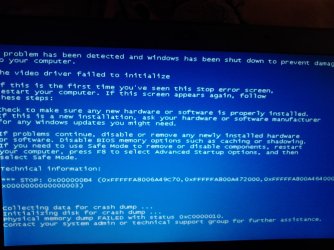
ah sorry, i didn't think you meant that comment because i have already said that chkdsk runs so slow that my life is not long enough to wait for it :D however i have tried to run the automatic repair from my admin account and it looks like it actually repaired something now because i got past the windows logo. i took a photo of the bsod
 

Attachments

  • DSC_0081.jpg
    DSC_0081.jpg
    278.2 KB · Views: 0

My Computer

Computer type
PC/Desktop
Computer Manufacturer/Model Number
Sony Vaio VPCSB4M9E
OS
Windows 7 Professional 64 bit (German)
CPU
Intel® Core™ i3-2350M Prozessor
Memory
6 GB
Graphics Card(s)
Intel® HD Graphics 3000 AMD Radeon® HD 6470M
Antivirus
Avast! Free
Browser
Torch
Boot again to Advanced Boot Options then do "repair computer" then "startup repair". After that click "view diagnostics details" (or something alike). What tests ended with a status code not 0x0 (success) and what errors occurred/has been fixed?

In Advanced Boot Options then do "repair computer" then "command prompt"

Code:
dir   c:\users
Lists your account name (and some others)?
 

My Computer

Computer type
Laptop
Computer Manufacturer/Model Number
ACER ASPIRE 5742G
OS
Microsoft Windows 7 Home Premium 64-bits 7601 Multiprocessor Free Service Pack 1
CPU
Intel(R) Core(TM) i3 CPU M 370 @ 2.40GHz
Motherboard
Acer Aspire 5742G
Memory
4,00 GB
Graphics Card(s)
ATI Mobility Radeon HD 5400 Series
Sound Card
(1) AMD High Definition Audio Device (2) Realtek High Defi
Screen Resolution
1366 x 768 x 32 bits (4294967296 colors) @ 60 Hz
Hard Drives
WDC WD5000BEVT-22ZAT0
ah sorry, i didn't think you meant that comment because i have already said that chkdsk runs so slow that my life is not long enough to wait for it :D however i have tried to run the automatic repair from my admin account and it looks like it actually repaired something now because i got past the windows logo. i took a photo of the bsod
In screenshot you see
  • It is related to the video driver.
  • 0xC0000010. It can't even make a crashdump! This actually means STATUS_INVALID_DEVICE_REQUEST

Did you install/uninstall something just before problems began?
 

My Computer

Computer type
Laptop
Computer Manufacturer/Model Number
ACER ASPIRE 5742G
OS
Microsoft Windows 7 Home Premium 64-bits 7601 Multiprocessor Free Service Pack 1
CPU
Intel(R) Core(TM) i3 CPU M 370 @ 2.40GHz
Motherboard
Acer Aspire 5742G
Memory
4,00 GB
Graphics Card(s)
ATI Mobility Radeon HD 5400 Series
Sound Card
(1) AMD High Definition Audio Device (2) Realtek High Defi
Screen Resolution
1366 x 768 x 32 bits (4294967296 colors) @ 60 Hz
Hard Drives
WDC WD5000BEVT-22ZAT0
nothing. probably there was a windows update a couple of hours before the crash because there is a restore point from 11 am. the system was hibernated probably after the update and after waking up it crashed at like 3 pm. that was the only change, i didn't install anything
 

My Computer

Computer type
PC/Desktop
Computer Manufacturer/Model Number
Sony Vaio VPCSB4M9E
OS
Windows 7 Professional 64 bit (German)
CPU
Intel® Core™ i3-2350M Prozessor
Memory
6 GB
Graphics Card(s)
Intel® HD Graphics 3000 AMD Radeon® HD 6470M
Antivirus
Avast! Free
Browser
Torch
Boot again to Advanced Boot Options then do "repair computer" then "startup repair". After that click "view diagnostics details" (or something alike). What tests ended with a status code not 0x0 (success) and what errors occurred/has been fixed?

In Advanced Boot Options then do "repair computer" then "command prompt"

Code:
dir   c:\users
Lists your account name (and some others)?

i'm gonna do this tomorrow, i need to use my laptop right now and the startup repair takes ages
 

My Computer

Computer type
PC/Desktop
Computer Manufacturer/Model Number
Sony Vaio VPCSB4M9E
OS
Windows 7 Professional 64 bit (German)
CPU
Intel® Core™ i3-2350M Prozessor
Memory
6 GB
Graphics Card(s)
Intel® HD Graphics 3000 AMD Radeon® HD 6470M
Antivirus
Avast! Free
Browser
Torch
Back
Top