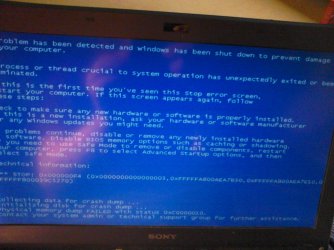
Solved System restore not working after BSOD

In Advanced Boot Options then do "repair computer" then "command prompt"
Code:
dir  c:\users

Lists your account name (and some others)?
 

My Computer My Computer

Computer type
Laptop
Computer Manufacturer/Model Number
ACER ASPIRE 5742G
OS
Microsoft Windows 7 Home Premium 64-bits 7601 Multiprocessor Free Service Pack 1
CPU
Intel(R) Core(TM) i3 CPU M 370 @ 2.40GHz
Motherboard
Acer Aspire 5742G
Memory
4,00 GB
Graphics Card(s)
ATI Mobility Radeon HD 5400 Series
Sound Card
(1) AMD High Definition Audio Device (2) Realtek High Defi
Screen Resolution
1366 x 768 x 32 bits (4294967296 colors) @ 60 Hz
Hard Drives
WDC WD5000BEVT-22ZAT0
yes, the accounts are alright
 

My Computer My Computer

Computer type
PC/Desktop
Computer Manufacturer/Model Number
Sony Vaio VPCSB4M9E
OS
Windows 7 Professional 64 bit (German)
CPU
Intel® Core™ i3-2350M Prozessor
Memory
6 GB
Graphics Card(s)
Intel® HD Graphics 3000 AMD Radeon® HD 6470M
Antivirus
Avast! Free
Browser
Torch
yes, the accounts are alright
And listed under C:\USERS in recovery environment.... correct?
If so in windows recovery->command prompt:
Code:
[COLOR=black]sfc  /scannow  /offbootdir=c:\  /offwindir=c:\windows[/COLOR]

Does it complete with: Windows did not find any integrity violations ?
 

My Computer My Computer

Computer type
Laptop
Computer Manufacturer/Model Number
ACER ASPIRE 5742G
OS
Microsoft Windows 7 Home Premium 64-bits 7601 Multiprocessor Free Service Pack 1
CPU
Intel(R) Core(TM) i3 CPU M 370 @ 2.40GHz
Motherboard
Acer Aspire 5742G
Memory
4,00 GB
Graphics Card(s)
ATI Mobility Radeon HD 5400 Series
Sound Card
(1) AMD High Definition Audio Device (2) Realtek High Defi
Screen Resolution
1366 x 768 x 32 bits (4294967296 colors) @ 60 Hz
Hard Drives
WDC WD5000BEVT-22ZAT0
OK. so i ran an sfc scan and i have no idea what has it done but magically system restore started working. so i restored the system to its state before the windows update and now everything seems fine. (according to the wu log there was only one update installed that day, KB915597) after that i got a bsod again but not the same one as before. and then chkdsk ran on c: while booting and now it looks like the problems are fixed. i hope it will stay this way. anyway, i'm marking this thread solved. THANKS A LOT for your help!!
 

My Computer My Computer

Computer type
PC/Desktop
Computer Manufacturer/Model Number
Sony Vaio VPCSB4M9E
OS
Windows 7 Professional 64 bit (German)
CPU
Intel® Core™ i3-2350M Prozessor
Memory
6 GB
Graphics Card(s)
Intel® HD Graphics 3000 AMD Radeon® HD 6470M
Antivirus
Avast! Free
Browser
Torch
OK. so i ran an sfc scan and i have no idea what has it done but magically system restore started working. so i restored the system to its state before the windows update and now everything seems fine. (according to the wu log there was only one update installed that day, KB915597) after that i got a bsod again but not the same one as before. and then chkdsk ran on c: while booting and now it looks like the problems are fixed. i hope it will stay this way. anyway, i'm marking this thread solved. THANKS A LOT for your help!!
You rolled back the system files by doing a system restore. System is most likely in a wrong state again(?) But it is bootable. Please do in http://www.sevenforums.com/tutorials/783-elevated-command-prompt.html
Code:
sfc/scannow
And post what happens.
 

My Computer My Computer

Computer type
Laptop
Computer Manufacturer/Model Number
ACER ASPIRE 5742G
OS
Microsoft Windows 7 Home Premium 64-bits 7601 Multiprocessor Free Service Pack 1
CPU
Intel(R) Core(TM) i3 CPU M 370 @ 2.40GHz
Motherboard
Acer Aspire 5742G
Memory
4,00 GB
Graphics Card(s)
ATI Mobility Radeon HD 5400 Series
Sound Card
(1) AMD High Definition Audio Device (2) Realtek High Defi
Screen Resolution
1366 x 768 x 32 bits (4294967296 colors) @ 60 Hz
Hard Drives
WDC WD5000BEVT-22ZAT0
OK. so i ran an sfc scan and i have no idea what has it done but magically system restore started working. so i restored the system to its state before the windows update and now everything seems fine. (according to the wu log there was only one update installed that day, KB915597) after that i got a bsod again but not the same one as before. and then chkdsk ran on c: while booting and now it looks like the problems are fixed. i hope it will stay this way. anyway, i'm marking this thread solved. THANKS A LOT for your help!!
I assume you did install KB915597 afterwards succesfully. Was chkdsk while booting als taking hours to complete? What BSOD did you get? Please do again in Elevated Command Prompt:
Code:
chkdsk/f  c:
It asks you to perform it on boot.... press Y to confirm. No repairs anymore by chkdsk?
 

My Computer My Computer

Computer type
Laptop
Computer Manufacturer/Model Number
ACER ASPIRE 5742G
OS
Microsoft Windows 7 Home Premium 64-bits 7601 Multiprocessor Free Service Pack 1
CPU
Intel(R) Core(TM) i3 CPU M 370 @ 2.40GHz
Motherboard
Acer Aspire 5742G
Memory
4,00 GB
Graphics Card(s)
ATI Mobility Radeon HD 5400 Series
Sound Card
(1) AMD High Definition Audio Device (2) Realtek High Defi
Screen Resolution
1366 x 768 x 32 bits (4294967296 colors) @ 60 Hz
Hard Drives
WDC WD5000BEVT-22ZAT0
I assume you did install KB915597 afterwards succesfully. Was chkdsk while booting als taking hours to complete? What BSOD did you get? Please do again in Elevated Command Prompt:
Code:
chkdsk/f  c:
It asks you to perform it on boot.... press Y to confirm. No repairs anymore by chkdsk?

I have already done this right after running sfc, no errors apparently. Chkdsk ran normally, both yesterday and today it was completed in 10-15 minutes. I didn't install the update, in fact I want to keep the system from updating for a while. I don't know if that update caused the problem but it sure looks like it. I wanted to run the check ups before installing the updates but it seems like everything is fine. I will wait a couple of days before updating to see if any problem appears. Normally I try not to mess up my Windows so if something has caused a BSOD, it must have happened that day. And there was only one update apparently. I'm not sure what was the error code of the BSOD, I think 0x0000007B. But luckily it only happened once, before chkdsk.
 

My Computer My Computer

Computer type
PC/Desktop
Computer Manufacturer/Model Number
Sony Vaio VPCSB4M9E
OS
Windows 7 Professional 64 bit (German)
CPU
Intel® Core™ i3-2350M Prozessor
Memory
6 GB
Graphics Card(s)
Intel® HD Graphics 3000 AMD Radeon® HD 6470M
Antivirus
Avast! Free
Browser
Torch

Attachments

  • DSC_0087.jpg
    DSC_0087.jpg
    318.6 KB · Views: 1
Last edited:

My Computer My Computer

Computer type
PC/Desktop
Computer Manufacturer/Model Number
Sony Vaio VPCSB4M9E
OS
Windows 7 Professional 64 bit (German)
CPU
Intel® Core™ i3-2350M Prozessor
Memory
6 GB
Graphics Card(s)
Intel® HD Graphics 3000 AMD Radeon® HD 6470M
Antivirus
Avast! Free
Browser
Torch
Back
Top