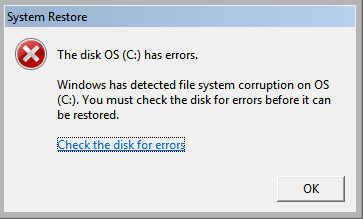
Cannot check (C Drive but It says I need to do that to restore (I'm trying to restore however it say"The Disk OS (C has errors. Window has detected file system(Image above) corruption to OS (C You must check the disk for errors before it can be restored.)
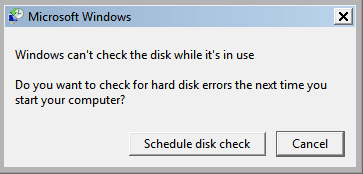
And I do the check disk button but It says you cannot check while (C is in use.
Note: I can't disk check due to the (C Error, I can't even start up unless I do Safe Mode.
Hello and welcome Riuuiu that last message youy should just reboot the machinew and let it run the disk check.
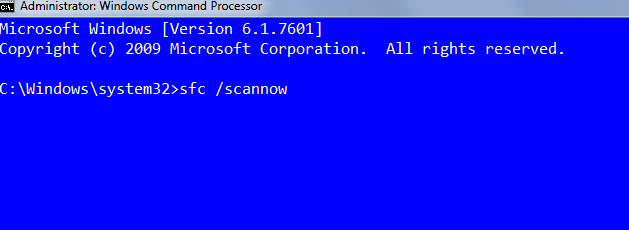
If you can get safe mode then you type cmd in Start right click the small blue window > Run as admin > type in the little black and white screen sfc /scannow and hit enter.
One other Desktop (tester) and spare Toshba laptop both with SSD's
Running Kaspersky 2016 ISS on all machines config'd identically
Logitec audio stereo systems on each machine (x3)
Canon MG5250MFC
Router/modem TP-Link running WPA2SK
Hello, Thanks for that I did it that. however I can't even chkdsk it says there is a Error on (C when it attempts to check it and requests I do system restore, but system restore doesn't work and tells me I need to chkdsk first (This is when I try to boot the pc the normal way.)
One other Desktop (tester) and spare Toshba laptop both with SSD's
Running Kaspersky 2016 ISS on all machines config'd identically
Logitec audio stereo systems on each machine (x3)
Canon MG5250MFC
Router/modem TP-Link running WPA2SK
One other Desktop (tester) and spare Toshba laptop both with SSD's
Running Kaspersky 2016 ISS on all machines config'd identically
Logitec audio stereo systems on each machine (x3)
Canon MG5250MFC
Router/modem TP-Link running WPA2SK
Well just go to Start type cmd > right click > run as admin and when you get the black and white window type sfc /scannow - there is a space between the sfc and the /scannow.
See my pic (mine is blue / white out of choice)
Attachments
SCANN.PNG
5 KB
· Views: 34
My Computer
At a glance
Desk1 7 Home Prem / Desk2 10 Pro / Main lap A...Desk1 i5 3750K / Laptop i7 GTX 860M / Desk2 i...Desk1 8GB (1866) / Desk2 16GB (1333) / Laptop...Desk 1& 2NVidia GTX 650 & Laptops on board Intel
Computer type
PC/Desktop
Computer Manufacturer/Model Number
Own build (new) Desk1 / Asus ROG Win 7 / Desk2 1st build
OS
Desk1 7 Home Prem / Desk2 10 Pro / Main lap Asus ROG 10 Pro 2 laptop Toshiba 7 Pro Asus P2520 7 & 10
One other Desktop (tester) and spare Toshba laptop both with SSD's
Running Kaspersky 2016 ISS on all machines config'd identically
Logitec audio stereo systems on each machine (x3)
Canon MG5250MFC
Router/modem TP-Link running WPA2SK
One other Desktop (tester) and spare Toshba laptop both with SSD's
Running Kaspersky 2016 ISS on all machines config'd identically
Logitec audio stereo systems on each machine (x3)
Canon MG5250MFC
Router/modem TP-Link running WPA2SK
I know this solution was posted a while back but I have spent hours trying to resolve the same problem that this link started with, as my laptop keyboard just wouldn't work & I was at a stage of system restore but couldn't because of the scan disk problem. I eventually got to this link & wanted to say Thanks.....what worked? It was Kaktussofit solution of the scan dsk check (with the screen grabs, it cleared the corrupt file I had & now all is working & I didn't even need to system restore.
cannot fix system restore disk errors - no errors ?
CHKDSK no errors found - system Restore cannot run, disk have errors ???
- What to do ???
HELP PLEASE !!!
cannot fix system restore disk errors - no errors ?
CHKDSK no errors found - system Restore cannot run, disk have errors ???
- What to do ???
HELP PLEASE !!!
Hello Zenicablues now not wanting to appear pedantic but it would be better if you posted your own thread only because multiple requests in one thread does lead to confusion as to who one is actually answering.
So please go ahead and post a new thread because of what I have just outlined and as new thread it will be more likely to be answered as opposed to be hidden away in this thread.
My Computer
At a glance
Desk1 7 Home Prem / Desk2 10 Pro / Main lap A...Desk1 i5 3750K / Laptop i7 GTX 860M / Desk2 i...Desk1 8GB (1866) / Desk2 16GB (1333) / Laptop...Desk 1& 2NVidia GTX 650 & Laptops on board Intel
Computer type
PC/Desktop
Computer Manufacturer/Model Number
Own build (new) Desk1 / Asus ROG Win 7 / Desk2 1st build
OS
Desk1 7 Home Prem / Desk2 10 Pro / Main lap Asus ROG 10 Pro 2 laptop Toshiba 7 Pro Asus P2520 7 & 10
One other Desktop (tester) and spare Toshba laptop both with SSD's
Running Kaspersky 2016 ISS on all machines config'd identically
Logitec audio stereo systems on each machine (x3)
Canon MG5250MFC
Router/modem TP-Link running WPA2SK

 Cannot check (C
 Drive but It says I need to do that to restore (I'm trying to restore however it say"The Disk OS (C