Solved System restore not working

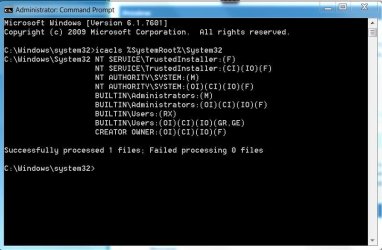
Looks like system recovery is working, just not within Windows. This can happen if permissions are not set up properly. Please do the following: Start Menu -> All Programs -> Accessories -> Right click Command Prompt and clikc Run as administrator -> Run the following command and presss Enter
icacls %SystemRoot%\System32​
-> Post a screenshot
You should get something similar to:
icacls.JPG

As to SFC: post #69 of Lion Transformation Pack 1.0 for win7(32-bit) query that you asked about.
 

My Computer

Computer Manufacturer/Model Number
HP Pavilion e9110t
OS
Windows 7 Home Premium 64 Bit
CPU
Intel(R) Core(TM)2 Quad CPU Q9550 @ 2.83GHz
Motherboard
Pegatron IPIEL-LA3
Memory
6.00 GB Hundai HMT125U6BFR8C-H9
Graphics Card(s)
ATI Radeon HD 4850
Sound Card
Realtek High Definition Audio/ATI High Definition Audio
Monitor(s) Displays
Acer AL2216W
Screen Resolution
1680x1050
Hard Drives
Hitachi HDP725050GLA360 ATA Device 500 GB
PSU
Unknown/installed by HP
Case
HP generic case
Cooling
Intel Stock Cooling
Keyboard
HP Keyboard
Mouse
HP Mouse
Internet Speed
Download: 19.15 Mbps Upload: 1.67 Mbps
Other Info
Network Adapter Realtek RTL8168D/8111D Family PCI-E Gigabit Ethernet NIC (NDIS 6.20)
Network Adapter 802.11n Wireless PCI Express Card LAN Adapter
Looks like system recovery is working, just not within Windows. This can happen if permissions are not set up properly. Please do the following: Start Menu -> All Programs -> Accessories -> Right click Command Prompt and clikc Run as administrator -> Run the following command and presss Enter
icacls %SystemRoot%\System32​
-> Post a screenshot
You should get something similar to:
View attachment 204293

As to SFC: post #69 of Lion Transformation Pack 1.0 for win7(32-bit) query that you asked about.


i have uploaded the screenshot.
 

Attachments

  • icacls.PNG
    icacls.PNG
    5.8 KB · Views: 17

My Computer

Computer Manufacturer/Model Number
Compaq Presario CQ50-130US
OS
Windows 7 professional 32-bit
CPU
Intel(R) Pentium(R)Dual CPU [email protected] 2.00Ghz
Memory
2.00 GB
Monitor(s) Displays
Generic PnP Monitor
Screen Resolution
1280x800
Internet Speed
Lan
Everything appears as it should. Have you made any registry changes or used a registry cleaning tool at any time?
 

My Computer

Computer Manufacturer/Model Number
HP Pavilion e9110t
OS
Windows 7 Home Premium 64 Bit
CPU
Intel(R) Core(TM)2 Quad CPU Q9550 @ 2.83GHz
Motherboard
Pegatron IPIEL-LA3
Memory
6.00 GB Hundai HMT125U6BFR8C-H9
Graphics Card(s)
ATI Radeon HD 4850
Sound Card
Realtek High Definition Audio/ATI High Definition Audio
Monitor(s) Displays
Acer AL2216W
Screen Resolution
1680x1050
Hard Drives
Hitachi HDP725050GLA360 ATA Device 500 GB
PSU
Unknown/installed by HP
Case
HP generic case
Cooling
Intel Stock Cooling
Keyboard
HP Keyboard
Mouse
HP Mouse
Internet Speed
Download: 19.15 Mbps Upload: 1.67 Mbps
Other Info
Network Adapter Realtek RTL8168D/8111D Family PCI-E Gigabit Ethernet NIC (NDIS 6.20)
Network Adapter 802.11n Wireless PCI Express Card LAN Adapter
Everything appears as it should. Have you made any registry changes or used a registry cleaning tool at any time?

Ya everytime i use.. Ccleaner and tune-up registry cleaner...
 

My Computer

Computer Manufacturer/Model Number
Compaq Presario CQ50-130US
OS
Windows 7 professional 32-bit
CPU
Intel(R) Pentium(R)Dual CPU [email protected] 2.00Ghz
Memory
2.00 GB
Monitor(s) Displays
Generic PnP Monitor
Screen Resolution
1280x800
Internet Speed
Lan
Many of us on the forums actually do not recommend automated optimization tools for Windows 7. Windows 7 does a much better job of handling its own optimization than its predecessors did. We especially do not recommend registry cleaning as an "optimization" step because automated registry cleaning causes more harm to the registry than it actually repairs.

In the future, if you need help optimizing Windows 7, please post a thread in Performance & Maintenance - Windows 7 Forums or follow the tutorial enclosed in that forum to http://www.sevenforums.com/tutorial...ws-7-a.html?filter[2]=Performance Maintenance.


I happen to know from personal experience that cleaning the registry can cause system restore to be unusable. It is the primary reason I stopped using registry cleaners myself.
 

My Computer

Computer Manufacturer/Model Number
HP Pavilion e9110t
OS
Windows 7 Home Premium 64 Bit
CPU
Intel(R) Core(TM)2 Quad CPU Q9550 @ 2.83GHz
Motherboard
Pegatron IPIEL-LA3
Memory
6.00 GB Hundai HMT125U6BFR8C-H9
Graphics Card(s)
ATI Radeon HD 4850
Sound Card
Realtek High Definition Audio/ATI High Definition Audio
Monitor(s) Displays
Acer AL2216W
Screen Resolution
1680x1050
Hard Drives
Hitachi HDP725050GLA360 ATA Device 500 GB
PSU
Unknown/installed by HP
Case
HP generic case
Cooling
Intel Stock Cooling
Keyboard
HP Keyboard
Mouse
HP Mouse
Internet Speed
Download: 19.15 Mbps Upload: 1.67 Mbps
Other Info
Network Adapter Realtek RTL8168D/8111D Family PCI-E Gigabit Ethernet NIC (NDIS 6.20)
Network Adapter 802.11n Wireless PCI Express Card LAN Adapter
Many of us on the forums actually do not recommend automated optimization tools for Windows 7. Windows 7 does a much better job of handling its own optimization than its predecessors did. We especially do not recommend registry cleaning as an "optimization" step because automated registry cleaning causes more harm to the registry than it actually repairs.

In the future, if you need help optimizing Windows 7, please post a thread in Performance & Maintenance - Windows 7 Forums or follow the tutorial enclosed in that forum to http://www.sevenforums.com/tutorials/11728-optimize-windows-7-a.html?filter[2]=Performance%20Maintenance.


I happen to know from personal experience that cleaning the registry can cause system restore to be unusable. It is the primary reason I stopped using registry cleaners myself.

K.. Tanx..
 

My Computer

Computer Manufacturer/Model Number
Compaq Presario CQ50-130US
OS
Windows 7 professional 32-bit
CPU
Intel(R) Pentium(R)Dual CPU [email protected] 2.00Ghz
Memory
2.00 GB
Monitor(s) Displays
Generic PnP Monitor
Screen Resolution
1280x800
Internet Speed
Lan
My system restore points are getting deleted automatically pls help me.
 

My Computer

Computer Manufacturer/Model Number
Compaq Presario CQ50-130US
OS
Windows 7 professional 32-bit
CPU
Intel(R) Pentium(R)Dual CPU [email protected] 2.00Ghz
Memory
2.00 GB
Monitor(s) Displays
Generic PnP Monitor
Screen Resolution
1280x800
Internet Speed
Lan

My Computer

Computer Manufacturer/Model Number
HP Pavilion e9110t
OS
Windows 7 Home Premium 64 Bit
CPU
Intel(R) Core(TM)2 Quad CPU Q9550 @ 2.83GHz
Motherboard
Pegatron IPIEL-LA3
Memory
6.00 GB Hundai HMT125U6BFR8C-H9
Graphics Card(s)
ATI Radeon HD 4850
Sound Card
Realtek High Definition Audio/ATI High Definition Audio
Monitor(s) Displays
Acer AL2216W
Screen Resolution
1680x1050
Hard Drives
Hitachi HDP725050GLA360 ATA Device 500 GB
PSU
Unknown/installed by HP
Case
HP generic case
Cooling
Intel Stock Cooling
Keyboard
HP Keyboard
Mouse
HP Mouse
Internet Speed
Download: 19.15 Mbps Upload: 1.67 Mbps
Other Info
Network Adapter Realtek RTL8168D/8111D Family PCI-E Gigabit Ethernet NIC (NDIS 6.20)
Network Adapter 802.11n Wireless PCI Express Card LAN Adapter
Hello Kumaranil1918,

Are you using a 3rd party tool for defragmenting? These can sometimes delete your restore points.
I was using PerfectDisk for a while and every time I ran it my restore points were wiped out.
 

My Computer

Computer type
PC/Desktop
Computer Manufacturer/Model Number
Custom Build
OS
Win 7 Ultimate, Win 8.1 Pro, Linux Mint 19 Cinnamon (All 64-Bit)
CPU
Intel i5 4690K
Motherboard
Gigabyte Z97X-UD3H
Memory
Corsair Vengeance LP 32GB DDR3
Graphics Card(s)
MSI GTX 1060 GAMING X 6GB
Sound Card
Onboard
Hard Drives
Samsung 850 EVO 250GB SSD (x2)
Samsung 860 EVO 1TB SSD (x2)
Crucial MX300 525GB SSD
WD Blue 2TB 5400rpm Intellipark Disabled (x2)
PSU
Corsair HX750i
Case
Phanteks Enthoo Pro
Cooling
CM Hyper 212 EVO on CPU, Noctua Redux NF-P14S 1500rpm (x6)
Keyboard
Corsair K70 RGB LUX
Mouse
Corsair Sabre RGB
Antivirus
Avast Free, MalwareBytes, SAS & CryptoPrevent
Browser
Chrome
Other Info
StarTech PEXESAT322I 2 Port PCI-E SATA Card
ASUS PCE-AC56 Dual-band AC1300 Wireless Card
Akasa FC.Six Manual Fan Controller
And a Partridge in a Pear Tree!

Attachments

  • vssadmin list shadowstorage.PNG
    vssadmin list shadowstorage.PNG
    7.5 KB · Views: 16

My Computer

Computer Manufacturer/Model Number
Compaq Presario CQ50-130US
OS
Windows 7 professional 32-bit
CPU
Intel(R) Pentium(R)Dual CPU [email protected] 2.00Ghz
Memory
2.00 GB
Monitor(s) Displays
Generic PnP Monitor
Screen Resolution
1280x800
Internet Speed
Lan
Hello Kumaranil1918,

Are you using a 3rd party tool for defragmenting? These can sometimes delete your restore points.
I was using PerfectDisk for a while and every time I ran it my restore points were wiped out.
No i don use any 3rd party tool for defragmentation.This problem started since 1week..
 

My Computer

Computer Manufacturer/Model Number
Compaq Presario CQ50-130US
OS
Windows 7 professional 32-bit
CPU
Intel(R) Pentium(R)Dual CPU [email protected] 2.00Ghz
Memory
2.00 GB
Monitor(s) Displays
Generic PnP Monitor
Screen Resolution
1280x800
Internet Speed
Lan

My Computer

Computer Manufacturer/Model Number
HP, Dell, Gateway, Toshiba - 4 laptops and 2 desktops
OS
Vista, Windows7, Mint Mate, Zorin, Windows 8
CPU
from 1.6GHz Duo to i7
Monitor(s) Displays
2x HP w2207
Hard Drives
5x HDD, 7x SSD, 12x Externals
Keyboard
with trackball - no mices
Mouse
Trackball mice
Internet Speed
DSL 6000
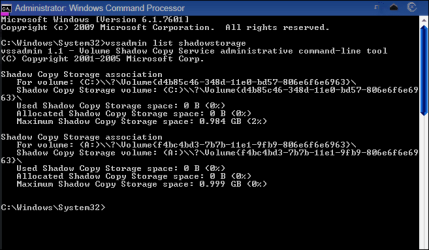
Start an http://www.sevenforums.com/tutorials/783-elevated-command-prompt.html and type the following command and then Enter:
vssadmin list shadowstorage
and post a screenshot of the results.
I have uploaded d screenshot.
1. You have no restore points.
2. Your shadowstorage is far too small. A single shadow (restore point) can be as big as 1GB. I suggest you allocate 5 to 10GBs.


How to allocate shadow storage space??
 

My Computer

Computer Manufacturer/Model Number
Compaq Presario CQ50-130US
OS
Windows 7 professional 32-bit
CPU
Intel(R) Pentium(R)Dual CPU [email protected] 2.00Ghz
Memory
2.00 GB
Monitor(s) Displays
Generic PnP Monitor
Screen Resolution
1280x800
Internet Speed
Lan

My Computer

Computer Manufacturer/Model Number
HP Pavilion e9110t
OS
Windows 7 Home Premium 64 Bit
CPU
Intel(R) Core(TM)2 Quad CPU Q9550 @ 2.83GHz
Motherboard
Pegatron IPIEL-LA3
Memory
6.00 GB Hundai HMT125U6BFR8C-H9
Graphics Card(s)
ATI Radeon HD 4850
Sound Card
Realtek High Definition Audio/ATI High Definition Audio
Monitor(s) Displays
Acer AL2216W
Screen Resolution
1680x1050
Hard Drives
Hitachi HDP725050GLA360 ATA Device 500 GB
PSU
Unknown/installed by HP
Case
HP generic case
Cooling
Intel Stock Cooling
Keyboard
HP Keyboard
Mouse
HP Mouse
Internet Speed
Download: 19.15 Mbps Upload: 1.67 Mbps
Other Info
Network Adapter Realtek RTL8168D/8111D Family PCI-E Gigabit Ethernet NIC (NDIS 6.20)
Network Adapter 802.11n Wireless PCI Express Card LAN Adapter
You can also use this command:

vssadmin resize shadowstorage /for=C: /on=C: /maxsize=10%

The 10% you can of course change to a number of your liking. Instead of 10% you can also say 5GB or 10GB or whatever. just do not forget the 'GB' - else it will assume bytes which is useless.
 

My Computer

Computer Manufacturer/Model Number
HP, Dell, Gateway, Toshiba - 4 laptops and 2 desktops
OS
Vista, Windows7, Mint Mate, Zorin, Windows 8
CPU
from 1.6GHz Duo to i7
Monitor(s) Displays
2x HP w2207
Hard Drives
5x HDD, 7x SSD, 12x Externals
Keyboard
with trackball - no mices
Mouse
Trackball mice
Internet Speed
DSL 6000
Tank u all for ur help & support in solving my problems.I reinstalled my windows 7 PE 32-bit on 14.04.12.
 

My Computer

Computer Manufacturer/Model Number
Compaq Presario CQ50-130US
OS
Windows 7 professional 32-bit
CPU
Intel(R) Pentium(R)Dual CPU [email protected] 2.00Ghz
Memory
2.00 GB
Monitor(s) Displays
Generic PnP Monitor
Screen Resolution
1280x800
Internet Speed
Lan
Back
Top