
System Restore Point - Create

How to Create a System Restore Point in Windows 7

   Information
By default in Windows 7 for all drives that System Protection is turned on for, System Protection creates a scheduled restore point only if no other restore points have been created in the last 7 days, and before significant system events such as a program or driver installation.

For more information about restore points, see:
This tutorial will show you how to manually create a restore point whenever you want one.

   Note
These restore points contain information about registry settings and other system information that Windows 7 uses. System Restore points do not include the personal user files.

You will not be able to create a restore point in safe mode since it is not supported.

If you do a System Restore when the computer is in safe mode, then you cannot undo the restore operation. However, you can run System Restore again and choose a different restore point if one exists.

   Warning
System Protection will need to be turned on for the select drive that you wish to create a restore point for.

It has been reported that some 3rd party disk defragmentation programs could also delete your restore points when used.


OPTION ONE

Using a Shortcut


1. For how, see: How to Make a "Create System Restore Point" Shortcut in Windows 7


OPTION TWO

Through System Protection


1. Open the Control Panel (icons view).
A) Click on the System icon.

B) Go to step 3.
OR

2. Open the Start Menu.
A) Right click on the Computer button and click on Properties.
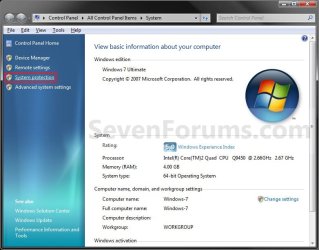
3. Click on the System Protection link. (See screenshot below step 4)

4. Close the System window. (See screenshot below)
System.jpg
5. Check to make sure that you have System Protection turned on for a listed disk that you want to create a restore point for, then select it. (See screenshot below step 6)

6. Click on the Create button. (See screenshot below)
System_Properties.jpg
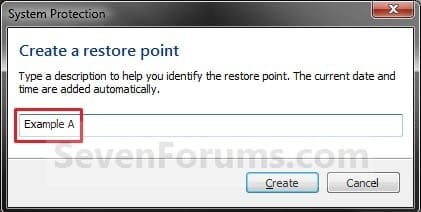
7. Type in a description for the restore point to help recognize it when doing a System Restore, and click on the Create button.. (See screenshot below)
Name.jpg
8. You will now see this while the restore point is being created. (See screenshot below)

Creating.jpg
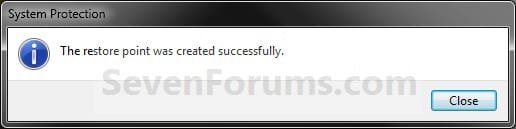
9. When the restore point has finished being created, click on the Close button. (See screenshot below)
Finished.jpg
10. Click on OK. (See screenshot below step 6)
That's it,
Shawn


Last edited:
Noticed that I'm not getting the 12am System restore point, nor the significant driver update restore point (I installed the Win7 Nvidia drivers today, no restore created) - seem to have a few generated by installing programs - again not Nvidia.
Is there a simple way to get the dailies or should I use Task Scheduler?
 

My Computer

Computer Manufacturer/Model Number
AMD Athlon 64 3200+, Lenovo G560 i3
OS
Windows 7 Ultimate, Ubuntu
Motherboard
Gigabyte K8T8000
Memory
DDR 2Gb (!)
Graphics Card(s)
6600GT
Monitor(s) Displays
MultiMonitor (2) LCD
Hard Drives
Old Seagate 75
Big Western Digital
Samsung 500Gb pulled out of an external drive and installed
Ext: Maxtor (Firewire), 1Gb Lacie (Samsung)
Mouse
Logitech MX620 Cordless

My Computer

Computer type
PC/Desktop
Computer Manufacturer/Model Number
Self built custom
OS
64-bit Windows 11 Pro for Workstations
CPU
Intel i7-8700K OC'd to 5 GHz
Motherboard
ASUS ROG Maximus XI Formula Z390
Memory
64 GB (4x16GB) G.SKILL TridentZ RGB DDR4 3600 MHz
Graphics Card(s)
ASUS ROG-STRIX-GTX1080TI-O11G-GAMING
Sound Card
Integrated
Monitor(s) Displays
2 x Samsung Odyssey G7 27"
Screen Resolution
2560x1440
Hard Drives
1TB Samsung 990 PRO M.2,
4TB Samsung 990 PRO PRO M.2,
TerraMaster F8 SSD Plus NAS
PSU
Seasonic Prime Titanium 850W
Case
Thermaltake Core P3
Cooling
Corsair Hydro H115i
Keyboard
Logitech wireless K800
Mouse
Logitech MX Master 4
Internet Speed
2 Gb/s Download and 100 Mb/s Upload
Antivirus
Malwarebyte Anti-Malware Premium
Browser
Google Chrome
Other Info
Logitech Z625 speaker system,
Logitech BRIO 4K Pro webcam,
HP Color LaserJet Pro MFP M477fdn,
APC SMART-UPS RT 1000 XL - SURT1000XLI,
Galaxy S23 Plus phone
Appreciate that tutorial - i did go in and do it manually and I'll probably grab the shortcut and put it in my documents or somewhere - don't need the desktop clutter.

Guess I'll have to learn how to make a new task!............

Well, I made a new task using your vbs script as the program!
Had a bit of an issue with permissions but finally it accepted my task.
Set to run in half an hour. We'll see.

Thanks again for the script

UPDATE: all worked fine
 
Last edited:

My Computer

Computer Manufacturer/Model Number
AMD Athlon 64 3200+, Lenovo G560 i3
OS
Windows 7 Ultimate, Ubuntu
Motherboard
Gigabyte K8T8000
Memory
DDR 2Gb (!)
Graphics Card(s)
6600GT
Monitor(s) Displays
MultiMonitor (2) LCD
Hard Drives
Old Seagate 75
Big Western Digital
Samsung 500Gb pulled out of an external drive and installed
Ext: Maxtor (Firewire), 1Gb Lacie (Samsung)
Mouse
Logitech MX620 Cordless
You're welcome Charles. :)
 

My Computer

Computer type
PC/Desktop
Computer Manufacturer/Model Number
Self built custom
OS
64-bit Windows 11 Pro for Workstations
CPU
Intel i7-8700K OC'd to 5 GHz
Motherboard
ASUS ROG Maximus XI Formula Z390
Memory
64 GB (4x16GB) G.SKILL TridentZ RGB DDR4 3600 MHz
Graphics Card(s)
ASUS ROG-STRIX-GTX1080TI-O11G-GAMING
Sound Card
Integrated
Monitor(s) Displays
2 x Samsung Odyssey G7 27"
Screen Resolution
2560x1440
Hard Drives
1TB Samsung 990 PRO M.2,
4TB Samsung 990 PRO PRO M.2,
TerraMaster F8 SSD Plus NAS
PSU
Seasonic Prime Titanium 850W
Case
Thermaltake Core P3
Cooling
Corsair Hydro H115i
Keyboard
Logitech wireless K800
Mouse
Logitech MX Master 4
Internet Speed
2 Gb/s Download and 100 Mb/s Upload
Antivirus
Malwarebyte Anti-Malware Premium
Browser
Google Chrome
Other Info
Logitech Z625 speaker system,
Logitech BRIO 4K Pro webcam,
HP Color LaserJet Pro MFP M477fdn,
APC SMART-UPS RT 1000 XL - SURT1000XLI,
Galaxy S23 Plus phone
All this seems to be very unnecessary.
Why cant W7 just auto create restore points similar to XP instead of all of us go thru all this modification?:confused:
I am dual booting XP and W7 and was confused as to why restore points kept disappearing.:cry: Now I know.
My question is : does anyone know if this creation of a restore point only if none has been made in 7 days will be included in the GA of W7?
I hope not. I think an option to turn off this feature so that you would be able to automatically create regular/daily restore points would be more sensible.
Am I the only one that feels this way??;)
 

My Computer

Computer Manufacturer/Model Number
Custom Low Rider !!
OS
Ubuntu,Mandriva,PCLOS,XP and,Windows 7
CPU
AMD Athlon 64 X2 Dual Core 4200
Memory
4 GB
Graphics Card(s)
NVIDIA GeForce
Sound Card
Onboard
Monitor(s) Displays
22" Acer Wide Screen
Screen Resolution
1280x1024
Hard Drives
WD 1 TB Caviar Black 7200 RPM
Case
Custom
Cooling
F-12 cooled
Keyboard
Saitek Eclipse
Mouse
Logitech invisible optic wireless
Internet Speed
Broadband
Hello Smoaky,

You can adjust or disable the System Restore tasks to create automatic restore points as you like. If you disable them, then Windows 7 will not create any automatic restor points. Either way. you are always free to manually create a restore point when you like.

Hope this helps,
Shawn
 

My Computer

Computer type
PC/Desktop
Computer Manufacturer/Model Number
Self built custom
OS
64-bit Windows 11 Pro for Workstations
CPU
Intel i7-8700K OC'd to 5 GHz
Motherboard
ASUS ROG Maximus XI Formula Z390
Memory
64 GB (4x16GB) G.SKILL TridentZ RGB DDR4 3600 MHz
Graphics Card(s)
ASUS ROG-STRIX-GTX1080TI-O11G-GAMING
Sound Card
Integrated
Monitor(s) Displays
2 x Samsung Odyssey G7 27"
Screen Resolution
2560x1440
Hard Drives
1TB Samsung 990 PRO M.2,
4TB Samsung 990 PRO PRO M.2,
TerraMaster F8 SSD Plus NAS
PSU
Seasonic Prime Titanium 850W
Case
Thermaltake Core P3
Cooling
Corsair Hydro H115i
Keyboard
Logitech wireless K800
Mouse
Logitech MX Master 4
Internet Speed
2 Gb/s Download and 100 Mb/s Upload
Antivirus
Malwarebyte Anti-Malware Premium
Browser
Google Chrome
Other Info
Logitech Z625 speaker system,
Logitech BRIO 4K Pro webcam,
HP Color LaserJet Pro MFP M477fdn,
APC SMART-UPS RT 1000 XL - SURT1000XLI,
Galaxy S23 Plus phone
Hello Smoaky,

You can adjust or disable the System Restore tasks to create automatic restore points as you like. If you disable them, then Windows 7 will not create any automatic restor points. Either way. you are always free to manually create a restore point when you like.

Hope this helps,
Shawn

Thanks ;)
I have read the how-to on this a while ago but I am running a dual boot of XP and every time I boot to XP all my previously saved restore points in W7 get deleted. Each time I boot to W7 I would have to start all over again creating restore points. Kinda makes having system restore useless...yes?:confused: Seems as though MS doesn't want anyone to run no other OS but W7.
 

My Computer

Computer Manufacturer/Model Number
Custom Low Rider !!
OS
Ubuntu,Mandriva,PCLOS,XP and,Windows 7
CPU
AMD Athlon 64 X2 Dual Core 4200
Memory
4 GB
Graphics Card(s)
NVIDIA GeForce
Sound Card
Onboard
Monitor(s) Displays
22" Acer Wide Screen
Screen Resolution
1280x1024
Hard Drives
WD 1 TB Caviar Black 7200 RPM
Case
Custom
Cooling
F-12 cooled
Keyboard
Saitek Eclipse
Mouse
Logitech invisible optic wireless
Internet Speed
Broadband

My Computer

Computer type
PC/Desktop
Computer Manufacturer/Model Number
Self built custom
OS
64-bit Windows 11 Pro for Workstations
CPU
Intel i7-8700K OC'd to 5 GHz
Motherboard
ASUS ROG Maximus XI Formula Z390
Memory
64 GB (4x16GB) G.SKILL TridentZ RGB DDR4 3600 MHz
Graphics Card(s)
ASUS ROG-STRIX-GTX1080TI-O11G-GAMING
Sound Card
Integrated
Monitor(s) Displays
2 x Samsung Odyssey G7 27"
Screen Resolution
2560x1440
Hard Drives
1TB Samsung 990 PRO M.2,
4TB Samsung 990 PRO PRO M.2,
TerraMaster F8 SSD Plus NAS
PSU
Seasonic Prime Titanium 850W
Case
Thermaltake Core P3
Cooling
Corsair Hydro H115i
Keyboard
Logitech wireless K800
Mouse
Logitech MX Master 4
Internet Speed
2 Gb/s Download and 100 Mb/s Upload
Antivirus
Malwarebyte Anti-Malware Premium
Browser
Google Chrome
Other Info
Logitech Z625 speaker system,
Logitech BRIO 4K Pro webcam,
HP Color LaserJet Pro MFP M477fdn,
APC SMART-UPS RT 1000 XL - SURT1000XLI,
Galaxy S23 Plus phone
update
Just found the How-to on stopping XP from deleting Vista/W7 restore points.
Thanks
I guess my point is seems like alot of work. MS is trying to make W7 as compatible as possible sure would have been nice for them to have thought about the people wanting to dual boot and keep us all from having to mess with the registry to accomplish this.
 

My Computer

Computer Manufacturer/Model Number
Custom Low Rider !!
OS
Ubuntu,Mandriva,PCLOS,XP and,Windows 7
CPU
AMD Athlon 64 X2 Dual Core 4200
Memory
4 GB
Graphics Card(s)
NVIDIA GeForce
Sound Card
Onboard
Monitor(s) Displays
22" Acer Wide Screen
Screen Resolution
1280x1024
Hard Drives
WD 1 TB Caviar Black 7200 RPM
Case
Custom
Cooling
F-12 cooled
Keyboard
Saitek Eclipse
Mouse
Logitech invisible optic wireless
Internet Speed
Broadband
Yeah, it was the same with Vista since XP had a different way of doing things causing this.
 

My Computer

Computer type
PC/Desktop
Computer Manufacturer/Model Number
Self built custom
OS
64-bit Windows 11 Pro for Workstations
CPU
Intel i7-8700K OC'd to 5 GHz
Motherboard
ASUS ROG Maximus XI Formula Z390
Memory
64 GB (4x16GB) G.SKILL TridentZ RGB DDR4 3600 MHz
Graphics Card(s)
ASUS ROG-STRIX-GTX1080TI-O11G-GAMING
Sound Card
Integrated
Monitor(s) Displays
2 x Samsung Odyssey G7 27"
Screen Resolution
2560x1440
Hard Drives
1TB Samsung 990 PRO M.2,
4TB Samsung 990 PRO PRO M.2,
TerraMaster F8 SSD Plus NAS
PSU
Seasonic Prime Titanium 850W
Case
Thermaltake Core P3
Cooling
Corsair Hydro H115i
Keyboard
Logitech wireless K800
Mouse
Logitech MX Master 4
Internet Speed
2 Gb/s Download and 100 Mb/s Upload
Antivirus
Malwarebyte Anti-Malware Premium
Browser
Google Chrome
Other Info
Logitech Z625 speaker system,
Logitech BRIO 4K Pro webcam,
HP Color LaserJet Pro MFP M477fdn,
APC SMART-UPS RT 1000 XL - SURT1000XLI,
Galaxy S23 Plus phone
Thanks
I will boot into XP in a few minutes and see how it goes;)
Come to think of it I remember having that prob when I had a dual boot of Vista and XP. Always thought it was a glitch in Vista...:o Never really was happy with Vista and I guess I was always looking for an excuse to stop using it. I even got to the point that I removed Vista and was running a dual boot of XP and Linux Mandriva. Then.......the clouds disappearednd the sun came out and ...behold....Windows 7 ascended from the heavens and now I am happy again and I no longer have the need for Prozac....:roflmao:
 

My Computer

Computer Manufacturer/Model Number
Custom Low Rider !!
OS
Ubuntu,Mandriva,PCLOS,XP and,Windows 7
CPU
AMD Athlon 64 X2 Dual Core 4200
Memory
4 GB
Graphics Card(s)
NVIDIA GeForce
Sound Card
Onboard
Monitor(s) Displays
22" Acer Wide Screen
Screen Resolution
1280x1024
Hard Drives
WD 1 TB Caviar Black 7200 RPM
Case
Custom
Cooling
F-12 cooled
Keyboard
Saitek Eclipse
Mouse
Logitech invisible optic wireless
Internet Speed
Broadband
LOL. ;)
 

My Computer

Computer type
PC/Desktop
Computer Manufacturer/Model Number
Self built custom
OS
64-bit Windows 11 Pro for Workstations
CPU
Intel i7-8700K OC'd to 5 GHz
Motherboard
ASUS ROG Maximus XI Formula Z390
Memory
64 GB (4x16GB) G.SKILL TridentZ RGB DDR4 3600 MHz
Graphics Card(s)
ASUS ROG-STRIX-GTX1080TI-O11G-GAMING
Sound Card
Integrated
Monitor(s) Displays
2 x Samsung Odyssey G7 27"
Screen Resolution
2560x1440
Hard Drives
1TB Samsung 990 PRO M.2,
4TB Samsung 990 PRO PRO M.2,
TerraMaster F8 SSD Plus NAS
PSU
Seasonic Prime Titanium 850W
Case
Thermaltake Core P3
Cooling
Corsair Hydro H115i
Keyboard
Logitech wireless K800
Mouse
Logitech MX Master 4
Internet Speed
2 Gb/s Download and 100 Mb/s Upload
Antivirus
Malwarebyte Anti-Malware Premium
Browser
Google Chrome
Other Info
Logitech Z625 speaker system,
Logitech BRIO 4K Pro webcam,
HP Color LaserJet Pro MFP M477fdn,
APC SMART-UPS RT 1000 XL - SURT1000XLI,
Galaxy S23 Plus phone
What do you suggest that I use as a default setting in "System Protection"?
1.) Restore system settings and previous versions of files
or
2.) Only restore previous versions of files?
 

My Computer

Computer Manufacturer/Model Number
Custom Low Rider !!
OS
Ubuntu,Mandriva,PCLOS,XP and,Windows 7
CPU
AMD Athlon 64 X2 Dual Core 4200
Memory
4 GB
Graphics Card(s)
NVIDIA GeForce
Sound Card
Onboard
Monitor(s) Displays
22" Acer Wide Screen
Screen Resolution
1280x1024
Hard Drives
WD 1 TB Caviar Black 7200 RPM
Case
Custom
Cooling
F-12 cooled
Keyboard
Saitek Eclipse
Mouse
Logitech invisible optic wireless
Internet Speed
Broadband
Hello Smoaky,

System settings would be for System Restore, and previous versions of files would be for the shadow copy Previous Versions feature.

For the best protection, #1 would be best. :)

Hope this helps,
Shawn
 

My Computer

Computer type
PC/Desktop
Computer Manufacturer/Model Number
Self built custom
OS
64-bit Windows 11 Pro for Workstations
CPU
Intel i7-8700K OC'd to 5 GHz
Motherboard
ASUS ROG Maximus XI Formula Z390
Memory
64 GB (4x16GB) G.SKILL TridentZ RGB DDR4 3600 MHz
Graphics Card(s)
ASUS ROG-STRIX-GTX1080TI-O11G-GAMING
Sound Card
Integrated
Monitor(s) Displays
2 x Samsung Odyssey G7 27"
Screen Resolution
2560x1440
Hard Drives
1TB Samsung 990 PRO M.2,
4TB Samsung 990 PRO PRO M.2,
TerraMaster F8 SSD Plus NAS
PSU
Seasonic Prime Titanium 850W
Case
Thermaltake Core P3
Cooling
Corsair Hydro H115i
Keyboard
Logitech wireless K800
Mouse
Logitech MX Master 4
Internet Speed
2 Gb/s Download and 100 Mb/s Upload
Antivirus
Malwarebyte Anti-Malware Premium
Browser
Google Chrome
Other Info
Logitech Z625 speaker system,
Logitech BRIO 4K Pro webcam,
HP Color LaserJet Pro MFP M477fdn,
APC SMART-UPS RT 1000 XL - SURT1000XLI,
Galaxy S23 Plus phone
Thanks Shawn ;)
I have mine set at #1 as per your suggestion.
Just expanded my W7 partition size and lost all my restore points :cry:
Oh well. time to create a manual restore point and go from there.
 

My Computer

Computer Manufacturer/Model Number
Custom Low Rider !!
OS
Ubuntu,Mandriva,PCLOS,XP and,Windows 7
CPU
AMD Athlon 64 X2 Dual Core 4200
Memory
4 GB
Graphics Card(s)
NVIDIA GeForce
Sound Card
Onboard
Monitor(s) Displays
22" Acer Wide Screen
Screen Resolution
1280x1024
Hard Drives
WD 1 TB Caviar Black 7200 RPM
Case
Custom
Cooling
F-12 cooled
Keyboard
Saitek Eclipse
Mouse
Logitech invisible optic wireless
Internet Speed
Broadband

My Computer

Computer type
PC/Desktop
Computer Manufacturer/Model Number
Self built custom
OS
64-bit Windows 11 Pro for Workstations
CPU
Intel i7-8700K OC'd to 5 GHz
Motherboard
ASUS ROG Maximus XI Formula Z390
Memory
64 GB (4x16GB) G.SKILL TridentZ RGB DDR4 3600 MHz
Graphics Card(s)
ASUS ROG-STRIX-GTX1080TI-O11G-GAMING
Sound Card
Integrated
Monitor(s) Displays
2 x Samsung Odyssey G7 27"
Screen Resolution
2560x1440
Hard Drives
1TB Samsung 990 PRO M.2,
4TB Samsung 990 PRO PRO M.2,
TerraMaster F8 SSD Plus NAS
PSU
Seasonic Prime Titanium 850W
Case
Thermaltake Core P3
Cooling
Corsair Hydro H115i
Keyboard
Logitech wireless K800
Mouse
Logitech MX Master 4
Internet Speed
2 Gb/s Download and 100 Mb/s Upload
Antivirus
Malwarebyte Anti-Malware Premium
Browser
Google Chrome
Other Info
Logitech Z625 speaker system,
Logitech BRIO 4K Pro webcam,
HP Color LaserJet Pro MFP M477fdn,
APC SMART-UPS RT 1000 XL - SURT1000XLI,
Galaxy S23 Plus phone
You're welcome Smoaky.

You might use this to make manually creating restore points easier to do. :)

http://www.sevenforums.com/tutorials/494-system-restore-point-shortcut.html
Pretty cool and it works great :shock:
Got it working on my laptop now I have to do this on my other two desktops.
(off topic)
Any word on your end about MS's "new" Anti- Virus named "Microsoft Security Essentials"?
I heard it will be available Tue June, 23rd for beta testing.
Sounds as though some people have already been testing it ;).
 

My Computer

Computer Manufacturer/Model Number
Custom Low Rider !!
OS
Ubuntu,Mandriva,PCLOS,XP and,Windows 7
CPU
AMD Athlon 64 X2 Dual Core 4200
Memory
4 GB
Graphics Card(s)
NVIDIA GeForce
Sound Card
Onboard
Monitor(s) Displays
22" Acer Wide Screen
Screen Resolution
1280x1024
Hard Drives
WD 1 TB Caviar Black 7200 RPM
Case
Custom
Cooling
F-12 cooled
Keyboard
Saitek Eclipse
Mouse
Logitech invisible optic wireless
Internet Speed
Broadband
Thanks for this tutorial. Essential for our security if something goes wrong.
regards,
 

My Computer

Computer Manufacturer/Model Number
Gericom Blockbuster2
OS
Win 7, Home Premium
CPU
P4 3.2
Memory
1.25
Graphics Card(s)
ATI Mobility Radeon 9600/9700, 128
Internet Speed
DSL
You're welcome Bjs53. :)


Smoaky, I have only heard the same thing about it. It does sound interesting though. :)
 

My Computer

Computer type
PC/Desktop
Computer Manufacturer/Model Number
Self built custom
OS
64-bit Windows 11 Pro for Workstations
CPU
Intel i7-8700K OC'd to 5 GHz
Motherboard
ASUS ROG Maximus XI Formula Z390
Memory
64 GB (4x16GB) G.SKILL TridentZ RGB DDR4 3600 MHz
Graphics Card(s)
ASUS ROG-STRIX-GTX1080TI-O11G-GAMING
Sound Card
Integrated
Monitor(s) Displays
2 x Samsung Odyssey G7 27"
Screen Resolution
2560x1440
Hard Drives
1TB Samsung 990 PRO M.2,
4TB Samsung 990 PRO PRO M.2,
TerraMaster F8 SSD Plus NAS
PSU
Seasonic Prime Titanium 850W
Case
Thermaltake Core P3
Cooling
Corsair Hydro H115i
Keyboard
Logitech wireless K800
Mouse
Logitech MX Master 4
Internet Speed
2 Gb/s Download and 100 Mb/s Upload
Antivirus
Malwarebyte Anti-Malware Premium
Browser
Google Chrome
Other Info
Logitech Z625 speaker system,
Logitech BRIO 4K Pro webcam,
HP Color LaserJet Pro MFP M477fdn,
APC SMART-UPS RT 1000 XL - SURT1000XLI,
Galaxy S23 Plus phone
Back
Top