System Restore Point - Create

How to Create a System Restore Point in Windows 7

   Information
By default in Windows 7 for all drives that System Protection is turned on for, System Protection creates a scheduled restore point only if no other restore points have been created in the last 7 days, and before significant system events such as a program or driver installation.

For more information about restore points, see:
This tutorial will show you how to manually create a restore point whenever you want one.

   Note
These restore points contain information about registry settings and other system information that Windows 7 uses. System Restore points do not include the personal user files.

You will not be able to create a restore point in safe mode since it is not supported.

If you do a System Restore when the computer is in safe mode, then you cannot undo the restore operation. However, you can run System Restore again and choose a different restore point if one exists.

   Warning
System Protection will need to be turned on for the select drive that you wish to create a restore point for.

It has been reported that some 3rd party disk defragmentation programs could also delete your restore points when used.


OPTION ONE

Using a Shortcut


1. For how, see: How to Make a "Create System Restore Point" Shortcut in Windows 7


OPTION TWO

Through System Protection


1. Open the Control Panel (icons view).
A) Click on the System icon.

B) Go to step 3.
OR

2. Open the Start Menu.
A) Right click on the Computer button and click on Properties.
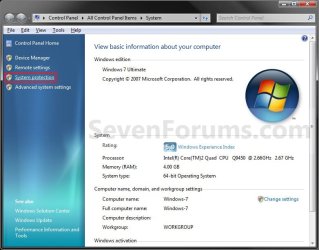
3. Click on the System Protection link. (See screenshot below step 4)

4. Close the System window. (See screenshot below)
System.jpg
5. Check to make sure that you have System Protection turned on for a listed disk that you want to create a restore point for, then select it. (See screenshot below step 6)

6. Click on the Create button. (See screenshot below)
System_Properties.jpg
7. Type in a description for the restore point to help recognize it when doing a System Restore, and click on the Create button.. (See screenshot below)
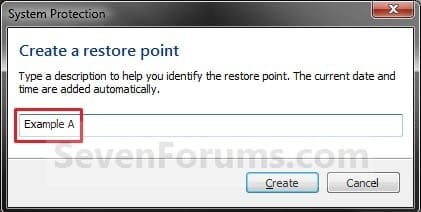
Name.jpg
8. You will now see this while the restore point is being created. (See screenshot below)

Creating.jpg
9. When the restore point has finished being created, click on the Close button. (See screenshot below)

Finished.jpg
10. Click on OK. (See screenshot below step 6)
That's it,
Shawn


Last edited:
Hello Hollyoaks,

This may work better for you for this instead.

http://www.sevenforums.com/tutorials/67114-system-restore-point-create-system-startup.html

Hope this helps,
Shawn

I will try that way later mate thank you. Just another question in the triggers window I have 2 triggers to run at start up and they are both at the same time 10am. Should I have 2 or 1?

You're welcome Holly.

It really just depends on if you wanted one created for each trigger or just one of the triggers. If just one, then you can just delete the other trigger. Please let us know how it went. :)
 

My Computer

Computer type
PC/Desktop
Computer Manufacturer/Model Number
Self built custom
OS
64-bit Windows 11 Pro for Workstations
CPU
Intel i7-8700K OC'd to 5 GHz
Motherboard
ASUS ROG Maximus XI Formula Z390
Memory
64 GB (4x16GB) G.SKILL TridentZ RGB DDR4 3600 MHz
Graphics Card(s)
ASUS ROG-STRIX-GTX1080TI-O11G-GAMING
Sound Card
Integrated
Monitor(s) Displays
2 x Samsung Odyssey G7 27"
Screen Resolution
2560x1440
Hard Drives
1TB Samsung 990 PRO M.2,
4TB Samsung 990 PRO PRO M.2,
TerraMaster F8 SSD Plus NAS
PSU
Seasonic Prime Titanium 850W
Case
Thermaltake Core P3
Cooling
Corsair Hydro H115i
Keyboard
Logitech wireless K800
Mouse
Logitech MX Master 4
Internet Speed
2 Gb/s Download and 100 Mb/s Upload
Antivirus
Malwarebyte Anti-Malware Premium
Browser
Google Chrome
Other Info
Logitech Z625 speaker system,
Logitech BRIO 4K Pro webcam,
HP Color LaserJet Pro MFP M477fdn,
APC SMART-UPS RT 1000 XL - SURT1000XLI,
Galaxy S23 Plus phone
Thanks for this tutorial!
I noticed it's doing this automatically sometimes, and my computer will have a little delay on opening different types of Software (Windows Update took 5 sec for me to open), is it usual that the performance will slow a liiiiittle bit down while Windows is creating a restore point?

Best Regards,
FredeGail
 

My Computer

Computer Manufacturer/Model Number
Brewed
OS
Microsoft Windows 7 Ultimate: x64 (SP1)
CPU
Intel® Core™ i5-2500K Processor
Motherboard
ASUS P8Z68-V PRO
Memory
Kingston DDR3 HyperX 1600MHz 8GB
Graphics Card(s)
ASUS GTX 560 TI DirectCU II 900MHz
Sound Card
Realtek® ALC892 8-Channel High Definition Audio CODEC
Monitor(s) Displays
ACER LCD P246HBD 1920x1080 (24") - Dell 1280x800
Screen Resolution
ACER LCD P246HBD ~ [1920X1080] - DELL ~ [1280x800]
Hard Drives
500 GB WD Caviar SE116 7200rpm SATA2
PSU
Corsair 750W Power Supply
Case
Coolermaster CM Scout
Cooling
Zalman FS-C77 Fatal1ty CPU Cooler
Keyboard
Logitech G15
Mouse
Coolermaster Sentinel Advanced
Internet Speed
[↓ 10 MB/s DL] [↑ 1 MB/s UL]
Other Info
- ROCCAT™ Kave – Solid 5.1 Surround Sound Gaming Headset
- Not overclocking
Thanks for this tutorial!
I noticed it's doing this automatically sometimes, and my computer will have a little delay on opening different types of Software (Windows Update took 5 sec for me to open), is it usual that the performance will slow a liiiiittle bit down while Windows is creating a restore point?

Best Regards,
FredeGail
You should let Windows create Restore points then do your other tasks.

Just let it finish Restore points and System Images before doing added tasks a lot less likely that an error will occur in the Image/Restore point.

Mike

Didn't realize you were on Brink. ;)
 

My Computer

Computer Manufacturer/Model Number
Hopalong/ Godzilla
OS
Windows7 Pro 64bit SP-1; Windows XP Pro 32bit
CPU
Intel Core i7-870 Lynnfield 2.93GHz LGA 1156 95W Quad-Core
Motherboard
ASUS P7P55D-E PRO
Memory
8GB@1400MHz Crucial Ballistix DDR3-1600 4x2GB
Graphics Card(s)
ASUS ENGTX460 DirectCU/2DI/1GD5 1GB 256-bit GDDR5
Sound Card
VIA Onboard
Monitor(s) Displays
Asus VS248H-P 24"; Samsung SyncMaster 941BW 19"ws
Screen Resolution
1920x1080; 1440x900
Hard Drives
Samsung 830 120GB SSD
Intel 320 120GB SSD
Western Digital Caviar Black WD7501AALS 750GB 7200 RPM SATA 3.0Gb/s
Western Digital Caviar Black WD6401AALS 640GB 7200 RPM SATA 3.0Gb/s
PSU
COOLER MASTER Silent Pro RS850-AMBAJ3-US 850W Modular
Case
COOLER MASTER HAF 932 RC-932-KKN5-GP Black
Cooling
Scythe "Mugen-2 Rev.B" (2 ScytheKaze-Jyuni PWM fans)
Keyboard
Logitech K-320
Mouse
Kensington
Antivirus
Avast Inernet Suite
Browser
IE 9 ; Chrome
Hello FredeGail,

Depending on how powerful your system is, it wouldn't be unusual to notice a bit of a performance drop while a restore point is being created. :)
 

My Computer

Computer type
PC/Desktop
Computer Manufacturer/Model Number
Self built custom
OS
64-bit Windows 11 Pro for Workstations
CPU
Intel i7-8700K OC'd to 5 GHz
Motherboard
ASUS ROG Maximus XI Formula Z390
Memory
64 GB (4x16GB) G.SKILL TridentZ RGB DDR4 3600 MHz
Graphics Card(s)
ASUS ROG-STRIX-GTX1080TI-O11G-GAMING
Sound Card
Integrated
Monitor(s) Displays
2 x Samsung Odyssey G7 27"
Screen Resolution
2560x1440
Hard Drives
1TB Samsung 990 PRO M.2,
4TB Samsung 990 PRO PRO M.2,
TerraMaster F8 SSD Plus NAS
PSU
Seasonic Prime Titanium 850W
Case
Thermaltake Core P3
Cooling
Corsair Hydro H115i
Keyboard
Logitech wireless K800
Mouse
Logitech MX Master 4
Internet Speed
2 Gb/s Download and 100 Mb/s Upload
Antivirus
Malwarebyte Anti-Malware Premium
Browser
Google Chrome
Other Info
Logitech Z625 speaker system,
Logitech BRIO 4K Pro webcam,
HP Color LaserJet Pro MFP M477fdn,
APC SMART-UPS RT 1000 XL - SURT1000XLI,
Galaxy S23 Plus phone
Hello FredeGail,

Depending on how powerful your system is, it wouldn't be unusual to notice a bit of a performance drop while a restore point is being created. :)

It's probably a refer to my memory is DDR2, due to my board doesn't support the new technology, DDR3.
- Which I'm defiantly annoyed about :geek:

I'm making image backups of the system, and saving it on the D:/ drive (non-windows-disk).

Thanks for this tutorial!
I noticed it's doing this automatically sometimes, and my computer will have a little delay on opening different types of Software (Windows Update took 5 sec for me to open), is it usual that the performance will slow a liiiiittle bit down while Windows is creating a restore point?

Best Regards,
FredeGail
You should let Windows create Restore points then do your other tasks.

Just let it finish Restore points and System Images before doing added tasks a lot less likely that an error will occur in the Image/Restore point.

Mike

Didn't realize you were on Brink. ;)

Defiantly, but it's such a small things as.. let's say.. opening Windows Update. But it's a no problem :geek:

Best Regards,
FredeGail


EDIT; OH MY GOSH, I have a badge! This is soooo big! Thanks to aaaall supporters!!
 

My Computer

Computer Manufacturer/Model Number
Brewed
OS
Microsoft Windows 7 Ultimate: x64 (SP1)
CPU
Intel® Core™ i5-2500K Processor
Motherboard
ASUS P8Z68-V PRO
Memory
Kingston DDR3 HyperX 1600MHz 8GB
Graphics Card(s)
ASUS GTX 560 TI DirectCU II 900MHz
Sound Card
Realtek® ALC892 8-Channel High Definition Audio CODEC
Monitor(s) Displays
ACER LCD P246HBD 1920x1080 (24") - Dell 1280x800
Screen Resolution
ACER LCD P246HBD ~ [1920X1080] - DELL ~ [1280x800]
Hard Drives
500 GB WD Caviar SE116 7200rpm SATA2
PSU
Corsair 750W Power Supply
Case
Coolermaster CM Scout
Cooling
Zalman FS-C77 Fatal1ty CPU Cooler
Keyboard
Logitech G15
Mouse
Coolermaster Sentinel Advanced
Internet Speed
[↓ 10 MB/s DL] [↑ 1 MB/s UL]
Other Info
- ROCCAT™ Kave – Solid 5.1 Surround Sound Gaming Headset
- Not overclocking
Schedule Daily Create Restore Point

I want to automatically create a restore point at 6 pm everyday. I managed to do it via help from this forum about 18 months ago. However my laptop was stolen last week and I have forgotten what I did - my new laptop is running Win7 Home Premium. Can someone please advise on what is now regarded as the easiest way to schedule the daily back up?
 

My Computer

OS
64

My Computer

Computer type
PC/Desktop
OS
Microsoft Windows 7 Home Premium 64-bit 7601 Multiprocessor Free Service Pack 1
CPU
Intel(R) Core(TM) i7-3770 CPU @ 3.40GHz
Motherboard
ASUSTeK COMPUTER INC. P8H77-M
Memory
8.00 GB
Graphics Card(s)
Intel(R) HD Graphics 4000
Sound Card
On Board
Monitor(s) Displays
Dell 24"
Screen Resolution
1920 x 1080
Hard Drives
(1) INTEL SSDSC2CT180A3 ATA Device (2) ST500DM002-1BD142 ATA Device (3) WDC WD3200AAKS-75L9A0 ATA Device (4) Generic- Compact Flash USB Device (5) Generic- MS/MS-Pro USB Device (6) Generic- SD/MMC USB Device (7) Generic- SM/xD-Picture USB
PSU
500w Corsair
Case
Cooler Master
Cooling
3 Fans
Keyboard
Logitech MK300
Mouse
Logitech WOM
Internet Speed
75Mb
Antivirus
Norton 360
Browser
Firefox, Opera, IE

My Computer

Computer type
PC/Desktop
Computer Manufacturer/Model Number
Self built custom
OS
64-bit Windows 11 Pro for Workstations
CPU
Intel i7-8700K OC'd to 5 GHz
Motherboard
ASUS ROG Maximus XI Formula Z390
Memory
64 GB (4x16GB) G.SKILL TridentZ RGB DDR4 3600 MHz
Graphics Card(s)
ASUS ROG-STRIX-GTX1080TI-O11G-GAMING
Sound Card
Integrated
Monitor(s) Displays
2 x Samsung Odyssey G7 27"
Screen Resolution
2560x1440
Hard Drives
1TB Samsung 990 PRO M.2,
4TB Samsung 990 PRO PRO M.2,
TerraMaster F8 SSD Plus NAS
PSU
Seasonic Prime Titanium 850W
Case
Thermaltake Core P3
Cooling
Corsair Hydro H115i
Keyboard
Logitech wireless K800
Mouse
Logitech MX Master 4
Internet Speed
2 Gb/s Download and 100 Mb/s Upload
Antivirus
Malwarebyte Anti-Malware Premium
Browser
Google Chrome
Other Info
Logitech Z625 speaker system,
Logitech BRIO 4K Pro webcam,
HP Color LaserJet Pro MFP M477fdn,
APC SMART-UPS RT 1000 XL - SURT1000XLI,
Galaxy S23 Plus phone
If you go to the search bar in the windows menu that pops up when you press the windows key and type, "create restore" a link will appear that will send you right to the "Create Restore Point" screen.

Just a tip to skip a few steps.
 

My Computer

Computer type
PC/Desktop
Computer Manufacturer/Model Number
Custom Build
OS
Windows 7 Professional 64 Bit
CPU
AMD FX(tm)-8120 Eight Core Processor 3.89 GHz
Memory
8
Graphics Card(s)
AMD Radeon HD 7800 Series
Hard Drives
2 1 Tb drives
1 500 gb
Antivirus
Comodo
Browser
Firefox/Chrome
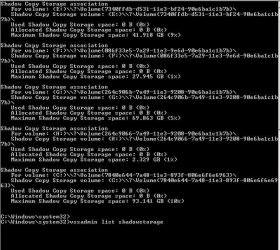
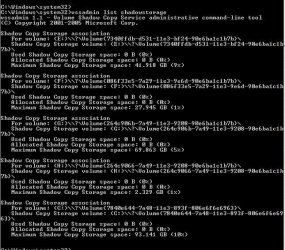
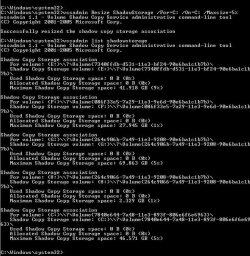
I have used elevated see if all shadow copies is working and its allocated space. I note that no matter what size I set the allocated amouint is zero..is this the problem..maybe or is this normal. see attached elevated results
 

Attachments

  • shadow coppy availability.JPG
    shadow coppy availability.JPG
    107 KB · Views: 167
  • restore 10% as set before adjustment.JPG
    restore 10% as set before adjustment.JPG
    105.6 KB · Views: 165
  • restore resized.JPG
    restore resized.JPG
    129.3 KB · Views: 157

My Computer

Computer type
PC/Desktop
Computer Manufacturer/Model Number
Compaq Presario
OS
Windows 7 64 bit
Hello artinusa, :)

What does it show in your System Protection settings?

If you create a restore point, does it then show a used and allocated amount for it?
 

My Computer

Computer type
PC/Desktop
Computer Manufacturer/Model Number
Self built custom
OS
64-bit Windows 11 Pro for Workstations
CPU
Intel i7-8700K OC'd to 5 GHz
Motherboard
ASUS ROG Maximus XI Formula Z390
Memory
64 GB (4x16GB) G.SKILL TridentZ RGB DDR4 3600 MHz
Graphics Card(s)
ASUS ROG-STRIX-GTX1080TI-O11G-GAMING
Sound Card
Integrated
Monitor(s) Displays
2 x Samsung Odyssey G7 27"
Screen Resolution
2560x1440
Hard Drives
1TB Samsung 990 PRO M.2,
4TB Samsung 990 PRO PRO M.2,
TerraMaster F8 SSD Plus NAS
PSU
Seasonic Prime Titanium 850W
Case
Thermaltake Core P3
Cooling
Corsair Hydro H115i
Keyboard
Logitech wireless K800
Mouse
Logitech MX Master 4
Internet Speed
2 Gb/s Download and 100 Mb/s Upload
Antivirus
Malwarebyte Anti-Malware Premium
Browser
Google Chrome
Other Info
Logitech Z625 speaker system,
Logitech BRIO 4K Pro webcam,
HP Color LaserJet Pro MFP M477fdn,
APC SMART-UPS RT 1000 XL - SURT1000XLI,
Galaxy S23 Plus phone
Back
Top