System Restore Point - Create

How to Create a System Restore Point in Windows 7

   Information
By default in Windows 7 for all drives that System Protection is turned on for, System Protection creates a scheduled restore point only if no other restore points have been created in the last 7 days, and before significant system events such as a program or driver installation.

For more information about restore points, see:
This tutorial will show you how to manually create a restore point whenever you want one.

   Note
These restore points contain information about registry settings and other system information that Windows 7 uses. System Restore points do not include the personal user files.

You will not be able to create a restore point in safe mode since it is not supported.

If you do a System Restore when the computer is in safe mode, then you cannot undo the restore operation. However, you can run System Restore again and choose a different restore point if one exists.

   Warning
System Protection will need to be turned on for the select drive that you wish to create a restore point for.

It has been reported that some 3rd party disk defragmentation programs could also delete your restore points when used.


OPTION ONE

Using a Shortcut


1. For how, see: How to Make a "Create System Restore Point" Shortcut in Windows 7


OPTION TWO

Through System Protection


1. Open the Control Panel (icons view).
A) Click on the System icon.

B) Go to step 3.
OR

2. Open the Start Menu.
A) Right click on the Computer button and click on Properties.
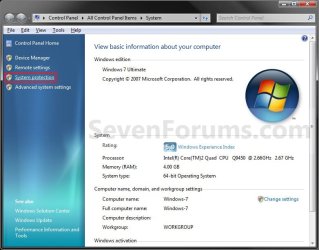
3. Click on the System Protection link. (See screenshot below step 4)

4. Close the System window. (See screenshot below)
System.jpg
5. Check to make sure that you have System Protection turned on for a listed disk that you want to create a restore point for, then select it. (See screenshot below step 6)

6. Click on the Create button. (See screenshot below)
System_Properties.jpg
7. Type in a description for the restore point to help recognize it when doing a System Restore, and click on the Create button.. (See screenshot below)
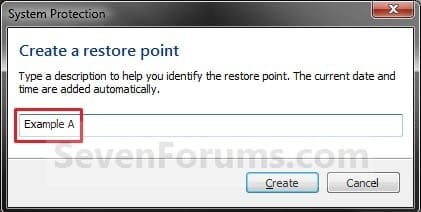
Name.jpg
8. You will now see this while the restore point is being created. (See screenshot below)
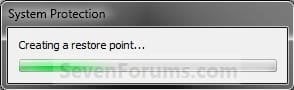
Creating.jpg
9. When the restore point has finished being created, click on the Close button. (See screenshot below)
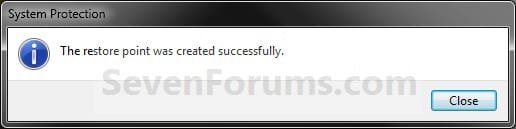
Finished.jpg
10. Click on OK. (See screenshot below step 6)
That's it,
Shawn


Last edited:

My Computer

Computer Manufacturer/Model Number
Custom Low Rider !!
OS
Ubuntu,Mandriva,PCLOS,XP and,Windows 7
CPU
AMD Athlon 64 X2 Dual Core 4200
Memory
4 GB
Graphics Card(s)
NVIDIA GeForce
Sound Card
Onboard
Monitor(s) Displays
22" Acer Wide Screen
Screen Resolution
1280x1024
Hard Drives
WD 1 TB Caviar Black 7200 RPM
Case
Custom
Cooling
F-12 cooled
Keyboard
Saitek Eclipse
Mouse
Logitech invisible optic wireless
Internet Speed
Broadband
Smoaky,

Well you can adjust the existing System Restore task for this, but it will only create one if it detects a change to the system.

If you want each time no matter what, then you could create a task to run the instanst create restore point shortcut instead. Option One in METHOD TWO of the tutorial below can help show you how to if needed. :)

Startup Programs - Enable or Disable - Vista Forums
 

My Computer

Computer type
PC/Desktop
Computer Manufacturer/Model Number
Self built custom
OS
64-bit Windows 11 Pro for Workstations
CPU
Intel i7-8700K OC'd to 5 GHz
Motherboard
ASUS ROG Maximus XI Formula Z390
Memory
64 GB (4x16GB) G.SKILL TridentZ RGB DDR4 3600 MHz
Graphics Card(s)
ASUS ROG-STRIX-GTX1080TI-O11G-GAMING
Sound Card
Integrated
Monitor(s) Displays
2 x Samsung Odyssey G7 27"
Screen Resolution
2560x1440
Hard Drives
1TB Samsung 990 PRO M.2,
4TB Samsung 990 PRO PRO M.2,
TerraMaster F8 SSD Plus NAS
PSU
Seasonic Prime Titanium 850W
Case
Thermaltake Core P3
Cooling
Corsair Hydro H115i
Keyboard
Logitech wireless K800
Mouse
Logitech MX Master 4
Internet Speed
2 Gb/s Download and 100 Mb/s Upload
Antivirus
Malwarebyte Anti-Malware Premium
Browser
Google Chrome
Other Info
Logitech Z625 speaker system,
Logitech BRIO 4K Pro webcam,
HP Color LaserJet Pro MFP M477fdn,
APC SMART-UPS RT 1000 XL - SURT1000XLI,
Galaxy S23 Plus phone
Cool,
I will give that a try.:D
Wondering why MS cant just create a restore point every calendar day when boot-up occurs no matter what? Sure that will take up some disk space but we all could adjust that according to our needs as an option. :confused:
 

My Computer

Computer Manufacturer/Model Number
Custom Low Rider !!
OS
Ubuntu,Mandriva,PCLOS,XP and,Windows 7
CPU
AMD Athlon 64 X2 Dual Core 4200
Memory
4 GB
Graphics Card(s)
NVIDIA GeForce
Sound Card
Onboard
Monitor(s) Displays
22" Acer Wide Screen
Screen Resolution
1280x1024
Hard Drives
WD 1 TB Caviar Black 7200 RPM
Case
Custom
Cooling
F-12 cooled
Keyboard
Saitek Eclipse
Mouse
Logitech invisible optic wireless
Internet Speed
Broadband
Yep, creating one everyday no matter what would use up the maximum disk storage space set and cause the older restore points to be automatically deleted faster. Normally you would only want to create one before making a change to your system to preserve the older restore points as long as possible in case you needed to go back that far.
 

My Computer

Computer type
PC/Desktop
Computer Manufacturer/Model Number
Self built custom
OS
64-bit Windows 11 Pro for Workstations
CPU
Intel i7-8700K OC'd to 5 GHz
Motherboard
ASUS ROG Maximus XI Formula Z390
Memory
64 GB (4x16GB) G.SKILL TridentZ RGB DDR4 3600 MHz
Graphics Card(s)
ASUS ROG-STRIX-GTX1080TI-O11G-GAMING
Sound Card
Integrated
Monitor(s) Displays
2 x Samsung Odyssey G7 27"
Screen Resolution
2560x1440
Hard Drives
1TB Samsung 990 PRO M.2,
4TB Samsung 990 PRO PRO M.2,
TerraMaster F8 SSD Plus NAS
PSU
Seasonic Prime Titanium 850W
Case
Thermaltake Core P3
Cooling
Corsair Hydro H115i
Keyboard
Logitech wireless K800
Mouse
Logitech MX Master 4
Internet Speed
2 Gb/s Download and 100 Mb/s Upload
Antivirus
Malwarebyte Anti-Malware Premium
Browser
Google Chrome
Other Info
Logitech Z625 speaker system,
Logitech BRIO 4K Pro webcam,
HP Color LaserJet Pro MFP M477fdn,
APC SMART-UPS RT 1000 XL - SURT1000XLI,
Galaxy S23 Plus phone
Thanks!!!!
Your an admin...what do you think should be the best solution to restore points IYHO ??
Does Vista/W7 has the best answer or what?:huh:
 

My Computer

Computer Manufacturer/Model Number
Custom Low Rider !!
OS
Ubuntu,Mandriva,PCLOS,XP and,Windows 7
CPU
AMD Athlon 64 X2 Dual Core 4200
Memory
4 GB
Graphics Card(s)
NVIDIA GeForce
Sound Card
Onboard
Monitor(s) Displays
22" Acer Wide Screen
Screen Resolution
1280x1024
Hard Drives
WD 1 TB Caviar Black 7200 RPM
Case
Custom
Cooling
F-12 cooled
Keyboard
Saitek Eclipse
Mouse
Logitech invisible optic wireless
Internet Speed
Broadband
It really depends on your specific needs, but I would recommend to leave the default restore point task as is and only manually create a restore point right before you make changes to your system to be safe. For example, before installing Windows Updates, drivers, programs, etc.....

Of course, creating good backups of any files that you do not want to lose is always best as well. ;)
 

My Computer

Computer type
PC/Desktop
Computer Manufacturer/Model Number
Self built custom
OS
64-bit Windows 11 Pro for Workstations
CPU
Intel i7-8700K OC'd to 5 GHz
Motherboard
ASUS ROG Maximus XI Formula Z390
Memory
64 GB (4x16GB) G.SKILL TridentZ RGB DDR4 3600 MHz
Graphics Card(s)
ASUS ROG-STRIX-GTX1080TI-O11G-GAMING
Sound Card
Integrated
Monitor(s) Displays
2 x Samsung Odyssey G7 27"
Screen Resolution
2560x1440
Hard Drives
1TB Samsung 990 PRO M.2,
4TB Samsung 990 PRO PRO M.2,
TerraMaster F8 SSD Plus NAS
PSU
Seasonic Prime Titanium 850W
Case
Thermaltake Core P3
Cooling
Corsair Hydro H115i
Keyboard
Logitech wireless K800
Mouse
Logitech MX Master 4
Internet Speed
2 Gb/s Download and 100 Mb/s Upload
Antivirus
Malwarebyte Anti-Malware Premium
Browser
Google Chrome
Other Info
Logitech Z625 speaker system,
Logitech BRIO 4K Pro webcam,
HP Color LaserJet Pro MFP M477fdn,
APC SMART-UPS RT 1000 XL - SURT1000XLI,
Galaxy S23 Plus phone
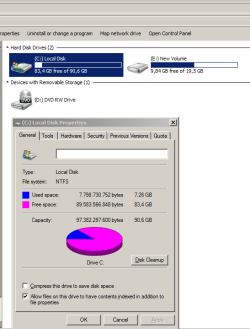
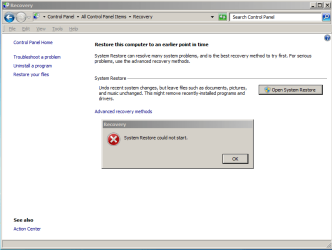
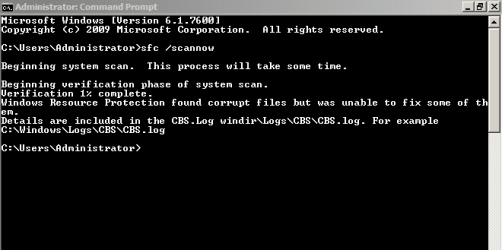
System Restore could not start

recently I instated a cracked version of Win7 ultimate 32bit. letter I discovered that no system protection at all as you see at the attached photos.
I tray to do my best to do something can fix this problem but no result at all, so could you please help me to find a solution?
thanks in advance
 

Attachments

  • Capture 1.PNG
    Capture 1.PNG
    15.2 KB · Views: 414
  • Capture2.PNG
    Capture2.PNG
    14 KB · Views: 354
  • Capture3.PNG
    Capture3.PNG
    5.4 KB · Views: 590

My Computer

Computer Manufacturer/Model Number
Toshiba satellite A200 1MB
OS
Windows7 Ultimate 32bit-version 6.1.7600 Bult
Motherboard
intel(R) core(TM)cpu T5300 @ 1.73GHz
Hello Freiheit, and welcome to Seven Forums.

Sorry, but the only thing that can fix this is to uninstall (format) the cracked version and install a legal copy that has not been broken by a hack. :(
 

My Computer

Computer type
PC/Desktop
Computer Manufacturer/Model Number
Self built custom
OS
64-bit Windows 11 Pro for Workstations
CPU
Intel i7-8700K OC'd to 5 GHz
Motherboard
ASUS ROG Maximus XI Formula Z390
Memory
64 GB (4x16GB) G.SKILL TridentZ RGB DDR4 3600 MHz
Graphics Card(s)
ASUS ROG-STRIX-GTX1080TI-O11G-GAMING
Sound Card
Integrated
Monitor(s) Displays
2 x Samsung Odyssey G7 27"
Screen Resolution
2560x1440
Hard Drives
1TB Samsung 990 PRO M.2,
4TB Samsung 990 PRO PRO M.2,
TerraMaster F8 SSD Plus NAS
PSU
Seasonic Prime Titanium 850W
Case
Thermaltake Core P3
Cooling
Corsair Hydro H115i
Keyboard
Logitech wireless K800
Mouse
Logitech MX Master 4
Internet Speed
2 Gb/s Download and 100 Mb/s Upload
Antivirus
Malwarebyte Anti-Malware Premium
Browser
Google Chrome
Other Info
Logitech Z625 speaker system,
Logitech BRIO 4K Pro webcam,
HP Color LaserJet Pro MFP M477fdn,
APC SMART-UPS RT 1000 XL - SURT1000XLI,
Galaxy S23 Plus phone
Cool, now after I create the restore point, how do I access it again?

Thanks.
 

My Computer

Computer type
PC/Desktop
OS
Windows 7 Professional x64
Hello GWT,

If needed, you can do a system restore to select a restore point to go back to.

Hope this helps,
Shawn
 

My Computer

Computer type
PC/Desktop
Computer Manufacturer/Model Number
Self built custom
OS
64-bit Windows 11 Pro for Workstations
CPU
Intel i7-8700K OC'd to 5 GHz
Motherboard
ASUS ROG Maximus XI Formula Z390
Memory
64 GB (4x16GB) G.SKILL TridentZ RGB DDR4 3600 MHz
Graphics Card(s)
ASUS ROG-STRIX-GTX1080TI-O11G-GAMING
Sound Card
Integrated
Monitor(s) Displays
2 x Samsung Odyssey G7 27"
Screen Resolution
2560x1440
Hard Drives
1TB Samsung 990 PRO M.2,
4TB Samsung 990 PRO PRO M.2,
TerraMaster F8 SSD Plus NAS
PSU
Seasonic Prime Titanium 850W
Case
Thermaltake Core P3
Cooling
Corsair Hydro H115i
Keyboard
Logitech wireless K800
Mouse
Logitech MX Master 4
Internet Speed
2 Gb/s Download and 100 Mb/s Upload
Antivirus
Malwarebyte Anti-Malware Premium
Browser
Google Chrome
Other Info
Logitech Z625 speaker system,
Logitech BRIO 4K Pro webcam,
HP Color LaserJet Pro MFP M477fdn,
APC SMART-UPS RT 1000 XL - SURT1000XLI,
Galaxy S23 Plus phone
What I plan to do is this. I want to clone my Win7 HD with a bigger HD and I want to install Acronis on it in order to facilitate the transfer.

And the end of the cloning process and after I physically install the new HD, I want to revert to that cloned restore point to back before I installed Acronis so it won't be on my new machine. That way I don't have to do an un-install of it and a registry clean up.

Does that make sense?
 

My Computer

Computer type
PC/Desktop
OS
Windows 7 Professional x64
GWT,

As long as the clone backup includes the restore point, you should still be able to do a system restore using that restore point in that manner.
 

My Computer

Computer type
PC/Desktop
Computer Manufacturer/Model Number
Self built custom
OS
64-bit Windows 11 Pro for Workstations
CPU
Intel i7-8700K OC'd to 5 GHz
Motherboard
ASUS ROG Maximus XI Formula Z390
Memory
64 GB (4x16GB) G.SKILL TridentZ RGB DDR4 3600 MHz
Graphics Card(s)
ASUS ROG-STRIX-GTX1080TI-O11G-GAMING
Sound Card
Integrated
Monitor(s) Displays
2 x Samsung Odyssey G7 27"
Screen Resolution
2560x1440
Hard Drives
1TB Samsung 990 PRO M.2,
4TB Samsung 990 PRO PRO M.2,
TerraMaster F8 SSD Plus NAS
PSU
Seasonic Prime Titanium 850W
Case
Thermaltake Core P3
Cooling
Corsair Hydro H115i
Keyboard
Logitech wireless K800
Mouse
Logitech MX Master 4
Internet Speed
2 Gb/s Download and 100 Mb/s Upload
Antivirus
Malwarebyte Anti-Malware Premium
Browser
Google Chrome
Other Info
Logitech Z625 speaker system,
Logitech BRIO 4K Pro webcam,
HP Color LaserJet Pro MFP M477fdn,
APC SMART-UPS RT 1000 XL - SURT1000XLI,
Galaxy S23 Plus phone
Shawn you might want to update the bit at the beginning about how often a restore pint is created. It is once every 7 days if one hasn't been created by another means,

Restore Points (Windows)

Scheduled restore points

System Restore can be configured to create restore points at regular intervals. Users can also manually create and name a restore point at any time from within the System Restore user interface. These restore points are saved and compressed, and these choices are available to the user through the System Restore user interface. System Restore in Windows 7 creates a scheduled restore point only if no other restore points have been created in the last 7 days. System Restore in Windows Vista creates a checkpoint every 24 hours if no other restore points were created that day. System Restore in Windows XP creates a checkpoint every 24 hours of absolute time.
 

My Computer

Computer type
PC/Desktop
Computer Manufacturer/Model Number
Me
OS
Win 7 Ultimate x64
CPU
FX-8350 @ 4.6 GHz so far
Motherboard
Asus M5A97 EVO
Memory
ADATA XPG V1 Series Black 8GB DDR3 1600
Graphics Card(s)
Sapphire R9 270x Dual-X
Sound Card
Xonar DGX w/ Corsair Vengence 1300
Monitor(s) Displays
Acer S232HL Abid
Screen Resolution
1920x1080
Hard Drives
120 GB OCZ Vertex 3
500 GB Seagate 7200.12
PSU
Antec Earthwatts 650W Green
Case
Antec Three Hundred
Cooling
Cooler Master 212 EVO
Keyboard
Logitech G510
Mouse
Logitech G500s
Internet Speed
35000/3000
Thank you Storm. Updated. :)
 

My Computer

Computer type
PC/Desktop
Computer Manufacturer/Model Number
Self built custom
OS
64-bit Windows 11 Pro for Workstations
CPU
Intel i7-8700K OC'd to 5 GHz
Motherboard
ASUS ROG Maximus XI Formula Z390
Memory
64 GB (4x16GB) G.SKILL TridentZ RGB DDR4 3600 MHz
Graphics Card(s)
ASUS ROG-STRIX-GTX1080TI-O11G-GAMING
Sound Card
Integrated
Monitor(s) Displays
2 x Samsung Odyssey G7 27"
Screen Resolution
2560x1440
Hard Drives
1TB Samsung 990 PRO M.2,
4TB Samsung 990 PRO PRO M.2,
TerraMaster F8 SSD Plus NAS
PSU
Seasonic Prime Titanium 850W
Case
Thermaltake Core P3
Cooling
Corsair Hydro H115i
Keyboard
Logitech wireless K800
Mouse
Logitech MX Master 4
Internet Speed
2 Gb/s Download and 100 Mb/s Upload
Antivirus
Malwarebyte Anti-Malware Premium
Browser
Google Chrome
Other Info
Logitech Z625 speaker system,
Logitech BRIO 4K Pro webcam,
HP Color LaserJet Pro MFP M477fdn,
APC SMART-UPS RT 1000 XL - SURT1000XLI,
Galaxy S23 Plus phone
You're welcome. Only posted it due to a thread about SR and remembered seeing that it was 7 days, so went looking and one of the things found in addition to the above Technet link was this tutorial. :)
 

My Computer

Computer type
PC/Desktop
Computer Manufacturer/Model Number
Me
OS
Win 7 Ultimate x64
CPU
FX-8350 @ 4.6 GHz so far
Motherboard
Asus M5A97 EVO
Memory
ADATA XPG V1 Series Black 8GB DDR3 1600
Graphics Card(s)
Sapphire R9 270x Dual-X
Sound Card
Xonar DGX w/ Corsair Vengence 1300
Monitor(s) Displays
Acer S232HL Abid
Screen Resolution
1920x1080
Hard Drives
120 GB OCZ Vertex 3
500 GB Seagate 7200.12
PSU
Antec Earthwatts 650W Green
Case
Antec Three Hundred
Cooling
Cooler Master 212 EVO
Keyboard
Logitech G510
Mouse
Logitech G500s
Internet Speed
35000/3000
Nice to know since I normaly only create one myself before I install new software just in case I don't want to keep it I can remove it and then use my restore point to go back also.Fabe
 

My Computer

Computer Manufacturer/Model Number
Self Built
OS
Windows 7 ultimate 64 bit / XP Home sp3
CPU
intel Core 2 Duo E8400 3.0ghz
Motherboard
Asus P5ND bios 1401
Memory
8 gigs 1066 OCZ Fata1ty
Graphics Card(s)
EVGA GTX 580 Call of Duty Black Ops Edition
Sound Card
Creative Soundblaster Audigy 2zs
Monitor(s) Displays
Asus 24in LCD's 2MS X2
Screen Resolution
1920x1080p @60Hz
Hard Drives
WD Caviar 500 Black/ WD Caviar 200 Blue
PSU
OCZ 700W GameXtreme
Case
NZXT Apollo
Cooling
Corsair H50 CPU/120mm x3 /60mm x2 /Corsair Dominator Ram
Keyboard
Logitech Bluetooth Wireless MX5000
Mouse
Logitech Bluetooth Wireless MX1000
Internet Speed
Download 19.83 Upload 0.97
Other Info
Logitech Z2300 Speakers/ Bose Noise Cancelling Headphones/Avermedia PCI-e Hybrid TV Bravo/Epson NX415 all in one/ 4 Port Powered USB Hub/ LG 10x Bluray Burner /TSST Corp DVDRW External
Hello Smoaky,

You can adjust or disable the System Restore tasks to create automatic restore points as you like. If you disable them, then Windows 7 will not create any automatic restor points. Either way. you are always free to manually create a restore point when you like.

Hope this helps,
Shawn

Hi Brink in the link above on the jpeg 6 i don't have the option of 365 days I was wondering if I have done something wrong. I want to do daily restore points on start up. It says 23 hours in mine also in the general tab should I tick run with highest privileges
 

My Computer

OS
windows 7

My Computer

Computer type
PC/Desktop
Computer Manufacturer/Model Number
Self built custom
OS
64-bit Windows 11 Pro for Workstations
CPU
Intel i7-8700K OC'd to 5 GHz
Motherboard
ASUS ROG Maximus XI Formula Z390
Memory
64 GB (4x16GB) G.SKILL TridentZ RGB DDR4 3600 MHz
Graphics Card(s)
ASUS ROG-STRIX-GTX1080TI-O11G-GAMING
Sound Card
Integrated
Monitor(s) Displays
2 x Samsung Odyssey G7 27"
Screen Resolution
2560x1440
Hard Drives
1TB Samsung 990 PRO M.2,
4TB Samsung 990 PRO PRO M.2,
TerraMaster F8 SSD Plus NAS
PSU
Seasonic Prime Titanium 850W
Case
Thermaltake Core P3
Cooling
Corsair Hydro H115i
Keyboard
Logitech wireless K800
Mouse
Logitech MX Master 4
Internet Speed
2 Gb/s Download and 100 Mb/s Upload
Antivirus
Malwarebyte Anti-Malware Premium
Browser
Google Chrome
Other Info
Logitech Z625 speaker system,
Logitech BRIO 4K Pro webcam,
HP Color LaserJet Pro MFP M477fdn,
APC SMART-UPS RT 1000 XL - SURT1000XLI,
Galaxy S23 Plus phone

My Computer

OS
windows 7
Back
Top