System restore unsuccessful everytime!

Chandrashekhar

New member
Local time
10:41 PM
Messages
9
Every time I try restoring my pc to an earlier time, system restore starts normally..I choose a restore point..pc restarts and it says .."System restore "UNSUCCESSFUL" ..no changes where made to your files and settings..try choosing a different restore point" ..Why is it so? I have not installed any antivirus and I have even tried creating a new restore point and restoring it to that point..but of no avail..So matter of corruption of restore point is not possible(sort of-I don't know)...what can be the problem and how can I solve this...I am really scared, if something happens wrong how will I restore my pc?:(
 

My Computer

Computer type
PC/Desktop
Computer Manufacturer/Model Number
Compaq: CQ1-1030IN
OS
Windows 7 x86
Memory
2 gb
Graphics Card(s)
NVIDIA ION
Hard Drives
300 GB
Browser
Google Chrome
Don't worry about the restore points. I have the same problem, and a reinstall might be the only solution.
What I do is use Macrium Relfect, in fact it is better than restore points.
With Macrium, once a week put an image on your hard drive of your OS. Any problem, you just reinstall with the image. It works better than SR.
Macrium Reflect FREE Edition - Information and download
 

My Computer

Computer type
PC/Desktop
Computer Manufacturer/Model Number
Dell XPS 420
OS
Windows 10, Home Clean Install
CPU
Intel Core2 processsor Q8200(2.33Ghz 1333FSB) Quad Core Tech
Motherboard
Dell
Memory
6 gb
Graphics Card(s)
ATI Radeon 256MB HD3650
Sound Card
Intergrated 7.1 Channel Audio
Monitor(s) Displays
Dell SP2009W 20"
Hard Drives
640 GB Serial ATA Hard drive
Cooling
Fan
Keyboard
Dell USB Keyboard
Mouse
Dell Premium Optical USB
Internet Speed
DSL 2.85
Don't worry about the restore points. I have the same problem, and a reinstall might be the only solution.
What I do is use Macrium Relfect, in fact it is better than restore points.
With Macrium, once a week put an image on your hard drive of your OS. Any problem, you just reinstall with the image. It works better than SR.
Macrium Reflect FREE Edition - Information and download

I also had the same problem every since I started using Win 7. I use the Pro version of Macrium Reflect but Macrium Reflect Free (here is a good tutorial on how to use Macrium Reflect) will also do the job quite well. In fact, it is so reliable, I turned off System Restore.
 

My Computer

Computer type
PC/Desktop
Computer Manufacturer/Model Number
Custom Build
OS
Win 7 Ultimate 64 bit
CPU
Intel i7-3930K
Motherboard
ASUS P9X79 WS
Memory
Kingston HyperX Genesis 32GB Kit (8x4GB Modules) 1600MHz DDR
Graphics Card(s)
MSI R7850 Twin Frozr 2GD5/OC Radeon HD 7850 2GB 256-bit GDDR
Sound Card
Asus Xonar Essence STX
Monitor(s) Displays
3x Asus VG248QE 24", Vizio 32" TV
Screen Resolution
1920 x 1080, ?
Hard Drives
Samsung 128GB 840 Pro SSD (1),
Samsung 4TB 850 EVO SSDs (4)
Samsung 4TB 850 EVO SSDs (16) external backup drives used in 2.5" hot swap bays in the computer.
PSU
Corsair HX750w
Case
Antec Two Hundred v2 (modified)
Cooling
Cooler Master GeminII S524 120mm (fan replaced with a 140mm)
Keyboard
Logitech G510s
Mouse
Logitech M525 (two in use)
Internet Speed
=< 32Mbps down, 8Mbps up
Antivirus
AVAST!, MBAM, SAS, Spybot S&D (all but MBAM free) Glary Util
Browser
IE11
Other Info
LSI 9211-8i HBA card (8 SATA III ports), 2.5" & 3.5" Hot Swap Bays, HooToo HT-CR001 PCI-E to USB 3.0 Internal Hub + 6 Slot Card Reader, and LG Model CH12LS28 BD-ROM Optical Drive. Also, ScanSnap S1500 ADF duplexing scanner, Canon 9000F flat bed scanner, Corsair SP2500 2.1 speakers, Samsung CLP 415nw laser color printer, Cyberpower PP2200SW UPS
System Resore - turn off?

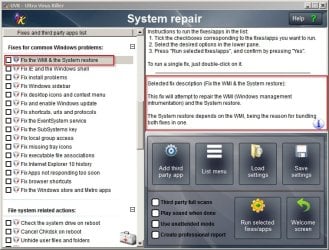
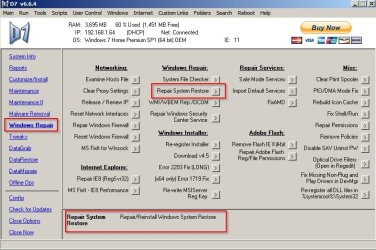
I'd agree with the above. I haven't used system restore for a few years. When I did use it and have problems I just use automated fixes like these:

System Restore Repair.jpg

System Restore Repair 2.jpg

There must be a way to do the same thing manually but I don't know what that method is.
 

My Computer

Computer type
Laptop
Computer Manufacturer/Model Number
ASUS
OS
Microsoft Windows 7 Home Premium 64-bit 7601 Multiprocessor Free Service Pack 1
CPU
AMD C-60 APU with Radeon(tm) HD Graphics
Motherboard
ASUSTeK COMPUTER INC. X501U
Memory
4.00 GB
Graphics Card(s)
AMD Radeon HD 6290 Graphics
Sound Card
(1) AMD High Definition Audio Device (2) Realtek High Defi
Screen Resolution
1366 x 768 x 32 bits (4294967296 colors) @ 60 Hz
Hard Drives
Hitachi HTS545050A7E380 SATA Disk Device
Antivirus
Comodo CIS & FW, SecureAplus App Whitelisting, Threatfire
Browser
Cyberfox 64bit, Opera 64bit, Airfox
Other Info
Spy-The-Spy, HitmanPro.Alert, Norton Connect Safe, MJRegWatcher, BitDefender TrafficLight, Voodoo Shield, Zemana AntiMalware
+1 On backups instead of relying on system restore. Macrium is good.

I quit using system restore when I installed an update of Internet Explorer and decided to roll back with system restore. You would think this would work after all, it is all microsoft. But after the restore running the system file checker revealed inconsistencies that were not previously there. So I resotred from backup and never used system restore again.
 

My Computer

Computer type
PC/Desktop
Computer Manufacturer/Model Number
Home built (GeneO industries)/Model 4
OS
Windows 10 Pro. EFI boot partition, full EFI boot
CPU
i7 4770k 4.4GHz (44-44-43-43 turbo) @ 1.248V
Motherboard
ASUS Maximus VI Hero
Memory
16GB (8GBx2) @2200 MHz G.skill Sniper 10-11-10-30-1, 1.6V
Graphics Card(s)
MSI GTX 970 Gaming 4G
Sound Card
Onboard SupremeFX Audio
Monitor(s) Displays
NEC Spectraview 2490WUXi-SV
Screen Resolution
1920 x 1200
Hard Drives
Samsung 850 Pro 256GB (OS), Samsung 2x 128GB 840 Pro SSD in RAID0, 3x WD Blue 6Gb/s 1TB RAID0, WD 2TB Black external USB 3.0, 2TB WD20EARS Green external USB 3.0, 2x 500GB Seagate and 1 750 GB external USB, 1x 350GB external USB3
PSU
Seasonic X-850 (2012 KM3 model)
Case
Fractal Design Define R4
Cooling
NH-D14, NF-F12, NF-A15; NF-P14, NF-P12,NF-A14, S12A PWM
Keyboard
Cooler Master Storm Quickfire Rapid - Brown
Mouse
Logitech G602
Internet Speed
126.4 Mb/s down, 24.3 Mb/s up
Other Info
USB 3.0 x8 , SATA III x8, eSATA, USB 2.0 x6. Samsung DVD R/W drive.

WEI: CPU 7.8, Memory 7.9, Graphics 7.9, Disk 7.9
Back
Top