
System Restore

How to Do a System Restore in Windows 7

   Information
This will show you how to do a System Restore to restore your Windows 7 system files to an earlier point in time. It's a way to undo system changes to your computer without affecting your personal user files, such as e‑mail, documents, or photos.

   Note
System Restore uses a feature called System Protection to regularly create and save restore points of selected hard disks in your computer. These restore points contain information about registry settings and other system information that Windows 7 uses. You can also create restore points manually.

   Warning
A System Restore will uninstall programs and drivers (step 8 in Option One below) that were installed after the date of the selected restore point.

A System Restore will replace the password of all local user accounts to what they were at the time of the selected restore point.

If you do a System Restore when the computer is in safe mode or Windows Recovery Environment (WinRE), then you will not be able to undo the restore operation. However, you are able to still run System Restore again and choose a different restore point if available.


CONTENTS:
  • Option One: To Do a System Restore in Windows 7 using System Protection
  • Option Two: To Do a System Restore at Boot using System Recovery Options


OPTION ONE

To Do a System Restore in Windows 7 using System Protection


NOTE: Be sure to temporarily disable your antivirus program first to prevent it from possibly preventing you from doing a system restore.
1. Do step 2, step 3, step 4, or step 5 below for how you would like to open System Restore.

2. Open the Start Menu, type rstrui.exe in the search box, press Enter, and go to step 6 below.

3. Open the Start Menu.
A) Click on All Programs, Accessories, System Tools, and System Restore, and go to step 6 below. (see screenshot below)
Start_Menu.jpg
4. Open the Control Panel (icons view).
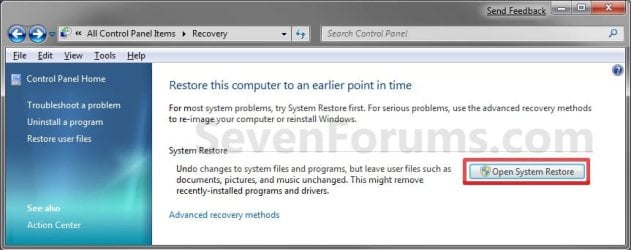
A) Click on the Recovery icon.

B) Click on the Open System Restore button. (see screenshot below)
Recovery.jpg
C) Go to step 7 or step 8 below.
5. Open the Start Menu.
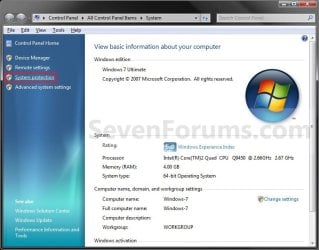
A) Right click on the Computer button and click on Properties.

B) Click on the System Protection link. (see screenshot below)
System.jpg
C) Close the System window, and go to step 6 below. (see screenshot above)
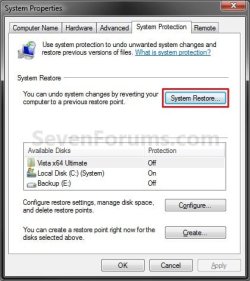
6. Click on the System Restore button. (see screenshot below)
System_Properties.jpg
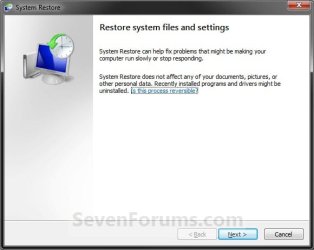
7. If You Have Not Done a System Restore Before
A) Click on the Next button, and go to step 9 below. (see screenshot below)
Restore.jpg
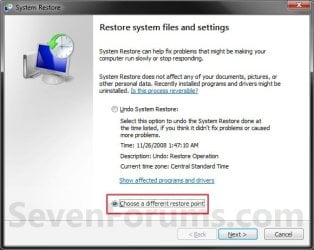
8. If You Have Done a System Restore Before
A) Select (dot) Choose a different restore point, click on the Next button, and go to step 9 below. (see screenshot below)
Restore_Point-2.jpg
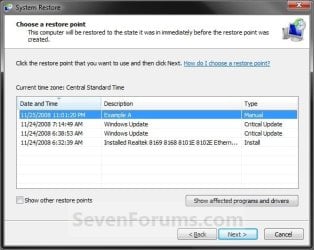
9. Select (click on) a listed restore point that you want to restore the drives that were included in the restore point back to how they were when the restore point was created. (see screenshot below)
NOTE: Check the Show other restore points box to see any restore points (older) that may not be listed here.
System_Restore.jpg
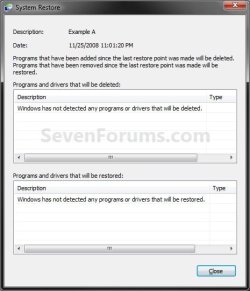
10. To Show Affected Programs and Drivers
NOTE: This will show you a list of programs and drivers that will be deleted and restored by the selected restore point.
A) Click on the Show affected programs and drivers button. (See screenshot above)

B) When done reviewing, click on the Close button. (see screenshot below)
Affected_Programs.jpg
11. Click on the Next button. (see screenshot below step 8)
NOTE: Make sure that the restore point you want is still selected (highlighted).

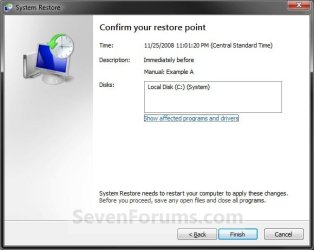
12. Click on the Finish button. (see screenshot below)
NOTE: The listed drives here will be restored back to how they were for the selected restore point.
Confirm.jpg
13. Click on Yes to confirm. (see screenshot below)
WARNING: This will immediately restart your computer to finish the system restore.
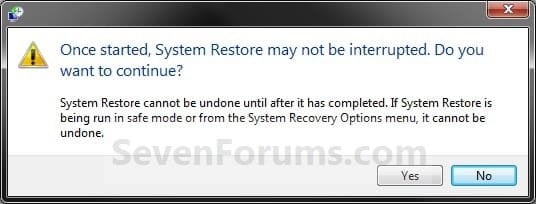
Last_Chance.jpg
14. After the computer has restarted, click on the Close button. (see screenshot below)
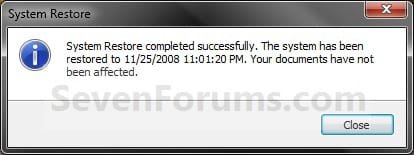
After_Reboot.jpg


OPTION TWO

To Do a System Restore at Boot using System Recovery Options


NOTE: This will allow you to restore Windows 7 to a earlier restore point with a Windows 7 installation disc or System Repair Disc from the System Recovery Options screen at bootup. This can be handy if you cannot startup Windows 7.
1. Using your retail Windows 7 installation disc or System Repair Disc, boot to the System Recovery Options screen.

2. Select the System Restore option. (see screenshot below)
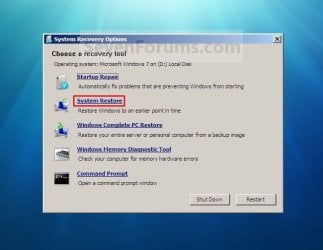
System_Recovery_Options.jpg
3. Continue starting with step 7 or step 8 in Option One above.
That's it,
Shawn


Last edited:
Answers inline. :)


a cooperator said:
Brink said:
If new restore points exceed your maximum disk space set for restore points, then old restore points will automatically be deleted to make room for the new one. This could be what happened to those missing manual restore points.
I know that old restore points delete when the maximum disk space exceeds the specific size. But I am asking about as long as Windows creates automatically restore points, what benefit there is I create a system restore manually. I will retrieve my system if I need that from one of those which Windows creates automatically and continuously.
Windows doesn't always automatically create restore points for everything. It would be beneficial to manually create a restore point say before making changes in the registry, or doing anything that may affect the system. It's best to make sure you have one, than find out later that you don't.

a cooperator said:
Brink said:
Since you screenshots are not in English. I have no way of reading all of it. However, Windows will also sometimes automatically create restore points say before installing Windows Updates, and before installing some programs (ex: VirtualBox or Prestio! Mr. Photo4) during their installation process. This is all normal.
I created one system point which was with installing 'Presto Mr.Photo, at :6/27/2012. But whenever I install or uninstall a program, I notice that Windows creates another point with description with this event, although the period for creating the previous point doesn't exceed 7 days.
Not sure, but it may have done something that triggered Windows to automatically create another restore point.

a cooperator said:
Brink said:
Q-Finally) Steps 7 and 8 in the tutorial on the first page here can help show you more on this to allow you to be able to select to use any of your restore points other than just the latest one.
But this link is the same one which we been discussing in since a certain period of time. This link shows me how to create a system restore either 'Through System Recovery Options at Boot' or 'Through System Protection'. But it doesn't show me how to retrieve any system restores(any restore points) from what I have created.

In other words, If I have created some restore points before.(the first: at 6/26/2012, the second: at 29/6/2012) Then, If I have done something wrong at this date: 7/1/2012 or even after, and computer didn't work well.
I want now to let my computer return to its normal status by retrieving from one of those points which I created before. My question: is how I can retrieve from one of those points created before(the first: at 6/26/2012, the second: at 29/6/2012 or even earlier ones if they are still), so my computer will return to what it was before that created point.

I hope you understand me
I understand you, but this tutorial on the first page of this thread is for how to do a system restore, and not for how to create a restore point. The steps are for how you would restore your system back to a selected restore point in "System Restore". You would use the steps in this tutorial to be able to select and use an available restore points.
 

My Computer My Computer

At a glance

64-bit Windows 11 Pro for WorkstationsIntel i7-8700K OC'd to 5 GHz64 GB (4x16GB) G.SKILL TridentZ RGB DDR4 3600...ASUS ROG-STRIX-GTX1080TI-O11G-GAMING
Computer type
PC/Desktop
Computer Manufacturer/Model Number
Self built custom
OS
64-bit Windows 11 Pro for Workstations
CPU
Intel i7-8700K OC'd to 5 GHz
Motherboard
ASUS ROG Maximus XI Formula Z390
Memory
64 GB (4x16GB) G.SKILL TridentZ RGB DDR4 3600 MHz
Graphics Card(s)
ASUS ROG-STRIX-GTX1080TI-O11G-GAMING
Sound Card
Integrated
Monitor(s) Displays
2 x Samsung Odyssey G7 27"
Screen Resolution
2560x1440
Hard Drives
1TB Samsung 990 PRO M.2,
4TB Samsung 990 PRO PRO M.2,
TerraMaster F8 SSD Plus NAS
PSU
Seasonic Prime Titanium 850W
Case
Thermaltake Core P3
Cooling
Corsair Hydro H115i
Keyboard
Logitech wireless K800
Mouse
Logitech MX Master 4
Internet Speed
2 Gb/s Download and 100 Mb/s Upload
Antivirus
Malwarebyte Anti-Malware Premium
Browser
Google Chrome
Other Info
Logitech Z625 speaker system,
Logitech BRIO 4K Pro webcam,
HP Color LaserJet Pro MFP M477fdn,
APC SMART-UPS RT 1000 XL - SURT1000XLI,
Galaxy S23 Plus phone
Thank you Brink very much indeed
If you have a look at this screenshot, you will see that my restore point which I created at 6/27/2012 is no longer available, although the dates from creating it doesn't exceed 7 days.
And all these points are created with Windows, whenever I uninstall or install a program.
Then if I created a point now, then I installed or installed eight or more programs one after one, I would no longer see my created restore point. This is quite strange, Windows shouldn't add any event has done on the computer in this list, otherwise we cannot find out restore points even we created a little while ago.

llllln.png


Imagine that I want now to restore my system from that point which created at 6/27/2012, How can I do as long as it isn't shown here, although it was shown here and also the date since creating it doesn't exceed even 5 days in order for Windows creates automatically other restore points.
This is most strange.

If you remember about what I asked about before about 'what does this button do', you will see that 'Mohammad' become close to be deleted. These names"description Of points" are going quickly in this list.:(


When you do a system restore , for instance, today, and then you install and uninstall some program which are more than 9. When you check over your created point, do you find it? Or you no longer see it in that list.

I hope you understand me.
 

My Computer My Computer

At a glance

Windows 7 Home Premium SP1-64bit.Intel Core i5 2.30GHz6GBATI Radeon HD 6770M
Computer Manufacturer/Model Number
HP pavilion DV6
OS
Windows 7 Home Premium SP1-64bit.
CPU
Intel Core i5 2.30GHz
Motherboard
Hewlett-Packard- Model 1657
Memory
6GB
Graphics Card(s)
ATI Radeon HD 6770M
Screen Resolution
1366x768
Hard Drives
750GB Toshiba
By default in Windows 7 for all drives that System Protection is turned on for, System Protection creates a scheduled restore point only if no other restore points have been created in the last 7 days, and before significant system events such as a program or driver installation.

The part I bolded above is what is happening when you installed those programs. 7 days is only if no other restore point has been automatically created since then to have one created automatically at that point. It will always automatically create restore points for these type of events no matter what. If either you manually create or Windows 7 automatically creates a bunch of restore points, then it will be normal for the older ones to be deleted as your maximum space usage for restore points is used up.

You may need to increase your maximum disk space usage for restore points to be able to store more restore points if you like since you having so many created.
 
Last edited:

My Computer My Computer

At a glance

64-bit Windows 11 Pro for WorkstationsIntel i7-8700K OC'd to 5 GHz64 GB (4x16GB) G.SKILL TridentZ RGB DDR4 3600...ASUS ROG-STRIX-GTX1080TI-O11G-GAMING
Computer type
PC/Desktop
Computer Manufacturer/Model Number
Self built custom
OS
64-bit Windows 11 Pro for Workstations
CPU
Intel i7-8700K OC'd to 5 GHz
Motherboard
ASUS ROG Maximus XI Formula Z390
Memory
64 GB (4x16GB) G.SKILL TridentZ RGB DDR4 3600 MHz
Graphics Card(s)
ASUS ROG-STRIX-GTX1080TI-O11G-GAMING
Sound Card
Integrated
Monitor(s) Displays
2 x Samsung Odyssey G7 27"
Screen Resolution
2560x1440
Hard Drives
1TB Samsung 990 PRO M.2,
4TB Samsung 990 PRO PRO M.2,
TerraMaster F8 SSD Plus NAS
PSU
Seasonic Prime Titanium 850W
Case
Thermaltake Core P3
Cooling
Corsair Hydro H115i
Keyboard
Logitech wireless K800
Mouse
Logitech MX Master 4
Internet Speed
2 Gb/s Download and 100 Mb/s Upload
Antivirus
Malwarebyte Anti-Malware Premium
Browser
Google Chrome
Other Info
Logitech Z625 speaker system,
Logitech BRIO 4K Pro webcam,
HP Color LaserJet Pro MFP M477fdn,
APC SMART-UPS RT 1000 XL - SURT1000XLI,
Galaxy S23 Plus phone
Thank you Brink.

If you have a look at this screenshot, you will see that the maximum disk sapce specified to the system restores is 10GB and current usage is 9.6GB.

lllllo.png


In my case, Slide left for more space, and slide right for less space.
So my question is I think as long as the slider of maximum usage is in the end on the left side, the maximum usage is 0GB, As result, 'Current Usage' is supposed to be 0GB. However, the current usage is 9.64GB, not 0GB
 
Last edited by a moderator:

My Computer My Computer

At a glance

Windows 7 Home Premium SP1-64bit.Intel Core i5 2.30GHz6GBATI Radeon HD 6770M
Computer Manufacturer/Model Number
HP pavilion DV6
OS
Windows 7 Home Premium SP1-64bit.
CPU
Intel Core i5 2.30GHz
Motherboard
Hewlett-Packard- Model 1657
Memory
6GB
Graphics Card(s)
ATI Radeon HD 6770M
Screen Resolution
1366x768
Hard Drives
750GB Toshiba
a cooperator,

Just having 9.64GB current usage with a max of 10GB doesn't mean that old restore points didn't get deleted to make room for new ones. It just means that the small .36GB of space left may not be enough for a restore point to equal the full 10GB, thus leaving only a 9.64GB current usage instead of your set max 10GB.

Yes, in your case the slider would be in reverse (left=more/right=less) for your language than that of a English copy of Windows 7. "Current usage" is not the same as "maximum usage". When you like, you could click on the "Delete" button there, or turn system protection off, for that drive letter to delete all of it's restore points to then have "current usage" showing as 0GB.
 

My Computer My Computer

At a glance

64-bit Windows 11 Pro for WorkstationsIntel i7-8700K OC'd to 5 GHz64 GB (4x16GB) G.SKILL TridentZ RGB DDR4 3600...ASUS ROG-STRIX-GTX1080TI-O11G-GAMING
Computer type
PC/Desktop
Computer Manufacturer/Model Number
Self built custom
OS
64-bit Windows 11 Pro for Workstations
CPU
Intel i7-8700K OC'd to 5 GHz
Motherboard
ASUS ROG Maximus XI Formula Z390
Memory
64 GB (4x16GB) G.SKILL TridentZ RGB DDR4 3600 MHz
Graphics Card(s)
ASUS ROG-STRIX-GTX1080TI-O11G-GAMING
Sound Card
Integrated
Monitor(s) Displays
2 x Samsung Odyssey G7 27"
Screen Resolution
2560x1440
Hard Drives
1TB Samsung 990 PRO M.2,
4TB Samsung 990 PRO PRO M.2,
TerraMaster F8 SSD Plus NAS
PSU
Seasonic Prime Titanium 850W
Case
Thermaltake Core P3
Cooling
Corsair Hydro H115i
Keyboard
Logitech wireless K800
Mouse
Logitech MX Master 4
Internet Speed
2 Gb/s Download and 100 Mb/s Upload
Antivirus
Malwarebyte Anti-Malware Premium
Browser
Google Chrome
Other Info
Logitech Z625 speaker system,
Logitech BRIO 4K Pro webcam,
HP Color LaserJet Pro MFP M477fdn,
APC SMART-UPS RT 1000 XL - SURT1000XLI,
Galaxy S23 Plus phone
Thank you very much Brink,
Today I have checked the" system security" button from the computer's proprieties and wen I clicked on the 'system restore' button. I was surprised because it sounded as if I didn't create any system points. I have seen this window, although I have many points in that list as you know
20871023.jpg

When I click 'next', I have see this even which has been happened:

llln.png


And even when I checked over for the current usage I found 151.50MB, although as you see I returned from the beginning. It should have been 0MB

lllla.png


I have never deleted anything via the "configure' button.

I have only opened these programs, but I didn't remember that done anything with the first two:
1- Belarc Advisor
2-PC Wizard 2012
3-Microsoft Windows Malicious Software Removal Tool (I run Microsoft Windows Malicious Software Removal Tool, but I didn't let it complete, only I have run it and cancelled the process before it completed)

Do you think any of these programs returned me sound as if I haven't done any system restores before ?
 

My Computer My Computer

At a glance

Windows 7 Home Premium SP1-64bit.Intel Core i5 2.30GHz6GBATI Radeon HD 6770M
Computer Manufacturer/Model Number
HP pavilion DV6
OS
Windows 7 Home Premium SP1-64bit.
CPU
Intel Core i5 2.30GHz
Motherboard
Hewlett-Packard- Model 1657
Memory
6GB
Graphics Card(s)
ATI Radeon HD 6770M
Screen Resolution
1366x768
Hard Drives
750GB Toshiba
I didn't see anything that would delete restore points from the programs you listed, but it does look like you deleted them with something. Do you have CCleaner installed? It has an option to delete restore points.

Windows probably already created another restore point for why it's not 0MB.
 

My Computer My Computer

At a glance

64-bit Windows 11 Pro for WorkstationsIntel i7-8700K OC'd to 5 GHz64 GB (4x16GB) G.SKILL TridentZ RGB DDR4 3600...ASUS ROG-STRIX-GTX1080TI-O11G-GAMING
Computer type
PC/Desktop
Computer Manufacturer/Model Number
Self built custom
OS
64-bit Windows 11 Pro for Workstations
CPU
Intel i7-8700K OC'd to 5 GHz
Motherboard
ASUS ROG Maximus XI Formula Z390
Memory
64 GB (4x16GB) G.SKILL TridentZ RGB DDR4 3600 MHz
Graphics Card(s)
ASUS ROG-STRIX-GTX1080TI-O11G-GAMING
Sound Card
Integrated
Monitor(s) Displays
2 x Samsung Odyssey G7 27"
Screen Resolution
2560x1440
Hard Drives
1TB Samsung 990 PRO M.2,
4TB Samsung 990 PRO PRO M.2,
TerraMaster F8 SSD Plus NAS
PSU
Seasonic Prime Titanium 850W
Case
Thermaltake Core P3
Cooling
Corsair Hydro H115i
Keyboard
Logitech wireless K800
Mouse
Logitech MX Master 4
Internet Speed
2 Gb/s Download and 100 Mb/s Upload
Antivirus
Malwarebyte Anti-Malware Premium
Browser
Google Chrome
Other Info
Logitech Z625 speaker system,
Logitech BRIO 4K Pro webcam,
HP Color LaserJet Pro MFP M477fdn,
APC SMART-UPS RT 1000 XL - SURT1000XLI,
Galaxy S23 Plus phone
I didn't see anything that would delete restore points from the programs you listed, but it does look like you deleted them with something. Do you have CCleaner installed? It has an option to delete restore points.

Windows probably already created another restore point for why it's not 0MB.


Thank you Brink very much.
No, I am quite sure that I didn't run anything else other than what I have mentioned.

But I would like to add something else which is that the first restore point I have created at 27/6/2012. After this date, the Windows has become automatically creating points with any new events happened in the computer.
So my questions:
First: do you think because the period of 7 days has been finished, then all restore points have been deleted?

Second: but now I have never created any points since I have returned into the beginning, but today when I have opened the system restore tool again I have noticed that windows still creating restore points for each new event. This is quite surprised

lllllli.png
 

My Computer My Computer

At a glance

Windows 7 Home Premium SP1-64bit.Intel Core i5 2.30GHz6GBATI Radeon HD 6770M
Computer Manufacturer/Model Number
HP pavilion DV6
OS
Windows 7 Home Premium SP1-64bit.
CPU
Intel Core i5 2.30GHz
Motherboard
Hewlett-Packard- Model 1657
Memory
6GB
Graphics Card(s)
ATI Radeon HD 6770M
Screen Resolution
1366x768
Hard Drives
750GB Toshiba
Answers inline. :)

No, I am quite sure that I didn't run anything else other than what I have mentioned.
Something deleted them since you only have a few now than all that you did previously.

First: do you think because the period of 7 days has been finished, then all restore points have been deleted?
Not at all. The 7 day period is "only" to have Windows to also create a new restore point if one has not been created with 7 days for the drive(s) that system protection is turned on for. That's all.

Second: but now I have never created any points since I have returned into the beginning, but today when I have opened the system restore tool again I have noticed that windows still creating restore points for each new event. This is quite surprised
That's no surpise since Windows 7 will always automatically create restore points for the drives that you have system protection turned on for when you do anything that affects that drive. Since it's for the C: drive (Windows 7 drive), then anything you do that affects the system will cause a restore point to be created for the C: drive.
 

My Computer My Computer

At a glance

64-bit Windows 11 Pro for WorkstationsIntel i7-8700K OC'd to 5 GHz64 GB (4x16GB) G.SKILL TridentZ RGB DDR4 3600...ASUS ROG-STRIX-GTX1080TI-O11G-GAMING
Computer type
PC/Desktop
Computer Manufacturer/Model Number
Self built custom
OS
64-bit Windows 11 Pro for Workstations
CPU
Intel i7-8700K OC'd to 5 GHz
Motherboard
ASUS ROG Maximus XI Formula Z390
Memory
64 GB (4x16GB) G.SKILL TridentZ RGB DDR4 3600 MHz
Graphics Card(s)
ASUS ROG-STRIX-GTX1080TI-O11G-GAMING
Sound Card
Integrated
Monitor(s) Displays
2 x Samsung Odyssey G7 27"
Screen Resolution
2560x1440
Hard Drives
1TB Samsung 990 PRO M.2,
4TB Samsung 990 PRO PRO M.2,
TerraMaster F8 SSD Plus NAS
PSU
Seasonic Prime Titanium 850W
Case
Thermaltake Core P3
Cooling
Corsair Hydro H115i
Keyboard
Logitech wireless K800
Mouse
Logitech MX Master 4
Internet Speed
2 Gb/s Download and 100 Mb/s Upload
Antivirus
Malwarebyte Anti-Malware Premium
Browser
Google Chrome
Other Info
Logitech Z625 speaker system,
Logitech BRIO 4K Pro webcam,
HP Color LaserJet Pro MFP M477fdn,
APC SMART-UPS RT 1000 XL - SURT1000XLI,
Galaxy S23 Plus phone
That's no surpise since Windows 7 will always automatically create restore points for the drives that you have system protection turned on for when you do anything that affects that drive. Since it's for the C: drive (Windows 7 drive), then anything you do that affects the system will cause a restore point to be created for the C: drive.

Thank you again.
I have noticed it takes a fair period of time(about 20 minutes) when I have manually created a restore point. So, as long as this will be automatically happening, then why should we manually do a restore point ?
 

My Computer My Computer

At a glance

Windows 7 Home Premium SP1-64bit.Intel Core i5 2.30GHz6GBATI Radeon HD 6770M
Computer Manufacturer/Model Number
HP pavilion DV6
OS
Windows 7 Home Premium SP1-64bit.
CPU
Intel Core i5 2.30GHz
Motherboard
Hewlett-Packard- Model 1657
Memory
6GB
Graphics Card(s)
ATI Radeon HD 6770M
Screen Resolution
1366x768
Hard Drives
750GB Toshiba
Yeah, sometimes it may take a bit for a manual restore point to show up, but it'll be there.

Creating manual restore points is helpful because Windows 7 may not always create one for you automatically. For example, manually create a restore point before editing the registry since Windows 7 will not create one for this.
 

My Computer My Computer

At a glance

64-bit Windows 11 Pro for WorkstationsIntel i7-8700K OC'd to 5 GHz64 GB (4x16GB) G.SKILL TridentZ RGB DDR4 3600...ASUS ROG-STRIX-GTX1080TI-O11G-GAMING
Computer type
PC/Desktop
Computer Manufacturer/Model Number
Self built custom
OS
64-bit Windows 11 Pro for Workstations
CPU
Intel i7-8700K OC'd to 5 GHz
Motherboard
ASUS ROG Maximus XI Formula Z390
Memory
64 GB (4x16GB) G.SKILL TridentZ RGB DDR4 3600 MHz
Graphics Card(s)
ASUS ROG-STRIX-GTX1080TI-O11G-GAMING
Sound Card
Integrated
Monitor(s) Displays
2 x Samsung Odyssey G7 27"
Screen Resolution
2560x1440
Hard Drives
1TB Samsung 990 PRO M.2,
4TB Samsung 990 PRO PRO M.2,
TerraMaster F8 SSD Plus NAS
PSU
Seasonic Prime Titanium 850W
Case
Thermaltake Core P3
Cooling
Corsair Hydro H115i
Keyboard
Logitech wireless K800
Mouse
Logitech MX Master 4
Internet Speed
2 Gb/s Download and 100 Mb/s Upload
Antivirus
Malwarebyte Anti-Malware Premium
Browser
Google Chrome
Other Info
Logitech Z625 speaker system,
Logitech BRIO 4K Pro webcam,
HP Color LaserJet Pro MFP M477fdn,
APC SMART-UPS RT 1000 XL - SURT1000XLI,
Galaxy S23 Plus phone
restore on windows 7

Set up my laptop to do a restore. Computer went to restart and is timing out on the shutting down page. How do I stop it without disrupting the restore ? Thanks
 

My Computer My Computer

At a glance

windows 7
OS
windows 7
Hello Mickey,

Do you have any 3rd party AV programs installed that may be interfering with it?

You could go ahead and hard restart the computer. It'll most likely give you a failed system restore message, but you might see if you may be able to do a system restore at boot instead.
 

My Computer My Computer

At a glance

64-bit Windows 11 Pro for WorkstationsIntel i7-8700K OC'd to 5 GHz64 GB (4x16GB) G.SKILL TridentZ RGB DDR4 3600...ASUS ROG-STRIX-GTX1080TI-O11G-GAMING
Computer type
PC/Desktop
Computer Manufacturer/Model Number
Self built custom
OS
64-bit Windows 11 Pro for Workstations
CPU
Intel i7-8700K OC'd to 5 GHz
Motherboard
ASUS ROG Maximus XI Formula Z390
Memory
64 GB (4x16GB) G.SKILL TridentZ RGB DDR4 3600 MHz
Graphics Card(s)
ASUS ROG-STRIX-GTX1080TI-O11G-GAMING
Sound Card
Integrated
Monitor(s) Displays
2 x Samsung Odyssey G7 27"
Screen Resolution
2560x1440
Hard Drives
1TB Samsung 990 PRO M.2,
4TB Samsung 990 PRO PRO M.2,
TerraMaster F8 SSD Plus NAS
PSU
Seasonic Prime Titanium 850W
Case
Thermaltake Core P3
Cooling
Corsair Hydro H115i
Keyboard
Logitech wireless K800
Mouse
Logitech MX Master 4
Internet Speed
2 Gb/s Download and 100 Mb/s Upload
Antivirus
Malwarebyte Anti-Malware Premium
Browser
Google Chrome
Other Info
Logitech Z625 speaker system,
Logitech BRIO 4K Pro webcam,
HP Color LaserJet Pro MFP M477fdn,
APC SMART-UPS RT 1000 XL - SURT1000XLI,
Galaxy S23 Plus phone
I bet I do.. how do I do a hard restart? Interrupt the power source ?
 

My Computer My Computer

At a glance

windows 7
OS
windows 7
You should be able to press and hold the power button in until it hard shuts down (powers off), then press the power button again to power back up.
 

My Computer My Computer

At a glance

64-bit Windows 11 Pro for WorkstationsIntel i7-8700K OC'd to 5 GHz64 GB (4x16GB) G.SKILL TridentZ RGB DDR4 3600...ASUS ROG-STRIX-GTX1080TI-O11G-GAMING
Computer type
PC/Desktop
Computer Manufacturer/Model Number
Self built custom
OS
64-bit Windows 11 Pro for Workstations
CPU
Intel i7-8700K OC'd to 5 GHz
Motherboard
ASUS ROG Maximus XI Formula Z390
Memory
64 GB (4x16GB) G.SKILL TridentZ RGB DDR4 3600 MHz
Graphics Card(s)
ASUS ROG-STRIX-GTX1080TI-O11G-GAMING
Sound Card
Integrated
Monitor(s) Displays
2 x Samsung Odyssey G7 27"
Screen Resolution
2560x1440
Hard Drives
1TB Samsung 990 PRO M.2,
4TB Samsung 990 PRO PRO M.2,
TerraMaster F8 SSD Plus NAS
PSU
Seasonic Prime Titanium 850W
Case
Thermaltake Core P3
Cooling
Corsair Hydro H115i
Keyboard
Logitech wireless K800
Mouse
Logitech MX Master 4
Internet Speed
2 Gb/s Download and 100 Mb/s Upload
Antivirus
Malwarebyte Anti-Malware Premium
Browser
Google Chrome
Other Info
Logitech Z625 speaker system,
Logitech BRIO 4K Pro webcam,
HP Color LaserJet Pro MFP M477fdn,
APC SMART-UPS RT 1000 XL - SURT1000XLI,
Galaxy S23 Plus phone
It is allowing me to undo the restore I tried to do and set a new point for restore . What AV programs do I need to disable before I do the restart?
 

My Computer My Computer

At a glance

windows 7
OS
windows 7
It depends on what AV program is installed.

Some common ones: Norton, McAfee, Kaspersky, etc....
 

My Computer My Computer

At a glance

64-bit Windows 11 Pro for WorkstationsIntel i7-8700K OC'd to 5 GHz64 GB (4x16GB) G.SKILL TridentZ RGB DDR4 3600...ASUS ROG-STRIX-GTX1080TI-O11G-GAMING
Computer type
PC/Desktop
Computer Manufacturer/Model Number
Self built custom
OS
64-bit Windows 11 Pro for Workstations
CPU
Intel i7-8700K OC'd to 5 GHz
Motherboard
ASUS ROG Maximus XI Formula Z390
Memory
64 GB (4x16GB) G.SKILL TridentZ RGB DDR4 3600 MHz
Graphics Card(s)
ASUS ROG-STRIX-GTX1080TI-O11G-GAMING
Sound Card
Integrated
Monitor(s) Displays
2 x Samsung Odyssey G7 27"
Screen Resolution
2560x1440
Hard Drives
1TB Samsung 990 PRO M.2,
4TB Samsung 990 PRO PRO M.2,
TerraMaster F8 SSD Plus NAS
PSU
Seasonic Prime Titanium 850W
Case
Thermaltake Core P3
Cooling
Corsair Hydro H115i
Keyboard
Logitech wireless K800
Mouse
Logitech MX Master 4
Internet Speed
2 Gb/s Download and 100 Mb/s Upload
Antivirus
Malwarebyte Anti-Malware Premium
Browser
Google Chrome
Other Info
Logitech Z625 speaker system,
Logitech BRIO 4K Pro webcam,
HP Color LaserJet Pro MFP M477fdn,
APC SMART-UPS RT 1000 XL - SURT1000XLI,
Galaxy S23 Plus phone
Brink, I know it is my diagnostic policy service is not working. Can you tell me how to get that working again please.
 

My Computer My Computer

At a glance

windows 7
OS
windows 7
OK. I was able to undo the restore. My computer was working before I uninstalled some programs yesterday. I see in the list if events in the restore that there were numerous critical updates I was not aware of. Should I take the restore to the first windows update on the 8th or to the time I uninstalled the first program?
 

My Computer My Computer

At a glance

windows 7
OS
windows 7
I'd try a restore point dated before this started to see if it may help. If not, then try an older restore point.
 

My Computer My Computer

At a glance

64-bit Windows 11 Pro for WorkstationsIntel i7-8700K OC'd to 5 GHz64 GB (4x16GB) G.SKILL TridentZ RGB DDR4 3600...ASUS ROG-STRIX-GTX1080TI-O11G-GAMING
Computer type
PC/Desktop
Computer Manufacturer/Model Number
Self built custom
OS
64-bit Windows 11 Pro for Workstations
CPU
Intel i7-8700K OC'd to 5 GHz
Motherboard
ASUS ROG Maximus XI Formula Z390
Memory
64 GB (4x16GB) G.SKILL TridentZ RGB DDR4 3600 MHz
Graphics Card(s)
ASUS ROG-STRIX-GTX1080TI-O11G-GAMING
Sound Card
Integrated
Monitor(s) Displays
2 x Samsung Odyssey G7 27"
Screen Resolution
2560x1440
Hard Drives
1TB Samsung 990 PRO M.2,
4TB Samsung 990 PRO PRO M.2,
TerraMaster F8 SSD Plus NAS
PSU
Seasonic Prime Titanium 850W
Case
Thermaltake Core P3
Cooling
Corsair Hydro H115i
Keyboard
Logitech wireless K800
Mouse
Logitech MX Master 4
Internet Speed
2 Gb/s Download and 100 Mb/s Upload
Antivirus
Malwarebyte Anti-Malware Premium
Browser
Google Chrome
Other Info
Logitech Z625 speaker system,
Logitech BRIO 4K Pro webcam,
HP Color LaserJet Pro MFP M477fdn,
APC SMART-UPS RT 1000 XL - SURT1000XLI,
Galaxy S23 Plus phone
Back
Top