Solved System Shutdown

chuckhig

New member
Power User
VIP
Local time
10:17 AM
Messages
186
Location
Adirondack Mountains..upstate New York
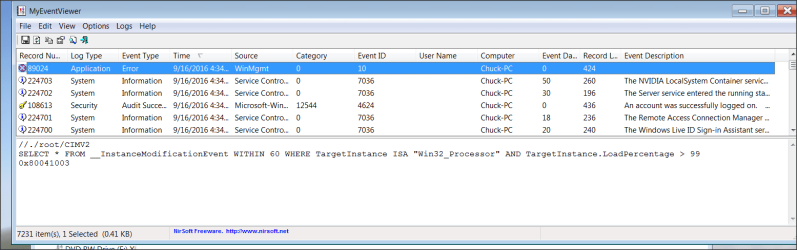
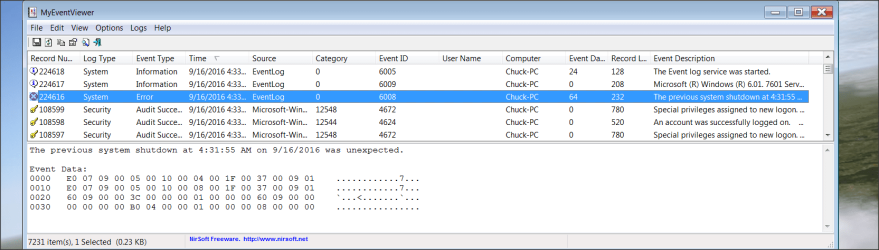
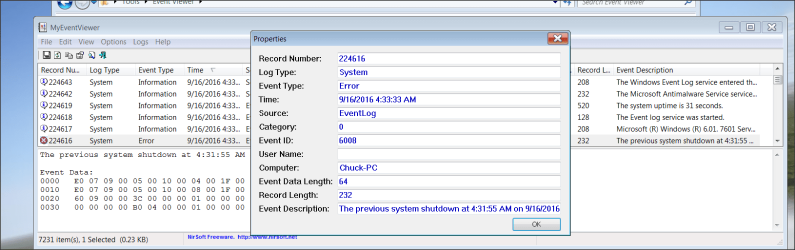
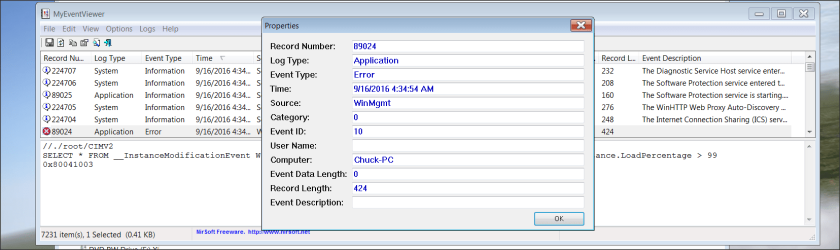
While running my simulator my computer just shuts down. No warning,nothing. When it restarts I do not even get a message to check my disc, which I have done with no errors. Cannot figure this. Here are my event logs which I have no idea how to read. Not so good with these computers. Any help appreciated.
 

Attachments

  • Snap 2016-09-16 at 04.36.34.png
    Snap 2016-09-16 at 04.36.34.png
    59.6 KB · Views: 5
  • Snap 2016-09-16 at 04.37.24.png
    Snap 2016-09-16 at 04.37.24.png
    115.9 KB · Views: 2
  • Snap 2016-09-16 at 04.38.21.png
    Snap 2016-09-16 at 04.38.21.png
    95.9 KB · Views: 2
  • Snap 2016-09-16 at 04.39.12.png
    Snap 2016-09-16 at 04.39.12.png
    98.7 KB · Views: 2

My Computer

OS
Windows 7 Home Premium 64 bit
Usually when a system shuts down like that during a game, etc, it may be an indication of an over temperature in the CPU. It shuts down to prevent damage.
You don't say what model computer.
Have you check the temperatures?
Have you cleaned the computer of dust recently?
 

My Computer

Computer type
PC/Desktop
Computer Manufacturer/Model Number
Custom Built
OS
Windows 10 Pro x64, Windows 8.1 Pro x64, Windows 7 Ultimate x64 SP1,
CPU
INTEL i9-7920X LGA 2066
Motherboard
Gigabyte X299-WU8 F3
Memory
64 GB (4 X 16 GB) G-Skill V Series DDR4 3200 Quad Channel
Graphics Card(s)
EVGA GTX 1060 SC 3 GB
Sound Card
Realtek Onboard ALC1220
Monitor(s) Displays
2 x Samsung S27E310
Screen Resolution
1920x1080
Hard Drives
Samsung 2 x 970 EVO Plus 500 GB NVMe
1 x 6TB WD 6003FZBX SATA
1 x 6TB WD 60EFRX SATA
12 x 3TB WD 30EFRX SATA
PSU
Seasonic X-1050
Case
Thermaltake Armor+
Cooling
Corsair H80i V2 Liquid AOI Cooler
Keyboard
Logitech G510s
Mouse
Logitech MX Master 2S
Internet Speed
200 Mb/s
Antivirus
ESET NOD32 13.1
Browser
EDGE (Dev, Canary, Beta), Chrome
Other Info
ASUS RT-AC68U router
Malwarebytes 4.0.4
Thank you for your reply. I am going to check heat out. Makes sense. I do keep my computer clean and do a good dusting once a year. Also will be looking at a cooler if necessary. I will post back when I am finished.
 

My Computer

OS
Windows 7 Home Premium 64 bit
Usually when a system shuts down like that during a game, etc, it may be an indication of an over temperature in the CPU. It shuts down to prevent damage.
You don't say what model computer.
Have you check the temperatures?
Have you cleaned the computer of dust recently? ........... I really did not monitor heat temperatures prior to this issue. I opened my computer and found LOTS of dust and my fan was a bit dirty. I believe you are correct on the heat issue. So, I bought a liquid cooler and now I can monitor my computer temperatures in real time, which I never did before. I can also adjust my cooler to work harder to aid me when running my simulator. No problems so far and I am able to lower temperatures when necessary. Only used this for five days, but I seem good. Thank you for your assistance. I will advise you if I have any problems. Thank you very much for pointing me in the right direction. Not good with these computers.

 

My Computer

OS
Windows 7 Home Premium 64 bit
Might help to fill out your full system specs or at least post them.

With that information people could at least see what hardware you are dealing with.

I personally use MSI Afterburner to monitor my CPU/GPU temps, fan speeds, fps etc.
 

My Computer

Computer type
PC/Desktop
Computer Manufacturer/Model Number
Self Built
OS
Windows 10 Pro x64
CPU
Intel i7 2600K @ 4.4GHz
Motherboard
Asus P8Z77-V LX2
Memory
16GB Corsair Vengeance Pro DDR3 1600 MHz
Graphics Card(s)
ZOTAC GTX 1070 AMP Edition
Sound Card
Asus Xonar D2
Monitor(s) Displays
Viewsonic 24" VX2439WM LCD/LG 22" W2261VP LCD
Screen Resolution
1920x1080 DVI 1080p 16:9 on both screens
Hard Drives
1x SanDisk Extreme 120GB SSD SATA III (OS), 1x Samsung EVO 250GB SSD SATA III (Games), 1x Seagate Barracuda 1TB SATA III (Storage)
PSU
Corsair TX850W
Case
Corsair Carbide 200R
Cooling
3x 120mm Fans (Front, Bottom and Rear)
Keyboard
Roccat Isku
Mouse
Corsair M65 RGB
Internet Speed
Virgin Media 100Mb
Antivirus
Windows Defender
Browser
Firefox
Other Info
Logitech Z640 5.1 Speakers. Kingston HyperX Cloud Headset. M-Audio Oxygen 25/88 Keystation ES Midi Keyboard's
Update: Went to my favorite computer repair stare and left my computer. This is also the location that built this computer, so they are familiar with the unit. Was stress tested all night and day and it would not shut off. It was and is clean inside so, the BIOS was re-set. The first time I ran it at home....same thing. So, the next theory is maybe my power strip is malfunctioning..??..I just switched my computer cord to another power strip. Cannot try yet for other reasons. Will be back later for a try. Make sense this theory? Thanks Chuck
 

My Computer

OS
Windows 7 Home Premium 64 bit
It's possible or there's not enough power supply around your house.
 

My Computer

Computer type
PC/Desktop
Computer Manufacturer/Model Number
ASUS X550ZE
OS
Windows 7 Home Premium 64-BIT
CPU
AMD A8 7200P
Motherboard
N/A
Memory
8GB 1600mhz
Graphics Card(s)
Radeon R5 (APU) + Radeon R5 M230 2GB Dual Graphics
Sound Card
Realtek ALC269 with SonicMaster
Monitor(s) Displays
Laptop Display
Screen Resolution
1920 x 1080 @60hz
Hard Drives
WDC WD50 00LPVX-80V0TT0 (500GB)
PSU
Laptop Charger
Mouse
ARMAGGEDON TEXTRON SCORPION 7
Internet Speed
100 mbps DOWN / 50 mbps UP
Antivirus
Windows Defender
Browser
Mozzila FireFox, Valve Steam in-game internet browser
Not sure how to check that. Anyway it just quit again....so much for that theory. I am leaning towards a better video card. Have not given up yet. Still searching for definitive cause....
 

My Computer

OS
Windows 7 Home Premium 64 bit
I just thought of this...the computer repair could not run my simulator, so it did not crash. All the stress tests were good. Anyway, so much for the power strip theory..crashed. I even installed a new power cord just in case there was a problem there...crashed..I have been running this NVIDIA 970 for over four years. Warranty for three, so I cannot for the life of me think of anything else but video card. Just waiting for other suggestions/help a little longer. If I go for a new gpu I am going to do it right. Thanks for any suggestions. Chuck
 

My Computer

OS
Windows 7 Home Premium 64 bit
Back
Top