system slow down

karthik dm

New member
Local time
8:52 AM
Messages
9
HI..
i jus bought new sony vaio-E series with 2 GB ram,,, it was fine working for 3 weeks,,
i installed sql server n visual studio,,, my lap gettin slow in booting,,,and in performance,,,
i m using windows 7 os 64 bit,,
is dre any way to increase its speed and performance,,,
any one ....plz help.....
 

My Computer

OS
windows 7 home basic 32 bit
Hello karth,

Installing more programs has the potential to slow a computer down because of what gets installed, such as startup programs. In my signature is a link to a safe way of speeding your computer up. Click the "optimize Windows 7" link and you will be taken to a tutorial within this very forum by top dog Brink
 

My Computer

Computer type
PC/Desktop
Computer Manufacturer/Model Number
Custom Asus Build
OS
Microsoft Windows 8.1 Pro 64-bit
CPU
Intel(R) Core(TM) i3-4130 CPU @ 3.40GHz
Motherboard
B85M-E
Memory
8.00 GB
Graphics Card(s)
None
Sound Card
Realtek High Definition Audio
Monitor(s) Displays
Asus 23.6" Monitor
Screen Resolution
1920 x 1080 x 32 bits (4294967296 colors) @ 60 Hz
Hard Drives
INTEL SSDSC2BW180A4
Samsung SSD 840 PRO Series
PSU
Seasonic S12II-380Bronze
Case
Lian Li
Cooling
Fan, Passive
Keyboard
Logitech K120
Mouse
Microsoft Touch Mouse
Internet Speed
4ms Ping, 19.0 Mbps Download, 19.0 Mbps Upload
Antivirus
Eset Endpoint
Browser
Internet Explorer, Chrome
To Speed Up Windows in General:
If you want to speed up your Shut Down, there is a Tutorial here

Just before Cleaning via CCleaner, run Disk Cleanup and Disk Defragmenter.

I would download and open CCleaner and use CCEnhancer for more features. Then go to the Clean Tab, Analyze and run the Cleaner. Next go to Tools (NEVER GO TO REGISTRY) and select Startup, select them all and select Disable and then Remove.

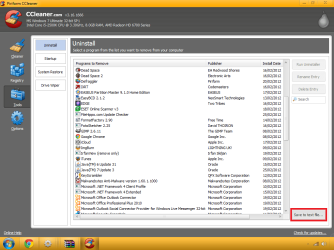
Then click on CCleaner's Uninstall Tab and remove anything you don't need or use. Ask here if you are unsure if it is safe to remove or not, or you could Google it.

Next, read these articles:
99 ways to Make Your Computer Blazingly Fast
   Note
This guide was intended for Windows XP, but I would ignore Step 2, Step 10, Step 11, Step 16, Step 28, Step 37.

http://www.sevenforums.com/tutorials/11728-optimize-windows-7-a.html
Speed Up Windows 7 – Master Tutorial to Make Windows 7 Super Fast - Tweaking with Vishal

I would next run an SFC Scan and a Check Disk Scan.

What I do as soon as I get a computer os open MSConfig, select the Boot Tab and select No GUI Boot, this will disable the Boot Animation.

I would also use MSE and Malwarebytes to check for Viruses and Malware.
 

My Computer

Computer type
PC/Desktop
Computer Manufacturer/Model Number
Novatech iRush Pro
OS
Windows 7 Ultimate SP1 - 64 Bit
CPU
Intel Core i5 2500k
Motherboard
Foxconn H67M-S/H67M-V/H67
Memory
2x4GB DDR3 1333Hz
Graphics Card(s)
Ati Radeon 6770
Sound Card
None
Monitor(s) Displays
Samsung S22B150
Screen Resolution
1920x1080
Hard Drives
2x500GB
PSU
500W
Cooling
Fan
Keyboard
HP KU0316
Mouse
Wireless Logitech M185
Internet Speed
20MB/s
Antivirus
Avast Free
Browser
Google Chrome
Other Info
Logitech M185 Mouse
KU-M316 Keyboard
Thanks frnz,,,
i did abt wat u all..mentioned... now getting ok,,
but one more qn s dre,,, in sony vaio,,, by default,,d sys comes with lot of vaio software which makes mess up and no use at all,,
eg:- vaio analysis manager,,and wen i connected to internet,,it automatically downloads some media files and vaio files...
how to stop or remove these software,,,which are not necessary,,,
 

My Computer

OS
windows 7 home basic 32 bit
Download CCleaner and click the Uninstall button, then remove any un-needed software like VAIO. I did mention this in Post #3.

You could also try gregrockers method to cleaning up factory bloatware.
 

My Computer

Computer type
PC/Desktop
Computer Manufacturer/Model Number
Novatech iRush Pro
OS
Windows 7 Ultimate SP1 - 64 Bit
CPU
Intel Core i5 2500k
Motherboard
Foxconn H67M-S/H67M-V/H67
Memory
2x4GB DDR3 1333Hz
Graphics Card(s)
Ati Radeon 6770
Sound Card
None
Monitor(s) Displays
Samsung S22B150
Screen Resolution
1920x1080
Hard Drives
2x500GB
PSU
500W
Cooling
Fan
Keyboard
HP KU0316
Mouse
Wireless Logitech M185
Internet Speed
20MB/s
Antivirus
Avast Free
Browser
Google Chrome
Other Info
Logitech M185 Mouse
KU-M316 Keyboard
ya tats d prob,,,, how to differentiate,,whether d soft or prog is needed one or not,,is dre any way to diff,,,sys bloatware from others,, i can classify them,, but i want in clear manner,,, which one to remover,,n which to be not,,,,
 

My Computer

OS
windows 7 home basic 32 bit

My Computer

Computer type
PC/Desktop
Computer Manufacturer/Model Number
Novatech iRush Pro
OS
Windows 7 Ultimate SP1 - 64 Bit
CPU
Intel Core i5 2500k
Motherboard
Foxconn H67M-S/H67M-V/H67
Memory
2x4GB DDR3 1333Hz
Graphics Card(s)
Ati Radeon 6770
Sound Card
None
Monitor(s) Displays
Samsung S22B150
Screen Resolution
1920x1080
Hard Drives
2x500GB
PSU
500W
Cooling
Fan
Keyboard
HP KU0316
Mouse
Wireless Logitech M185
Internet Speed
20MB/s
Antivirus
Avast Free
Browser
Google Chrome
Other Info
Logitech M185 Mouse
KU-M316 Keyboard
Once you have turned off all of the bloatware from starting with Windows, achieving a Clean Boot described in Clean up factory bloatware, then you can take some time to decide what you want and don't want.

To understand each Vaio or other software more fully, you can open the Program in Start>All Programs and look around inside it, then google it to read about how others have dealt with it.

I would eventually uninstall all Vaio programs after making my Recovery disks, but there may be some like cam software, HD monitor, battery monitor, etc. that you feel is worth keeping after comparing it to Win7's own built-in version which is almost always superior.

After uninstalling OEM bloatware programs and utilities, be sure to monitor System File integrity as explained in SFC -SCANNOW Command.

The way that bloatware affects the System causes many users to decide sooner or later to Clean Reinstall Windows 7 Factory OEM
 
Back
Top