System wont start windows!!

Internet Badass

(null)
Member
VIP
Local time
1:25 AM
Messages
141
Location
Colorado
Hi all.

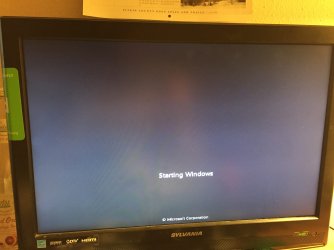
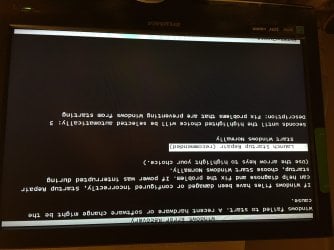
My computer doesnt want to start windows at all! It prompts me with the screen i attached in first image. The first selection doesnt do anything except make the screen go black for 1 second then back to this screen. The 2nd option goes to the windows 7 startup screen, but it crashes and goes back to bios screen before the 4 windows colors even appear! I have been having some other problems with crashing lately, so in a way am not surprised, but what can i do to get my comp working again? Clean install?

Thank you
 

Attachments
  • image.jpeg
    image.jpeg
    462 KB · Views: 3

My Computer

Computer type
PC/Desktop
Computer Manufacturer/Model Number
custom
OS
Windows 7 Home Premium 64 bit
CPU
AMD Phenom 9950
Motherboard
ASUS m3a32-mvp deluxe
Memory
12gb ddr2, 2gbx2+4gbx2
Graphics Card(s)
Zotac nvidia gt 730
Sound Card
integrated
Monitor(s) Displays
Samsung syncmaster 213t, dell 13 in
Screen Resolution
1600x1200
Hard Drives
Seagate 750 gb 7200 rpm harddrive, Seagate 7200 rpm120 gb harddrive, samsung 1TB 5400rpm
Case
Alienware Aurora
Cooling
fans yo
Keyboard
Logitech G15
Mouse
microsoft intellimouse explorer 3.0
Internet Speed
10mbps
Antivirus
microsoft security suite
Browser
chrome
It doesnt get past this exact moment on this screen when i choose to start normally
 

Attachments

  • image.jpeg
    image.jpeg
    433.2 KB · Views: 1

My Computer

Computer type
PC/Desktop
Computer Manufacturer/Model Number
custom
OS
Windows 7 Home Premium 64 bit
CPU
AMD Phenom 9950
Motherboard
ASUS m3a32-mvp deluxe
Memory
12gb ddr2, 2gbx2+4gbx2
Graphics Card(s)
Zotac nvidia gt 730
Sound Card
integrated
Monitor(s) Displays
Samsung syncmaster 213t, dell 13 in
Screen Resolution
1600x1200
Hard Drives
Seagate 750 gb 7200 rpm harddrive, Seagate 7200 rpm120 gb harddrive, samsung 1TB 5400rpm
Case
Alienware Aurora
Cooling
fans yo
Keyboard
Logitech G15
Mouse
microsoft intellimouse explorer 3.0
Internet Speed
10mbps
Antivirus
microsoft security suite
Browser
chrome

My Computer

Computer type
PC/Desktop
Computer Manufacturer/Model Number
Custom Built By Me.
OS
Windows 10 Pro 64 bit
CPU
AMD FX 9590 8 Core Black Edition
Motherboard
MSI 990FXA GAMING (MS-7893)
Memory
Corsair Vengeance 16GB DDR3
Graphics Card(s)
AMD Radeon (TM) R9 380 Gaming Series
Sound Card
AMD High Definition
Monitor(s) Displays
Samsung 32" 60Hz 4ms Curved PLS LED
Screen Resolution
1920 X 1080
Hard Drives
C: 223 GB SSD = E: 465 GB HDD = F: 931 GB HDD = G: 149 GB HDD = H: 931 GB HDD
PSU
EVGA Supernova NEX750B 750W ATX EPS12V 80PLUS Bronze
Case
Cool Master
Cooling
Noctua NH-D15 Premium Cooler with 2x NF-A15 PWM 140mm Fan
Internet Speed
Fiber Optic: Download 332.7 Mbps / Upload 331.5 Mbps
Antivirus
Windows Defender
Browser
Slimjet (64bit)
So i made a startup repair disk, and i booted from it but nothing happened and it just booted from windows anyway and didnt work just as it is doing. Try another disk or is this the startup repair not working?
 

My Computer

Computer type
PC/Desktop
Computer Manufacturer/Model Number
custom
OS
Windows 7 Home Premium 64 bit
CPU
AMD Phenom 9950
Motherboard
ASUS m3a32-mvp deluxe
Memory
12gb ddr2, 2gbx2+4gbx2
Graphics Card(s)
Zotac nvidia gt 730
Sound Card
integrated
Monitor(s) Displays
Samsung syncmaster 213t, dell 13 in
Screen Resolution
1600x1200
Hard Drives
Seagate 750 gb 7200 rpm harddrive, Seagate 7200 rpm120 gb harddrive, samsung 1TB 5400rpm
Case
Alienware Aurora
Cooling
fans yo
Keyboard
Logitech G15
Mouse
microsoft intellimouse explorer 3.0
Internet Speed
10mbps
Antivirus
microsoft security suite
Browser
chrome
So i made a startup repair disk, and i booted from it but nothing happened and it just booted from windows anyway and didnt work just as it is doing. Try another disk or is this the startup repair not working?
Standalone boot CD? USB?

If the machine ignored your standalone boot media and just continued trying to boot from the hard drive, I'd double-check in the BIOS that you have your USB or CD devices in front of your hard drive in the startup boot device sequence list. If not, rearrange things so that USB and CD are examined first, only falling through to hard drive third if neither of the other bootable media is present.

Bootable USB would normally just go there immediately. Bootable CD usually presents "press any key to boot from CD" and after a few seconds if you don't press some keyboard key the BIOS will just go to the next device in the boot list, i.e. ignoring the bootable CD.

So the fact that you see none of this expected behavior suggests to me your BIOS startup boot device list doesn't have the alternate optional boot devices up high, in front of the hard drive where they really should be.
 

My Computer

Computer type
PC/Desktop
Computer Manufacturer/Model Number
Home-built, two systems (1) and (2)
OS
Windows 7 Pro x64 (1), Win7 Pro X64 (2)
CPU
i5-3350p 3.1Ghz/6MB-cache (1); E8400 3.0Ghz/6MB-cache (2)
Motherboard
ASUS P8Z77-V Pro (1); ASUS P5Q3 (2)
Memory
8GB PC3-12800 DDR3 (1); 4GB PC3-10600 DDR3 (2)
Graphics Card(s)
ATI HD7750 (1), (see TV cards); ATI R7 250 (2)
Sound Card
Realtek ALC892 HD Audio (1); Realtek ALC1200 HD Audio (2)
Monitor(s) Displays
Eizo HD2441W LCD, Eizo S2433W (1); Eizo 24" S2433W (2)
Screen Resolution
1920x1200, 1920x1200 (1); 1920x1200 (2)
Hard Drives
(1) 1TB SATA-II (7200RPM), 2x2TB SATA-III (7200RPM), 250GB SATA-III (10000RPM) for OS; 2x2TB external USB 3.0

(2) 320GB SATA-II (7200RPM), 750GB SATA-II (7200RPM), 150GB SATA-II (10000RPM) for OS; 2TB external USB 3.0
PSU
Nesteq ECS-6001 600W (1); Nesteq ECS-5001 500W (2)
Case
Acousti-Case 360 (1) and (2)
Cooling
Noctua NH-U12P SE2 for CPU, 2x120mm case fans (1) and (2)
Keyboard
IBM PS/2 (1) and (2)
Mouse
Logitech MX Revolution wireless (1); Microsoft wired (2)
Internet Speed
100mbps down / 10mbps up
Antivirus
Microsoft Security Essentials; Malwarebyte Anti-Malware Pro
Browser
Firefox
Other Info
Ceton InfiniTV 4-tuner cablecard-enabled TV card as well as Hauppauge HVR-2250 OTA/ATSC 2-tuner TV card in (1), running under Win7 WMC
So i made a startup repair disk, and i booted from it but nothing happened and it just booted from windows anyway and didnt work just as it is doing. Try another disk or is this the startup repair not working?
Standalone boot CD? USB?

If the machine ignored your standalone boot media and just continued trying to boot from the hard drive, I'd double-check in the BIOS that you have your USB or CD devices in front of your hard drive in the startup boot device sequence list. If not, rearrange things so that USB and CD are examined first, only falling through to hard drive third if neither of the other bootable media is present.

Bootable USB would normally just go there immediately. Bootable CD usually presents "press any key to boot from CD" and after a few seconds if you don't press some keyboard key the BIOS will just go to the next device in the boot list, i.e. ignoring the bootable CD.

So the fact that you see none of this expected behavior suggests to me your BIOS startup boot device list doesn't have the alternate optional boot devices up high, in front of the hard drive where they really should be.

Thanks dsperber! I would have posted but.. I don't think anyone could have said it better.
 

My Computer

Computer type
PC/Desktop
Computer Manufacturer/Model Number
Custom Built By Me.
OS
Windows 10 Pro 64 bit
CPU
AMD FX 9590 8 Core Black Edition
Motherboard
MSI 990FXA GAMING (MS-7893)
Memory
Corsair Vengeance 16GB DDR3
Graphics Card(s)
AMD Radeon (TM) R9 380 Gaming Series
Sound Card
AMD High Definition
Monitor(s) Displays
Samsung 32" 60Hz 4ms Curved PLS LED
Screen Resolution
1920 X 1080
Hard Drives
C: 223 GB SSD = E: 465 GB HDD = F: 931 GB HDD = G: 149 GB HDD = H: 931 GB HDD
PSU
EVGA Supernova NEX750B 750W ATX EPS12V 80PLUS Bronze
Case
Cool Master
Cooling
Noctua NH-D15 Premium Cooler with 2x NF-A15 PWM 140mm Fan
Internet Speed
Fiber Optic: Download 332.7 Mbps / Upload 331.5 Mbps
Antivirus
Windows Defender
Browser
Slimjet (64bit)
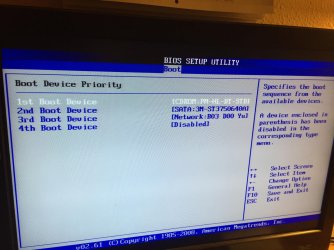
Why cant i boot from cd? The cd is first in boot device priority, but it doesnt prompt me to press any key to boot from it.
 

Attachments

  • image.jpg
    image.jpg
    738.5 KB · Views: 1

My Computer

Computer type
PC/Desktop
Computer Manufacturer/Model Number
custom
OS
Windows 7 Home Premium 64 bit
CPU
AMD Phenom 9950
Motherboard
ASUS m3a32-mvp deluxe
Memory
12gb ddr2, 2gbx2+4gbx2
Graphics Card(s)
Zotac nvidia gt 730
Sound Card
integrated
Monitor(s) Displays
Samsung syncmaster 213t, dell 13 in
Screen Resolution
1600x1200
Hard Drives
Seagate 750 gb 7200 rpm harddrive, Seagate 7200 rpm120 gb harddrive, samsung 1TB 5400rpm
Case
Alienware Aurora
Cooling
fans yo
Keyboard
Logitech G15
Mouse
microsoft intellimouse explorer 3.0
Internet Speed
10mbps
Antivirus
microsoft security suite
Browser
chrome
What about the part on the right stating "A device enclosed in parentheses has been disabled...? :confused:
 

My Computer

Computer Manufacturer/Model Number
Self
OS
Main - Windows 7 Pro SP1 64-Bit; 2nd - Windows Server 2008 R2
CPU
Main - Core i7 2600K; 2nd - Core i7 920
Motherboard
Main - Asus P8Z68-V Pro/Gen3; 2nd - Gigabyte GA-EX58-UDR3
Memory
Main - 16GB Corsair Vengeance; 2nd - 12GB Corsair Vengeance
Graphics Card(s)
Main - XFX Radeon 6870 1GB; 2nd - XFX Radeon 4870 1GB
Sound Card
Both: Onboard Realtek Azalia
Monitor(s) Displays
Main - Hann 25" + I-INC 25" + Acer 23"; 2nd - Upgrading Soon
Screen Resolution
Main - 1920x1080 (All Three Monitors); 2nd - Upgrading Soon
Hard Drives
Main - (1) Crucial M4 128GB (Boot)
Main - (1) Seagate 2TB 64MB Cache (Data)
Main - (1) Seagate 2TB 64MB Cache (Data Backup)
2nd - (1) Intel X25-M SSD 80GB (Boot)
2nd - (3) Seagate 1TB 32MB Cache (Data Backup)
2nd - (1) Seagate 320GB (Because)
PSU
Main - OCZ 600W Modular; 2nd - OCZ 600W
Case
Main - Thermaltake Element G; 2nd - NZXT something or other
Cooling
Main - Corsair H80; 2nd - Prolimatech Megahalems
Keyboard
Main - Razer Reclusa; 2nd - Old MS Keyboard
Mouse
Main - Logitech MX Revolution; 2nd - Old MS Mouse
Internet Speed
20Mbps Time-Warner Cable
What about the part on the right stating "A device enclosed in parentheses has been disabled...? :confused:
That could be from the fact that the fourth item in the list shows "DISABLED". All four entries seem to be enclosed in parentheses, so this whole statement over in the comment section is somewhat ambiguous and perplexing. Don't know what it is really trying to say, good or bad.


Why cant i boot from cd? The cd is first in boot device priority, but it doesnt prompt me to press any key to boot from it.
Given what your screenshot shows is now your boot sequence, the usual explanation is that whatever CD you're inserting is simply "not bootable".

Are you sure the CD itself is bootable? Can you at least start the boot process from it in some other machine, if you have one to experiment with?

Do you have a known Windows Installation media disc you can try to boot from? You don't have to go through the whole process, you just want to see if it boots from the disc and loads the bootstrap software and begins whatever it's supposed to begin. Maybe an old Windows XP installer, or a known standalone "rescue media" (say from Partition Wizard, or Macrium Reflect) which you absolutely know IS a bootable CD/DVD and can be demonstrated to be bootable in some other PC.


NOTE: I don't see a USB HDD or similar device in that list. Surely your PC has USB ports, and I would have expected to see a USB item in the boot device list, most commonly in front of the CD/DVD device. Did you remove it?
 

My Computer

Computer type
PC/Desktop
Computer Manufacturer/Model Number
Home-built, two systems (1) and (2)
OS
Windows 7 Pro x64 (1), Win7 Pro X64 (2)
CPU
i5-3350p 3.1Ghz/6MB-cache (1); E8400 3.0Ghz/6MB-cache (2)
Motherboard
ASUS P8Z77-V Pro (1); ASUS P5Q3 (2)
Memory
8GB PC3-12800 DDR3 (1); 4GB PC3-10600 DDR3 (2)
Graphics Card(s)
ATI HD7750 (1), (see TV cards); ATI R7 250 (2)
Sound Card
Realtek ALC892 HD Audio (1); Realtek ALC1200 HD Audio (2)
Monitor(s) Displays
Eizo HD2441W LCD, Eizo S2433W (1); Eizo 24" S2433W (2)
Screen Resolution
1920x1200, 1920x1200 (1); 1920x1200 (2)
Hard Drives
(1) 1TB SATA-II (7200RPM), 2x2TB SATA-III (7200RPM), 250GB SATA-III (10000RPM) for OS; 2x2TB external USB 3.0

(2) 320GB SATA-II (7200RPM), 750GB SATA-II (7200RPM), 150GB SATA-II (10000RPM) for OS; 2TB external USB 3.0
PSU
Nesteq ECS-6001 600W (1); Nesteq ECS-5001 500W (2)
Case
Acousti-Case 360 (1) and (2)
Cooling
Noctua NH-U12P SE2 for CPU, 2x120mm case fans (1) and (2)
Keyboard
IBM PS/2 (1) and (2)
Mouse
Logitech MX Revolution wireless (1); Microsoft wired (2)
Internet Speed
100mbps down / 10mbps up
Antivirus
Microsoft Security Essentials; Malwarebyte Anti-Malware Pro
Browser
Firefox
Other Info
Ceton InfiniTV 4-tuner cablecard-enabled TV card as well as Hauppauge HVR-2250 OTA/ATSC 2-tuner TV card in (1), running under Win7 WMC
Back
Top