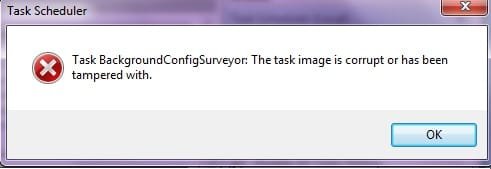
Hmmm, just checked my Registry as I was looking for a second problem of the same type.
I was very astonished to see no BackgroundConfigSurveyor key in HKLM\SOFTWARE\Microsoft\Windows NT\CurrentVersion\Schedule\TaskCache\Tree\Microsoft\Windows\PerfTrack. Is that ok? Nor do I find the deleted Id value in HKLM\SOFTWARE\Microsoft\Windows NT\CurrentVersion\Schedule\TaskCache\Plain!
=====
Edit:
I looked at this again. I can not confirm there were really no entries in the registry. But sure the task does not show up in the
Task Scheduler Library\Microsoft\Windows\PerfTrack and I
could not import the task again!
I went to the registry and started all over. I found the following:
- the tasks looks perfect when I import it
before I press OK (forward reference to next step: It does show the name 'BackgroundConfigSurveyor' in the name field)
- when I press OK, the tasks gets created in the the center pane but it does
not get a name. The field will be empty!
- as soon as I leave the Task Scheduler and restart it again, I will find the center pane for PerfTrack empty
- if I try to import the task again I will get the message: "An error has occurred for task BackgroundConfigSurveyor. Error message: A task or folder with this name already exists." I verfied this:
BackgroundConfigSurveyor really exists in
C:\Windows\System32\Tasks\Microsoft\Windows\PerfTrack
- I had a look at the saved 'BackgroundConfigSurveyor'-file. Interestingly the header is different from Idalon's file (see first post on this page)
Code:
<?xml version="1.0" encoding="UTF-16"?>
<Task version="1.3" xmlns="http://schemas.microsoft.com/windows/2004/02/mit/task">
- I looked at the same file on my Notebook. This file is identical to Idalon's-file! I took a copy of it and moved it to my desktop. Reinstalled it in 'Task Scheduler'. Interestingly it created a task named according to it's filename. Grrr.
- Removed the task again using Idalon's description
- Renamed the Copy of the 'BackgroundConfigSurveyor'-file to 'BackgroundConfigSurveyor'. Imported this taks into Task Scheduler again. Again this file looks perfect
before I press OK.
Again it will loose the name as soon as I press OK and vanish as soon as I restart the Task Scheduler!
- I removed the whole stuff again. Ran 'sfc /verifyonly'. No errors!
- I exported 'BackgroundConfigSurveyor' from my Notebook (right-click on the task 'BackgroundConfigSurveyor' offers an 'Export...'. I compared the exported file against the copied one from
C:\Windows\System32\Tasks\Microsoft\Windows\PerfTrack. They
are different! However importing this file led again to the same problems!
Now I wonder:
1) Should I ask the 'BackgroundConfigSurveyor'-task just using an other name? I can add a task 'BackgroundConfigSurveyor1' without problems. It will keep its name and it will not vanish as soon as I close the Task Scheduler!
2) Maybe all this is not important at all! The history on my Notebook shows 'BackgroundConfigSurveyor' never ran! So maybe the big benefit from Idalon's solution is, that we no longer get the 'Task BackgroundConfigSurveyor: The task image is corrupt or has been tampered with.' message...
Does anyone know what 'PerfMon' and 'BackgroundConfigSurveyor' do?
And before you ask: Yes I did run Task Scheduler with 'Run as Admin...' and to make sure I'll be testing this once more with the Adminstrator account as soon as I have published this.
I attached a screenshot and a copy of 'BackgroundConfigSurveyor' created by teh Export.... Note: this file must be named 'BackgroundConfigSurveyor
.xml'. I had to change the extension to .xml.txt so the forum would allow me to upload it.