Task Manager - Create Elevated Shortcut

How to Create an Elevated Task Manager Shortcut in Windows 7

   Information
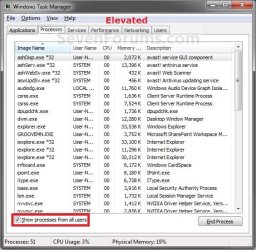
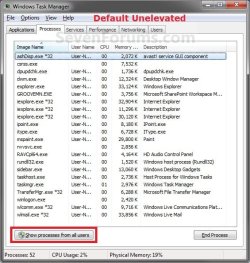
This will show you how to create a elevated Task Manager shortcut that will "run as an administrator" in Windows 7 when opened. It will open as if you clicked Show processes from all users in the default Task Manager.

You will need to be logged in as an administrator to be able to use this elevated Task Manager shortcut.


EXAMPLE: Default Task Manager and Elevated Task Manager
Unelevated.jpg

Elevated.jpg


Here's How:
1. Right click on a empty space on the desktop and click on New and Shortcut.

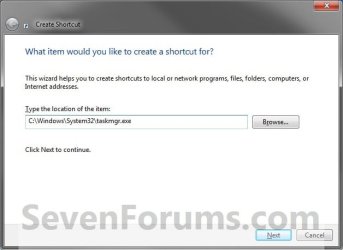
2. Copy and Paste the location below into the location box, then click on the Next button. (see screenshot below)
C:\Windows\System32\taskmgr.exe
StepA.jpg
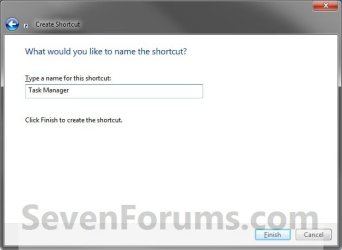
3. Type in Task Manager for a name, and click on the Finish button. (see screenshot below)
NOTE: You can name this shortcut anything you like though.
StepB.jpg
4. Right click on the new Task Manager shortcut on the desktop, then click on Properties, Shortcut tab, and the Advanced button. (see screenshot below)
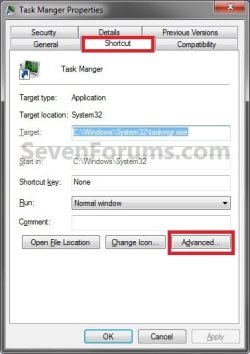
Step1.jpg
5. Select (check) the Run as administrator box, then click on OK. (see screenshot below)
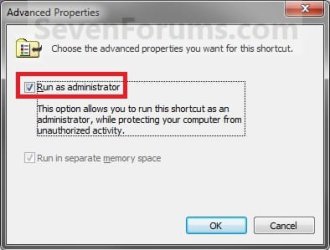
Step2.jpg
6. Click on OK. (see screenshot below step 4)

7. You can now Pin to Taskbar or Pin to Start Menu, add to Quick Launch, assign a keyboard shortcut to it, or move this shortcut to where you like for easy use.


That's it,
Shawn


Last edited:
Another great tutorial, thanks much! Now if we could only get it started minimized! ;)

Might be helpful to add that option in the tutorial, 'Run/Start Minimized'.
 

My Computer

Computer type
PC/Desktop
Computer Manufacturer/Model Number
Custom Build/Mod
OS
Windows 7 Home Premium x64
CPU
Intel QX9650 Extreme 4.0 GHz
Motherboard
ASUS Rampage Extreme Rev2
Memory
8GB (4x2) Corsair Dominator DDR3
Graphics Card(s)
2x Radeon R390X [8GB]
Sound Card
SupremeFX X-Fi
Monitor(s) Displays
Dell 2408WFP 26" Panel
Screen Resolution
1920x1200
Hard Drives
4x WD 2TB (8TB+ Total)
2x Crucial SSD 128GB (RAID-0)
1x LG Blu-ray read/write
1x Phillips LightScribe DVD read/write
PSU
Corsair HX1000
Case
CoolerMaster - Cosmos S
Cooling
Custom Liquid - 320mm rad w/ 3x 80mm fans, CPU/NB/SB Blocks
Keyboard
Logitech Illuminater Pro
Mouse
Logitech
Internet Speed
Fractional T1 - 125Mbps
Antivirus
ESET Security Suite / Microsoft Security Essentials
Browser
Cyberfox Intel x64
Other Info
OC'd to 5.0GHz @ 44c under full load
You're welcome Captain Zero. Thank you. :)
 

My Computer

Computer type
PC/Desktop
Computer Manufacturer/Model Number
Self built custom
OS
64-bit Windows 11 Pro for Workstations
CPU
Intel i7-8700K OC'd to 5 GHz
Motherboard
ASUS ROG Maximus XI Formula Z390
Memory
64 GB (4x16GB) G.SKILL TridentZ RGB DDR4 3600 MHz
Graphics Card(s)
ASUS ROG-STRIX-GTX1080TI-O11G-GAMING
Sound Card
Integrated
Monitor(s) Displays
2 x Samsung Odyssey G7 27"
Screen Resolution
2560x1440
Hard Drives
1TB Samsung 990 PRO M.2,
4TB Samsung 990 PRO PRO M.2,
TerraMaster F8 SSD Plus NAS
PSU
Seasonic Prime Titanium 850W
Case
Thermaltake Core P3
Cooling
Corsair Hydro H115i
Keyboard
Logitech wireless K800
Mouse
Logitech MX Master 4
Internet Speed
2 Gb/s Download and 100 Mb/s Upload
Antivirus
Malwarebyte Anti-Malware Premium
Browser
Google Chrome
Other Info
Logitech Z625 speaker system,
Logitech BRIO 4K Pro webcam,
HP Color LaserJet Pro MFP M477fdn,
APC SMART-UPS RT 1000 XL - SURT1000XLI,
Galaxy S23 Plus phone
If you'd like to have this new taskman shortcut start up upon system startup/reboots automatically...

1. goto start (orb)
2. all programs
3. right click on "Startup" folder and choose "Open" (or for all pc account users, choose "Open all users")
4. drag taskman icon into the startup folder (or right drag and choose "Copy here" to keep one on the desktop; for when you might accidental close taskman)

While there you can right click on taskman shortcut, choose properties and then choose "Minimized" from the Run drop down.

If you'd prefer to have it startup this way and only see it in the tray, use the taskman option tab and choose "hide when minimized".

Now it will start up automatically to only the system tray on system startup/reboots.
 

My Computer

Computer Manufacturer/Model Number
POS
OS
OS3.5
CPU
celery
Motherboard
Good Question ...Unknown
Memory
memory never forgets
Graphics Card(s)
OB
Sound Card
OB
Monitor(s) Displays
HUGE
Screen Resolution
168000000x105000000
Hard Drives
full
PSU
OEM 65watt
Case
N/A
Cooling
OB
Keyboard
OB
Mouse
mouse
Internet Speed
1 Trillion MBps
Other Info
Still An Awesome Forum!
Excellent. Thank you, Shawn

It never occurred to me that Task Manager was not showing all of the processes via CTR-ALT- Delete
 

My Computer

Computer Manufacturer/Model Number
Home built
OS
Windows 7 Ultimate 32 bit
CPU
Intel(R) Pentium(R) 4 CPU 3.00GHz
Motherboard
ASUS P4P800-VM Motherboard Chipset: Intel 865G + ICH5
Memory
2.50 GB RAM
Graphics Card(s)
NVIDIA GeForce 7600 GS
Sound Card
SoundMax Integrated Digital Audio (Chip)
Monitor(s) Displays
ViewSonic VX 1962 wm
Screen Resolution
1680 X 1050
Hard Drives
Seagate Barracuda 7200.10 80 GB
ST380215A ATA Device 18.6 GB
Western Digital "My Book" external hard drive 750 GB
Cooling
Fan based
Keyboard
Microsoft Comfort Curve Keyboard 2000 v10 USB
Mouse
Logitec optic USB
Internet Speed
3.01 Mb/s download 0.64 Mb/s upload
You're most welcome Carl. :)
 

My Computer

Computer type
PC/Desktop
Computer Manufacturer/Model Number
Self built custom
OS
64-bit Windows 11 Pro for Workstations
CPU
Intel i7-8700K OC'd to 5 GHz
Motherboard
ASUS ROG Maximus XI Formula Z390
Memory
64 GB (4x16GB) G.SKILL TridentZ RGB DDR4 3600 MHz
Graphics Card(s)
ASUS ROG-STRIX-GTX1080TI-O11G-GAMING
Sound Card
Integrated
Monitor(s) Displays
2 x Samsung Odyssey G7 27"
Screen Resolution
2560x1440
Hard Drives
1TB Samsung 990 PRO M.2,
4TB Samsung 990 PRO PRO M.2,
TerraMaster F8 SSD Plus NAS
PSU
Seasonic Prime Titanium 850W
Case
Thermaltake Core P3
Cooling
Corsair Hydro H115i
Keyboard
Logitech wireless K800
Mouse
Logitech MX Master 4
Internet Speed
2 Gb/s Download and 100 Mb/s Upload
Antivirus
Malwarebyte Anti-Malware Premium
Browser
Google Chrome
Other Info
Logitech Z625 speaker system,
Logitech BRIO 4K Pro webcam,
HP Color LaserJet Pro MFP M477fdn,
APC SMART-UPS RT 1000 XL - SURT1000XLI,
Galaxy S23 Plus phone
Create Elevated Shortcut

Hi folks. Brand new member.I've only just upgraded my old Toshiba Satellite Pro P100 from XP pro to W7 Ultimate, and still sorting out some annoyances.:)

I'd like to thank your Forum guys (Shawn) for http://www.sevenforums.com/tutorials/10499-task-manager-create-elevated-shortcut.html

I was able, via Task Manager, to "Create Elevated Shortcut" and solve my problem of "Show Processes from all Users", not sticking on when I ticked (checked) it.

Thanks again

Bazza
 

My Computer

Computer Manufacturer/Model Number
Toshiba Satellite Pro P100 Laptop
OS
Windows 7 Ultimate 32 bit
Memory
2 gig Ram
Monitor(s) Displays
17" Toshiba standard Laptop screen
Hard Drives
500 gig Seagate Momentus
You're most welcome Bazza, and welcome to Seven Forums. Thank you. :)
 

My Computer

Computer type
PC/Desktop
Computer Manufacturer/Model Number
Self built custom
OS
64-bit Windows 11 Pro for Workstations
CPU
Intel i7-8700K OC'd to 5 GHz
Motherboard
ASUS ROG Maximus XI Formula Z390
Memory
64 GB (4x16GB) G.SKILL TridentZ RGB DDR4 3600 MHz
Graphics Card(s)
ASUS ROG-STRIX-GTX1080TI-O11G-GAMING
Sound Card
Integrated
Monitor(s) Displays
2 x Samsung Odyssey G7 27"
Screen Resolution
2560x1440
Hard Drives
1TB Samsung 990 PRO M.2,
4TB Samsung 990 PRO PRO M.2,
TerraMaster F8 SSD Plus NAS
PSU
Seasonic Prime Titanium 850W
Case
Thermaltake Core P3
Cooling
Corsair Hydro H115i
Keyboard
Logitech wireless K800
Mouse
Logitech MX Master 4
Internet Speed
2 Gb/s Download and 100 Mb/s Upload
Antivirus
Malwarebyte Anti-Malware Premium
Browser
Google Chrome
Other Info
Logitech Z625 speaker system,
Logitech BRIO 4K Pro webcam,
HP Color LaserJet Pro MFP M477fdn,
APC SMART-UPS RT 1000 XL - SURT1000XLI,
Galaxy S23 Plus phone
Great instructions, I somehow got it to work when I first installed Win7, but I just reinstalled and forgot what it was that I did! You made it easy though :)

Quick question, any point in using the C:\Windows\SysWOW64\taskmgr.exe?
 

My Computer

Computer Manufacturer/Model Number
Custom Desktop
OS
Windows 7 Home Premium/Pro x64 (Two drives, one from older computer)
CPU
Intel Core 2 Quad Q8400
Motherboard
Gigabyte G41M-Combo
Memory
4GB DDR2 @ 800MHz
Graphics Card(s)
Nvidia GTX 480
Sound Card
Onboard
Monitor(s) Displays
Old Emprex LCD
Screen Resolution
1680x1050
Hard Drives
500GB 7200rpm Seagate
1TB Western Digital Caviar Black
PSU
DiabloTek 450W
Case
CoolerMaster HAF 922 (older USB 2.0 version)
Cooling
Enermax ETS-T40
Keyboard
Logitech G15
Mouse
Logitech Trackman Wheel
Internet Speed
30Mbps Down, 5Mbps Up
Hello Freakie, and welcome to Seven Forums. Thank you. :)

In the 64-bit Windows 7 and Vista, Microsoft offers a set of 32 bit executables in the SysWOW64 (Windows on Windows) directory of the system for backwards compatibility.

Since you have the 64-bit Windows 7, there would really be no need for yourself to use anything other than the 64 bit executable of taskmgr.

Hope this helps,
Shawn
 

My Computer

Computer type
PC/Desktop
Computer Manufacturer/Model Number
Self built custom
OS
64-bit Windows 11 Pro for Workstations
CPU
Intel i7-8700K OC'd to 5 GHz
Motherboard
ASUS ROG Maximus XI Formula Z390
Memory
64 GB (4x16GB) G.SKILL TridentZ RGB DDR4 3600 MHz
Graphics Card(s)
ASUS ROG-STRIX-GTX1080TI-O11G-GAMING
Sound Card
Integrated
Monitor(s) Displays
2 x Samsung Odyssey G7 27"
Screen Resolution
2560x1440
Hard Drives
1TB Samsung 990 PRO M.2,
4TB Samsung 990 PRO PRO M.2,
TerraMaster F8 SSD Plus NAS
PSU
Seasonic Prime Titanium 850W
Case
Thermaltake Core P3
Cooling
Corsair Hydro H115i
Keyboard
Logitech wireless K800
Mouse
Logitech MX Master 4
Internet Speed
2 Gb/s Download and 100 Mb/s Upload
Antivirus
Malwarebyte Anti-Malware Premium
Browser
Google Chrome
Other Info
Logitech Z625 speaker system,
Logitech BRIO 4K Pro webcam,
HP Color LaserJet Pro MFP M477fdn,
APC SMART-UPS RT 1000 XL - SURT1000XLI,
Galaxy S23 Plus phone
Ahh, I see. Sort of a strange thing to call a folder with 32-bit executables!

Thanks for the quick reply :D
 

My Computer

Computer Manufacturer/Model Number
Custom Desktop
OS
Windows 7 Home Premium/Pro x64 (Two drives, one from older computer)
CPU
Intel Core 2 Quad Q8400
Motherboard
Gigabyte G41M-Combo
Memory
4GB DDR2 @ 800MHz
Graphics Card(s)
Nvidia GTX 480
Sound Card
Onboard
Monitor(s) Displays
Old Emprex LCD
Screen Resolution
1680x1050
Hard Drives
500GB 7200rpm Seagate
1TB Western Digital Caviar Black
PSU
DiabloTek 450W
Case
CoolerMaster HAF 922 (older USB 2.0 version)
Cooling
Enermax ETS-T40
Keyboard
Logitech G15
Mouse
Logitech Trackman Wheel
Internet Speed
30Mbps Down, 5Mbps Up
LOL, yeah it does seem a bit misleading.
 

My Computer

Computer type
PC/Desktop
Computer Manufacturer/Model Number
Self built custom
OS
64-bit Windows 11 Pro for Workstations
CPU
Intel i7-8700K OC'd to 5 GHz
Motherboard
ASUS ROG Maximus XI Formula Z390
Memory
64 GB (4x16GB) G.SKILL TridentZ RGB DDR4 3600 MHz
Graphics Card(s)
ASUS ROG-STRIX-GTX1080TI-O11G-GAMING
Sound Card
Integrated
Monitor(s) Displays
2 x Samsung Odyssey G7 27"
Screen Resolution
2560x1440
Hard Drives
1TB Samsung 990 PRO M.2,
4TB Samsung 990 PRO PRO M.2,
TerraMaster F8 SSD Plus NAS
PSU
Seasonic Prime Titanium 850W
Case
Thermaltake Core P3
Cooling
Corsair Hydro H115i
Keyboard
Logitech wireless K800
Mouse
Logitech MX Master 4
Internet Speed
2 Gb/s Download and 100 Mb/s Upload
Antivirus
Malwarebyte Anti-Malware Premium
Browser
Google Chrome
Other Info
Logitech Z625 speaker system,
Logitech BRIO 4K Pro webcam,
HP Color LaserJet Pro MFP M477fdn,
APC SMART-UPS RT 1000 XL - SURT1000XLI,
Galaxy S23 Plus phone
Excellent instructions, so long as you follow them to the letter, ie: take your time, read all instructions.

It works perfectly, thank you:geek:
 

My Computer

Computer Manufacturer/Model Number
Apple MacBook Pro
OS
Win 7 Pro
CPU
2.40 Ghz Intel Core Duo P8600
Motherboard
Intel
Memory
4.0 Gb
Monitor(s) Displays
LCD & Viewsonic VS11349
Hard Drives
MBP 250 Gb
Case
unibody
Cooling
4" outboard fan in dock mode
You're welcome P.Milkes, and welcome to Seven Forums. :)
 

My Computer

Computer type
PC/Desktop
Computer Manufacturer/Model Number
Self built custom
OS
64-bit Windows 11 Pro for Workstations
CPU
Intel i7-8700K OC'd to 5 GHz
Motherboard
ASUS ROG Maximus XI Formula Z390
Memory
64 GB (4x16GB) G.SKILL TridentZ RGB DDR4 3600 MHz
Graphics Card(s)
ASUS ROG-STRIX-GTX1080TI-O11G-GAMING
Sound Card
Integrated
Monitor(s) Displays
2 x Samsung Odyssey G7 27"
Screen Resolution
2560x1440
Hard Drives
1TB Samsung 990 PRO M.2,
4TB Samsung 990 PRO PRO M.2,
TerraMaster F8 SSD Plus NAS
PSU
Seasonic Prime Titanium 850W
Case
Thermaltake Core P3
Cooling
Corsair Hydro H115i
Keyboard
Logitech wireless K800
Mouse
Logitech MX Master 4
Internet Speed
2 Gb/s Download and 100 Mb/s Upload
Antivirus
Malwarebyte Anti-Malware Premium
Browser
Google Chrome
Other Info
Logitech Z625 speaker system,
Logitech BRIO 4K Pro webcam,
HP Color LaserJet Pro MFP M477fdn,
APC SMART-UPS RT 1000 XL - SURT1000XLI,
Galaxy S23 Plus phone
thank you
 

My Computer

Computer Manufacturer/Model Number
Apple MacBook Pro
OS
Win 7 Pro
CPU
2.40 Ghz Intel Core Duo P8600
Motherboard
Intel
Memory
4.0 Gb
Monitor(s) Displays
LCD & Viewsonic VS11349
Hard Drives
MBP 250 Gb
Case
unibody
Cooling
4" outboard fan in dock mode
Brink - another great tutorial! The new shortcut .lnk on my Desktop works perfectly.

BUT ... I would like my Win 7 Pro 64-bit machine to open Task Manager "Showing processes from all users" AUTOMATICALLY on each restart. However, when I put your new shortcut .lnk into my Startup folder, it opens on bootup showing only my processes, not all.

I've jiggled it a few times to make sure that the shortcut .lnk in my Startup folder is exactly as you set it. But it just won't run in Administrator mode from that folder.

Any suggestions?

Thanks.
 

My Computer

Computer type
PC/Desktop
Computer Manufacturer/Model Number
Dell Optiplex 7010 MT
OS
Dual boot - Win 10 Pro 64-bit (good) and Win 7 Pro 64-bit (won't boot on the NVMe)
CPU
Intel Core i5 3470 @ 3.2GHz
Motherboard
Dell 0GY6Y8 - what would the Intel number be? - Q77 chipset
Memory
16GB RAM DDR3 (Four x 4GB)
Graphics Card(s)
Intel HD Graphics (on the CPU)
Sound Card
Realtek High Definition Audio - and Intel Display Audio
Monitor(s) Displays
Dell E176FP - nothing fancy
Screen Resolution
1280 x 1024 @ 60 Hz
Hard Drives
Now a Samsung 970 EVO Plus SSD NVMe, which works for the Win 10 only

Used to be two 500GB WDC WD5000AAKX (SATA @ 6GB/sec)

- External WD My Book 1110 USB device
PSU
What means PSU? I'm at sea level
Cooling
Ice cubes
Keyboard
Noisy
Mouse
Micky
Internet Speed
Verizon FIOS 500 Mbps (was 1Gbps but I can't type that fast)
Antivirus
Win 10 Windows Defender - Win 7 Avast Free
Browser
Firefox only with lots of security drives my wife crazy
Other Info
Also I still have an old but important XP SP3 machine that can run - Optiplex 755 Desktop w 4GB RAM and Momentus XT hybrid HD-SSD 500 GB hard drive. Used the registry hack to get more updates through "XP Embedded" or "POS" so now the machine rings like a cash register and the CD drawer opens to give change.

My Computer

Computer type
PC/Desktop
Computer Manufacturer/Model Number
Self built custom
OS
64-bit Windows 11 Pro for Workstations
CPU
Intel i7-8700K OC'd to 5 GHz
Motherboard
ASUS ROG Maximus XI Formula Z390
Memory
64 GB (4x16GB) G.SKILL TridentZ RGB DDR4 3600 MHz
Graphics Card(s)
ASUS ROG-STRIX-GTX1080TI-O11G-GAMING
Sound Card
Integrated
Monitor(s) Displays
2 x Samsung Odyssey G7 27"
Screen Resolution
2560x1440
Hard Drives
1TB Samsung 990 PRO M.2,
4TB Samsung 990 PRO PRO M.2,
TerraMaster F8 SSD Plus NAS
PSU
Seasonic Prime Titanium 850W
Case
Thermaltake Core P3
Cooling
Corsair Hydro H115i
Keyboard
Logitech wireless K800
Mouse
Logitech MX Master 4
Internet Speed
2 Gb/s Download and 100 Mb/s Upload
Antivirus
Malwarebyte Anti-Malware Premium
Browser
Google Chrome
Other Info
Logitech Z625 speaker system,
Logitech BRIO 4K Pro webcam,
HP Color LaserJet Pro MFP M477fdn,
APC SMART-UPS RT 1000 XL - SURT1000XLI,
Galaxy S23 Plus phone
Brink - you nailed it again.

It's working great as a Task Scheduler item, to start on system startup.

I followed steps 1 - 12 in your link. Didn't see the need to do 13 on. Unless I'm missing something.

Thanks again.
 

My Computer

Computer type
PC/Desktop
Computer Manufacturer/Model Number
Dell Optiplex 7010 MT
OS
Dual boot - Win 10 Pro 64-bit (good) and Win 7 Pro 64-bit (won't boot on the NVMe)
CPU
Intel Core i5 3470 @ 3.2GHz
Motherboard
Dell 0GY6Y8 - what would the Intel number be? - Q77 chipset
Memory
16GB RAM DDR3 (Four x 4GB)
Graphics Card(s)
Intel HD Graphics (on the CPU)
Sound Card
Realtek High Definition Audio - and Intel Display Audio
Monitor(s) Displays
Dell E176FP - nothing fancy
Screen Resolution
1280 x 1024 @ 60 Hz
Hard Drives
Now a Samsung 970 EVO Plus SSD NVMe, which works for the Win 10 only

Used to be two 500GB WDC WD5000AAKX (SATA @ 6GB/sec)

- External WD My Book 1110 USB device
PSU
What means PSU? I'm at sea level
Cooling
Ice cubes
Keyboard
Noisy
Mouse
Micky
Internet Speed
Verizon FIOS 500 Mbps (was 1Gbps but I can't type that fast)
Antivirus
Win 10 Windows Defender - Win 7 Avast Free
Browser
Firefox only with lots of security drives my wife crazy
Other Info
Also I still have an old but important XP SP3 machine that can run - Optiplex 755 Desktop w 4GB RAM and Momentus XT hybrid HD-SSD 500 GB hard drive. Used the registry hack to get more updates through "XP Embedded" or "POS" so now the machine rings like a cash register and the CD drawer opens to give change.
You're most welcome. :)

Yeah, there's no need to do 13 on for this unless you wanted to use a shortcut for the task instead.
 

My Computer

Computer type
PC/Desktop
Computer Manufacturer/Model Number
Self built custom
OS
64-bit Windows 11 Pro for Workstations
CPU
Intel i7-8700K OC'd to 5 GHz
Motherboard
ASUS ROG Maximus XI Formula Z390
Memory
64 GB (4x16GB) G.SKILL TridentZ RGB DDR4 3600 MHz
Graphics Card(s)
ASUS ROG-STRIX-GTX1080TI-O11G-GAMING
Sound Card
Integrated
Monitor(s) Displays
2 x Samsung Odyssey G7 27"
Screen Resolution
2560x1440
Hard Drives
1TB Samsung 990 PRO M.2,
4TB Samsung 990 PRO PRO M.2,
TerraMaster F8 SSD Plus NAS
PSU
Seasonic Prime Titanium 850W
Case
Thermaltake Core P3
Cooling
Corsair Hydro H115i
Keyboard
Logitech wireless K800
Mouse
Logitech MX Master 4
Internet Speed
2 Gb/s Download and 100 Mb/s Upload
Antivirus
Malwarebyte Anti-Malware Premium
Browser
Google Chrome
Other Info
Logitech Z625 speaker system,
Logitech BRIO 4K Pro webcam,
HP Color LaserJet Pro MFP M477fdn,
APC SMART-UPS RT 1000 XL - SURT1000XLI,
Galaxy S23 Plus phone
Back
Top