Gsel
New member
Hi..
I have a problem with my Task Manager.
I tried everything to open it. Ctrl+Alt+Del , Ctrl+Shft+Esc, Right-Clicking in the Task Bar, Search and Clicking taskmgr.exe, %systemroot%, still Task manager doesn't open.
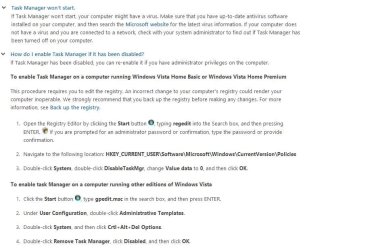
I've read something about enabling it through regedit but there's no Disable Taskmgr entry in my HKEY_CURRENT_USER\Software\Microsoft\Windows\CurrentVersion\Policies
I don't know why.
i just download a task manager fixer that will enable it, it prompt that it is enable but then again, task manager still doesn't appear..
Please Help!
Thanks!
God Bless!
I have a problem with my Task Manager.
I tried everything to open it. Ctrl+Alt+Del , Ctrl+Shft+Esc, Right-Clicking in the Task Bar, Search and Clicking taskmgr.exe, %systemroot%, still Task manager doesn't open.
I've read something about enabling it through regedit but there's no Disable Taskmgr entry in my HKEY_CURRENT_USER\Software\Microsoft\Windows\CurrentVersion\Policies
I don't know why.
i just download a task manager fixer that will enable it, it prompt that it is enable but then again, task manager still doesn't appear..
Please Help!
Thanks!
God Bless!
Last edited:
My Computer
- Computer type
- Laptop
- Computer Manufacturer/Model Number
- Acer
- OS
- Windows Vista Home Premium 32bit
- CPU
- Intel Premium dual-core processor T3200
- Memory
- 160GB HDD
- Antivirus
- ESET NOD32

 ))
))