
Conscious1
New member
- Local time
- 12:08 AM
- Messages
- 4
I used to be able to End Tasks when my computer froze by clicking CTRL+Alt+Delete. Now when I do that same thing only a tiny rectangular box appears on the screen. When I use my mouse to drag the corners open so I can see what's inside the box, and all I can view are the Task Manager "Services" with no options for anything else and no bar on top that says File, View, Tools, Help (not sure what used to be there) and not even a red X in the upper right hand corner of the screen to close the window. I have to go back to the desktop task bar to
close window."
I can no longer view running task or anything else that I used to have access to in that Task Manager Box and I certainly have no way to temporarily end a task.
I have looked for different "help" options on search engines and youtube videos but those seem to focus on the Task Manager not working at all.
My Task Manager program responds, in a way, but it is not working properly (like it used to) or it is impaired in some way.
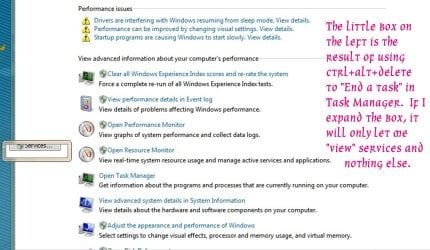
I would like to get it up and functioning like it used to again so that I can use it to "End Tasks" primarily, like I used to. I am going to attach a screen shot I took of what the tiny rectangular box that appears when I click CTRL+ALTz+ Delete.
Thank you in advance for your time and any information you may provide. Taylor:shock:
close window."
I can no longer view running task or anything else that I used to have access to in that Task Manager Box and I certainly have no way to temporarily end a task.
I have looked for different "help" options on search engines and youtube videos but those seem to focus on the Task Manager not working at all.
My Task Manager program responds, in a way, but it is not working properly (like it used to) or it is impaired in some way.
I would like to get it up and functioning like it used to again so that I can use it to "End Tasks" primarily, like I used to. I am going to attach a screen shot I took of what the tiny rectangular box that appears when I click CTRL+ALTz+ Delete.
Thank you in advance for your time and any information you may provide. Taylor:shock:
Attachments
My Computer
- Computer type
- PC/Desktop
- Computer Manufacturer/Model Number
- HP Pavilion p6610f Product Number BM417AA #ABA
- OS
- Windows 7 Home Premium 64bit Ver. 6.1.7601 SP1
- CPU
- Athlon ll X4 635 (P) 2.9 GHz (95W) 4 Cores Chipset AMD 785G
- Motherboard
- Motherboard name: H-ALVORIX_HF-RS880-uATX or Alvorix-GLBE
- Memory
- 2 DIMMS x 2 = 4GB 2.51GB available PC3-10600 MB/sec
- Graphics Card(s)
- Video- Integrated on motherboard-see motherboard and chipset
- Sound Card
- ? Realtek ?
- Monitor(s) Displays
- HP w2207h & Acer
- Screen Resolution
- 1024x768
- Hard Drives
- Seagate Baracuda 750 GB SATA 3G 7200 rpm
Multi-DVD Burner
- PSU
- ?
- Case
- ?
- Cooling
- ?
- Keyboard
- Microsoft
- Mouse
- Optical wired
- Internet Speed
- 20mb?
- Antivirus
- Windows Security Essentials
- Browser
- Mozilla Firefox, Chrome, IE, DuckDuckGo
- Other Info
- Not sure of a couple specs asked for


