Task Scheduler

metaguy

Always Appreciative
Member
VIP
Local time
12:32 PM
Messages
140
Location
California
2022_04_03_02_03_291.png
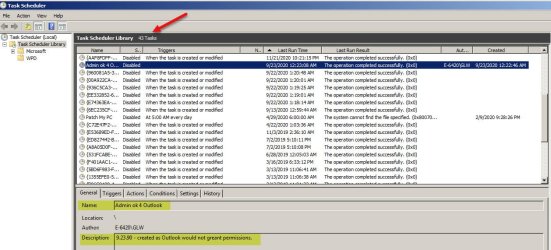
Background - Admin Tools/Task scheduler = see/#1 (attached). But this is not why I'm writing. Shows 43 tasks, but I have only 1 - described next. I don't know why the Outlook disabled task even shows, plus permission not granted.

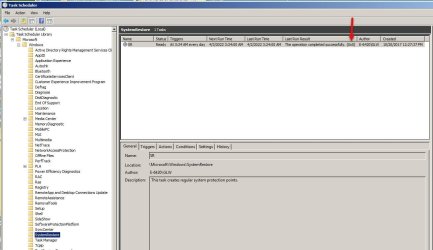
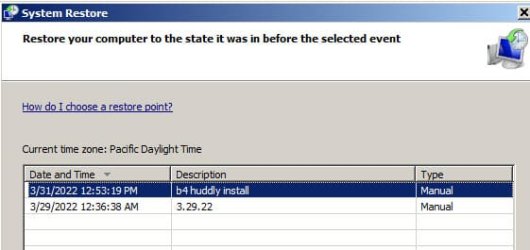
I go to Task Scheduler/Microsoft/System Restore - see/#2 (attached). However, this does not show up in System Properties/System Restore = see/#3 (attached). Why doesn't the daily task show up? Thanks.
 

Attachments
  • #1.jpg
    #1.jpg
    329.4 KB · Views: 4
  • #2.jpg
    #2.jpg
    209.5 KB · Views: 2
  • #3.jpg
    #3.jpg
    50.7 KB · Views: 7

My Computer

Computer type
Laptop
Computer Manufacturer/Model Number
Dell E6420 Laptop 64 bit
OS
Win 7 Ultimate
CPU
Intel i5-2520M CPU 2.50 Ghz
Memory
8 GB
Graphics Card(s)
Intel(R) HD Graphics 3000
Sound Card
Intel(R) Display Audio
Monitor(s) Displays
Samsung 32" and Dell 23"
Screen Resolution
1920 x 1080 and 1366 x 768
Hard Drives
Hitachi HTS545032B9A300
Fantom G-Force 2GB
Antivirus
Bitdefender
Browser
Firefox, primary
metaguy, you have so many disabled tasks. This indicates that you probably uninstalled many programs that had set the tasks. There should be a lot of trash all over.
My suggestion is to backup your data and then reinstall Win 7. It will run much faster.
For the updates, use Single file with all updates - Simplix
 

My Computers

System One System Two

  • Computer type
    PC/Desktop
    Computer Manufacturer/Model Number
    custom build
    OS
    Windows 7 HP 64
    CPU
    i5 6600K - 800MHz to 4200MHz
    Motherboard
    GA-Z170-HD3P
    Memory
    4+4G GSkill DDR4 3000
    Graphics Card(s)
    IG - Intel 530
    Monitor(s) Displays
    Samsung 226BW
    Screen Resolution
    1680x1050
    Hard Drives
    (1) -1 SM951 – 128GB M.2 AHCI PCIe SSD drive for Windows 7 and Lubuntu
    (2) -1 WD SATA 3 - 1T for Data
    (3) -1 WD SATA 3 - 1T for backup
    PSU
    Thermaltake 450W TR2 gold
    Keyboard
    Old and good Chicony mechanical keyboard
    Mouse
    Logitech mX performance - 9 buttons (had to disable some)
    Internet Speed
    500Mb/s
    Browser
    Firefox 64
    Other Info
    TinyWall firewall
  • Computer type
    Laptop
    System Manufacturer/Model Number
    Asus Q550LF
    OS
    Windows 7 Pro
    CPU
    i7-4500U 800MHz to 3.0GHz
    Motherboard
    Asus Q550LF
    Memory
    (4+4)G DDR3 1600
    Graphics Card(s)
    IG intel 4400 + NVIDIA GeForce GT 745M
    Sound Card
    Realtek
    Monitor(s) Displays
    LG Display LP156WF4-SPH1
    Screen Resolution
    1920 x 1080
    Hard Drives
    BX500 120G SSD for Windows and programs +
    1T HDD for data
    Internet Speed
    500 Mb/s
    Browser
    Firefox
    Other Info
    TinyWall firewall
Hi

there is something really screwy here
and those in screenshot 1 have been around for ages

you should not have that many tasks there
 

My Computer

Computer type
PC/Desktop
Computer Manufacturer/Model Number
medionl/Aspire 6930G/acer x55a
OS
W7 home premium 32bit/W7HP 64bit/w10 tp insider ring
CPU
E5300 dual core
Motherboard
medion MS7366
Memory
3gb
Graphics Card(s)
Nvidia Geforce 7100 Nforce 630i
Monitor(s) Displays
avixc
Internet Speed
n (isp resticted to 72)
Antivirus
mse/pands
Browser
palemoon
Other Info
Belkin Fd7050 n USB using Railink RT2870 drivers, more upto date
Could I not just delete all scheduled tasks? Then reset System Restore. I don't want any that are showing, particularly app updates. Being a happy Win 7 user, I'm cautious about on line access.
You're probably right about a clean Win 7 Ultimate re-install from E: Drive. But, unless I'm wrong that will wipe everything clean and require essentially starting over. I regularly back up data and more on an external drive, but short of a major crash, that's a no go. Admittedly, I'd get rid of a lot of junk, but... I'm already aggressive tweaking and house keeping, probably to my detriment.
Just today Outlook wouldn't connect with incoming server - error 0x800ccc1a. Google inquiry suggested SFC. Got one unfixed issue, but couldn't locate it in log. So, ran Tweaking Windows Repair and Outlook's back to normal. Thank goodness.

Screen has lost attachment link, so can't show today's Task Scheduler or SFC log. Okay, back to first line of this reply.
 

My Computer

Computer type
Laptop
Computer Manufacturer/Model Number
Dell E6420 Laptop 64 bit
OS
Win 7 Ultimate
CPU
Intel i5-2520M CPU 2.50 Ghz
Memory
8 GB
Graphics Card(s)
Intel(R) HD Graphics 3000
Sound Card
Intel(R) Display Audio
Monitor(s) Displays
Samsung 32" and Dell 23"
Screen Resolution
1920 x 1080 and 1366 x 768
Hard Drives
Hitachi HTS545032B9A300
Fantom G-Force 2GB
Antivirus
Bitdefender
Browser
Firefox, primary
As you probably know, every time you install a program some lines are added to the register.
When you uninstall, most added lines to the register are left behind.
These lines are instructions loaded every time you start the computer for programs that don't exist any more.
An example are all those task schedules. They try to execute tasks on programs that don't exist any more. Same apply to services.
There are also many system files left on some system folders.

When I first installed Win 7 and Office (with all updates) I did a drive image and saved it to my backup drive. My data is on another drive.
Every two to three years I reload the image and clean install the other programs. Takes no more than 2 hours a the performance gain is visible.

But it's up to you to decide what to do but my advice is to do a clean install.
 

My Computers

System One System Two

  • Computer type
    PC/Desktop
    Computer Manufacturer/Model Number
    custom build
    OS
    Windows 7 HP 64
    CPU
    i5 6600K - 800MHz to 4200MHz
    Motherboard
    GA-Z170-HD3P
    Memory
    4+4G GSkill DDR4 3000
    Graphics Card(s)
    IG - Intel 530
    Monitor(s) Displays
    Samsung 226BW
    Screen Resolution
    1680x1050
    Hard Drives
    (1) -1 SM951 – 128GB M.2 AHCI PCIe SSD drive for Windows 7 and Lubuntu
    (2) -1 WD SATA 3 - 1T for Data
    (3) -1 WD SATA 3 - 1T for backup
    PSU
    Thermaltake 450W TR2 gold
    Keyboard
    Old and good Chicony mechanical keyboard
    Mouse
    Logitech mX performance - 9 buttons (had to disable some)
    Internet Speed
    500Mb/s
    Browser
    Firefox 64
    Other Info
    TinyWall firewall
  • Computer type
    Laptop
    System Manufacturer/Model Number
    Asus Q550LF
    OS
    Windows 7 Pro
    CPU
    i7-4500U 800MHz to 3.0GHz
    Motherboard
    Asus Q550LF
    Memory
    (4+4)G DDR3 1600
    Graphics Card(s)
    IG intel 4400 + NVIDIA GeForce GT 745M
    Sound Card
    Realtek
    Monitor(s) Displays
    LG Display LP156WF4-SPH1
    Screen Resolution
    1920 x 1080
    Hard Drives
    BX500 120G SSD for Windows and programs +
    1T HDD for data
    Internet Speed
    500 Mb/s
    Browser
    Firefox
    Other Info
    TinyWall firewall
Megahertz07 - I truly appreciate your advice. FYI, I did delete all scheduled task except SR. News at 11.
When I migrated from a hard-drive to SSD in Oct., 2021, I put the following on a thumb drive:
- 7601.24214.180801-1700.win7sp1_ldr_escrow_CLIENT_ULTIMATE_x64FRE_en-us.iso Image
- Windows7-USB-DVD-Download-Tool-Installer-en-US.exe
'System' is also on laptop E: drive. I take that is for reinstalling. Of course there are no longer updates for Win 7.

I have a disc only for Win Office Pro Plus 2007. All other apps are in backups on external HDD or via download.

Bitdefender does a weekly system scan. I periodically run AVS Registry scan and Win 7 Disk Cleanup. Am I naive to think most everything is caught? Does this modify your advice. If not, use the thumb drive or can I do a clean install with E: drive?

Sorry to be so much trouble. P.S. I have a doozy of an issue networking my laser printer. Will address this in detail in a separate question. Thanks.
 

My Computer

Computer type
Laptop
Computer Manufacturer/Model Number
Dell E6420 Laptop 64 bit
OS
Win 7 Ultimate
CPU
Intel i5-2520M CPU 2.50 Ghz
Memory
8 GB
Graphics Card(s)
Intel(R) HD Graphics 3000
Sound Card
Intel(R) Display Audio
Monitor(s) Displays
Samsung 32" and Dell 23"
Screen Resolution
1920 x 1080 and 1366 x 768
Hard Drives
Hitachi HTS545032B9A300
Fantom G-Force 2GB
Antivirus
Bitdefender
Browser
Firefox, primary

My Computers

System One System Two

  • Computer type
    PC/Desktop
    Computer Manufacturer/Model Number
    custom build
    OS
    Windows 7 HP 64
    CPU
    i5 6600K - 800MHz to 4200MHz
    Motherboard
    GA-Z170-HD3P
    Memory
    4+4G GSkill DDR4 3000
    Graphics Card(s)
    IG - Intel 530
    Monitor(s) Displays
    Samsung 226BW
    Screen Resolution
    1680x1050
    Hard Drives
    (1) -1 SM951 – 128GB M.2 AHCI PCIe SSD drive for Windows 7 and Lubuntu
    (2) -1 WD SATA 3 - 1T for Data
    (3) -1 WD SATA 3 - 1T for backup
    PSU
    Thermaltake 450W TR2 gold
    Keyboard
    Old and good Chicony mechanical keyboard
    Mouse
    Logitech mX performance - 9 buttons (had to disable some)
    Internet Speed
    500Mb/s
    Browser
    Firefox 64
    Other Info
    TinyWall firewall
  • Computer type
    Laptop
    System Manufacturer/Model Number
    Asus Q550LF
    OS
    Windows 7 Pro
    CPU
    i7-4500U 800MHz to 3.0GHz
    Motherboard
    Asus Q550LF
    Memory
    (4+4)G DDR3 1600
    Graphics Card(s)
    IG intel 4400 + NVIDIA GeForce GT 745M
    Sound Card
    Realtek
    Monitor(s) Displays
    LG Display LP156WF4-SPH1
    Screen Resolution
    1920 x 1080
    Hard Drives
    BX500 120G SSD for Windows and programs +
    1T HDD for data
    Internet Speed
    500 Mb/s
    Browser
    Firefox
    Other Info
    TinyWall firewall
Back
Top