
Task Scheduler

jonmacnl

New member
Local time
7:56 AM
Messages
3
Location
Netherlands
I have tried everything mentioned here in this forum and also the various tutorials to get regular/daily restore points working - (everything is enabled) - however, I can not check to see the history of checkpoints taken as the History tab in Task Scheduler is (disabled). How do I enable the History tab? Thank you.
 

Attachments
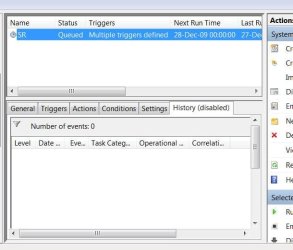
  • SR screen.jpg
    SR screen.jpg
    33.4 KB · Views: 29

My Computer

OS
windows 7 ultimate
Motherboard
Foxconn 775 G31MXP-K V/S/GBL/PCIE
Memory
2048 Mb DDR2/800 Kingston
Graphics Card(s)
Palit nVi GF9500GT Super 512
Monitor(s) Displays
Samsung 21"
Hard Drives
320 Gb Samsung HD322HJ 16/S
Keyboard
Microsoft
Mouse
Microsoft
Internet Speed
cable

My Computer

Computer type
PC/Desktop
Computer Manufacturer/Model Number
Dell XPS 420
OS
Windows 10, Home Clean Install
CPU
Intel Core2 processsor Q8200(2.33Ghz 1333FSB) Quad Core Tech
Motherboard
Dell
Memory
6 gb
Graphics Card(s)
ATI Radeon 256MB HD3650
Sound Card
Intergrated 7.1 Channel Audio
Monitor(s) Displays
Dell SP2009W 20"
Hard Drives
640 GB Serial ATA Hard drive
Cooling
Fan
Keyboard
Dell USB Keyboard
Mouse
Dell Premium Optical USB
Internet Speed
DSL 2.85
Thank you

Should have seen that myself - thanks rich
 

My Computer

OS
windows 7 ultimate
Motherboard
Foxconn 775 G31MXP-K V/S/GBL/PCIE
Memory
2048 Mb DDR2/800 Kingston
Graphics Card(s)
Palit nVi GF9500GT Super 512
Monitor(s) Displays
Samsung 21"
Hard Drives
320 Gb Samsung HD322HJ 16/S
Keyboard
Microsoft
Mouse
Microsoft
Internet Speed
cable

My Computer

Computer type
PC/Desktop
Computer Manufacturer/Model Number
Dell XPS 420
OS
Windows 10, Home Clean Install
CPU
Intel Core2 processsor Q8200(2.33Ghz 1333FSB) Quad Core Tech
Motherboard
Dell
Memory
6 gb
Graphics Card(s)
ATI Radeon 256MB HD3650
Sound Card
Intergrated 7.1 Channel Audio
Monitor(s) Displays
Dell SP2009W 20"
Hard Drives
640 GB Serial ATA Hard drive
Cooling
Fan
Keyboard
Dell USB Keyboard
Mouse
Dell Premium Optical USB
Internet Speed
DSL 2.85
Windows 7 will not create an automatic restore point unless no other points have been created for 7 days. It does not create one daily.
 

My Computer

Computer type
PC/Desktop
Computer Manufacturer/Model Number
Custom Built
OS
Windows 10 Pro x64, Windows 8.1 Pro x64, Windows 7 Ultimate x64 SP1,
CPU
INTEL i9-7920X LGA 2066
Motherboard
Gigabyte X299-WU8 F3
Memory
64 GB (4 X 16 GB) G-Skill V Series DDR4 3200 Quad Channel
Graphics Card(s)
EVGA GTX 1060 SC 3 GB
Sound Card
Realtek Onboard ALC1220
Monitor(s) Displays
2 x Samsung S27E310
Screen Resolution
1920x1080
Hard Drives
Samsung 2 x 970 EVO Plus 500 GB NVMe
1 x 6TB WD 6003FZBX SATA
1 x 6TB WD 60EFRX SATA
12 x 3TB WD 30EFRX SATA
PSU
Seasonic X-1050
Case
Thermaltake Armor+
Cooling
Corsair H80i V2 Liquid AOI Cooler
Keyboard
Logitech G510s
Mouse
Logitech MX Master 2S
Internet Speed
200 Mb/s
Antivirus
ESET NOD32 13.1
Browser
EDGE (Dev, Canary, Beta), Chrome
Other Info
ASUS RT-AC68U router
Malwarebytes 4.0.4
When I bought my new computer with Windows 7 Ultimate, I also bought, what I think is an excellent book "Windows 7 Inside Out" Microsoft. On page 398 it is explained how you can create a text file using code and run it utilizing the Task Scheduler. I keep getting an error when I try to set it up. I must be doing something wrong. See attached file.
 

Attachments

  • IMG.jpg
    IMG.jpg
    272.3 KB · Views: 14

My Computer

OS
windows 7 ultimate
Motherboard
Foxconn 775 G31MXP-K V/S/GBL/PCIE
Memory
2048 Mb DDR2/800 Kingston
Graphics Card(s)
Palit nVi GF9500GT Super 512
Monitor(s) Displays
Samsung 21"
Hard Drives
320 Gb Samsung HD322HJ 16/S
Keyboard
Microsoft
Mouse
Microsoft
Internet Speed
cable
Back
Top