Taskbar disappears

Status
Not open for further replies.

ExNavy11

Member
Power User
Local time
8:06 AM
Messages
256
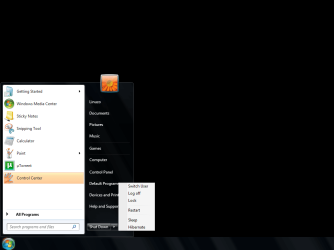
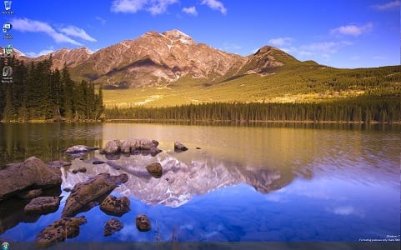
This has happened twice i think. Not sure what causes it but the taskbar will literally disappear.

You can see my background picture where the taskbar is suppose to be. However you still see the Start Menu Launcher button on the bottom left.
 

Attachments

  • Untitled.png
    Untitled.png
    153 KB · Views: 3,606

My Computer

Computer Manufacturer/Model Number
Built
OS
Windows 7 RTM
CPU
Intel I7 920 2.67 ghz
Motherboard
EVGA X58
Memory
6GB CORSAIR DOMINATOR
Graphics Card(s)
GeForce GTX 260 Core 216 896MB 448-bit GDDR3 PCI Express 2.0
This has happened twice i think. Not sure what causes it but the taskbar will literally disappear.

You can see my background picture where the taskbar is suppose to be. However you still see the Start Menu Launcher button on the bottom left.
did you try just clicking on the start menu cause mine would sometimes flicker and would come back if i did that. its probably just a beta bug
 

My Computer

OS
Windows 7 Ultimate Beta 7000
CPU
AMD Athlon 64 X2 5000+ Brisbane 2.6GHz Black Edition
Motherboard
ASUS M2A-VM
Memory
Kingston 2GB DDR2 667
Monitor(s) Displays
Acer AL2216Wbd 22" Widescreen
Screen Resolution
1680x1050
Hard Drives
HITACHI 500GB SATA
Other Info
Laptop: Compaq C700
Yeah, still wont return. Im sure if i restart itll come back. Hope it wont be a frequent occurrence.
 

My Computer

Computer Manufacturer/Model Number
Built
OS
Windows 7 RTM
CPU
Intel I7 920 2.67 ghz
Motherboard
EVGA X58
Memory
6GB CORSAIR DOMINATOR
Graphics Card(s)
GeForce GTX 260 Core 216 896MB 448-bit GDDR3 PCI Express 2.0
Have you tried updating to the latest display drivers?
 

My Computer

Computer Manufacturer/Model Number
ENIAC
OS
Windows 7 RC 7100 32bit/64bit
CPU
Intel Core2Duo E4500 2.20 GHz
Motherboard
ASUS P5LD2-X/1333
Memory
2x1GB Kinsgston DDR2 800MHz
Graphics Card(s)
Nvidia 8500GT
Sound Card
Onboard High Definition Audio Device
Monitor(s) Displays
Sony Bravia 42"
Case
LINKW 2222
Cooling
Standard Intel
Keyboard
Some cheap one
Mouse
Microsoft Intellimouse something
Internet Speed
24MBps ADSL
I've seen it twice, I just hit the Windows key, then opened an app, and it came back.
 

My Computer

Computer Manufacturer/Model Number
Custom Desktop & HP G60-120US
OS
Windows 7 Pro x64 & Win7 Pre x64 / Ubuntu 9.10 Beta
CPU
Q6600 Quad Core 2 - 2.4Ghz
Motherboard
EVGA - 680i SLI
Memory
4GB Kingston DDR2 800
Graphics Card(s)
XFX 8800GT Alpha Dog Ed. X 2 SLI
Sound Card
On Board
Monitor(s) Displays
24"Dell Wide Screen and Gateway 17" Widescreen & HP 15.4"
Screen Resolution
1920 x1200 (Dell) 1440 x 900(Gateway) & 1366x768 (HP Laptop)
Hard Drives
WD 500GB, Seagate 1.5 TB
PSU
Rosewell RX750
Case
Antec 900
Cooling
Zalman 8700
Keyboard
Saitek Cyborg & Logitech wireless
Mouse
Logitech G5 & Logitech wireless
Internet Speed
Cable - 20Mbs/sec DOWN 5Mbs/s UP
Make sure you are not using LiveMesh! ;)
 

My Computer

Computer Manufacturer/Model Number
Hp 530
OS
Windows 7 RC1
CPU
Core Duo,1.6Ghz
Motherboard
T2300
Memory
1GB
Got it back. I just right clicked where the taskbar would be, and changed one of the Properties.

Thanks all
 

My Computer

Computer Manufacturer/Model Number
Built
OS
Windows 7 RTM
CPU
Intel I7 920 2.67 ghz
Motherboard
EVGA X58
Memory
6GB CORSAIR DOMINATOR
Graphics Card(s)
GeForce GTX 260 Core 216 896MB 448-bit GDDR3 PCI Express 2.0
I didn't have that happen yet, however I had my desktop disappear. It had to do with something in start-up when connected to a projector. Started just like this.
 

Attachments

  • fail.png
    fail.png
    3.3 KB · Views: 530
  • fail2.png
    fail2.png
    23.6 KB · Views: 1,304

My Computer

Computer Manufacturer/Model Number
Dell M1330 XPS - Laptop
OS
Windows 7 Build 7100
CPU
Core 2 Duo T7250
Motherboard
Dell Inc. 0U8042
Memory
2GB PC2-5300
Graphics Card(s)
NVIDIA 8400M GS
Sound Card
Standard HD Audio
Monitor(s) Displays
13" LCD Widescreen
Screen Resolution
1280x800
Hard Drives
160GB
Internet Speed
25 Mbit
Mine has had the same thing happen twice now. I just left it for 5 minutes and the screen saver came on, then when I came back the taskbar was gone.

I managed to fix it by going into 'Taskbar and Start Menu Settings' in the control panel and playing around. I moved it to the other positions around the screen and it still didn't appear, but I got it to come back by selecting 'auto hide the taskbar' and then deselecting it.
 

My Computer

Computer Manufacturer/Model Number
Piro21
OS
Windows 7 Ultimate Beta
CPU
Intel Core 2 Duo E6300
Motherboard
Intel DG965WH
Memory
4 GB Patriot DDR2-800
Graphics Card(s)
Nvidia GeForce 8500 GT
Monitor(s) Displays
Samsung 931BF 19" LCD
Screen Resolution
1280x1024
Hard Drives
2 Seagate ST3500320AS 500 GB
Case
Antec NSK6500
My taskbar does that sometimes, a few times when I access the snipping tool.
 

My Computer

Computer type
PC/Desktop
Computer Manufacturer/Model Number
Airbot 2.0
OS
Windows 7 Ultimate x64 SP1
CPU
Core i7 920 (D0) @ 4Ghz, *26c idle *65c full load on air
Motherboard
Asus P6X58D Premium - Sata 6Gb/s - USB 3.0
Memory
12GB DDR3 Corsair Dominator -CMD12GX3M6A1600C8 at 1600MHz
Graphics Card(s)
Zotac Geforce GTX 770
Sound Card
ASUS Xonar D2X
Monitor(s) Displays
1 LG 24" Flatron W2453V-PF 1 Samsung 24" P2450H both 2ms RT
Screen Resolution
1920x1080@60hz
Hard Drives
1 Samsung 250GB 840 Evo SSD
1 OCZ Vertex2 180GB SSD
1 TB Samsung Spinpoint F1 7200RPM 32MB cache
2 500GB WD Caviar Blacks 7200RPM 32MB cache (WD5001AALS)

Pioneer DVD Burner DVR-S18M
PSU
Corsair HX1000W
Case
Cooler Master HAF 932
Cooling
Case Fans *3 230mm, *1 140mm/CPU - *Tuniq Tower 120 Extreme
Keyboard
Logitech Wireless MK700
Mouse
Logitech Wireless MK700
Internet Speed
DL 15 Mbps UL 0.98 Mbps
Antivirus
None
Browser
Firefox Nightly
Other Info
Processor-7.7 *RAM- 7.9 *Graphics-7.9 *Gaming Graphics- 7.9 *SSD- 7.8 W.E.I final score= 7.7
*Phone- LG Nexus 5
I had it happen a couple of times but only when I was installing certain apps, got it back by just clicking on the desktop.
 

My Computer

Computer Manufacturer/Model Number
Home Brew
OS
Windows 7 Ultimate Vista Ultimate x64
CPU
Core 2 Duo E8500 3.16Ghz @ 3.8Ghz
Motherboard
eVGA 750i FTW
Memory
2x2Gigs Patriot PC2-6400 LL
Graphics Card(s)
Inno3D GeForce GTX260 216 SP
Monitor(s) Displays
ASUS VW222U 22" 2ms Response time
Screen Resolution
1680x1050
Hard Drives
SATA 150GB
SATA II 250GB
USB IDE 750GB Ext.
PSU
HYTEC 600W & Thermaltake 650W Toughpower Power Exp
Case
Thermaltake Armor LCS (Liquid Cooling System)
Cooling
Liquid Cooling System
Keyboard
Logitech G15 Gaming Keyboard
Mouse
Logitech G9 Gaming Mouse
Its happening to me and I cannot do anything to bring it back. I have even rebooted multiple times with no luck.
 

Attachments

  • ScreenShot.jpg
    ScreenShot.jpg
    28.4 KB · Views: 324

My Computer

OS
Windows 7

My Computer

Computer type
PC/Desktop
Computer Manufacturer/Model Number
Airbot 2.0
OS
Windows 7 Ultimate x64 SP1
CPU
Core i7 920 (D0) @ 4Ghz, *26c idle *65c full load on air
Motherboard
Asus P6X58D Premium - Sata 6Gb/s - USB 3.0
Memory
12GB DDR3 Corsair Dominator -CMD12GX3M6A1600C8 at 1600MHz
Graphics Card(s)
Zotac Geforce GTX 770
Sound Card
ASUS Xonar D2X
Monitor(s) Displays
1 LG 24" Flatron W2453V-PF 1 Samsung 24" P2450H both 2ms RT
Screen Resolution
1920x1080@60hz
Hard Drives
1 Samsung 250GB 840 Evo SSD
1 OCZ Vertex2 180GB SSD
1 TB Samsung Spinpoint F1 7200RPM 32MB cache
2 500GB WD Caviar Blacks 7200RPM 32MB cache (WD5001AALS)

Pioneer DVD Burner DVR-S18M
PSU
Corsair HX1000W
Case
Cooler Master HAF 932
Cooling
Case Fans *3 230mm, *1 140mm/CPU - *Tuniq Tower 120 Extreme
Keyboard
Logitech Wireless MK700
Mouse
Logitech Wireless MK700
Internet Speed
DL 15 Mbps UL 0.98 Mbps
Antivirus
None
Browser
Firefox Nightly
Other Info
Processor-7.7 *RAM- 7.9 *Graphics-7.9 *Gaming Graphics- 7.9 *SSD- 7.8 W.E.I final score= 7.7
*Phone- LG Nexus 5
That's usually a sign of the Shell crashing (explorer.exe). Most times the shell will restart immediately after a crash but that depends on Why or what caused the shell to crash. You can always restart explorer.exe manually from the Windows folder (if you can get to it) or from the run box.
Retarting will always work but if the root cause of the crash is still there, then all bets are off until that has been found and resolved.
 

My Computer

Computer Manufacturer/Model Number
Personal Build
OS
Vista Ult 64bit - Windows 7 Ult 7264 64bit
CPU
Intel Core 2 Duo E6750
Motherboard
Asus Commando
Memory
4 G's Crucial Ballistix Tracer
Graphics Card(s)
BFG Nvidia 8800 GTS 340
Sound Card
Creative Sound Blaster X-FI Platinum FATAL1TY
Monitor(s) Displays
2-22" HP W2207 LCD
Screen Resolution
1920 x 1080
Hard Drives
3 x 500G WD Caviar SATA II
PSU
Enermax Noise Taker II 600W
Case
NZXT Lexa Classic (dual doored & windowed)
Cooling
Zalman 9700 CPU cooler - 4 x 120mm, 1 x 90mm fans
Keyboard
Logitech MX 5500
Mouse
Logitech MX Revolution
Internet Speed
Blazing...
Hi Brannongillis and welcome,

You could try a repair install, might fix it. I used it and it worked good for me. Saves all your files/settings, except maybe a couple basic settings revert back to default.
http://www.sevenforums.com/tutorials/3413-repair-install.html

Ok I finally tried this last night. After the repair all seemed fine. I even rebooted and everything was fine. Then it downloaded some sort of update from Windows (I normally check these things but just let it do its thing this time so I am unsure of the update). Once the update was installed it stated I needed to reboot. I did but choose to go back into Vista first to make sure everything was still there since its my main OS for now. Then I rebooted back into 7 and the taskbar was acting up again. I could see the start button just as before but the clock and all other items were gone. I tried to reboot and samething.

There has to be something on my computer causing a conflict. I wonder if its that update that it downloaded? I can try to uninstall it.
 

My Computer

OS
Windows 7
I m having the same problem...happened a few times. Always after the screensaver went on..
You can either reboot...or just, in the taskbar & menu options: check and unchecked the "auto hide taskbar"... that will do it.
 

My Computer

Computer Manufacturer/Model Number
HP pavilion zd 8000
OS
Windows 7 Ultimate built 6956 32 bits
CPU
Intel 4 3.00 Ghz
Memory
1 Go
Graphics Card(s)
ATI
Screen Resolution
1440 x 900
I seem to lose the taskbar every time the screensaver cuts in too. I have found what seems to me to be a consistently repeatable cure, albeit temporary. I right click the desktop, select Personalize, and bring up the screen saver settings. I click Preview, and as soon as the screen saver starts up I move the mouse, the screensaver terminates and the taskbar has reappeared. Works EVERY time for me!
 

My Computer

OS
Windows 7
I seem to lose the taskbar every time the screensaver cuts in too. I have found what seems to me to be a consistently repeatable cure, albeit temporary. I right click the desktop, select Personalize, and bring up the screen saver settings. I click Preview, and as soon as the screen saver starts up I move the mouse, the screensaver terminates and the taskbar has reappeared. Works EVERY time for me!

I can confirm that this temporary solution works for me every time as well. I'm also frustrated that this problem has yet to be fixed, since it has been present for me since the early beta. After testing on multiple systems, my best guess is that it is related to the video drivers, since only those computers with certain NVIDIA gfx cards are what I've seen this on. Certain driver versions appear to work, but not the latest one from the NVIDIA website. Clearly, the screensaver is involved, when looking at antient's temporary solution.

Interestingly, once the bar has disappeared, if you wait for the screensaver to turn on again, then move the mouse, the bar reappears. This is esentially the same as previewing the screensaver.

Has anyone figured out a real solution besides reverting? It's the only real thing holding back my Win7 love.

 

My Computer

OS
Windows 7
I can confirm that this temporary solution works for me every time as well. I'm also frustrated that this problem has yet to be fixed, since it has been present for me since the early beta. After testing on multiple systems, my best guess is that it is related to the video drivers, since only those computers with certain NVIDIA gfx cards are what I've seen this on. Certain driver versions appear to work, but not the latest one from the NVIDIA website. Clearly, the screensaver is involved, when looking at antient's temporary solution.

Interestingly, once the bar has disappeared, if you wait for the screensaver to turn on again, then move the mouse, the bar reappears. This is esentially the same as previewing the screensaver.

Has anyone figured out a real solution besides reverting? It's the only real thing holding back my Win7 love.

Just to confirm the NVIDIA theory, my card is a NVIDIA GeForce 9400, in an iMac 24"

FWIW, antient
 

My Computer

OS
Windows 7
I found that after the screen saver ended my TaskBar would disappear and leave the start button as well. open task manager end explorer.exe and start new task explorer.exe restarting explorer.exe workd great. after reinstalling the screensaver I did not get the problem again.
 

My Computer

OS
windows7, Vista x64, WinXP
Status
Not open for further replies.
Back
Top