Taskbar issue

barneyk

Banned
Local time
4:15 PM
Messages
23
I managed to turn aero peek off in Windows 7 beta but I have just installed Win 7 RC and can't fully get rid of it.

I have used all the methods in the tutorial and I don't have an aero theme but I am still left with these seriously distracting little popups every time my mouse goes near the taskbar. They don't consist of the full aero peek popup.

Instead they are little text popups. Telling me what I already know, yes it is firefox thank you windows for sharing that with me. I never would have worked out from looking at it.. arghhhhhh!
They are doing my head in!

Please help
 

My Computer

Computer type
PC/Desktop
OS
.
Hello Barney, and welcome to Seven Forums.

I'm sorry, but that is not a part of Aero Peek. Aero Peek is just basically "Show Desktop". It sounds like you are describing the pop-up descriptions for pinned taskbar items. Unfortunately, the ability to change that options seems to have been disabled. :(

Sorry,
Shawn
 

My Computer

Computer type
PC/Desktop
Computer Manufacturer/Model Number
Self built custom
OS
64-bit Windows 11 Pro for Workstations
CPU
Intel i7-8700K OC'd to 5 GHz
Motherboard
ASUS ROG Maximus XI Formula Z390
Memory
64 GB (4x16GB) G.SKILL TridentZ RGB DDR4 3600 MHz
Graphics Card(s)
ASUS ROG-STRIX-GTX1080TI-O11G-GAMING
Sound Card
Integrated
Monitor(s) Displays
2 x Samsung Odyssey G7 27"
Screen Resolution
2560x1440
Hard Drives
1TB Samsung 990 PRO M.2,
4TB Samsung 990 PRO PRO M.2,
TerraMaster F8 SSD Plus NAS
PSU
Seasonic Prime Titanium 850W
Case
Thermaltake Core P3
Cooling
Corsair Hydro H115i
Keyboard
Logitech wireless K800
Mouse
Logitech MX Master 4
Internet Speed
2 Gb/s Download and 100 Mb/s Upload
Antivirus
Malwarebyte Anti-Malware Premium
Browser
Google Chrome
Other Info
Logitech Z625 speaker system,
Logitech BRIO 4K Pro webcam,
HP Color LaserJet Pro MFP M477fdn,
APC SMART-UPS RT 1000 XL - SURT1000XLI,
Galaxy S23 Plus phone
Hello Barney, and welcome to Seven Forums.

I'm sorry, but that is not a part of Aero Peek. Aero Peek is just basically "Show Desktop". It sounds like you are describing the pop-up descriptions for pinned taskbar items. Unfortunately, the ability to change that options seems to have been disabled. :(

Sorry,
Shawn
I think you think I'm talking about those tiny little grey boxes with faded writing that are quite unobtrusive. I'm not I'm talking about boxes a couple of centimetres high in some cases that are brightly coloured text versions of the aero stuff.

I know this for sure because I have regained the unobtrusive no one notices them tiny tiny grey boxes and lost the gynormous multicolour aero text boxes by messing with the registry. And changing the mouse hover time.

Anyhow thanks for trying to help and I'm off to read the rest of the forum. Which I've looked at for quite awhile but never joined (it's pretty cool here actually). :)

If you want me to post what I did specifically (it took two seconds and a reboot) I will.
I just don't want to get yelled at for advising people to mess with their registry. :devil::D
 
Last edited:

My Computer

Computer type
PC/Desktop
OS
.
Can you post a screen shot of what you are talking about because I have no idea, use the paperclip to upload your pics.
 

My Computer

Computer Manufacturer/Model Number
Home Brew
OS
Windows 7 Ultimate Vista Ultimate x64
CPU
Core 2 Duo E8500 3.16Ghz @ 3.8Ghz
Motherboard
eVGA 750i FTW
Memory
2x2Gigs Patriot PC2-6400 LL
Graphics Card(s)
Inno3D GeForce GTX260 216 SP
Monitor(s) Displays
ASUS VW222U 22" 2ms Response time
Screen Resolution
1680x1050
Hard Drives
SATA 150GB
SATA II 250GB
USB IDE 750GB Ext.
PSU
HYTEC 600W & Thermaltake 650W Toughpower Power Exp
Case
Thermaltake Armor LCS (Liquid Cooling System)
Cooling
Liquid Cooling System
Keyboard
Logitech G15 Gaming Keyboard
Mouse
Logitech G9 Gaming Mouse
I fixed it though :huh:

I can upload how it is now. But not how it was.

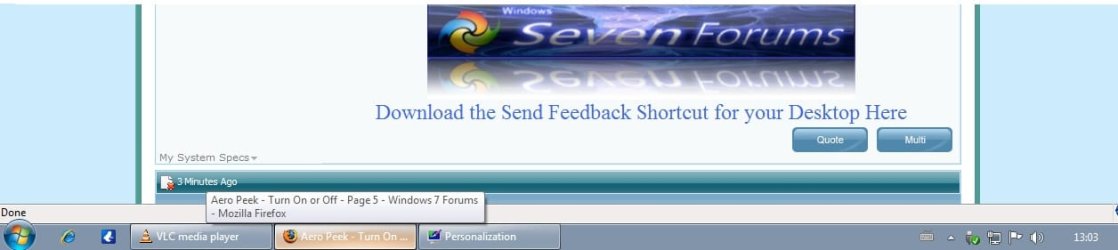
Ok I've uploaded it as it is now without the big multicoloured covering half the length of the taskbar aero text only popups this has normal unobtrusive ones.

The aero style ones where much darker text wise and that message would have gone for three quarters of the length of the task bar had multiple colours and been slightly above the taskbar.
N.B I'm not talking about aero peek proper I turned that off straight away this was a text description only.

Do you get what I mean now?
Sorry I'm bad at explaining stuff and not very techy.
 

Attachments

  • desktoppopupsgrab.jpg
    desktoppopupsgrab.jpg
    36.2 KB · Views: 28
Last edited:

My Computer

Computer type
PC/Desktop
OS
.
Barney,

Are you talking about the taskbar buttons, or the text above them? If you can post what you have changed that may help determine what it is was.
 

My Computer

Computer type
PC/Desktop
Computer Manufacturer/Model Number
Self built custom
OS
64-bit Windows 11 Pro for Workstations
CPU
Intel i7-8700K OC'd to 5 GHz
Motherboard
ASUS ROG Maximus XI Formula Z390
Memory
64 GB (4x16GB) G.SKILL TridentZ RGB DDR4 3600 MHz
Graphics Card(s)
ASUS ROG-STRIX-GTX1080TI-O11G-GAMING
Sound Card
Integrated
Monitor(s) Displays
2 x Samsung Odyssey G7 27"
Screen Resolution
2560x1440
Hard Drives
1TB Samsung 990 PRO M.2,
4TB Samsung 990 PRO PRO M.2,
TerraMaster F8 SSD Plus NAS
PSU
Seasonic Prime Titanium 850W
Case
Thermaltake Core P3
Cooling
Corsair Hydro H115i
Keyboard
Logitech wireless K800
Mouse
Logitech MX Master 4
Internet Speed
2 Gb/s Download and 100 Mb/s Upload
Antivirus
Malwarebyte Anti-Malware Premium
Browser
Google Chrome
Other Info
Logitech Z625 speaker system,
Logitech BRIO 4K Pro webcam,
HP Color LaserJet Pro MFP M477fdn,
APC SMART-UPS RT 1000 XL - SURT1000XLI,
Galaxy S23 Plus phone
As I made clear in my first post I'm referring to the popups.

First I had the aero peek popups, I disabled that.

That was the replaced by aeropeek style text only popups as I said before gynormous multicolour aero text popups.

I disabled that by going into the registry and changing the 'MouseHoverTime' from 400 to something ridiculous like 20000.

I rebooted and the problem appears to have been solved as you can see in the grab above I now have normal little unobtrusive grey popups. Which is fine.

I really cannot explain it a different way again.
 

My Computer

Computer type
PC/Desktop
OS
.
That's what I had thought you may have been referring to, but was not sure when you had mentioned Aero Peek if it was the thumbnail previews for the pinned taskbar items, text pop-ups, or what.

I had to ask to be sure since you did not have a screenshot of the original problem.

I'm not sure what may have caused the huge multicolor text for you, but I'm happy to hear that you got it sorted out.
 

My Computer

Computer type
PC/Desktop
Computer Manufacturer/Model Number
Self built custom
OS
64-bit Windows 11 Pro for Workstations
CPU
Intel i7-8700K OC'd to 5 GHz
Motherboard
ASUS ROG Maximus XI Formula Z390
Memory
64 GB (4x16GB) G.SKILL TridentZ RGB DDR4 3600 MHz
Graphics Card(s)
ASUS ROG-STRIX-GTX1080TI-O11G-GAMING
Sound Card
Integrated
Monitor(s) Displays
2 x Samsung Odyssey G7 27"
Screen Resolution
2560x1440
Hard Drives
1TB Samsung 990 PRO M.2,
4TB Samsung 990 PRO PRO M.2,
TerraMaster F8 SSD Plus NAS
PSU
Seasonic Prime Titanium 850W
Case
Thermaltake Core P3
Cooling
Corsair Hydro H115i
Keyboard
Logitech wireless K800
Mouse
Logitech MX Master 4
Internet Speed
2 Gb/s Download and 100 Mb/s Upload
Antivirus
Malwarebyte Anti-Malware Premium
Browser
Google Chrome
Other Info
Logitech Z625 speaker system,
Logitech BRIO 4K Pro webcam,
HP Color LaserJet Pro MFP M477fdn,
APC SMART-UPS RT 1000 XL - SURT1000XLI,
Galaxy S23 Plus phone
Back
Top