Taskbar List or Thumbnail Previews Mode - Change

How to Change Taskbar Thumbnail and List Mode Threshold in Windows 7 and Windows 8


   Information
By default, the taskbar will show thumbnail previews of open windows and programs when you hover the mouse pointer over it's taskbar icon while using a Aero theme.

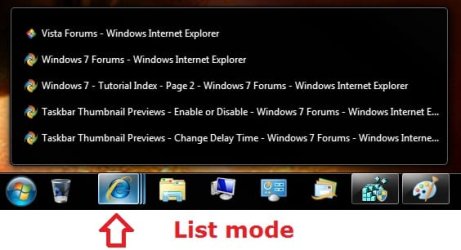
When you are using a Basic or High Contrast theme, the taskbar will only show a list of tabs (list mode) for the open windows and programs (ex: Internet Explorer) when you hover the mouse pointer over it's taskbar icon, and never any thumbnail previews.

While still using a Aero theme, this will show you how to change the number of thumbnail previews that will display for a icon on the taskbar before it switches to list mode instead in Windows 7.
   Note
If the taskbar thumbnail previews of multiple windows/tabs opened for a icon go past your screen's edge, then they will automatically be displayed in list mode instead of thumbnail preview mode.

For example, if your screen resolution is 1200x800, and say you have more than 15 tabs open in IE, then it will display in list mode when you hover over IE's icon on the taskbar.

Limits before list mode examples:
1920x1080 = 15 tabs or windows open for a icon
1200x800 = 10 tabs or windows open for a icon

EXAMPLE: Taskbar Thumbnail Previews Mode
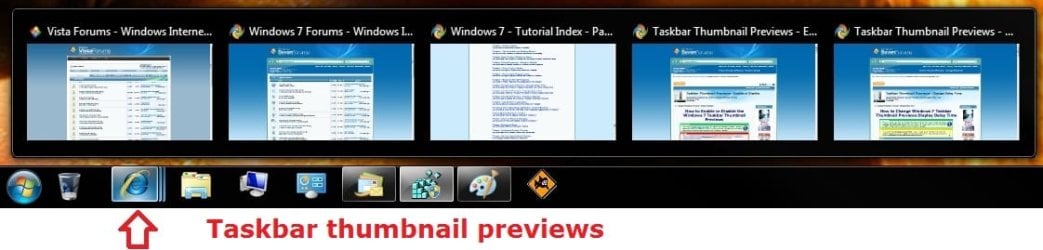
Default.jpg
EXAMPLE: Taskbar List Mode
List-mode.jpg


OPTION ONE

Change Taskbar Thumbnail and List Mode Threshold using REG File


1. To Always Have Taskbar List Mode
NOTE: This sets the NumThumbnails value to 0 in OPTION TWO below.
A) Click on the download button below to download the file below.
Taskbar_Always_List_Mode.reg

Download


B) Go to step 3.
2. To Have Taskbar Thumbnail Previews Mode
NOTE: This deletes the NumThumbnails value in OPTION TWO below. This is the default setting.
A) Click on the download button below to download the file below.
Taskbar_Thumbnail_Previews_Mode.reg

Download


3. Save the .reg file to your desktop.

4. Double click/tap on the downloaded .reg file to merge it.

5. If prompted, click/tap on Run, Yes (UAC), Yes, and OK to approve the merge.

6. Log off and log on, or restart the computer to apply the changes.

7. When done, you can delete the downloaded .reg file if you like.


OPTION TWO

Change Taskbar Thumbnail and List Mode Threshold in Registry Editor


1. Press the Windows + R keys to open the Run dialog, type regedit, and click/tap on OK.

2. In regedit, navigate to the location below. (see screenshot below step 3A)
HKEY_CURRENT_USER\Software\Microsoft\Windows\CurrentVersion\Explorer\Taskband
3. To Change Thumbnail Previews Threshold Before Switching to List Mode
A) In the right pane, right click on a empty space and click on New and DWORD (32-bit) Value. (see screenshot below)
Step1.jpg
B) Type NumThumbnails and press enter. (see screenshot below)
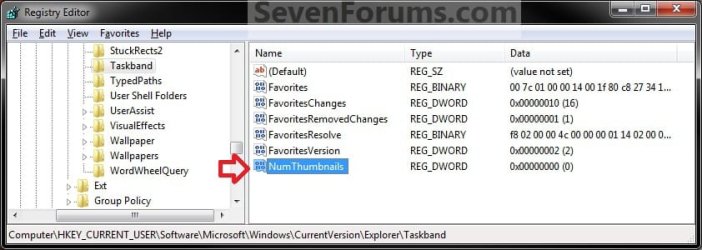
Step2.jpg
C) In the right pane, double click on NumThumbnails. (see screenshot above)
D) Type in how many thumbail previews you want to have display so that it will switch to list mode after this number, then click on OK. (see screenshot below)
NOTE: Typing in 0 will result in always being in list mode.
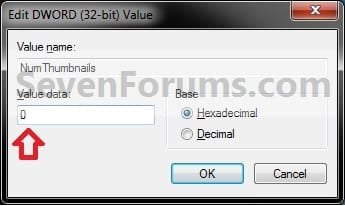
Step3.jpg
E) Go to step 5.
4. To Restore Taskbar Thumbnail Previews Mode
NOTE: This is the default setting.
A) In the right pane, right click on NumThumbnails and click on Delete. (see screenshot below step 3B)

B) Click on Yes to confirm. (see screenshot below)
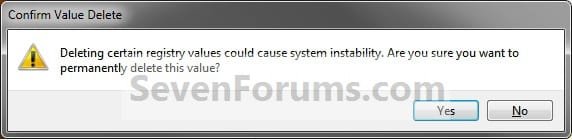
Delete.jpg
5. Close regedit.

6. Log off and log on, or restart the computer to apply the changes.
That's it,
Shawn


Attachments

Last edited:
You are very talented, Brink! How did you learn to do all this stuff? Is there any video training available so that I can learn some "programming", particularly VB Scripting for Outlook? [I need video training, becaue I have a cognitive deficit which makes it hard for me to read and learn things.]

Thank you so much for doing this! You're awesome!

~Antonio :geek:
 

My Computer

Computer Manufacturer/Model Number
HP Pavilion Media Center PC m7350n
OS
Microsoft Windows 7 Home Premium 32-bit 7601 Multiprocessor Free Service Pack 1
CPU
Intel(R) Pentium(R) D CPU 2.80GHz
Motherboard
ASUSTek Computer INC. EMERY
Memory
2.00 GB
Graphics Card(s)
NVIDIA GeForce 6200SE TurboCache(TM)
Sound Card
Realtek High Definition Audio
Monitor(s) Displays
HP L1710 LCD Display
Screen Resolution
1280 x 1024 x 32 bits (4294967296 colors) @ 60 Hz
Hard Drives
(1) SAMSUNG SP2504C (2) EPSON Stylus Storage USB Device (3) Generic USB CF Reader USB Device (4) Generic USB MS Reader USB Device (5) Generic USB SD Reader USB Device (6) Generic USB SM Reader USB Device (7) Seagate FA GoFlex Desk USB Dev
Internet Speed
20+mbps
Another amazing tutorial Shawn, Thanks.:)
Derek
 

My Computer

Computer type
PC/Desktop
Computer Manufacturer/Model Number
Self Built
OS
Win 10 Pro x64
CPU
Intel I5-2500K @3.3GHz
Motherboard
Asrock P67 Extreme4
Memory
16GB G.Skill Ripjaws X (4x4GB)
Graphics Card(s)
EVGA GeForce 750 Ti SC 2GB
Sound Card
ASUS Xonar DG 5.1 Channels 24-bit 96KHz PCI Interface Sound
Monitor(s) Displays
auria eq2367
Screen Resolution
1920 x 1080
Hard Drives
250GB Samsung 850 EVO SSD
1TB WD Blue
1TB Hitachi
PSU
SeaSonic X 650W 80 Plus Gold
Case
Corsair Obsidian 750D
Cooling
Corsair H60, Three 140mm case fans
Keyboard
Logitech Wireless Keyboard K520
Mouse
Logitech Wireless Mouse M310
Internet Speed
Wave Broadband ~ 100 dn 5 up
Antivirus
Windows Defender, Malwarebytes Premium
Browser
Edge, IE11, Chrome
Other Info
Laptop specs: HP g7-1365dx /
CPU: AMD A6-3420M APU with Radeon(tm) HD Graphics /
RAM: Crucial 8Gb (2x4Gb) /
SSD: Crucial M4-CT128M4SSD2 ATA Device/ FW 000F /
GFX: AMD Radeon HD 6520G /
OS: Windows 10 Pro x64
Thank you guys, and you're both most welcome.

From what you had posted here Antonio, I had just picked it up from there to make it easier for everyone to do. There's all sorts of training available out on the net for programming and scripting, but I'm afraid that I'm not much of a programmer and do not have anything that I could recommend.
 

My Computer

Computer type
PC/Desktop
Computer Manufacturer/Model Number
Self built custom
OS
64-bit Windows 11 Pro for Workstations
CPU
Intel i7-8700K OC'd to 5 GHz
Motherboard
ASUS ROG Maximus XI Formula Z390
Memory
64 GB (4x16GB) G.SKILL TridentZ RGB DDR4 3600 MHz
Graphics Card(s)
ASUS ROG-STRIX-GTX1080TI-O11G-GAMING
Sound Card
Integrated
Monitor(s) Displays
2 x Samsung Odyssey G7 27"
Screen Resolution
2560x1440
Hard Drives
1TB Samsung 990 PRO M.2,
4TB Samsung 990 PRO PRO M.2,
TerraMaster F8 SSD Plus NAS
PSU
Seasonic Prime Titanium 850W
Case
Thermaltake Core P3
Cooling
Corsair Hydro H115i
Keyboard
Logitech wireless K800
Mouse
Logitech MX Master 4
Internet Speed
2 Gb/s Download and 100 Mb/s Upload
Antivirus
Malwarebyte Anti-Malware Premium
Browser
Google Chrome
Other Info
Logitech Z625 speaker system,
Logitech BRIO 4K Pro webcam,
HP Color LaserJet Pro MFP M477fdn,
APC SMART-UPS RT 1000 XL - SURT1000XLI,
Galaxy S23 Plus phone
Brink,

Thanks for the reply. As I said, I appreciate the great formatting job you did with the instructions. Did you use HTML, or another language or something else? THAT is what I would like to learn. As well, I would like to learn a common programming language, but I do not know where to start. Is Visual Basic a good place to begin learning application programming?

Best,

~Antonio :cool:
 

My Computer

Computer Manufacturer/Model Number
HP Pavilion Media Center PC m7350n
OS
Microsoft Windows 7 Home Premium 32-bit 7601 Multiprocessor Free Service Pack 1
CPU
Intel(R) Pentium(R) D CPU 2.80GHz
Motherboard
ASUSTek Computer INC. EMERY
Memory
2.00 GB
Graphics Card(s)
NVIDIA GeForce 6200SE TurboCache(TM)
Sound Card
Realtek High Definition Audio
Monitor(s) Displays
HP L1710 LCD Display
Screen Resolution
1280 x 1024 x 32 bits (4294967296 colors) @ 60 Hz
Hard Drives
(1) SAMSUNG SP2504C (2) EPSON Stylus Storage USB Device (3) Generic USB CF Reader USB Device (4) Generic USB MS Reader USB Device (5) Generic USB SD Reader USB Device (6) Generic USB SM Reader USB Device (7) Seagate FA GoFlex Desk USB Dev
Internet Speed
20+mbps

My Computer

Computer type
PC/Desktop
Computer Manufacturer/Model Number
Self built custom
OS
64-bit Windows 11 Pro for Workstations
CPU
Intel i7-8700K OC'd to 5 GHz
Motherboard
ASUS ROG Maximus XI Formula Z390
Memory
64 GB (4x16GB) G.SKILL TridentZ RGB DDR4 3600 MHz
Graphics Card(s)
ASUS ROG-STRIX-GTX1080TI-O11G-GAMING
Sound Card
Integrated
Monitor(s) Displays
2 x Samsung Odyssey G7 27"
Screen Resolution
2560x1440
Hard Drives
1TB Samsung 990 PRO M.2,
4TB Samsung 990 PRO PRO M.2,
TerraMaster F8 SSD Plus NAS
PSU
Seasonic Prime Titanium 850W
Case
Thermaltake Core P3
Cooling
Corsair Hydro H115i
Keyboard
Logitech wireless K800
Mouse
Logitech MX Master 4
Internet Speed
2 Gb/s Download and 100 Mb/s Upload
Antivirus
Malwarebyte Anti-Malware Premium
Browser
Google Chrome
Other Info
Logitech Z625 speaker system,
Logitech BRIO 4K Pro webcam,
HP Color LaserJet Pro MFP M477fdn,
APC SMART-UPS RT 1000 XL - SURT1000XLI,
Galaxy S23 Plus phone
Thank you very much for this one too Brink :)

By the way. I miss a "Thanks" button for posts in the forum.

Laurus
 

My Computer

Computer Manufacturer/Model Number
Dell Studio 1555
OS
Windows 7 Home Premium 64 bit
CPU
Duo Core 2 2.1 GHz
Memory
4 GB
Graphics Card(s)
ATI Mobility HD 4570
Sound Card
IDT HD Audio
Hard Drives
Western Digital 500 GB SATA
Internet Speed
13 Megabit ADSL2+
You're most welcome Laurus. :)
 

My Computer

Computer type
PC/Desktop
Computer Manufacturer/Model Number
Self built custom
OS
64-bit Windows 11 Pro for Workstations
CPU
Intel i7-8700K OC'd to 5 GHz
Motherboard
ASUS ROG Maximus XI Formula Z390
Memory
64 GB (4x16GB) G.SKILL TridentZ RGB DDR4 3600 MHz
Graphics Card(s)
ASUS ROG-STRIX-GTX1080TI-O11G-GAMING
Sound Card
Integrated
Monitor(s) Displays
2 x Samsung Odyssey G7 27"
Screen Resolution
2560x1440
Hard Drives
1TB Samsung 990 PRO M.2,
4TB Samsung 990 PRO PRO M.2,
TerraMaster F8 SSD Plus NAS
PSU
Seasonic Prime Titanium 850W
Case
Thermaltake Core P3
Cooling
Corsair Hydro H115i
Keyboard
Logitech wireless K800
Mouse
Logitech MX Master 4
Internet Speed
2 Gb/s Download and 100 Mb/s Upload
Antivirus
Malwarebyte Anti-Malware Premium
Browser
Google Chrome
Other Info
Logitech Z625 speaker system,
Logitech BRIO 4K Pro webcam,
HP Color LaserJet Pro MFP M477fdn,
APC SMART-UPS RT 1000 XL - SURT1000XLI,
Galaxy S23 Plus phone
Hello Kathleen, and welcome to Seven Forums.

Could you give more details and screenshots of what you are trying to do and what's not working with it?
 

My Computer

Computer type
PC/Desktop
Computer Manufacturer/Model Number
Self built custom
OS
64-bit Windows 11 Pro for Workstations
CPU
Intel i7-8700K OC'd to 5 GHz
Motherboard
ASUS ROG Maximus XI Formula Z390
Memory
64 GB (4x16GB) G.SKILL TridentZ RGB DDR4 3600 MHz
Graphics Card(s)
ASUS ROG-STRIX-GTX1080TI-O11G-GAMING
Sound Card
Integrated
Monitor(s) Displays
2 x Samsung Odyssey G7 27"
Screen Resolution
2560x1440
Hard Drives
1TB Samsung 990 PRO M.2,
4TB Samsung 990 PRO PRO M.2,
TerraMaster F8 SSD Plus NAS
PSU
Seasonic Prime Titanium 850W
Case
Thermaltake Core P3
Cooling
Corsair Hydro H115i
Keyboard
Logitech wireless K800
Mouse
Logitech MX Master 4
Internet Speed
2 Gb/s Download and 100 Mb/s Upload
Antivirus
Malwarebyte Anti-Malware Premium
Browser
Google Chrome
Other Info
Logitech Z625 speaker system,
Logitech BRIO 4K Pro webcam,
HP Color LaserJet Pro MFP M477fdn,
APC SMART-UPS RT 1000 XL - SURT1000XLI,
Galaxy S23 Plus phone
By default, the taskbar will show thumbnail previews of open windows and programs when you hover the mouse pointer over it's taskbar icon while using a Aero theme.

It should be noted that this only applies if you have the taskbar setting enabled to group similar windows (default Windows 7 behavior) and there are more than 1 in the stack. I was hoping this would get rid of the thumbnail on hover for when there's only 1 window.
 

My Computer

OS
Windows 7 Professional x64
Hello ackmanx, and welcome to Seven Forums.

That's what the first "By default" is for in the quote. ;)

If you like, you could use the tutorial below to disable taskbar thumbnail previews. However, this is an all or not setting. It will enable or disable them completely and not just when you only have 1 window open from the same icon.

http://www.sevenforums.com/tutorials/52265-taskbar-thumbnail-previews-enable-disable.html

Hope this helps some,
Shawn
 

My Computer

Computer type
PC/Desktop
Computer Manufacturer/Model Number
Self built custom
OS
64-bit Windows 11 Pro for Workstations
CPU
Intel i7-8700K OC'd to 5 GHz
Motherboard
ASUS ROG Maximus XI Formula Z390
Memory
64 GB (4x16GB) G.SKILL TridentZ RGB DDR4 3600 MHz
Graphics Card(s)
ASUS ROG-STRIX-GTX1080TI-O11G-GAMING
Sound Card
Integrated
Monitor(s) Displays
2 x Samsung Odyssey G7 27"
Screen Resolution
2560x1440
Hard Drives
1TB Samsung 990 PRO M.2,
4TB Samsung 990 PRO PRO M.2,
TerraMaster F8 SSD Plus NAS
PSU
Seasonic Prime Titanium 850W
Case
Thermaltake Core P3
Cooling
Corsair Hydro H115i
Keyboard
Logitech wireless K800
Mouse
Logitech MX Master 4
Internet Speed
2 Gb/s Download and 100 Mb/s Upload
Antivirus
Malwarebyte Anti-Malware Premium
Browser
Google Chrome
Other Info
Logitech Z625 speaker system,
Logitech BRIO 4K Pro webcam,
HP Color LaserJet Pro MFP M477fdn,
APC SMART-UPS RT 1000 XL - SURT1000XLI,
Galaxy S23 Plus phone
Hello ackmanx, and welcome to Seven Forums.

That's what the first "By default" is for in the quote.

If you like, you could use the tutorial below to disable taskbar thumbnail previews. However, this is an all or not setting. It will enable or disable them completely and not just when you only have 1 window open from the same icon.

http://www.sevenforums.com/tutorials...e-disable.html

Hope this helps some,
Shawn

Thanks for the reply. The registry edit at the bottom of your link was exactly what I was hoping for. This site is amazing. It's like the one-stop place for doing something Microsoft didn't put in or hasn't made easy.
 

My Computer

OS
Windows 7 Professional x64
You're welcome. I'm glad that it was able to help. :)
 

My Computer

Computer type
PC/Desktop
Computer Manufacturer/Model Number
Self built custom
OS
64-bit Windows 11 Pro for Workstations
CPU
Intel i7-8700K OC'd to 5 GHz
Motherboard
ASUS ROG Maximus XI Formula Z390
Memory
64 GB (4x16GB) G.SKILL TridentZ RGB DDR4 3600 MHz
Graphics Card(s)
ASUS ROG-STRIX-GTX1080TI-O11G-GAMING
Sound Card
Integrated
Monitor(s) Displays
2 x Samsung Odyssey G7 27"
Screen Resolution
2560x1440
Hard Drives
1TB Samsung 990 PRO M.2,
4TB Samsung 990 PRO PRO M.2,
TerraMaster F8 SSD Plus NAS
PSU
Seasonic Prime Titanium 850W
Case
Thermaltake Core P3
Cooling
Corsair Hydro H115i
Keyboard
Logitech wireless K800
Mouse
Logitech MX Master 4
Internet Speed
2 Gb/s Download and 100 Mb/s Upload
Antivirus
Malwarebyte Anti-Malware Premium
Browser
Google Chrome
Other Info
Logitech Z625 speaker system,
Logitech BRIO 4K Pro webcam,
HP Color LaserJet Pro MFP M477fdn,
APC SMART-UPS RT 1000 XL - SURT1000XLI,
Galaxy S23 Plus phone
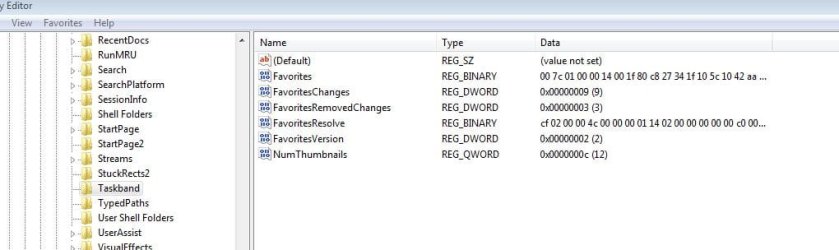
sorry to necropost this old thread but I had the same problem, found this solution (which is very clearly explained, thank you) and implemented it but it did not work. I thought perhaps since I'm running a 64 bit system, I should use a 64 bit number instead of the recommended 32 bit number but that did not make any difference.

I tried setting it to 0, tried setting it to 10 and then 12. No luck. Just doesn't work

NumThumbnails.JPG
 

Attachments

  • NumThumbnails.JPG
    NumThumbnails.JPG
    54.8 KB · Views: 477

My Computer

Computer type
PC/Desktop
Computer Manufacturer/Model Number
self built
OS
Windows 7 Pro 64 bit version 6.1 (Service Pack 1)
CPU
Intel i7
Motherboard
Asus Z97 with Intel chipset
Memory
16 GB
Graphics Card(s)
i7 on-chip graphics driver
Hard Drives
Samsung EVO 256Gig boot drive, Seagate 2TB hybrid data drive
Antivirus
Norton
Browser
several, ususally FireFox
Hello phinds, :)

Yeah, it should work as is in the tutorial in both 32-bit and 64-bit.

Just to verify, did you restart the computer afterwards to see if it may fully apply?

In addition, do you have any 3rd party all-in-one tweaking type program installed that may have set this instead and overriding what's in the tutorial?
 

My Computer

Computer type
PC/Desktop
Computer Manufacturer/Model Number
Self built custom
OS
64-bit Windows 11 Pro for Workstations
CPU
Intel i7-8700K OC'd to 5 GHz
Motherboard
ASUS ROG Maximus XI Formula Z390
Memory
64 GB (4x16GB) G.SKILL TridentZ RGB DDR4 3600 MHz
Graphics Card(s)
ASUS ROG-STRIX-GTX1080TI-O11G-GAMING
Sound Card
Integrated
Monitor(s) Displays
2 x Samsung Odyssey G7 27"
Screen Resolution
2560x1440
Hard Drives
1TB Samsung 990 PRO M.2,
4TB Samsung 990 PRO PRO M.2,
TerraMaster F8 SSD Plus NAS
PSU
Seasonic Prime Titanium 850W
Case
Thermaltake Core P3
Cooling
Corsair Hydro H115i
Keyboard
Logitech wireless K800
Mouse
Logitech MX Master 4
Internet Speed
2 Gb/s Download and 100 Mb/s Upload
Antivirus
Malwarebyte Anti-Malware Premium
Browser
Google Chrome
Other Info
Logitech Z625 speaker system,
Logitech BRIO 4K Pro webcam,
HP Color LaserJet Pro MFP M477fdn,
APC SMART-UPS RT 1000 XL - SURT1000XLI,
Galaxy S23 Plus phone
Yes, I restarted AND turned the computer off and on again. Neither helped.

this is a very recent new build and has no added software other than a few utilities such as WINZIP, Notepad++, amd Norton Security. Nothing at all funky.

What's in the tutorial is a registry entry and if it had been overridden, wouldn't that show up in the registry entry that I posted the screen shot of?

Thanks for trying to help. I'd really like to get this fixed. I've been annoyed for years that the magnifier is just unfixable in my laptop and I was looking forward to getting it back with the new workstation and was happy that it worked just fine right after the build.
 

My Computer

Computer type
PC/Desktop
Computer Manufacturer/Model Number
self built
OS
Windows 7 Pro 64 bit version 6.1 (Service Pack 1)
CPU
Intel i7
Motherboard
Asus Z97 with Intel chipset
Memory
16 GB
Graphics Card(s)
i7 on-chip graphics driver
Hard Drives
Samsung EVO 256Gig boot drive, Seagate 2TB hybrid data drive
Antivirus
Norton
Browser
several, ususally FireFox
What are you seeing happen instead? Is it still showing list mode after 10?

Would anything in the info and note box at the top of the tutorial apply?
 

My Computer

Computer type
PC/Desktop
Computer Manufacturer/Model Number
Self built custom
OS
64-bit Windows 11 Pro for Workstations
CPU
Intel i7-8700K OC'd to 5 GHz
Motherboard
ASUS ROG Maximus XI Formula Z390
Memory
64 GB (4x16GB) G.SKILL TridentZ RGB DDR4 3600 MHz
Graphics Card(s)
ASUS ROG-STRIX-GTX1080TI-O11G-GAMING
Sound Card
Integrated
Monitor(s) Displays
2 x Samsung Odyssey G7 27"
Screen Resolution
2560x1440
Hard Drives
1TB Samsung 990 PRO M.2,
4TB Samsung 990 PRO PRO M.2,
TerraMaster F8 SSD Plus NAS
PSU
Seasonic Prime Titanium 850W
Case
Thermaltake Core P3
Cooling
Corsair Hydro H115i
Keyboard
Logitech wireless K800
Mouse
Logitech MX Master 4
Internet Speed
2 Gb/s Download and 100 Mb/s Upload
Antivirus
Malwarebyte Anti-Malware Premium
Browser
Google Chrome
Other Info
Logitech Z625 speaker system,
Logitech BRIO 4K Pro webcam,
HP Color LaserJet Pro MFP M477fdn,
APC SMART-UPS RT 1000 XL - SURT1000XLI,
Galaxy S23 Plus phone
What are you seeing happen instead? Is it still showing list mode after 10?

Would anything in the info and note box at the top of the tutorial apply?
It shows list mode regardless of what I do. If I have the number set at zero, it shows list mode regardless of how many windows explorer windows I have open and the same is true if I set the number to 5 or 10 or 12 and have 1 window open or 15 windows open.

Nothing seems to be able to get it off of list mode.

I'll go back and look at the tutorial again.
 

My Computer

Computer type
PC/Desktop
Computer Manufacturer/Model Number
self built
OS
Windows 7 Pro 64 bit version 6.1 (Service Pack 1)
CPU
Intel i7
Motherboard
Asus Z97 with Intel chipset
Memory
16 GB
Graphics Card(s)
i7 on-chip graphics driver
Hard Drives
Samsung EVO 256Gig boot drive, Seagate 2TB hybrid data drive
Antivirus
Norton
Browser
several, ususally FireFox

My Computer

Computer type
PC/Desktop
Computer Manufacturer/Model Number
Self built custom
OS
64-bit Windows 11 Pro for Workstations
CPU
Intel i7-8700K OC'd to 5 GHz
Motherboard
ASUS ROG Maximus XI Formula Z390
Memory
64 GB (4x16GB) G.SKILL TridentZ RGB DDR4 3600 MHz
Graphics Card(s)
ASUS ROG-STRIX-GTX1080TI-O11G-GAMING
Sound Card
Integrated
Monitor(s) Displays
2 x Samsung Odyssey G7 27"
Screen Resolution
2560x1440
Hard Drives
1TB Samsung 990 PRO M.2,
4TB Samsung 990 PRO PRO M.2,
TerraMaster F8 SSD Plus NAS
PSU
Seasonic Prime Titanium 850W
Case
Thermaltake Core P3
Cooling
Corsair Hydro H115i
Keyboard
Logitech wireless K800
Mouse
Logitech MX Master 4
Internet Speed
2 Gb/s Download and 100 Mb/s Upload
Antivirus
Malwarebyte Anti-Malware Premium
Browser
Google Chrome
Other Info
Logitech Z625 speaker system,
Logitech BRIO 4K Pro webcam,
HP Color LaserJet Pro MFP M477fdn,
APC SMART-UPS RT 1000 XL - SURT1000XLI,
Galaxy S23 Plus phone
Back
Top