
Taskbar List or Thumbnail Previews Mode - Change

How to Change Taskbar Thumbnail and List Mode Threshold in Windows 7 and Windows 8


   Information
By default, the taskbar will show thumbnail previews of open windows and programs when you hover the mouse pointer over it's taskbar icon while using a Aero theme.

When you are using a Basic or High Contrast theme, the taskbar will only show a list of tabs (list mode) for the open windows and programs (ex: Internet Explorer) when you hover the mouse pointer over it's taskbar icon, and never any thumbnail previews.

While still using a Aero theme, this will show you how to change the number of thumbnail previews that will display for a icon on the taskbar before it switches to list mode instead in Windows 7.
   Note
If the taskbar thumbnail previews of multiple windows/tabs opened for a icon go past your screen's edge, then they will automatically be displayed in list mode instead of thumbnail preview mode.

For example, if your screen resolution is 1200x800, and say you have more than 15 tabs open in IE, then it will display in list mode when you hover over IE's icon on the taskbar.

Limits before list mode examples:
1920x1080 = 15 tabs or windows open for a icon
1200x800 = 10 tabs or windows open for a icon

EXAMPLE: Taskbar Thumbnail Previews Mode
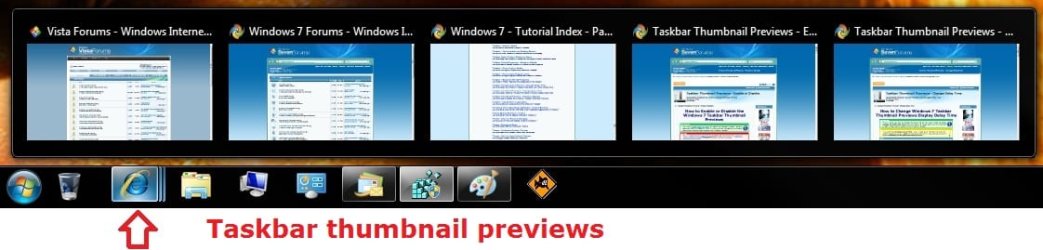
Default.jpg
EXAMPLE: Taskbar List Mode
List-mode.jpg


OPTION ONE

Change Taskbar Thumbnail and List Mode Threshold using REG File


1. To Always Have Taskbar List Mode
NOTE: This sets the NumThumbnails value to 0 in OPTION TWO below.
A) Click on the download button below to download the file below.
Taskbar_Always_List_Mode.reg

Download


B) Go to step 3.
2. To Have Taskbar Thumbnail Previews Mode
NOTE: This deletes the NumThumbnails value in OPTION TWO below. This is the default setting.
A) Click on the download button below to download the file below.
Taskbar_Thumbnail_Previews_Mode.reg

Download


3. Save the .reg file to your desktop.

4. Double click/tap on the downloaded .reg file to merge it.

5. If prompted, click/tap on Run, Yes (UAC), Yes, and OK to approve the merge.

6. Log off and log on, or restart the computer to apply the changes.

7. When done, you can delete the downloaded .reg file if you like.


OPTION TWO

Change Taskbar Thumbnail and List Mode Threshold in Registry Editor


1. Press the Windows + R keys to open the Run dialog, type regedit, and click/tap on OK.

2. In regedit, navigate to the location below. (see screenshot below step 3A)
HKEY_CURRENT_USER\Software\Microsoft\Windows\CurrentVersion\Explorer\Taskband
3. To Change Thumbnail Previews Threshold Before Switching to List Mode
A) In the right pane, right click on a empty space and click on New and DWORD (32-bit) Value. (see screenshot below)
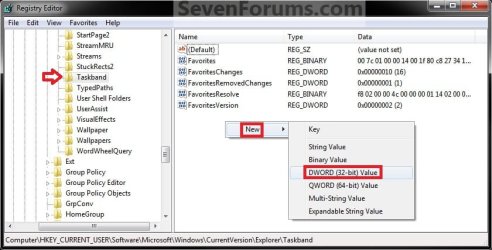
Step1.jpg
B) Type NumThumbnails and press enter. (see screenshot below)
Step2.jpg
C) In the right pane, double click on NumThumbnails. (see screenshot above)
D) Type in how many thumbail previews you want to have display so that it will switch to list mode after this number, then click on OK. (see screenshot below)
NOTE: Typing in 0 will result in always being in list mode.
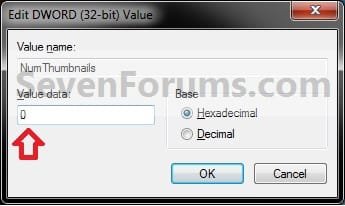
Step3.jpg
E) Go to step 5.
4. To Restore Taskbar Thumbnail Previews Mode
NOTE: This is the default setting.
A) In the right pane, right click on NumThumbnails and click on Delete. (see screenshot below step 3B)

B) Click on Yes to confirm. (see screenshot below)
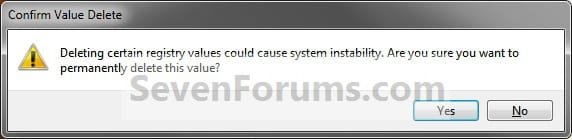
Delete.jpg
5. Close regedit.

6. Log off and log on, or restart the computer to apply the changes.
That's it,
Shawn


Attachments

Last edited:
In that case, double check to see if you may have disabled taskbar thumbnail previews using option 1 or 3 in the tutorial. Either could cause this.

http://www.sevenforums.com/tutorials/52265-taskbar-thumbnail-previews-enable-disable.html
Ha. That's a different tutorial than the one I was using that had me changing the registry. This tutorial got the job done by suggesting that I change to an Aero format instead of the high contrast one I was using.

I actually like the aero theme better and would likely have changed to it at some point and then the thumbnails would have come back and I probably would not have made the connection and been mystified as to why they came back out of nowhere. :o

Thank you. This is very helpful to me.

Paul
 

My Computer

Computer type
PC/Desktop
Computer Manufacturer/Model Number
self built
OS
Windows 7 Pro 64 bit version 6.1 (Service Pack 1)
CPU
Intel i7
Motherboard
Asus Z97 with Intel chipset
Memory
16 GB
Graphics Card(s)
i7 on-chip graphics driver
Hard Drives
Samsung EVO 256Gig boot drive, Seagate 2TB hybrid data drive
Antivirus
Norton
Browser
several, ususally FireFox
You're most welcome Paul. :)
 

My Computer

Computer type
PC/Desktop
Computer Manufacturer/Model Number
Self built custom
OS
64-bit Windows 11 Pro for Workstations
CPU
Intel i7-8700K OC'd to 5 GHz
Motherboard
ASUS ROG Maximus XI Formula Z390
Memory
64 GB (4x16GB) G.SKILL TridentZ RGB DDR4 3600 MHz
Graphics Card(s)
ASUS ROG-STRIX-GTX1080TI-O11G-GAMING
Sound Card
Integrated
Monitor(s) Displays
2 x Samsung Odyssey G7 27"
Screen Resolution
2560x1440
Hard Drives
1TB Samsung 990 PRO M.2,
4TB Samsung 990 PRO PRO M.2,
TerraMaster F8 SSD Plus NAS
PSU
Seasonic Prime Titanium 850W
Case
Thermaltake Core P3
Cooling
Corsair Hydro H115i
Keyboard
Logitech wireless K800
Mouse
Logitech MX Master 4
Internet Speed
2 Gb/s Download and 100 Mb/s Upload
Antivirus
Malwarebyte Anti-Malware Premium
Browser
Google Chrome
Other Info
Logitech Z625 speaker system,
Logitech BRIO 4K Pro webcam,
HP Color LaserJet Pro MFP M477fdn,
APC SMART-UPS RT 1000 XL - SURT1000XLI,
Galaxy S23 Plus phone
We need a big THANK YOU button for stuff like this.
I found this tutorial when I moused over the Explorer folder icon on my taskbar; and, instead of all of my open folders displaying as thumbnails lined up across the top of my taskbar, I got a fly-up list.
Until I researched the situation, I had no idea what had happened; but, I did find that I preferred the list arrangement for those times when I had more than a few folders open.
Following your instructions, I set mine to display a maximum of three as thumbnails and any more than that as a list.
Thanks for this tutorial !
 

My Computer

Computer type
PC/Desktop
Computer Manufacturer/Model Number
Dell Optiplex 780m "mini-tower"
OS
Windows 7 Pro x64
CPU
Intel Core Two Duo E8600 3.33 ghz
Motherboard
Whatever DELL put in it
Memory
8GB
Graphics Card(s)
Gigabyte Radeon R7 240
Monitor(s) Displays
HP 2159m
PSU
750 Watt Corsair CX750
Keyboard
Logitech Wireless
Mouse
Logitech Wireless
Browser
Chrome, Firefox, IE
We need a big THANK YOU button for stuff like this.
I found this tutorial when I moused over the Explorer folder icon on my taskbar; and, instead of all of my open folders displaying as thumbnails lined up across the top of my taskbar, I got a fly-up list.
Until I researched the situation, I had no idea what had happened; but, I did find that I preferred the list arrangement for those times when I had more than a few folders open.
Following your instructions, I set mine to display a maximum of three as thumbnails and any more than that as a list.
Thanks for this tutorial !

:thumbsup:
 

My Computer

Computer type
PC/Desktop
Computer Manufacturer/Model Number
Self built custom
OS
64-bit Windows 11 Pro for Workstations
CPU
Intel i7-8700K OC'd to 5 GHz
Motherboard
ASUS ROG Maximus XI Formula Z390
Memory
64 GB (4x16GB) G.SKILL TridentZ RGB DDR4 3600 MHz
Graphics Card(s)
ASUS ROG-STRIX-GTX1080TI-O11G-GAMING
Sound Card
Integrated
Monitor(s) Displays
2 x Samsung Odyssey G7 27"
Screen Resolution
2560x1440
Hard Drives
1TB Samsung 990 PRO M.2,
4TB Samsung 990 PRO PRO M.2,
TerraMaster F8 SSD Plus NAS
PSU
Seasonic Prime Titanium 850W
Case
Thermaltake Core P3
Cooling
Corsair Hydro H115i
Keyboard
Logitech wireless K800
Mouse
Logitech MX Master 4
Internet Speed
2 Gb/s Download and 100 Mb/s Upload
Antivirus
Malwarebyte Anti-Malware Premium
Browser
Google Chrome
Other Info
Logitech Z625 speaker system,
Logitech BRIO 4K Pro webcam,
HP Color LaserJet Pro MFP M477fdn,
APC SMART-UPS RT 1000 XL - SURT1000XLI,
Galaxy S23 Plus phone
hklm?

Can this registry value be set for the local machine, not just current user?

Using win 10 in this case. (On win 7 I have Aero disabled to begin with.)

Thanks.

--peter
 

My Computer

Computer type
Laptop
Computer Manufacturer/Model Number
Lenovo T61p
OS
win 7 pro x64
CPU
T7700 Intel
Memory
4GB

My Computer

Computer type
PC/Desktop
Computer Manufacturer/Model Number
Self built custom
OS
64-bit Windows 11 Pro for Workstations
CPU
Intel i7-8700K OC'd to 5 GHz
Motherboard
ASUS ROG Maximus XI Formula Z390
Memory
64 GB (4x16GB) G.SKILL TridentZ RGB DDR4 3600 MHz
Graphics Card(s)
ASUS ROG-STRIX-GTX1080TI-O11G-GAMING
Sound Card
Integrated
Monitor(s) Displays
2 x Samsung Odyssey G7 27"
Screen Resolution
2560x1440
Hard Drives
1TB Samsung 990 PRO M.2,
4TB Samsung 990 PRO PRO M.2,
TerraMaster F8 SSD Plus NAS
PSU
Seasonic Prime Titanium 850W
Case
Thermaltake Core P3
Cooling
Corsair Hydro H115i
Keyboard
Logitech wireless K800
Mouse
Logitech MX Master 4
Internet Speed
2 Gb/s Download and 100 Mb/s Upload
Antivirus
Malwarebyte Anti-Malware Premium
Browser
Google Chrome
Other Info
Logitech Z625 speaker system,
Logitech BRIO 4K Pro webcam,
HP Color LaserJet Pro MFP M477fdn,
APC SMART-UPS RT 1000 XL - SURT1000XLI,
Galaxy S23 Plus phone
Thanks! I already implemented it based on the win 7 tutorial, and it worked perfectly. Recommended by the 7+TaskbarTweaker guy. Since I set it to zero, the defaults don't matter to me. I prefer to do away with all the eye candy that MS thinks will make me happy. It doesn't.
 

My Computer

Computer type
Laptop
Computer Manufacturer/Model Number
Lenovo T61p
OS
win 7 pro x64
CPU
T7700 Intel
Memory
4GB
Thanks! I already implemented it based on the win 7 tutorial, and it worked perfectly. Recommended by the 7+TaskbarTweaker guy. Since I set it to zero, the defaults don't matter to me. I prefer to do away with all the eye candy that MS thinks will make me happy. It doesn't.

:thumbsup:
 

My Computer

Computer type
PC/Desktop
Computer Manufacturer/Model Number
Self built custom
OS
64-bit Windows 11 Pro for Workstations
CPU
Intel i7-8700K OC'd to 5 GHz
Motherboard
ASUS ROG Maximus XI Formula Z390
Memory
64 GB (4x16GB) G.SKILL TridentZ RGB DDR4 3600 MHz
Graphics Card(s)
ASUS ROG-STRIX-GTX1080TI-O11G-GAMING
Sound Card
Integrated
Monitor(s) Displays
2 x Samsung Odyssey G7 27"
Screen Resolution
2560x1440
Hard Drives
1TB Samsung 990 PRO M.2,
4TB Samsung 990 PRO PRO M.2,
TerraMaster F8 SSD Plus NAS
PSU
Seasonic Prime Titanium 850W
Case
Thermaltake Core P3
Cooling
Corsair Hydro H115i
Keyboard
Logitech wireless K800
Mouse
Logitech MX Master 4
Internet Speed
2 Gb/s Download and 100 Mb/s Upload
Antivirus
Malwarebyte Anti-Malware Premium
Browser
Google Chrome
Other Info
Logitech Z625 speaker system,
Logitech BRIO 4K Pro webcam,
HP Color LaserJet Pro MFP M477fdn,
APC SMART-UPS RT 1000 XL - SURT1000XLI,
Galaxy S23 Plus phone
Back
Top