
Taskbar problem - Windows listed upside down

kali4nietis

New member
Local time
6:42 AM
Messages
1
I often have numerous windows of the same application open at the same time. If I open 12 or more windows (e.g., 12 Word docs or 12 Excel books), the taskbar combines them and lists them vertically in order. If everything worked as it should, the oldest window (e.g., Book1.xlsx) would appear at the bottom (closest to my taskbar, which is at the bottom of my screen), and the newest (e.g., Book12.xlsx) would be listed at the top of the list. In my case, this is not happening. My vertical list features Book1.xlsx at the top of the list, and each new window appears at the bottom. The same is true with all programs. I find this extremely frustrating, and I haven't found a solution anywhere. The problem has existed since I bought this computer two months ago. Any help would be appreciated. A screen shot is attached.
 

Attachments
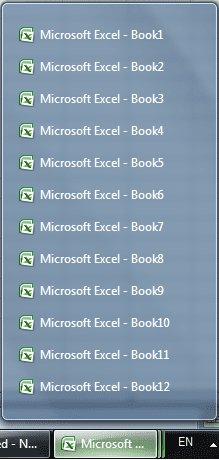
  • taskbar.png
    taskbar.png
    17 KB · Views: 12

My Computer

OS
Windows 7 Home Premium 64-bit
Please. Anyone know how to reverse this combine order?

This is the only post online I can find on this specific subject -- and it's unanswered...
 

My Computer

OS
Win7 64
Try this: Right Click an empty spot on taskbar > Click Properties > Task Bar buttons - Never Combine > Click Apply.

Switch it back so it says "Always Combine, then Hide" (Assuming you really want them to combine, I never do)

If it didn't help you try this program:

Change the order of windows on your taskbar

Launch MaxMonkey. The MaxMonkey icon will appear in your system tray. Right click on the icon and select "Organize Taskbar Windows..." from the pop-up menu.

This will open the "Organize Taskbar Windows" window. This window contains a list of windows that appear on your taskbar.

To change the order of windows on your taskbar, make a selection and then use the "Move Up" and "Move Down" buttons.

Entries that appear at the top of this list will be nearest your taskbar "Start" button. Entries at the end of this list will appear at the end of your taskbar.

When you have arranged the taskbar windows in the order that you require, click on the "Apply" button to apply the changes.

MaxMonkey - Automatically Restore And Close Windows
 

My Computer

Computer type
PC/Desktop
Computer Manufacturer/Model Number
Custom
OS
Dual Boot: Windows 8.1 & Server 2012r2 VMs: Kali Linux, Backbox, Matriux, Windows 8.1
CPU
A10 7700 Kavari SteamRoller
Motherboard
ASUS A88XM-PLUS (FM2+ )
Memory
8GB DDR3 SDRAM PC3-8500
Graphics Card(s)
1024MB ATI AMD Radeon R7 Graphics
Sound Card
Realtek High Definition Audio
Monitor(s) Displays
Samsung
Hard Drives
SSD Crucial 120gb
WD VelociRaptor 1tb
PSU
Rosewill Gaming 650w
Case
Rosewill Galaxy 2
Internet Speed
55/12
Antivirus
Malwarebytes, MSE, SAS
Browser
FireFox, Chrome
mhansen1,

Thanks for trying, but MaxMonkey does the same thing as "Taskbar Tweaker" -- but just not as well... Taskbar Tweaker allows you to manually change the combine order of combined groups of windows in the taskbar, but whenever you restart those programs (e.g., like firefox windows) Windows 7 reverts to default (upside down) order again. Thus, Taskbar Tweaker is nearly useless.

My goal is to reverse the order of them to oldest on bottom, newest on top. Just like Windows XP does the job.

The original poster included a screenshot that says it all. Windows 7 just reverses the order for no good reason.
 

My Computer

OS
Win7 64
I don't know of any other program that would do what you want. There may be a way to edit it in the registry but I honestly have no idea if you can or not.
 

My Computer

Computer type
PC/Desktop
Computer Manufacturer/Model Number
Custom
OS
Dual Boot: Windows 8.1 & Server 2012r2 VMs: Kali Linux, Backbox, Matriux, Windows 8.1
CPU
A10 7700 Kavari SteamRoller
Motherboard
ASUS A88XM-PLUS (FM2+ )
Memory
8GB DDR3 SDRAM PC3-8500
Graphics Card(s)
1024MB ATI AMD Radeon R7 Graphics
Sound Card
Realtek High Definition Audio
Monitor(s) Displays
Samsung
Hard Drives
SSD Crucial 120gb
WD VelociRaptor 1tb
PSU
Rosewill Gaming 650w
Case
Rosewill Galaxy 2
Internet Speed
55/12
Antivirus
Malwarebytes, MSE, SAS
Browser
FireFox, Chrome
I too am having this issue. Anyone found a solution yet?
 

My Computer

Computer type
PC/Desktop
OS
Windows 7

My Computer

Computer type
PC/Desktop
Computer Manufacturer/Model Number
Self built custom
OS
64-bit Windows 11 Pro for Workstations
CPU
Intel i7-8700K OC'd to 5 GHz
Motherboard
ASUS ROG Maximus XI Formula Z390
Memory
64 GB (4x16GB) G.SKILL TridentZ RGB DDR4 3600 MHz
Graphics Card(s)
ASUS ROG-STRIX-GTX1080TI-O11G-GAMING
Sound Card
Integrated
Monitor(s) Displays
2 x Samsung Odyssey G7 27"
Screen Resolution
2560x1440
Hard Drives
1TB Samsung 990 PRO M.2,
4TB Samsung 990 PRO PRO M.2,
TerraMaster F8 SSD Plus NAS
PSU
Seasonic Prime Titanium 850W
Case
Thermaltake Core P3
Cooling
Corsair Hydro H115i
Keyboard
Logitech wireless K800
Mouse
Logitech MX Master 4
Internet Speed
2 Gb/s Download and 100 Mb/s Upload
Antivirus
Malwarebyte Anti-Malware Premium
Browser
Google Chrome
Other Info
Logitech Z625 speaker system,
Logitech BRIO 4K Pro webcam,
HP Color LaserJet Pro MFP M477fdn,
APC SMART-UPS RT 1000 XL - SURT1000XLI,
Galaxy S23 Plus phone
Thanks Shawn, however the issue is not that the thumbnail previews change to list mode (I like that and actually changed the number to zero so it is always in list mode, I find the thumbnails annoying).

The issue is that the list appears in the opposite order of how they appear using Windows XP, with the most recently opened file at the bottom of the list. I'd like to reverse this so the most recently opened file is at the top.
 

My Computer

Computer type
PC/Desktop
OS
Windows 7
By default, the items will be listed in order from first opened at left/top to last opened at right/bottom.

I'm not aware of any way to change the order. :(
 

My Computer

Computer type
PC/Desktop
Computer Manufacturer/Model Number
Self built custom
OS
64-bit Windows 11 Pro for Workstations
CPU
Intel i7-8700K OC'd to 5 GHz
Motherboard
ASUS ROG Maximus XI Formula Z390
Memory
64 GB (4x16GB) G.SKILL TridentZ RGB DDR4 3600 MHz
Graphics Card(s)
ASUS ROG-STRIX-GTX1080TI-O11G-GAMING
Sound Card
Integrated
Monitor(s) Displays
2 x Samsung Odyssey G7 27"
Screen Resolution
2560x1440
Hard Drives
1TB Samsung 990 PRO M.2,
4TB Samsung 990 PRO PRO M.2,
TerraMaster F8 SSD Plus NAS
PSU
Seasonic Prime Titanium 850W
Case
Thermaltake Core P3
Cooling
Corsair Hydro H115i
Keyboard
Logitech wireless K800
Mouse
Logitech MX Master 4
Internet Speed
2 Gb/s Download and 100 Mb/s Upload
Antivirus
Malwarebyte Anti-Malware Premium
Browser
Google Chrome
Other Info
Logitech Z625 speaker system,
Logitech BRIO 4K Pro webcam,
HP Color LaserJet Pro MFP M477fdn,
APC SMART-UPS RT 1000 XL - SURT1000XLI,
Galaxy S23 Plus phone
Back
Top