
Taskbar Thumbnail Live Previews - Enable or Disable in Windows 7

How to Enable or Disable Taskbar Thumbnail Live Previews in Windows 7

   Information
This will show you how to enable or disable having taskbar thumbnail live previews display a Aero Peek of the open window on the desktop when you hover the pointer over a taskbar thumbnail preview of a icon with a open window in Windows 7.

This tutorial also enables and disables Aero Peek.

   Note
Taskbar thumbnail previews will only work if you are using a Aero Theme. This feature is not available in the Windows 7 Starter edition.


EXAMPLE: Taskbar Thumbnail Live Preview
NOTE: This is an example of a taskbar thumbnail live preview (Aero Peek) of Task Manager on my desktop when I hover my pointer on the thumbnail preview of the Task Manager icon on the taskbar.
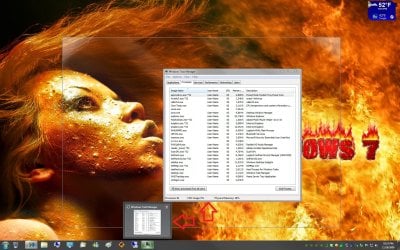
Taskbar_Live_Thumbnail_Preview.jpg


Here's How:
1. Open the Visual Effects settings.

2. To Enable "Taskbar Thumbnail Live Previews"
A) Check the Enable Aero Peek box. (see screenshot below)

B) Go to step 4.
3. To Disable "Taskbar Thumbnail Live Previews"
A) Uncheck the Enable Aero Peek box. (see screenshot below)
4. Click on OK. (see screenshot below)


Visual_Effects.jpg
That's it,
Shawn


Nice tutorial :p :) :geek:
 

My Computer My Computer

Computer type
PC/Desktop
Computer Manufacturer/Model Number
Self assembled
OS
Windows 10 Home 64Bit
CPU
Intel Core i5 10400 @ 2.90GHz
Motherboard
Intel Corporation DG41WV (PROCESSOR)
Memory
8.00GB Single-Channel Unknown @ 1329MHz (16-20-20-38)
Sound Card
Realtek High Definition Audio
Monitor(s) Displays
DELL E170S
Screen Resolution
1280x1024 pixels
Hard Drives
931GB TOSHIBA DT01ACA100 (SATA)
238GB TEAM TM8PS7256G (SATA SSD)
Case
Nothing Fancy
Cooling
Fans
Keyboard
A4 Tech Co LTD
Mouse
A4 Tech Co Ltd/Logitech
Internet Speed
25 Mbps
Thank you sir. :D
 

My Computer My Computer

Computer type
PC/Desktop
Computer Manufacturer/Model Number
Self built custom
OS
64-bit Windows 11 Pro for Workstations
CPU
Intel i7-8700K OC'd to 5 GHz
Motherboard
ASUS ROG Maximus XI Formula Z390
Memory
64 GB (4x16GB) G.SKILL TridentZ RGB DDR4 3600 MHz
Graphics Card(s)
ASUS ROG-STRIX-GTX1080TI-O11G-GAMING
Sound Card
Integrated
Monitor(s) Displays
2 x Samsung Odyssey G7 27"
Screen Resolution
2560x1440
Hard Drives
1TB Samsung 990 PRO M.2,
4TB Samsung 990 PRO PRO M.2,
TerraMaster F8 SSD Plus NAS
PSU
Seasonic Prime Titanium 850W
Case
Thermaltake Core P3
Cooling
Corsair Hydro H115i
Keyboard
Logitech wireless K800
Mouse
Logitech MX Master 4
Internet Speed
2 Gb/s Download and 100 Mb/s Upload
Antivirus
Malwarebyte Anti-Malware Premium
Browser
Google Chrome
Other Info
Logitech Z625 speaker system,
Logitech BRIO 4K Pro webcam,
HP Color LaserJet Pro MFP M477fdn,
APC SMART-UPS RT 1000 XL - SURT1000XLI,
Galaxy S23 Plus phone
Doesn't Work on Windows 10

Hey I tried this but to no avail as i am on Windows 10 Pro and I do have "Enable Peek" Checked but It doesn't seem to work I was wondering if you knew a fix and if so can you please let me know it A.S.A.P

Thanks,
:)

And i just realized how old this Thread is ahah so guys if you do see this please let me know if you have come across this and if so if you know the fix for it :))
 

My Computer My Computer

Computer type
PC/Desktop
OS
Windows 10 Pro 64bit
CPU
Intel 17 4790k
Motherboard
ASRock
Memory
16gb
Graphics Card(s)
Nvidia Geforce GTX 1060 6gb
Monitor(s) Displays
AOC 24'
Screen Resolution
1920 X 1080
Hard Drives
2tb Seagate
Keyboard
Razer Blackwidow Chroma
Mouse
Razer Deathadder Chroma
Browser
Chrome

My Computer My Computer

Computer type
PC/Desktop
Computer Manufacturer/Model Number
Self built custom
OS
64-bit Windows 11 Pro for Workstations
CPU
Intel i7-8700K OC'd to 5 GHz
Motherboard
ASUS ROG Maximus XI Formula Z390
Memory
64 GB (4x16GB) G.SKILL TridentZ RGB DDR4 3600 MHz
Graphics Card(s)
ASUS ROG-STRIX-GTX1080TI-O11G-GAMING
Sound Card
Integrated
Monitor(s) Displays
2 x Samsung Odyssey G7 27"
Screen Resolution
2560x1440
Hard Drives
1TB Samsung 990 PRO M.2,
4TB Samsung 990 PRO PRO M.2,
TerraMaster F8 SSD Plus NAS
PSU
Seasonic Prime Titanium 850W
Case
Thermaltake Core P3
Cooling
Corsair Hydro H115i
Keyboard
Logitech wireless K800
Mouse
Logitech MX Master 4
Internet Speed
2 Gb/s Download and 100 Mb/s Upload
Antivirus
Malwarebyte Anti-Malware Premium
Browser
Google Chrome
Other Info
Logitech Z625 speaker system,
Logitech BRIO 4K Pro webcam,
HP Color LaserJet Pro MFP M477fdn,
APC SMART-UPS RT 1000 XL - SURT1000XLI,
Galaxy S23 Plus phone
Hi Brink Thank you for the fast reply :)

I believe you might of misunderstood my intention the "Thumbnail" works as i desire it to but my peek is not working and i would like it to i have tried the attached method and i have even deleted the Key in the registry the "Peek" that is mentioned in the above tutorial is what i am trying to achieve as i have not been able to use it :) if you would like i am more than happy to attach some screenshots to clarify??
 

My Computer My Computer

Computer type
PC/Desktop
OS
Windows 10 Pro 64bit
CPU
Intel 17 4790k
Motherboard
ASRock
Memory
16gb
Graphics Card(s)
Nvidia Geforce GTX 1060 6gb
Monitor(s) Displays
AOC 24'
Screen Resolution
1920 X 1080
Hard Drives
2tb Seagate
Keyboard
Razer Blackwidow Chroma
Mouse
Razer Deathadder Chroma
Browser
Chrome

My Computer My Computer

Computer type
PC/Desktop
Computer Manufacturer/Model Number
Self built custom
OS
64-bit Windows 11 Pro for Workstations
CPU
Intel i7-8700K OC'd to 5 GHz
Motherboard
ASUS ROG Maximus XI Formula Z390
Memory
64 GB (4x16GB) G.SKILL TridentZ RGB DDR4 3600 MHz
Graphics Card(s)
ASUS ROG-STRIX-GTX1080TI-O11G-GAMING
Sound Card
Integrated
Monitor(s) Displays
2 x Samsung Odyssey G7 27"
Screen Resolution
2560x1440
Hard Drives
1TB Samsung 990 PRO M.2,
4TB Samsung 990 PRO PRO M.2,
TerraMaster F8 SSD Plus NAS
PSU
Seasonic Prime Titanium 850W
Case
Thermaltake Core P3
Cooling
Corsair Hydro H115i
Keyboard
Logitech wireless K800
Mouse
Logitech MX Master 4
Internet Speed
2 Gb/s Download and 100 Mb/s Upload
Antivirus
Malwarebyte Anti-Malware Premium
Browser
Google Chrome
Other Info
Logitech Z625 speaker system,
Logitech BRIO 4K Pro webcam,
HP Color LaserJet Pro MFP M477fdn,
APC SMART-UPS RT 1000 XL - SURT1000XLI,
Galaxy S23 Plus phone
Hi Brink i found out that it was a user based problem so i just decided to create a new user as the link u attached did not work out for me I would like to Thank you for taking the time and effort to help me :)
 

My Computer My Computer

Computer type
PC/Desktop
OS
Windows 10 Pro 64bit
CPU
Intel 17 4790k
Motherboard
ASRock
Memory
16gb
Graphics Card(s)
Nvidia Geforce GTX 1060 6gb
Monitor(s) Displays
AOC 24'
Screen Resolution
1920 X 1080
Hard Drives
2tb Seagate
Keyboard
Razer Blackwidow Chroma
Mouse
Razer Deathadder Chroma
Browser
Chrome
I'm happy to hear that you got it sorted. :)
 

My Computer My Computer

Computer type
PC/Desktop
Computer Manufacturer/Model Number
Self built custom
OS
64-bit Windows 11 Pro for Workstations
CPU
Intel i7-8700K OC'd to 5 GHz
Motherboard
ASUS ROG Maximus XI Formula Z390
Memory
64 GB (4x16GB) G.SKILL TridentZ RGB DDR4 3600 MHz
Graphics Card(s)
ASUS ROG-STRIX-GTX1080TI-O11G-GAMING
Sound Card
Integrated
Monitor(s) Displays
2 x Samsung Odyssey G7 27"
Screen Resolution
2560x1440
Hard Drives
1TB Samsung 990 PRO M.2,
4TB Samsung 990 PRO PRO M.2,
TerraMaster F8 SSD Plus NAS
PSU
Seasonic Prime Titanium 850W
Case
Thermaltake Core P3
Cooling
Corsair Hydro H115i
Keyboard
Logitech wireless K800
Mouse
Logitech MX Master 4
Internet Speed
2 Gb/s Download and 100 Mb/s Upload
Antivirus
Malwarebyte Anti-Malware Premium
Browser
Google Chrome
Other Info
Logitech Z625 speaker system,
Logitech BRIO 4K Pro webcam,
HP Color LaserJet Pro MFP M477fdn,
APC SMART-UPS RT 1000 XL - SURT1000XLI,
Galaxy S23 Plus phone
Its Happened AGAIN

ok so it has happened again and i think ive found the culprit as i it has only started after i bought Dishonored 2 idk if im the only person with this problem but i logged off last night and everything was fine until i log back onto this morning to find the my NumThumbnail Registry Key has been changed to one which essentially disables the thumbnails and when i change it back it makes it do the previous problem
 

My Computer My Computer

Computer type
PC/Desktop
OS
Windows 10 Pro 64bit
CPU
Intel 17 4790k
Motherboard
ASRock
Memory
16gb
Graphics Card(s)
Nvidia Geforce GTX 1060 6gb
Monitor(s) Displays
AOC 24'
Screen Resolution
1920 X 1080
Hard Drives
2tb Seagate
Keyboard
Razer Blackwidow Chroma
Mouse
Razer Deathadder Chroma
Browser
Chrome
As a side note im currently viewing my system restore point from yesterday and i have discovered that a holy hell alot of drivers are delted and will be reinstalled any reason as to why this may be??
 

My Computer My Computer

Computer type
PC/Desktop
OS
Windows 10 Pro 64bit
CPU
Intel 17 4790k
Motherboard
ASRock
Memory
16gb
Graphics Card(s)
Nvidia Geforce GTX 1060 6gb
Monitor(s) Displays
AOC 24'
Screen Resolution
1920 X 1080
Hard Drives
2tb Seagate
Keyboard
Razer Blackwidow Chroma
Mouse
Razer Deathadder Chroma
Browser
Chrome
Not sure unless you or something installed the drivers after the restore point was created.
 

My Computer My Computer

Computer type
PC/Desktop
Computer Manufacturer/Model Number
Self built custom
OS
64-bit Windows 11 Pro for Workstations
CPU
Intel i7-8700K OC'd to 5 GHz
Motherboard
ASUS ROG Maximus XI Formula Z390
Memory
64 GB (4x16GB) G.SKILL TridentZ RGB DDR4 3600 MHz
Graphics Card(s)
ASUS ROG-STRIX-GTX1080TI-O11G-GAMING
Sound Card
Integrated
Monitor(s) Displays
2 x Samsung Odyssey G7 27"
Screen Resolution
2560x1440
Hard Drives
1TB Samsung 990 PRO M.2,
4TB Samsung 990 PRO PRO M.2,
TerraMaster F8 SSD Plus NAS
PSU
Seasonic Prime Titanium 850W
Case
Thermaltake Core P3
Cooling
Corsair Hydro H115i
Keyboard
Logitech wireless K800
Mouse
Logitech MX Master 4
Internet Speed
2 Gb/s Download and 100 Mb/s Upload
Antivirus
Malwarebyte Anti-Malware Premium
Browser
Google Chrome
Other Info
Logitech Z625 speaker system,
Logitech BRIO 4K Pro webcam,
HP Color LaserJet Pro MFP M477fdn,
APC SMART-UPS RT 1000 XL - SURT1000XLI,
Galaxy S23 Plus phone
PLEASE HELP
I tried to uncheck "enable aero peek" and It worked for one day only (maybe less)
Why is the setting is not keeping up?
 

My Computer My Computer

Computer type
PC/Desktop
OS
Windows 7 Ultimate x64
Hello zpoison, :)

If you haven't already, check to see if the blue note box at the top of the tutorial may apply.
 

My Computer My Computer

Computer type
PC/Desktop
Computer Manufacturer/Model Number
Self built custom
OS
64-bit Windows 11 Pro for Workstations
CPU
Intel i7-8700K OC'd to 5 GHz
Motherboard
ASUS ROG Maximus XI Formula Z390
Memory
64 GB (4x16GB) G.SKILL TridentZ RGB DDR4 3600 MHz
Graphics Card(s)
ASUS ROG-STRIX-GTX1080TI-O11G-GAMING
Sound Card
Integrated
Monitor(s) Displays
2 x Samsung Odyssey G7 27"
Screen Resolution
2560x1440
Hard Drives
1TB Samsung 990 PRO M.2,
4TB Samsung 990 PRO PRO M.2,
TerraMaster F8 SSD Plus NAS
PSU
Seasonic Prime Titanium 850W
Case
Thermaltake Core P3
Cooling
Corsair Hydro H115i
Keyboard
Logitech wireless K800
Mouse
Logitech MX Master 4
Internet Speed
2 Gb/s Download and 100 Mb/s Upload
Antivirus
Malwarebyte Anti-Malware Premium
Browser
Google Chrome
Other Info
Logitech Z625 speaker system,
Logitech BRIO 4K Pro webcam,
HP Color LaserJet Pro MFP M477fdn,
APC SMART-UPS RT 1000 XL - SURT1000XLI,
Galaxy S23 Plus phone
Hi Brink, thanks for the tip
I have windows 7 X64 , I guess I am elegible to use this function since I have aero theme and all that.

I have unchecked the "aero peek" and It works, but after a couple of hour it return back to normal

I tried with : run ->gpedit.msc turn off taskbar preview
It seems to work until now
 

My Computer My Computer

Computer type
PC/Desktop
OS
Windows 7 Ultimate x64

My Computer My Computer

Computer type
PC/Desktop
Computer Manufacturer/Model Number
Self built custom
OS
64-bit Windows 11 Pro for Workstations
CPU
Intel i7-8700K OC'd to 5 GHz
Motherboard
ASUS ROG Maximus XI Formula Z390
Memory
64 GB (4x16GB) G.SKILL TridentZ RGB DDR4 3600 MHz
Graphics Card(s)
ASUS ROG-STRIX-GTX1080TI-O11G-GAMING
Sound Card
Integrated
Monitor(s) Displays
2 x Samsung Odyssey G7 27"
Screen Resolution
2560x1440
Hard Drives
1TB Samsung 990 PRO M.2,
4TB Samsung 990 PRO PRO M.2,
TerraMaster F8 SSD Plus NAS
PSU
Seasonic Prime Titanium 850W
Case
Thermaltake Core P3
Cooling
Corsair Hydro H115i
Keyboard
Logitech wireless K800
Mouse
Logitech MX Master 4
Internet Speed
2 Gb/s Download and 100 Mb/s Upload
Antivirus
Malwarebyte Anti-Malware Premium
Browser
Google Chrome
Other Info
Logitech Z625 speaker system,
Logitech BRIO 4K Pro webcam,
HP Color LaserJet Pro MFP M477fdn,
APC SMART-UPS RT 1000 XL - SURT1000XLI,
Galaxy S23 Plus phone
Back
Top