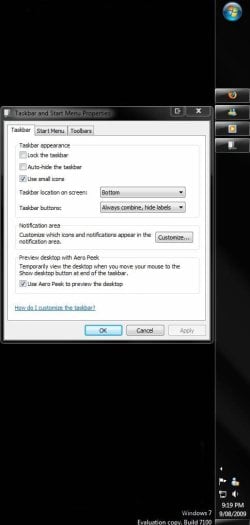
Taskbar - Use Small or Large Icons

How to Use Small or Large Icons on the Windows 7 Taskbar


   Information
This will show you how to set the Windows 7 taskbar to display with either small or large icons.
   Tip
Microsoft has made available a hotfix that will resolve a problem where the taskbar customizations are lost and reset to defaults when automatic logon is enabled in Windows 7 and Windows Server 2008 R2. More details are available at FIX: The Taskbar is reset to the default settings when you use the "Automatically Log On" feature in Windows 7 and in Windows Server 2008 R2.

EXAMPLE: Taskbar with Large Icons
NOTE: This is the default setting.
1135d1228023873-taskbar-use-small-large-icons-large_icons.jpg

EXAMPLE: Taskbar with Small Icons
1136d1228023873-taskbar-use-small-large-icons-small_icons.jpg


OPTION ONE

Through Taskbar Properties


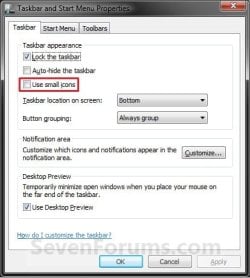
1. Right click on a empty space on the taskbar and click on Properties.

2. To Use Small Icons on the Taskbar
A) Check the Use small icons box. (see screenshot below step 3A)

B) Go to step 4.
3. To Use Large Icons on the Taskbar
A) Uncheck the Use small icons box. (see screenshot below)
NOTE: This is the default setting.
Properties.jpg
4. Click on OK. (See screenshot above)


OPTION TWO

Using a REG file Download


1. To Use Small Icons on the Taskbar
A) Click on the Download button below to download the file below.
Small_Icons_for_Taskbar.reg

Download


B) Go to step 3.
2. To Use Large Icons on the Taskbar
A) Click on the Download button below to download the file below.
NOTE: This is the default setting.
Large_Icons_for_Taskbar.reg

Download


3. Click on Save, and save the .reg file to the desktop.

4. Right click on the downloaded .reg file and click on Merge.

5. Click on Run, Yes, Yes, and OK when prompted.

6. Log off and log on, or restart the computer to apply.

7. When done, you can delete the downloaded .reg file if you like.


OPTION THREE

Manually in Registry Editor


1. Open the Start Menu, then type regedit in the search box and press Enter.

2. If prompted by UAC, then click on Yes.

3. In regedit, navigate to the location below. (see screenshot below)
HKEY_CURRENT_USER\Software\Microsoft\Windows\CurrentVersion\Explorer\Advanced
REG-1.jpg
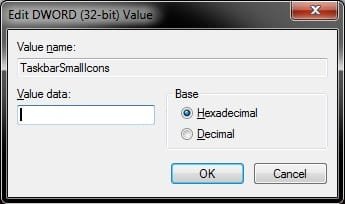
4. In the right pane of Advanced, right click on TaskbarSmallIcons and click on Modify. (see screenshot above)

5. To Use Large Icons on the Taskbar
A) Type 0 (number zero), and click on OK. (see screenshot below)
NOTE: This is the default setting.
REG-2.jpg
B) Go to step 7.
6. To Use Small Icons on the Taskbar
A) Type 1, and click on OK. (see screenshot above)
7. Close regedit.

8. Log off and log on, or restart the computer to apply.
That's it,
Shawn


Attachments

Last edited:
I dislike large icons but wish to view the date. Any way to that?
 

My Computer My Computer

Computer Manufacturer/Model Number
Toshiba Satellite A305-S6839
OS
Windows 7 Ultimate x64
I dislike large icons but wish to view the date. Any way to that?
I guess the date can be seen in both large and small icons. :confused:
What exactly do you want?
 

My Computer My Computer

Computer Manufacturer/Model Number
Samsung NP530U4B-S02IN
OS
Windows® 8 Pro (64-bit)
CPU
Intel® Core™ i5 Processor 2467M (1.60GHz, 3MB L3 Cache)
Motherboard
Samsung Electronics
Memory
6GB DDR3 System Memory at 1,333MHz (on BD 4GB + 2GB x 1)
Graphics Card(s)
AMD Radeon™ HD7550M 1GB DDR3 (Ext. Graphic)
Sound Card
Realtek High Definition Audio
Monitor(s) Displays
35.56cm (14.0) SuperBright 300nit HD LED Display
Screen Resolution
1366x768
Hard Drives
1TB S-ATA II Hard Drive (5400RPM) with ExpressCache 16GB SSD
Internet Speed
sucks
Antivirus
Microsoft Security Essentials
Browser
Google Chrome (Sync enabled)
I guess the date can be seen in both large and small icons. :confused:
What exactly do you want?


No, it can't. If you use large icons which is the big taskbar it will show the date under the clock all the time, if you use small icons which is the small taskbar, it will only show the clock. But you can mouse over the time and it will show the date.


He wants to use small taskbar but have the clock show as well as the date without mousing over the clock. I don't think you can have both. You can use a date/time gadget.
 

My Computer My Computer

Computer type
PC/Desktop
Computer Manufacturer/Model Number
Airbot 2.0
OS
Windows 7 Ultimate x64 SP1
CPU
Core i7 920 (D0) @ 4Ghz, *26c idle *65c full load on air
Motherboard
Asus P6X58D Premium - Sata 6Gb/s - USB 3.0
Memory
12GB DDR3 Corsair Dominator -CMD12GX3M6A1600C8 at 1600MHz
Graphics Card(s)
Zotac Geforce GTX 770
Sound Card
ASUS Xonar D2X
Monitor(s) Displays
1 LG 24" Flatron W2453V-PF 1 Samsung 24" P2450H both 2ms RT
Screen Resolution
1920x1080@60hz
Hard Drives
1 Samsung 250GB 840 Evo SSD
1 OCZ Vertex2 180GB SSD
1 TB Samsung Spinpoint F1 7200RPM 32MB cache
2 500GB WD Caviar Blacks 7200RPM 32MB cache (WD5001AALS)

Pioneer DVD Burner DVR-S18M
PSU
Corsair HX1000W
Case
Cooler Master HAF 932
Cooling
Case Fans *3 230mm, *1 140mm/CPU - *Tuniq Tower 120 Extreme
Keyboard
Logitech Wireless MK700
Mouse
Logitech Wireless MK700
Internet Speed
DL 15 Mbps UL 0.98 Mbps
Antivirus
None
Browser
Firefox Nightly
Other Info
Processor-7.7 *RAM- 7.9 *Graphics-7.9 *Gaming Graphics- 7.9 *SSD- 7.8 W.E.I final score= 7.7
*Phone- LG Nexus 5
No, it can't. If you use large icons which is the big taskbar it will show the date under the clock all the time, if you use small icons which is the small taskbar, it will only show the clock. But you can mouse over the time and it will show the date.


He wants to use small taskbar but have the clock show as well as the date without mousing over the clock. I don't think you can have both. You can use a date/time gadget.

I have both the time and date with small icons??

Screenshots here
Capture.JPG Capture2.JPG
 

My Computer My Computer

Computer Manufacturer/Model Number
Built
OS
Windows 7 RC build 7100x64 // 7260x32
CPU
Quad core 2.33GHz
Motherboard
Asus P5Q SE
Memory
4 gig DRR2
Graphics Card(s)
8400 GS gigabyte
Sound Card
built in with motherboard
Monitor(s) Displays
LG Flaton l1739s
Screen Resolution
1440x900 x2
Hard Drives
500 gig HDD // and a 500 gig out
PSU
500Watt
Case
ATX black case
Cooling
Cpu fan \ case fan
Keyboard
logitech
Mouse
logitech
Internet Speed
1500
Well yes, but your taskbar is still big. It's not like this, which is what he probably is using. But I guess we'll find out from him or not if he doesn't care about the size of the taskbar, and just the icons. :)

taskbar.JPG
 

My Computer My Computer

Computer type
PC/Desktop
Computer Manufacturer/Model Number
Airbot 2.0
OS
Windows 7 Ultimate x64 SP1
CPU
Core i7 920 (D0) @ 4Ghz, *26c idle *65c full load on air
Motherboard
Asus P6X58D Premium - Sata 6Gb/s - USB 3.0
Memory
12GB DDR3 Corsair Dominator -CMD12GX3M6A1600C8 at 1600MHz
Graphics Card(s)
Zotac Geforce GTX 770
Sound Card
ASUS Xonar D2X
Monitor(s) Displays
1 LG 24" Flatron W2453V-PF 1 Samsung 24" P2450H both 2ms RT
Screen Resolution
1920x1080@60hz
Hard Drives
1 Samsung 250GB 840 Evo SSD
1 OCZ Vertex2 180GB SSD
1 TB Samsung Spinpoint F1 7200RPM 32MB cache
2 500GB WD Caviar Blacks 7200RPM 32MB cache (WD5001AALS)

Pioneer DVD Burner DVR-S18M
PSU
Corsair HX1000W
Case
Cooler Master HAF 932
Cooling
Case Fans *3 230mm, *1 140mm/CPU - *Tuniq Tower 120 Extreme
Keyboard
Logitech Wireless MK700
Mouse
Logitech Wireless MK700
Internet Speed
DL 15 Mbps UL 0.98 Mbps
Antivirus
None
Browser
Firefox Nightly
Other Info
Processor-7.7 *RAM- 7.9 *Graphics-7.9 *Gaming Graphics- 7.9 *SSD- 7.8 W.E.I final score= 7.7
*Phone- LG Nexus 5
Well yes, but your taskbar is still big. It's not like this, which is what he probably is using. But I guess we'll find out from him or not if he doesn't care about the size of the taskbar, and just the icons. :)

View attachment 22203

I know its not as small as yours that is only cos the time and date pushes it up more but still using small icons

in your other post you were saying that you cant use small icons and still show both time and date.. unless im mistaken?
 

My Computer My Computer

Computer Manufacturer/Model Number
Built
OS
Windows 7 RC build 7100x64 // 7260x32
CPU
Quad core 2.33GHz
Motherboard
Asus P5Q SE
Memory
4 gig DRR2
Graphics Card(s)
8400 GS gigabyte
Sound Card
built in with motherboard
Monitor(s) Displays
LG Flaton l1739s
Screen Resolution
1440x900 x2
Hard Drives
500 gig HDD // and a 500 gig out
PSU
500Watt
Case
ATX black case
Cooling
Cpu fan \ case fan
Keyboard
logitech
Mouse
logitech
Internet Speed
1500
I took the assumption he wants to use the small taskbar and not the big one. You can't get the date and time to both show on the small taskbar, can you? Maybe I should of gave a better explanation in my original post. But like I said, we'll find out if he doesn't care his taskbar is big and just wants small icons, regardless of the size of the taskbar.
 

My Computer My Computer

Computer type
PC/Desktop
Computer Manufacturer/Model Number
Airbot 2.0
OS
Windows 7 Ultimate x64 SP1
CPU
Core i7 920 (D0) @ 4Ghz, *26c idle *65c full load on air
Motherboard
Asus P6X58D Premium - Sata 6Gb/s - USB 3.0
Memory
12GB DDR3 Corsair Dominator -CMD12GX3M6A1600C8 at 1600MHz
Graphics Card(s)
Zotac Geforce GTX 770
Sound Card
ASUS Xonar D2X
Monitor(s) Displays
1 LG 24" Flatron W2453V-PF 1 Samsung 24" P2450H both 2ms RT
Screen Resolution
1920x1080@60hz
Hard Drives
1 Samsung 250GB 840 Evo SSD
1 OCZ Vertex2 180GB SSD
1 TB Samsung Spinpoint F1 7200RPM 32MB cache
2 500GB WD Caviar Blacks 7200RPM 32MB cache (WD5001AALS)

Pioneer DVD Burner DVR-S18M
PSU
Corsair HX1000W
Case
Cooler Master HAF 932
Cooling
Case Fans *3 230mm, *1 140mm/CPU - *Tuniq Tower 120 Extreme
Keyboard
Logitech Wireless MK700
Mouse
Logitech Wireless MK700
Internet Speed
DL 15 Mbps UL 0.98 Mbps
Antivirus
None
Browser
Firefox Nightly
Other Info
Processor-7.7 *RAM- 7.9 *Graphics-7.9 *Gaming Graphics- 7.9 *SSD- 7.8 W.E.I final score= 7.7
*Phone- LG Nexus 5
I took the assumption he wants to use the small taskbar and not the big one. You can't get the date and time to both show on the small taskbar, can you? Maybe I should of gave a better explanation in my original post. But like I said, we'll find out if he doesn't care his taskbar is big and just wants small icons, regardless of the size of the taskbar.

Your right

Small task = small icons (time only)
big task = small icons (or big) with both time and date
 

My Computer My Computer

Computer Manufacturer/Model Number
Built
OS
Windows 7 RC build 7100x64 // 7260x32
CPU
Quad core 2.33GHz
Motherboard
Asus P5Q SE
Memory
4 gig DRR2
Graphics Card(s)
8400 GS gigabyte
Sound Card
built in with motherboard
Monitor(s) Displays
LG Flaton l1739s
Screen Resolution
1440x900 x2
Hard Drives
500 gig HDD // and a 500 gig out
PSU
500Watt
Case
ATX black case
Cooling
Cpu fan \ case fan
Keyboard
logitech
Mouse
logitech
Internet Speed
1500
nice 1..
I too don't like the large icons here !
 

My Computer My Computer

Computer Manufacturer/Model Number
Gigabyte
OS
Win7 Ultimate 32bit
CPU
3Ghz /2MB L2
Motherboard
Gigabyte 945 S3P
Memory
2GB
Graphics Card(s)
1GB nVidia 5800 GT
Sound Card
built in
Monitor(s) Displays
Acer 17"
Hard Drives
320 GB
160 GB
PSU
400 W
Case
Discovery
Cooling
n/a
Big bar + date

If you want the date, you can make your taskbar larger - then it will show the date, even if you have small icons.

Like attached:


I do prefer the task bar on the right hand though ever since I'm used to having a netbook.
 
Last edited:

My Computer My Computer

Computer Manufacturer/Model Number
Asus EEE PC 1000HE
OS
Windows 7
CPU
1.66 Ghz Intel Atom N280
Motherboard
Asus
Memory
1 GB (upgrading to 2GB)
Hard Drives
140 GB
ST9160310AS ATA
I'm using windows 7 ultimate 32 bit with ie9. I've tried all of the tips for increasing the icon size on the taskbar but none of them work. Do you have any other suggestions on how to make them larger?
 

My Computer My Computer

Computer Manufacturer/Model Number
HP
OS
windows 7 ultimate 32bit
Hello Paty, and welcome to Seven Forums.

Could you post a screenshot of your taskbar with the icons you want to increase the size of outlined just to help make sure these are the same icons that the tutorial are referring to?

If they are not, then we may be able to suggest something else that may work instead. :)
 

My Computer My Computer

Computer type
PC/Desktop
Computer Manufacturer/Model Number
Self built custom
OS
64-bit Windows 11 Pro for Workstations
CPU
Intel i7-8700K OC'd to 5 GHz
Motherboard
ASUS ROG Maximus XI Formula Z390
Memory
64 GB (4x16GB) G.SKILL TridentZ RGB DDR4 3600 MHz
Graphics Card(s)
ASUS ROG-STRIX-GTX1080TI-O11G-GAMING
Sound Card
Integrated
Monitor(s) Displays
2 x Samsung Odyssey G7 27"
Screen Resolution
2560x1440
Hard Drives
1TB Samsung 990 PRO M.2,
4TB Samsung 990 PRO PRO M.2,
TerraMaster F8 SSD Plus NAS
PSU
Seasonic Prime Titanium 850W
Case
Thermaltake Core P3
Cooling
Corsair Hydro H115i
Keyboard
Logitech wireless K800
Mouse
Logitech MX Master 4
Internet Speed
2 Gb/s Download and 100 Mb/s Upload
Antivirus
Malwarebyte Anti-Malware Premium
Browser
Google Chrome
Other Info
Logitech Z625 speaker system,
Logitech BRIO 4K Pro webcam,
HP Color LaserJet Pro MFP M477fdn,
APC SMART-UPS RT 1000 XL - SURT1000XLI,
Galaxy S23 Plus phone
To toggle the size of the toolbar within the user's account, you could create a batch file from this:
Code:
reg query HKCU\Software\Microsoft\Windows\CurrentVersion\Explorer\Advanced /v TaskbarSmallIcons | find "0x0"
 
If %ERRORLEVEL% == 0 goto turnon
IF %ERRORLEVEL% == 1 goto turnoff
goto end
 
:turnon
reg add "HKCU\Software\Microsoft\Windows\CurrentVersion\Explorer\Advanced" /v TaskbarSmallIcons /t REG_DWORD /d 1 /f
 
goto end
 
:turnoff
reg add "HKCU\Software\Microsoft\Windows\CurrentVersion\Explorer\Advanced" /v TaskbarSmallIcons /t REG_DWORD /d 0 /f
 
goto end
 
:end
taskkill /f /im explorer.exe
start explorer.exe

To make the size of the toolbar smaller for a user from a separate administrator account use this:
Code:
reg.exe load HKLM\TempHive "C:\Documents and Settings\User\NTUSER.DAT"
 
reg add "HKLM\TempHive\Software\Microsoft\Windows\CurrentVersion\Explorer\Advanced" /v TaskbarSmallIcons /t REG_DWORD /d 1 /f
 
reg.exe unload HKLM\TempHive
Just change "User" to whatever the name of the user (or user folder name) is. I'm not sure about the clock issue.
 

Attachments

Last edited by a moderator:

My Computer My Computer

Computer type
PC/Desktop
OS
Windows 7 32bit
Back
Top