Taskbar went Windows 1995 mode :-(

Adec

New member
Local time
4:01 PM
Messages
8
Well, i really didn't know where to put this topic, so it ended up here.

Anyway, some weeks ago i had my usual update for windows 7 and everything went good.
But, when i restartet the computer as told, the update manager never got further than "Preparing Update" - or whatever it says.

I waited to see if anything would happen, but it didn't.

I took the final solution - and killed my computer on the on/off button.

.. Then, when i startet the computer again, my aero taskbar was like a Windows 1998 taskbar. I have tried everything - Restart, Change Theme - Restart, wait for update... nothing happened.

So now i really need someones help?

P.S. I think i have uploaded af pic? But i'm new at this forum, so i really don't know.
 

Attachments

  • Udklip.PNG
    Udklip.PNG
    34.6 KB · Views: 41

My Computer

OS
Windows 7 Home Premium x64
The DWM service might not be running

Go to
Start>Run>services.msc> enable desktop window session manager
 

My Computer

Computer type
PC/Desktop
Computer Manufacturer/Model Number
Custom Build
OS
Windows 10 Pro x64, Arch Linux
CPU
Intel Core 2 Quad Q8200 OC'd 3.08GHz
Motherboard
Asus Rampage formula LGA775
Memory
8GB DDR2 900Mhz
Graphics Card(s)
MSI GT730 2GB GDDR5 (Kepler)
Sound Card
Supreme FX2
Monitor(s) Displays
Samsung LS22F350 LED
Screen Resolution
1080P
Hard Drives
Kingston SSDNow UV400 120GB, 500GB Hitachi, 2TB Samsung, 500GB Seagate FreeAgent, 640GB Samsung, 160GB Toshiba (Arch)
PSU
AeroCool 500W Bronze
Cooling
Cooler Master V6 + 3X fans
Keyboard
Prolink keyboard
Mouse
Logitech M705
Internet Speed
1MiB/s
Browser
Chrome Beta
Thanks for the answer.

I have been looking for that Desktop Window Manager (I have another language - Danish), and i can't find it.

I also tried to follow a guide to Hack into some things and manual start the services in the DWM. - I still can't fint the DWM in Services.msc

Anyone who know what it could be called in Danish?
 

My Computer

OS
Windows 7 Home Premium x64
It kind of looks like Aero might be turned off. Check your WEI (Windows Experience Index) and try rerunning it.
 

My Computer

Computer type
PC/Desktop
Computer Manufacturer/Model Number
Home Built
OS
Windows 10 Education 64 bit
CPU
AMD Phenom II X4 980 Black Edition Deneb 3.7GHz
Motherboard
Asus M4N68T-M V2 µATX Motherboard
Memory
8GB 4GBx2 Kingston PC10600 DDR3 1333 Memory
Graphics Card(s)
Zotac NVIDIA Geforce GT640 2 Gig DDR3 PCIe
Sound Card
VIA VT1708s High Definition Audio 8-channel Onboard
Monitor(s) Displays
22" LG E2242 1080p and 2 19" I-INC AG191D
Screen Resolution
1280x1024 - 1920x1080 - 1280x1024
Hard Drives
Crucial M100 256 GB SSD and 500 GB WD Blue SATA
PSU
Thermaltake TR 620
Case
Power Up Black ATX Mid-Tower Case
Cooling
Stock heatsink and fan
Keyboard
Logitech Wireless K350 Wave
Mouse
Logitech Wireless M570 Trackman Wheel
Internet Speed
80 Mbps Down 30 Mbps Up
Antivirus
Windows Defender
Browser
Internet Explorer 11
Other Info
HP DVD1040e Lightscribe - External USB2
Thanks for the answer.

I have been looking for that Desktop Window Manager (I have another language - Danish), and i can't find it.

I also tried to follow a guide to Hack into some things and manual start the services in the DWM. - I still can't fint the DWM in Services.msc

Anyone who know what it could be called in Danish?

Do you see this anywhere?

"desktop styring"

Or have a look here,

Desktop window ... - English - Danish Translation and Examples
 

My Computer

Computer type
PC/Desktop
Computer Manufacturer/Model Number
Self Built
OS
Win 10 Pro x64
CPU
Intel I5-2500K @3.3GHz
Motherboard
Asrock P67 Extreme4
Memory
16GB G.Skill Ripjaws X (4x4GB)
Graphics Card(s)
EVGA GeForce 750 Ti SC 2GB
Sound Card
ASUS Xonar DG 5.1 Channels 24-bit 96KHz PCI Interface Sound
Monitor(s) Displays
auria eq2367
Screen Resolution
1920 x 1080
Hard Drives
250GB Samsung 850 EVO SSD
1TB WD Blue
1TB Hitachi
PSU
SeaSonic X 650W 80 Plus Gold
Case
Corsair Obsidian 750D
Cooling
Corsair H60, Three 140mm case fans
Keyboard
Logitech Wireless Keyboard K520
Mouse
Logitech Wireless Mouse M310
Internet Speed
Wave Broadband ~ 100 dn 5 up
Antivirus
Windows Defender, Malwarebytes Premium
Browser
Edge, IE11, Chrome
Other Info
Laptop specs: HP g7-1365dx /
CPU: AMD A6-3420M APU with Radeon(tm) HD Graphics /
RAM: Crucial 8Gb (2x4Gb) /
SSD: Crucial M4-CT128M4SSD2 ATA Device/ FW 000F /
GFX: AMD Radeon HD 6520G /
OS: Windows 10 Pro x64

My Computer

OS
Windows 7 Home Premium x64

My Computer

Computer type
PC/Desktop
Computer Manufacturer/Model Number
Self Built
OS
Win 10 Pro x64
CPU
Intel I5-2500K @3.3GHz
Motherboard
Asrock P67 Extreme4
Memory
16GB G.Skill Ripjaws X (4x4GB)
Graphics Card(s)
EVGA GeForce 750 Ti SC 2GB
Sound Card
ASUS Xonar DG 5.1 Channels 24-bit 96KHz PCI Interface Sound
Monitor(s) Displays
auria eq2367
Screen Resolution
1920 x 1080
Hard Drives
250GB Samsung 850 EVO SSD
1TB WD Blue
1TB Hitachi
PSU
SeaSonic X 650W 80 Plus Gold
Case
Corsair Obsidian 750D
Cooling
Corsair H60, Three 140mm case fans
Keyboard
Logitech Wireless Keyboard K520
Mouse
Logitech Wireless Mouse M310
Internet Speed
Wave Broadband ~ 100 dn 5 up
Antivirus
Windows Defender, Malwarebytes Premium
Browser
Edge, IE11, Chrome
Other Info
Laptop specs: HP g7-1365dx /
CPU: AMD A6-3420M APU with Radeon(tm) HD Graphics /
RAM: Crucial 8Gb (2x4Gb) /
SSD: Crucial M4-CT128M4SSD2 ATA Device/ FW 000F /
GFX: AMD Radeon HD 6520G /
OS: Windows 10 Pro x64
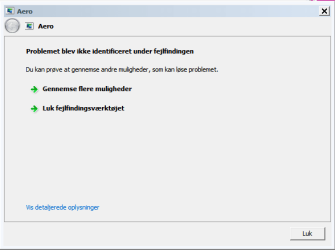
Yep, did that.

But when i do, i just get this:

First line is: The Problem wasn't identified durring the troubleshooting.
 

Attachments

  • Udklip.PNG
    Udklip.PNG
    5.2 KB · Views: 10

My Computer

OS
Windows 7 Home Premium x64
Put in the Windows 7 reinstall disk and try the troubleshooting utilities on there. Every issue I've had so far has been solved by either that and installing updates manually. Boot from the disk, and right before the installer it should ask you about trying to repair.
 

My Computer

Computer Manufacturer/Model Number
iBuyPower Chimera X58
OS
Windows 8 Pro x64
CPU
Intel Core i7 920
Motherboard
Asus P6T Deluxe V2
Memory
12GB (2GB x6) Triple Channel DDR3 1333 MHz
Graphics Card(s)
ATI Radeon HD 4870 X2 2GB GDDR5
Sound Card
Integrated Digital HD 7.1 Surround Sound
Monitor(s) Displays
24.6-inch ASUS VW246H 20000:1 Contrast, 2 ms response time,
Screen Resolution
1920x1080
Hard Drives
1 TB 7200 RPM SATA II 3 GBps 16MB cache
PSU
NZXT 800W Gaming Series
Case
Guardian Inferno (Custom Painted NZXT Guardian 921)
Cooling
Thermaltake V1 Fan Cooling System OC Proof
Keyboard
Razer Lycosa
Mouse
iBuyPower Ergonomical Internet Mouse
Internet Speed
11 MBps High-speed Cable
.. I bought my computer with Windows 7 installed on it - I don't have the disk :-(

But, as far as i can tell, my only solution is to either re-install Windows 7, or do this repair thing?
 

My Computer

OS
Windows 7 Home Premium x64
Sometimes if you rerun the WEI index it will allow for aero to work again. It might be worth running sfc /scannow in case some of your system files were corrupted.
 

My Computer

Computer type
PC/Desktop
Computer Manufacturer/Model Number
Home built
OS
Windows 7 Ult, Windows 8.1 Pro,
CPU
Q9650-4.275GHz, E8600 4.5GHz, E6750-3.8GHz
Motherboard
Evga 780i FTW
Memory
G.Skill PC2 9600 1200Mhz 5 5 5 15 2T
Graphics Card(s)
GTX480
Sound Card
Asus Xonar D2
Monitor(s) Displays
HannsG
Screen Resolution
1680X1050
Hard Drives
GSkill Phoenix Pro 120GB SSD
PSU
ThermalTake Toughpower 1000Watt modular
Case
ThermalTake XaserV
Cooling
Xigmatek S1283
Keyboard
Logitech G15
Mouse
Logitech G9
Internet Speed
T1

My Computer

Computer type
PC/Desktop
Computer Manufacturer/Model Number
Self Built
OS
Win 10 Pro x64
CPU
Intel I5-2500K @3.3GHz
Motherboard
Asrock P67 Extreme4
Memory
16GB G.Skill Ripjaws X (4x4GB)
Graphics Card(s)
EVGA GeForce 750 Ti SC 2GB
Sound Card
ASUS Xonar DG 5.1 Channels 24-bit 96KHz PCI Interface Sound
Monitor(s) Displays
auria eq2367
Screen Resolution
1920 x 1080
Hard Drives
250GB Samsung 850 EVO SSD
1TB WD Blue
1TB Hitachi
PSU
SeaSonic X 650W 80 Plus Gold
Case
Corsair Obsidian 750D
Cooling
Corsair H60, Three 140mm case fans
Keyboard
Logitech Wireless Keyboard K520
Mouse
Logitech Wireless Mouse M310
Internet Speed
Wave Broadband ~ 100 dn 5 up
Antivirus
Windows Defender, Malwarebytes Premium
Browser
Edge, IE11, Chrome
Other Info
Laptop specs: HP g7-1365dx /
CPU: AMD A6-3420M APU with Radeon(tm) HD Graphics /
RAM: Crucial 8Gb (2x4Gb) /
SSD: Crucial M4-CT128M4SSD2 ATA Device/ FW 000F /
GFX: AMD Radeon HD 6520G /
OS: Windows 10 Pro x64
.. I bought my computer with Windows 7 installed on it - I don't have the disk :-(

But, as far as i can tell, my only solution is to either re-install Windows 7, or do this repair thing?

If you didn't get a disk, then you should call the company and complain. They should have sent you a disk. I bought two computers from iBuyPower and they sent me the original disk that they used to install Windows 7 on both machines. So I have 2 Win7 disks lol.
 

My Computer

Computer Manufacturer/Model Number
iBuyPower Chimera X58
OS
Windows 8 Pro x64
CPU
Intel Core i7 920
Motherboard
Asus P6T Deluxe V2
Memory
12GB (2GB x6) Triple Channel DDR3 1333 MHz
Graphics Card(s)
ATI Radeon HD 4870 X2 2GB GDDR5
Sound Card
Integrated Digital HD 7.1 Surround Sound
Monitor(s) Displays
24.6-inch ASUS VW246H 20000:1 Contrast, 2 ms response time,
Screen Resolution
1920x1080
Hard Drives
1 TB 7200 RPM SATA II 3 GBps 16MB cache
PSU
NZXT 800W Gaming Series
Case
Guardian Inferno (Custom Painted NZXT Guardian 921)
Cooling
Thermaltake V1 Fan Cooling System OC Proof
Keyboard
Razer Lycosa
Mouse
iBuyPower Ergonomical Internet Mouse
Internet Speed
11 MBps High-speed Cable
Did you say that you had tried system restore? And did you have a look at your graphics adapter in device manager for a conflict. Good luck to you with this problem and welcome to Sevenforums :D
 

My Computer

Computer Manufacturer/Model Number
Gateway GT5692
OS
Windows 7 Ulti. x64
CPU
AMD Phenom 8450 triple-core 2.10 ghz
Memory
4GB
Graphics Card(s)
ATI Radion HD 3200
Monitor(s) Displays
Gateway FPD1775W
Screen Resolution
1280x720
Hard Drives
465.6613 Gibibytes
.. I bought my computer with Windows 7 installed on it - I don't have the disk :-(

But, as far as i can tell, my only solution is to either re-install Windows 7, or do this repair thing?

If you didn't get a disk, then you should call the company and complain. They should have sent you a disk. I bought two computers from iBuyPower and they sent me the original disk that they used to install Windows 7 on both machines. So I have 2 Win7 disks lol.

I think it's pretty rare to get the discs with oem systems these days.

@Adec, What brand is your computer?
 

My Computer

Computer type
PC/Desktop
Computer Manufacturer/Model Number
Self Built
OS
Win 10 Pro x64
CPU
Intel I5-2500K @3.3GHz
Motherboard
Asrock P67 Extreme4
Memory
16GB G.Skill Ripjaws X (4x4GB)
Graphics Card(s)
EVGA GeForce 750 Ti SC 2GB
Sound Card
ASUS Xonar DG 5.1 Channels 24-bit 96KHz PCI Interface Sound
Monitor(s) Displays
auria eq2367
Screen Resolution
1920 x 1080
Hard Drives
250GB Samsung 850 EVO SSD
1TB WD Blue
1TB Hitachi
PSU
SeaSonic X 650W 80 Plus Gold
Case
Corsair Obsidian 750D
Cooling
Corsair H60, Three 140mm case fans
Keyboard
Logitech Wireless Keyboard K520
Mouse
Logitech Wireless Mouse M310
Internet Speed
Wave Broadband ~ 100 dn 5 up
Antivirus
Windows Defender, Malwarebytes Premium
Browser
Edge, IE11, Chrome
Other Info
Laptop specs: HP g7-1365dx /
CPU: AMD A6-3420M APU with Radeon(tm) HD Graphics /
RAM: Crucial 8Gb (2x4Gb) /
SSD: Crucial M4-CT128M4SSD2 ATA Device/ FW 000F /
GFX: AMD Radeon HD 6520G /
OS: Windows 10 Pro x64
Hi,

There are 2 things you could try...

1 - Download a fresh copy of your video card drivers...

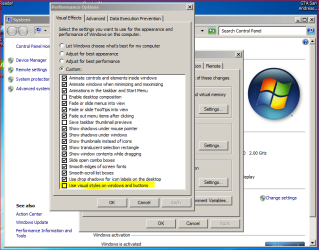
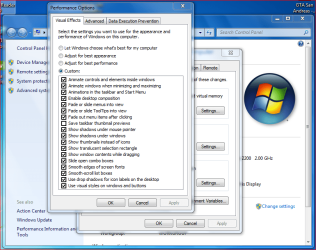
2 - Click the Start button, Right-Click 'Computer' and select properties, click 'Advanced Settings' followed by the 'Settings' button in the Performance section. Check to see if 'Use visual styles on windows & buttons' is selected/checked, if not then check it and click 'Apply' then 'Ok'

Visual styles switched off
Without VC.PNG

Visual styles switched on
With VC.PNG

Hope this helps :)


OS
 

My Computer

Computer Manufacturer/Model Number
Compaq Desktop
OS
Windows 7 Ultimate x64
CPU
AMD Sempron Dual Core
Memory
3GB
Graphics Card(s)
NVIDIA GeForce 6150SE nForce 430
Screen Resolution
1024x768
Hard Drives
150GB Sata
@Adec, What brand is your computer?
It's a HP computer. Bought via. a work deal. (much cheaper)

@Orbital Shark - I have tried that. Right now, i have then all turned on...

- EDIT: I didn't try that before downloading some fresh drivers - Doing now.
Okay, now i have the drivers - and tried to tick "Use visual styles on windows & buttons". When i does it says: "The Visuel Layouttypes couldn't be used"


@derekimo - I tried to run that sfc/scannow in the elevated command prompt. It got to 6%, and then stopped with the message: Windows Resource Protection could not do the wanted action.

NOTE: I tried to restore my update thing back to before thing error accoured. - My computer startet up saying: Systemristoring couldn't pack the file (C:\Windows\Resources\Themes\Aero\da-DK\aero.msstyles.mui) - I looked in that folder, and that file isn't there. Actually the whole folder "da-DK" isn't there...
 

My Computer

OS
Windows 7 Home Premium x64
What is your current Windows Experience Index score? Especially 'Graphics' & 'Gaming Graphics'...

If your GFX is scoring less than 2 then you'll not get aero effects and could (only could) see the issue your reporting...
 

My Computer

Computer Manufacturer/Model Number
Compaq Desktop
OS
Windows 7 Ultimate x64
CPU
AMD Sempron Dual Core
Memory
3GB
Graphics Card(s)
NVIDIA GeForce 6150SE nForce 430
Screen Resolution
1024x768
Hard Drives
150GB Sata
They are both at 6,6.

That shouldn't be the problem.

Yesterday, I tried to run the Troubleshooter with my restore CD - But it couldn't something went wrong, and i just had to press next, and let it start up normally.
 

My Computer

OS
Windows 7 Home Premium x64
They are both at 6,6.

That shouldn't be the problem.

Yesterday, I tried to run the Troubleshooter with my restore CD - But it couldn't something went wrong, and i just had to press next, and let it start up normally.

so is it working or..? this usually happens in the apperance section of your computer, pretty easy fix ?... my vista did this and its like the same on windows 7 to get up to scratch, think somone up there posted it for you...^
 

My Computer

Computer type
Laptop
Computer Manufacturer/Model Number
HP
OS
Windows 7 64 Bit Home Premium
CPU
Intel core I3
Motherboard
Unkown
Memory
4Gb
Graphics Card(s)
Ati Mobility Radeon
Sound Card
Default
Monitor(s) Displays
1
Hard Drives
c:/ 277Gb
PSU
Unknown
Case
HP Pavilion DV7
Cooling
Default
Keyboard
Default
Mouse
Default
Internet Speed
50Mb/s VIRGIN MEDIA CABLE (FIBRE-OPTIC)
Other Info
Bought November 2011
Back
Top