Taskbar went Windows 1995 mode :-(

Have you enabled DEP? Control Panel > System > Adv Settings > Advanced tab > Performance > Data Execution Prevention
Enable DEP for all programs (all programs and services except those I select)
 

My Computer My Computer

Computer type
PC/Desktop
Computer Manufacturer/Model Number
Bruce ... somewhere in his 40's
OS
Windows 7 Ultimate 32bit SP1
CPU
Intel(R) Core(TM)2 Quad CPU @ 2.40GHz, 2400 MHz
Motherboard
INTEL/D975XBX2
Memory
4 GB
Graphics Card(s)
ATI Radeon HD 2600 Pro
Monitor(s) Displays
Samsung SyncMaster 914v
Screen Resolution
1280 x 1024
Hard Drives
2/500GB each ... ST3500630AS ATA Device.
One is not connected
PSU
Rocketfish 700 W
Case
G.Skill Gigabyte Chassis
Keyboard
Standard PS/2 Keyboard
Mouse
Microsoft PS/2 Mouse
Internet Speed
DSL
Antivirus
Avira Internet Security
Browser
IE 11
Other Info
ATI HDMI Audio
updated video drivers????
 

My Computer My Computer

Computer Manufacturer/Model Number
Gateway/NV7923u & NV79C52u Laptops
OS
windows 7 professional & ultimate 64bit laptops
CPU
2.27 boost to 2.53 & 2.53 boost to 2.80
Motherboard
Mobile Intel® HM55 Express Chipset ???
Memory
4GB
Graphics Card(s)
Intel® Graphics Media Accelerator HD
Sound Card
realtek High-definition audio support
Monitor(s) Displays
17.3 " HD 1600 x 900
Hard Drives
hatachi Travelstar 5400 500GB & west digital 500GB
Internet Speed
35MB fios
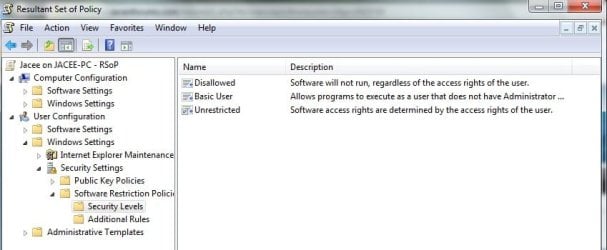
Also, what are your security policies? (resultant Set of Policies). Click on "run" and paste rsop.msc in the box, click ok another window will open, click on Security folder ... what does it say?

example
 

Attachments

  • RSoP.jpg
    RSoP.jpg
    37.7 KB · Views: 8

My Computer My Computer

Computer type
PC/Desktop
Computer Manufacturer/Model Number
Bruce ... somewhere in his 40's
OS
Windows 7 Ultimate 32bit SP1
CPU
Intel(R) Core(TM)2 Quad CPU @ 2.40GHz, 2400 MHz
Motherboard
INTEL/D975XBX2
Memory
4 GB
Graphics Card(s)
ATI Radeon HD 2600 Pro
Monitor(s) Displays
Samsung SyncMaster 914v
Screen Resolution
1280 x 1024
Hard Drives
2/500GB each ... ST3500630AS ATA Device.
One is not connected
PSU
Rocketfish 700 W
Case
G.Skill Gigabyte Chassis
Keyboard
Standard PS/2 Keyboard
Mouse
Microsoft PS/2 Mouse
Internet Speed
DSL
Antivirus
Avira Internet Security
Browser
IE 11
Other Info
ATI HDMI Audio
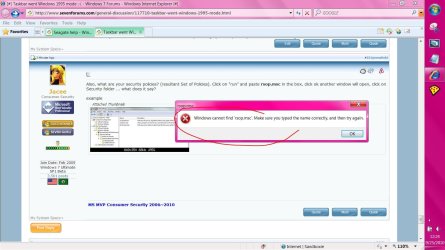
Also, what are your security policies? (resultant Set of Policies). Click on "run" and paste rsop.msc in the box, click ok another window will open, click on Security folder ... what does it say?

example


I can't do this :cry:
 

Attachments

  • Capture.JPG
    Capture.JPG
    141.5 KB · Views: 13

My Computer My Computer

Computer Manufacturer/Model Number
Gateway/NV7923u & NV79C52u Laptops
OS
windows 7 professional & ultimate 64bit laptops
CPU
2.27 boost to 2.53 & 2.53 boost to 2.80
Motherboard
Mobile Intel® HM55 Express Chipset ???
Memory
4GB
Graphics Card(s)
Intel® Graphics Media Accelerator HD
Sound Card
realtek High-definition audio support
Monitor(s) Displays
17.3 " HD 1600 x 900
Hard Drives
hatachi Travelstar 5400 500GB & west digital 500GB
Internet Speed
35MB fios
I did not see this listed in the Thread; but is the Themes Service Running???
 

My Computer My Computer

Computer type
PC/Desktop
Computer Manufacturer/Model Number
Dell OP7010
OS
Windows 7 Enterprise (x64); Windows Server 2008 R2 (x64)
Memory
16GB
Monitor(s) Displays
4 Dell 24" LCD
Screen Resolution
1280x1024
Keyboard
Dell
Mouse
Dell Optical
Internet Speed
40meg
@Adec, What brand is your computer?
It's a HP computer. Bought via. a work deal. (much cheaper)

@Orbital Shark - I have tried that. Right now, i have then all turned on...

- EDIT: I didn't try that before downloading some fresh drivers - Doing now.
Okay, now i have the drivers - and tried to tick "Use visual styles on windows & buttons". When i does it says: "The Visuel Layouttypes couldn't be used"


@derekimo - I tried to run that sfc/scannow in the elevated command prompt. It got to 6%, and then stopped with the message: Windows Resource Protection could not do the wanted action.

NOTE: I tried to restore my update thing back to before thing error accoured. - My computer startet up saying: Systemristoring couldn't pack the file (C:\Windows\Resources\Themes\Aero\da-DK\aero.msstyles.mui) - I looked in that folder, and that file isn't there. Actually the whole folder "da-DK" isn't there...

Sometimes if you rerun the WEI index it will allow for aero to work again. It might be worth running sfc /scannow in case some of your system files were corrupted.

Actually it was me who first posted the sfc /scannow although I'm certain that Derekemo and I posted at the same time LOL.

If you can't complete the scan then your system is corrupted big time and you would be best off using system restore or using an image which you have created earlier or try doing a start up repair from the Windows CD.
 

My Computer My Computer

Computer type
PC/Desktop
Computer Manufacturer/Model Number
Home built
OS
Windows 7 Ult, Windows 8.1 Pro,
CPU
Q9650-4.275GHz, E8600 4.5GHz, E6750-3.8GHz
Motherboard
Evga 780i FTW
Memory
G.Skill PC2 9600 1200Mhz 5 5 5 15 2T
Graphics Card(s)
GTX480
Sound Card
Asus Xonar D2
Monitor(s) Displays
HannsG
Screen Resolution
1680X1050
Hard Drives
GSkill Phoenix Pro 120GB SSD
PSU
ThermalTake Toughpower 1000Watt modular
Case
ThermalTake XaserV
Cooling
Xigmatek S1283
Keyboard
Logitech G15
Mouse
Logitech G9
Internet Speed
T1
Well, i have got a'lot of good answer which i tried - but none of them seem to work..

I think my system is screwed up pretty bad...

.. I found my Windows 7 installation disk though - so i think i'm gonna try some things with that.

Thanks for the help everyone! :-)
 

My Computer My Computer

OS
Windows 7 Home Premium x64
Well, i have got a'lot of good answer which i tried - but none of them seem to work..

I think my system is screwed up pretty bad...

.. I found my Windows 7 installation disk though - so i think i'm gonna try some things with that.

Thanks for the help everyone! :-)

Since you found your disc, you might want to try a repair install, it will allow you

to preserve your user accounts, data, programs, and system drivers.

http://www.sevenforums.com/tutorials/3413-repair-install.html
 

My Computer My Computer

Computer type
PC/Desktop
Computer Manufacturer/Model Number
Self Built
OS
Win 10 Pro x64
CPU
Intel I5-2500K @3.3GHz
Motherboard
Asrock P67 Extreme4
Memory
16GB G.Skill Ripjaws X (4x4GB)
Graphics Card(s)
EVGA GeForce 750 Ti SC 2GB
Sound Card
ASUS Xonar DG 5.1 Channels 24-bit 96KHz PCI Interface Sound
Monitor(s) Displays
auria eq2367
Screen Resolution
1920 x 1080
Hard Drives
250GB Samsung 850 EVO SSD
1TB WD Blue
1TB Hitachi
PSU
SeaSonic X 650W 80 Plus Gold
Case
Corsair Obsidian 750D
Cooling
Corsair H60, Three 140mm case fans
Keyboard
Logitech Wireless Keyboard K520
Mouse
Logitech Wireless Mouse M310
Internet Speed
Wave Broadband ~ 100 dn 5 up
Antivirus
Windows Defender, Malwarebytes Premium
Browser
Edge, IE11, Chrome
Other Info
Laptop specs: HP g7-1365dx /
CPU: AMD A6-3420M APU with Radeon(tm) HD Graphics /
RAM: Crucial 8Gb (2x4Gb) /
SSD: Crucial M4-CT128M4SSD2 ATA Device/ FW 000F /
GFX: AMD Radeon HD 6520G /
OS: Windows 10 Pro x64
Back
Top