
Taskbar window

busacct

New member
I have lost the window that appears above the taskbar. It now shows text instead of the window. How can I get the window back? Not sure if I understand posting a screen capture but have tried to do so so that you can better understand my problem. Appreciate any assistance anyone can offer.
 

Attachments
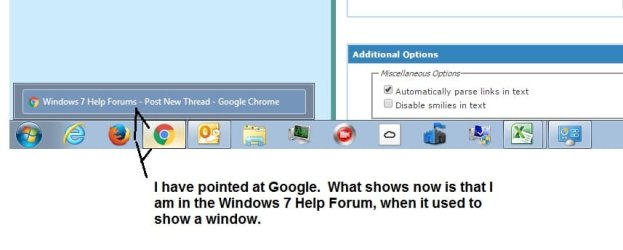
  • Taskbar Issue.jpg
    Taskbar Issue.jpg
    64.7 KB · Views: 1

My Computer

Computer type
PC/Desktop
Computer Manufacturer/Model Number
HP
OS
Windows 7 Home Premium / 64 bit
Antivirus
Microsoft Security Essentials
Browser
Google Chrome
busacct, try this tutorial from the site:

Taskbar Thumbnail Live Previews - Enable or Disable in Windows 7

That will show you how to enable Aero peek.

Something I came across on another forum was interesting. A user had installed a program that wasn't compatible with Aero, so they lost their thumbnail image as well. Did you recently install a new program?

Anyway, Good Luck, keep us posted!
 

My Computer

Computer type
PC/Desktop
Computer Manufacturer/Model Number
Custom
OS
Microsoft Windows 7 Ultimate 32-bit 7601 Multiprocessor Free Service Pack 1
CPU
Pentium(R) Dual-Core CPU E6500 @ 2.93GHz
Motherboard
Gigabyte Technology Co., Ltd. EP45-UD3L
Memory
G.Skill 2.00 GB
Graphics Card(s)
NVIDIA GeForce 8400 GS
Sound Card
High Definition Audio Device
Screen Resolution
1680 x 1050 x 32 bits (4294967296 colors) @ 59 Hz
Hard Drives
(1) ST1500DL003-9VT16L ATA Device (2) WDC WD3200AAKS-00L9A0 ATA Device (3) WDC WD7501AALS-00J7B0 ATA Device
Antivirus
MSE, Avast 17.2
Browser
Firefox
Back
Top